“当复杂的SQL不在需要特别的优化”,邪修研究PolarDB for PG 列式索引加速复杂SQL运行

“当复杂的SQL不在需要特别的优化”,邪修研究PolarDB for PG 列式索引加速复杂SQL运行

AustinDatabases
发布于 2025-08-13 14:36:34
发布于 2025-08-13 14:36:34
PolarDB for PostgreSQL 中包含了了一个Polar_csi的插件,通过在PolarDB for PostgreSQL 上安装插件的方式来使用向量引擎,列式索引。
这里需要提醒使用列式索引的前提条件
1 wal_level 参数必须设置为logical
2 一张表只能有一个列式索引
3 列式索引建立后不能修改,只能重建
4 安装polar_csi插件后,需要在数据库中执行create extension polar_csi 命令
5 是否启用polar_csi 有开关命令可以进行验证
同时要修改参数
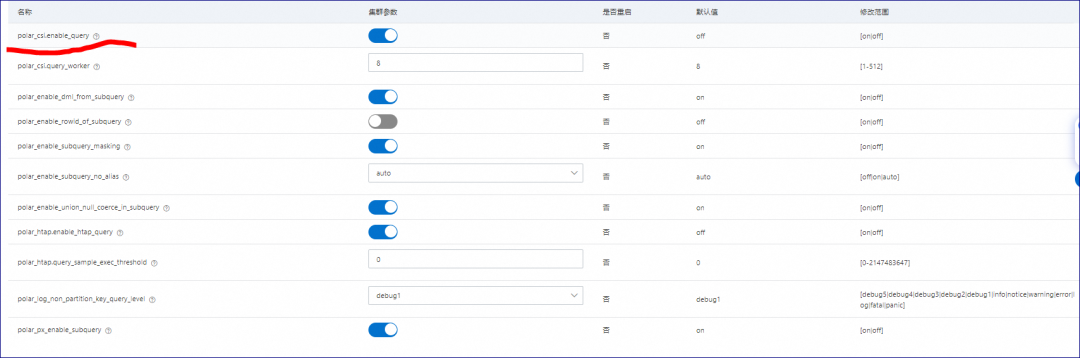
polar_csi.enable_query
polar_csi.enable_query
test=> create extension polar_csi;
CREATE EXTENSION
test=>
test=> -- 创建 customers 表
test=> CREATE TABLE customers (
test(>     customer_id SERIAL PRIMARY KEY,
test(>     name VARCHAR(100),
test(>     email VARCHAR(100),
test(>     created_at TIMESTAMP DEFAULT CURRENT_TIMESTAMP
test(> );
CREATE TABLE
test=>
test=> -- 创建 products 表
test=> CREATE TABLE products (
test(>     product_id SERIAL PRIMARY KEY,
test(>     name VARCHAR(100),
test(>     price DECIMAL(10, 2),
test(>     created_at TIMESTAMP DEFAULT CURRENT_TIMESTAMP
test(> );
CREATE TABLE
test=>
test=> -- 创建 orders 表
test=> CREATE TABLE orders (
test(>     order_id SERIAL PRIMARY KEY,
test(>     customer_id INT REFERENCES customers(customer_id),
test(>     product_id INT REFERENCES products(product_id),
test(>     order_date TIMESTAMP DEFAULT CURRENT_TIMESTAMP,
test(>     quantity INT,
test(>     total_amount DECIMAL(10, 2)
test(> );
针对这三张表我们每张表插入100,200万数据。
test=> \d
                    List of relations
 Schema |           Name            |   Type   |  Owner
--------+---------------------------+----------+----------
 public | customers                 | table    | dba_test
 public | customers_customer_id_seq | sequence | dba_test
 public | orders                    | table    | dba_test
 public | orders_order_id_seq       | sequence | dba_test
 public | products                  | table    | dba_test
 public | products_product_id_seq   | sequence | dba_test
(6 rows)

test=> select count(*) from customers;
  count
---------
 2000000
(1 row)

test=> explain analyze select count(*) from customers;
                                                                               QUERY PLAN
-------------------------------------------------------------------------------------------------------------------------------------------------------------------------
 Finalize Aggregate  (cost=27472.22..27472.23 rows=1 width=8) (actual time=139.527..142.490 rows=1 loops=1)
   ->  Gather  (cost=27472.00..27472.21 rows=2 width=8) (actual time=136.042..142.482 rows=3 loops=1)
         Workers Planned: 2
         Workers Launched: 2
         ->  Partial Aggregate  (cost=26472.00..26472.01 rows=1 width=8) (actual time=125.038..125.038 rows=1 loops=3)
               ->  Parallel Index Only Scan using customers_pkey on customers  (cost=0.43..24388.62 rows=833354 width=0) (actual time=0.202..90.587 rows=666667 loops=3)
                     Heap Fetches: 0
 Planning Time: 0.040 ms
 Execution Time: 142.566 ms
(9 rows)

test=> select count(*) from orders;
  count
---------
 1000000
(1 row)

test=> select count(*) from products;
  count
---------
 2000000
(1 row)

test=>
同时在数据库查询中,无法优化的SQL聚合加子查询,且没有数据的过滤,即使建立了索引也无法使用还是要走全表扫描等。
test=> explain analyze SELECT
test->     c.customer_id,
test->     c.name,
test->     COALESCE(order_counts.total_orders, 0) AS total_orders,
test->     COALESCE(order_totals.total_spent, 0) AS total_spent
test-> FROM
test->     customers c
test-> LEFT JOIN (
test(>     SELECT
test(>         customer_id,
test(>         COUNT(order_id) AS total_orders
test(>     FROM
test(>         orders
test(>     GROUP BY
test(>         customer_id
test(> ) AS order_counts ON c.customer_id = order_counts.customer_id
test-> LEFT JOIN (
test(>     SELECT
test(>         customer_id,
test(>         SUM(total_amount) AS total_spent
test(>     FROM
test(>         orders
test(>     GROUP BY
test(>         customer_id
test(> ) AS order_totals ON c.customer_id = order_totals.customer_id
test-> ORDER BY
test->     total_spent DESC;
                                                                          QUERY PLAN
---------------------------------------------------------------------------------------------------------------------------------------------------------------
 Gather Merge  (cost=217678.61..412136.56 rows=1666666 width=77) (actual time=1407.023..2104.550 rows=2000000 loops=1)
   Workers Planned: 2
   Workers Launched: 2
   ->  Sort  (cost=216678.59..218761.92 rows=833333 width=77) (actual time=1323.073..1454.480 rows=666667 loops=3)
         Sort Key: (COALESCE(order_totals.total_spent, '0'::numeric)) DESC
         Sort Method: external merge  Disk: 46088kB
         Worker 0:  Sort Method: external merge  Disk: 52096kB
         Worker 1:  Sort Method: external merge  Disk: 21328kB
         ->  Hash Left Join  (cost=47408.07..91348.40 rows=833333 width=77) (actual time=633.505..938.891 rows=666667 loops=3)
               Hash Cond: (c.customer_id = order_totals.customer_id)
               ->  Hash Left Join  (cost=23704.03..65456.86 rows=833333 width=45) (actual time=292.432..479.223 rows=666667 loops=3)
                     Hash Cond: (c.customer_id = order_counts.customer_id)
                     ->  Parallel Seq Scan on customers c  (cost=0.00..39565.33 rows=833333 width=37) (actual time=0.003..65.482 rows=666667 loops=3)
                     ->  Hash  (cost=23704.02..23704.02 rows=1 width=12) (actual time=292.407..292.409 rows=1 loops=3)
                           Buckets: 1024  Batches: 1  Memory Usage: 9kB
                           ->  Subquery Scan on order_counts  (cost=23704.00..23704.02 rows=1 width=12) (actual time=292.398..292.400 rows=1 loops=3)
                                 ->  HashAggregate  (cost=23704.00..23704.01 rows=1 width=12) (actual time=292.397..292.398 rows=1 loops=3)
                                       Group Key: orders.customer_id
                                       Batches: 1  Memory Usage: 25kB
                                       Worker 0:  Batches: 1  Memory Usage: 25kB
                                       Worker 1:  Batches: 1  Memory Usage: 25kB
                                       ->  Seq Scan on orders  (cost=0.00..18704.00 rows=1000000 width=8) (actual time=0.003..86.712 rows=1000000 loops=3)
               ->  Hash  (cost=23704.02..23704.02 rows=1 width=36) (actual time=341.045..341.049 rows=1 loops=3)
                     Buckets: 1024  Batches: 1  Memory Usage: 9kB
                     ->  Subquery Scan on order_totals  (cost=23704.00..23704.02 rows=1 width=36) (actual time=341.034..341.036 rows=1 loops=3)
                           ->  HashAggregate  (cost=23704.00..23704.01 rows=1 width=36) (actual time=341.032..341.034 rows=1 loops=3)
                                 Group Key: orders_1.customer_id
                                 Batches: 1  Memory Usage: 25kB
                                 Worker 0:  Batches: 1  Memory Usage: 25kB
                                 Worker 1:  Batches: 1  Memory Usage: 25kB
                                 ->  Seq Scan on orders orders_1  (cost=0.00..18704.00 rows=1000000 width=11) (actual time=0.003..75.037 rows=1000000 loops=3)
 Planning Time: 1.507 ms
 Execution Time: 2186.800 ms
(33 rows)
在没有动过任何的语句和添加更多索引的情况下,我们打开列式查询,再次验证查询的情况。
test=> SET polar_csi.enable_query = on;
SET
Time: 7.092 ms
test=> explain analyze SELECT
test->     c.customer_id,
test->     c.name,
test->     COALESCE(order_counts.total_orders, 0) AS total_orders,
test->     COALESCE(order_totals.total_spent, 0) AS total_spent
test-> FROM
test->     customers c
test-> LEFT JOIN (
test(>     SELECT
test(>         customer_id,
test(>         COUNT(order_id) AS total_orders
test(>     FROM
test(>         orders
test(>     GROUP BY
test(>         customer_id
test(> ) AS order_counts ON c.customer_id = order_counts.customer_id
test-> LEFT JOIN (
test(>     SELECT
test(>         customer_id,
test(>         SUM(total_amount) AS total_spent
test(>     FROM
test(>         orders
test(>     GROUP BY
test(>         customer_id
test(> ) AS order_totals ON c.customer_id = order_totals.customer_id
test-> ORDER BY
test->     total_spent DESC;
  QUERY PLAN
--------------
 CSI Executor
(1 row)

Time: 824.630 ms
test=>
整体语句查询的速度提高了3倍左右。
那么除了通过csi优化的方法,在csi中是否还有方案可以继续优化查询的速度。
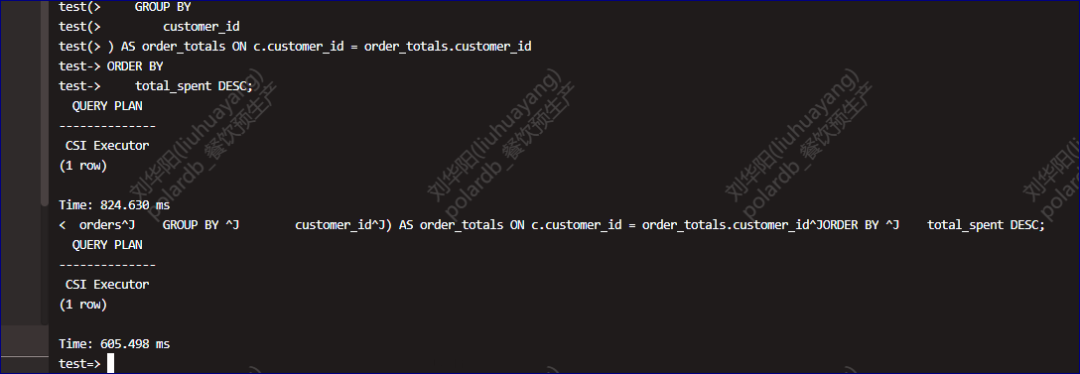
1 通过 polar_csi.memory_limit 的方案默认这个memory_limit使用的是1024MB,这是指的向量化引擎可以使用的内存大小,我们将默认的1024改为2048后,我们在次查询,查询速度提高了224ms,占原有速度的25%,提高可4分之一的查询速度。
图片
图片
除此以外我们还可以通过增加并行的方式提高查询的速度。
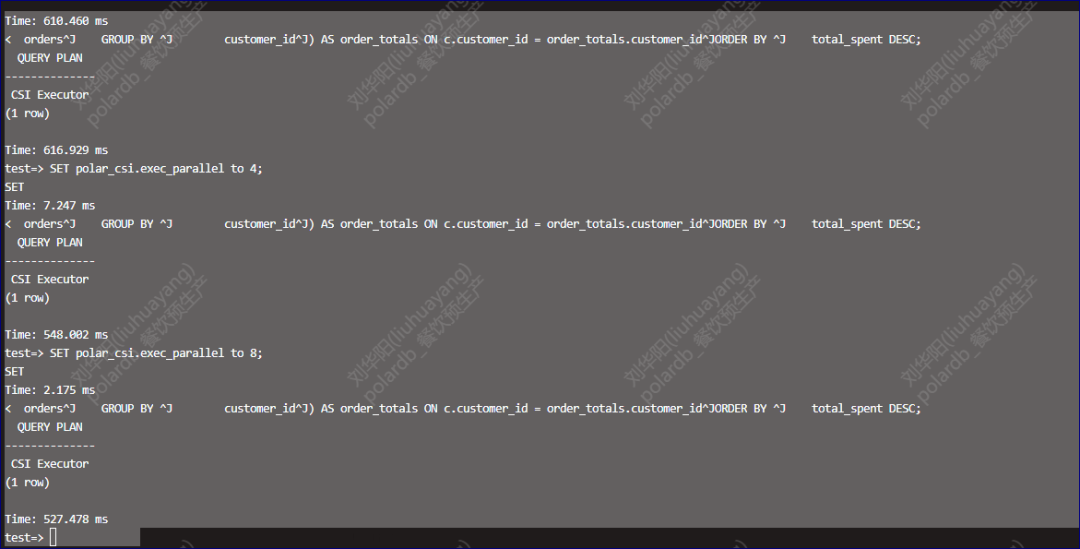
提高CSI并行后的查询速度的提升
提高CSI并行后的查询速度的提升
最后通过普通的查询索引的语句就可以看到csi类的索引以及创建的列数。
本文参与 腾讯云自媒体同步曝光计划,分享自微信公众号。
原始发表:2025-08-12,如有侵权请联系 cloudcommunity@tencent.com 删除
腾讯云开发者

Copyright © 2013 - 2026 Tencent Cloud. All Rights Reserved. 腾讯云 版权所有
深圳市腾讯计算机系统有限公司 ICP备案/许可证号:粤B2-20090059  粤公网安备44030502008569号
腾讯云计算(北京)有限责任公司 京ICP证150476号 | 京ICP备11018762号