使用 Netbird 轻松组建内网
原创
使用 Netbird 轻松组建内网
原创
贝壳
发布于 2025-10-18 23:43:16
发布于 2025-10-18 23:43:16
前言
部分服务器一直想组内网,原本想使用 Cloudflare Zero Trust 进行组网。无奈有时需要境外与境内互联,担心被封。NetBird 也是基于 WireGuard,但境外/境内的连通性目前对我来说稳定(也许是流量小…)。
关于 NetBird
NetBird 是一个由一系列组件组成的开源平台,负责处理点对点连接、隧道、身份验证和网络管理(IP、密钥、ACL 等)。 它使用 WireGuard®、Pion ICE(WebRTC)、Coturn 和 NetBird 自身的 客户端 等开源技术,简化安全的专用网络部署和管理。 NetBird 依赖四个组件:客户端(或代理)、管理、信号 和 中继 服务。只有经过身份验证的用户(或机器)才能访问被授权的资源。 对等体 Peer 指连接到网络的任何设备:云/本地 Linux 服务器、笔记本、手机或树莓派。
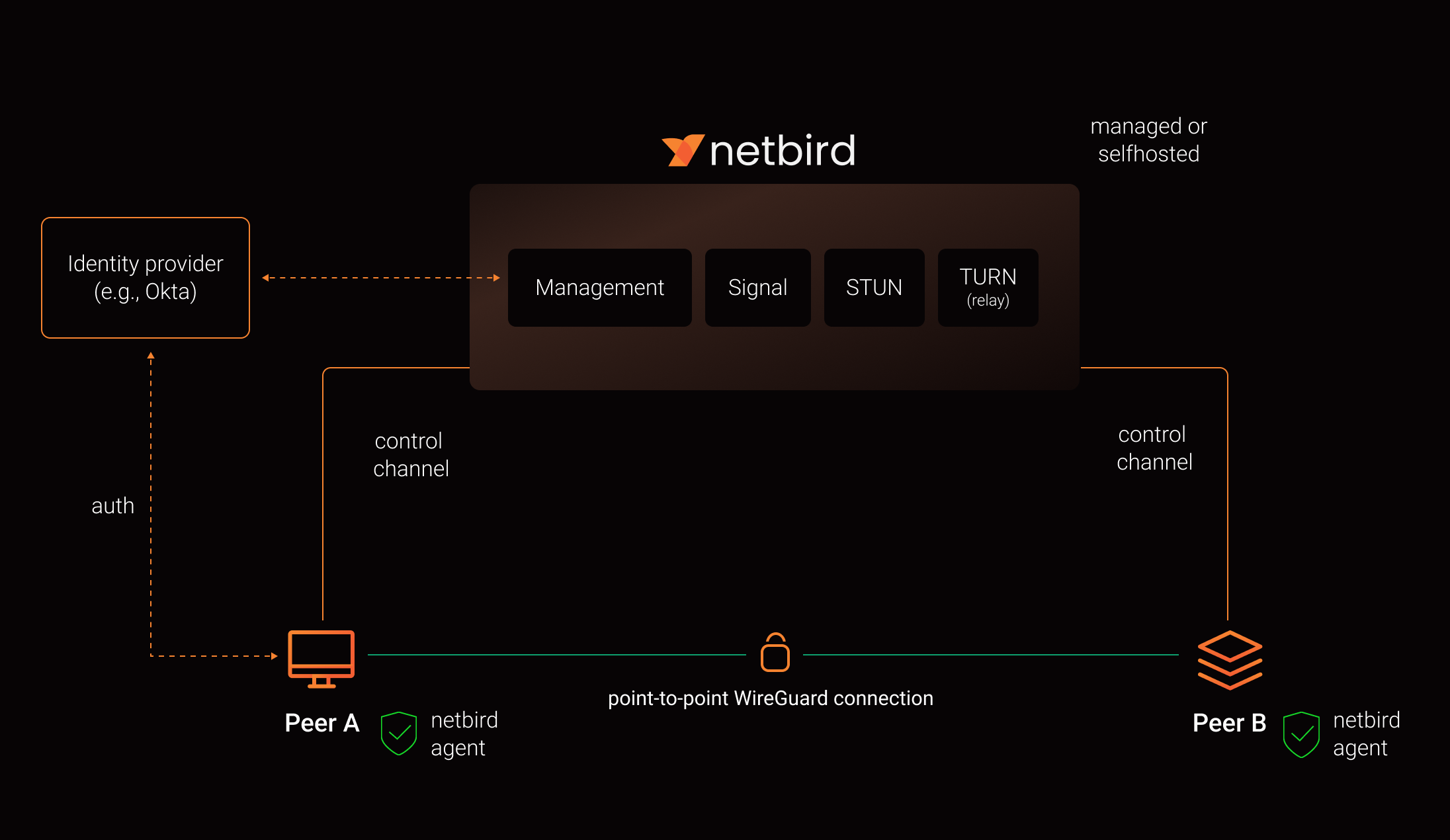
how-netbird-works.webp
安装并授权后,机器将形成网状网络,通过加密的点对点 WireGuard 隧道直接相连:
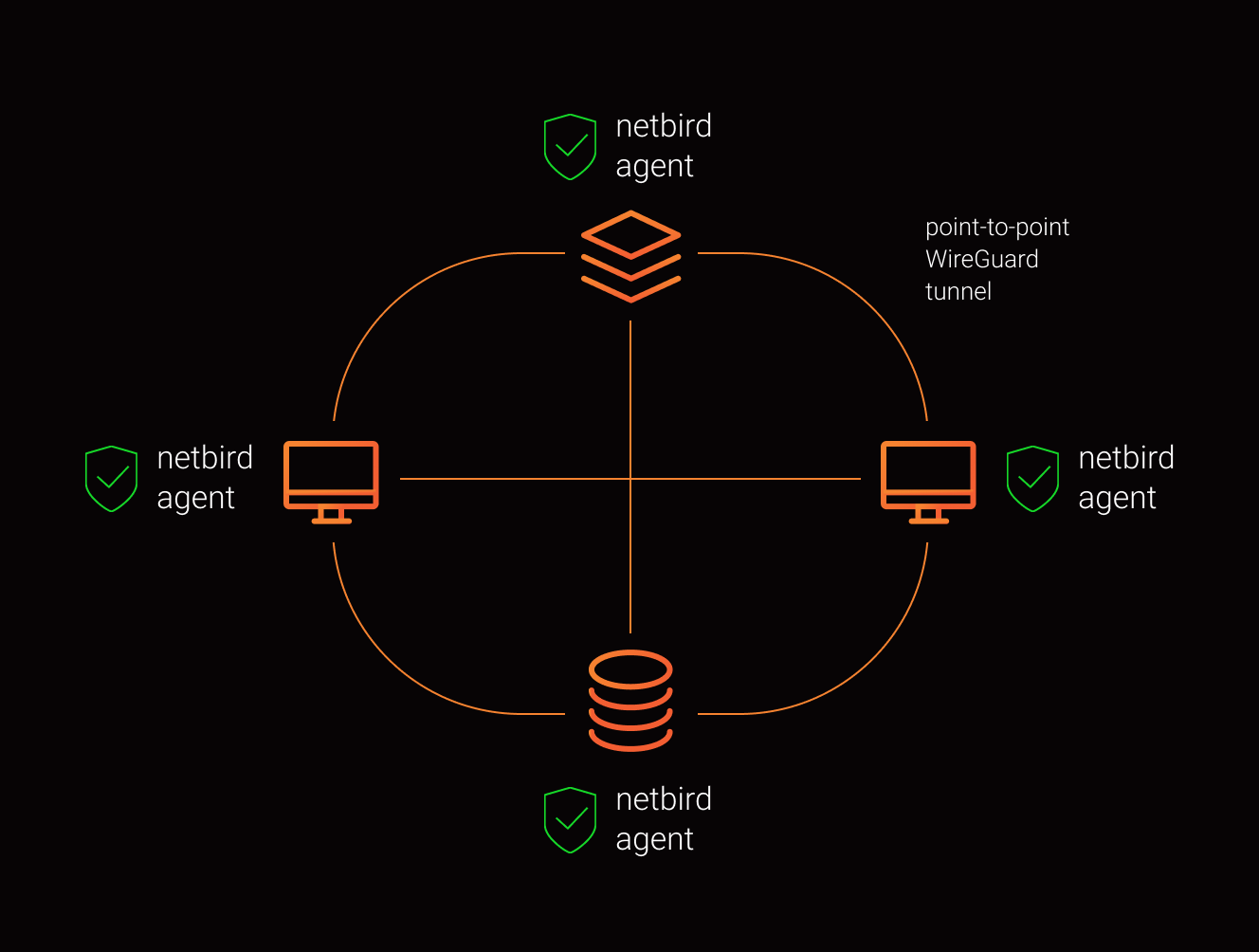
how-netbird-mesh.webp
前期准备
- 至少一台服务器(≥ 1C/2G),如 腾讯云轻量。
- 一个可用的 IDP(Identity Provider)。自建可选 Zitadel(官方脚本也用它),或:
- 自建:Zitadel / Keycloak / Authentik
- 托管:Azure AD(Entra ID)/ Okta / Google Workspace / Auth0 / JumpCloud安装 1Panel 或 Docker(本文用 1Panel 管理 Docker)。放行端口:TCP 33073、10000、33080;UDP 3478、49152–65535。安装 jq apt install jq / yum install jq
这里推荐使用 [腾讯云轻量服务器 , 推荐选择香港地区免备案, 还可以创建的时候直接选择1panel 、BT 面板,还有更多常用的应用一键开箱即用
tips: 腾讯云咨询也接入了 DeepSeek 的大模型,已经把常见问题归纳整理,常见问题可以直接询问即可,非常方便哒~
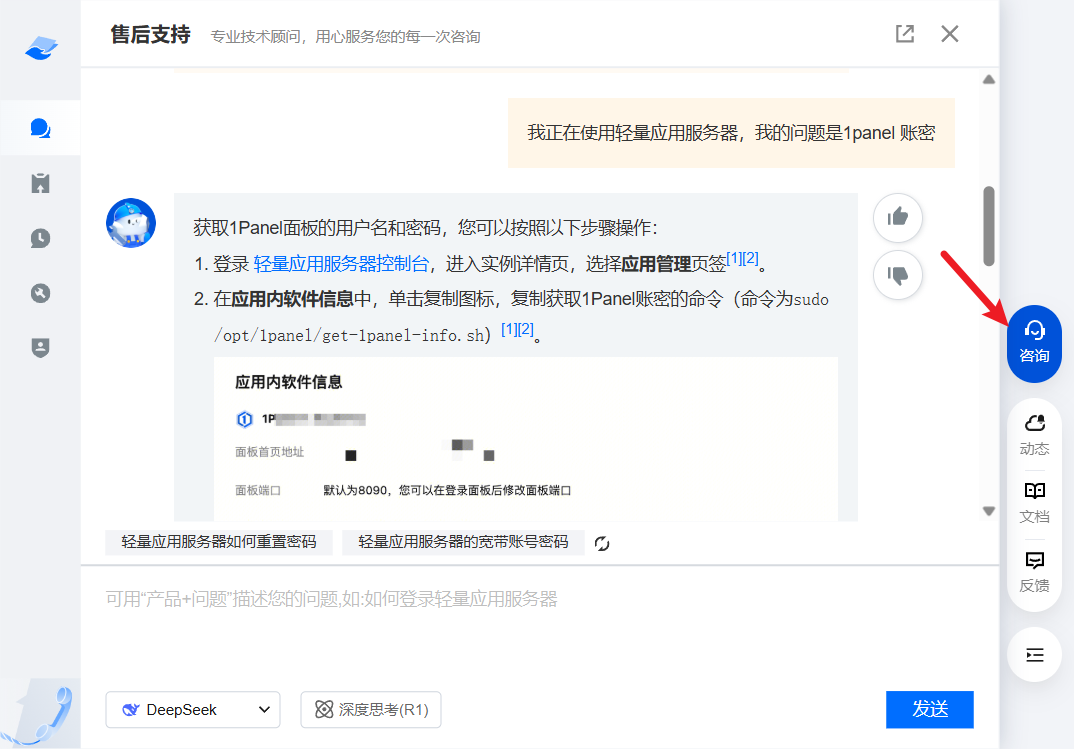
腾讯云-咨询问题.webp
安装
拉取 NetBird 仓库
注意默认已经启用了中国大陆加速的连接,是 举个栗子 博主提供的服务,如您对此表示安全担忧请,更改成
REPO="https://github.com/netbirdio/netbird/"即可。
#!/bin/bash
REPO="https://hub.mwm.moe/https://github.com/netbirdio/netbird/"
# 获取最新 tag,例如 v0.8.x
LATEST_TAG=$(basename $(curl -fs -o/dev/null -w %{redirect_url} ${REPO}releases/latest))
echo $LATEST_TAG
# 克隆对应版本
git clone --depth 1 --branch $LATEST_TAG $REPO
切换到包含 docker-compose 的目录:
cd netbird/infrastructure_files/配置 setup.env(基础)
新建或复制 setup.env 并填写基础项:
# 访问域名
NETBIRD_DOMAIN="vpn.example.com"
# 关闭内置证书签发(改用 Nginx 反代)
NETBIRD_DISABLE_LETSENCRYPT=true
# 指定端口
NETBIRD_MGMT_API_PORT=443
NETBIRD_SIGNAL_PORT=443
接下来根据所选 IDP 追加配置。本文演示 Zitadel 与 Authentik。
IDP 配置
Zitadel
在保留上面基础项的前提下,按以下步骤操作:
- 创建应用(User Agent / PKCE)
- 进入 **Projects → Create New Project**:名称 `NETBIRD`
- 在 **APPLICATIONS → New**:  名称 `netbird`、应用类型 `User Agent`、认证方式 `PKCE`
- **Redirect URIs**:  `https://<domain>/auth`、`https://<domain>/silent-auth`、`http://localhost:53000`(本地调试)  **Post Logout URIs**:`https://<domain>/`
- **授权模式**:`Authorization Code`、`Device Code`、`Refresh Token`
- 复制 **Client ID** 备用
- 参考截图: 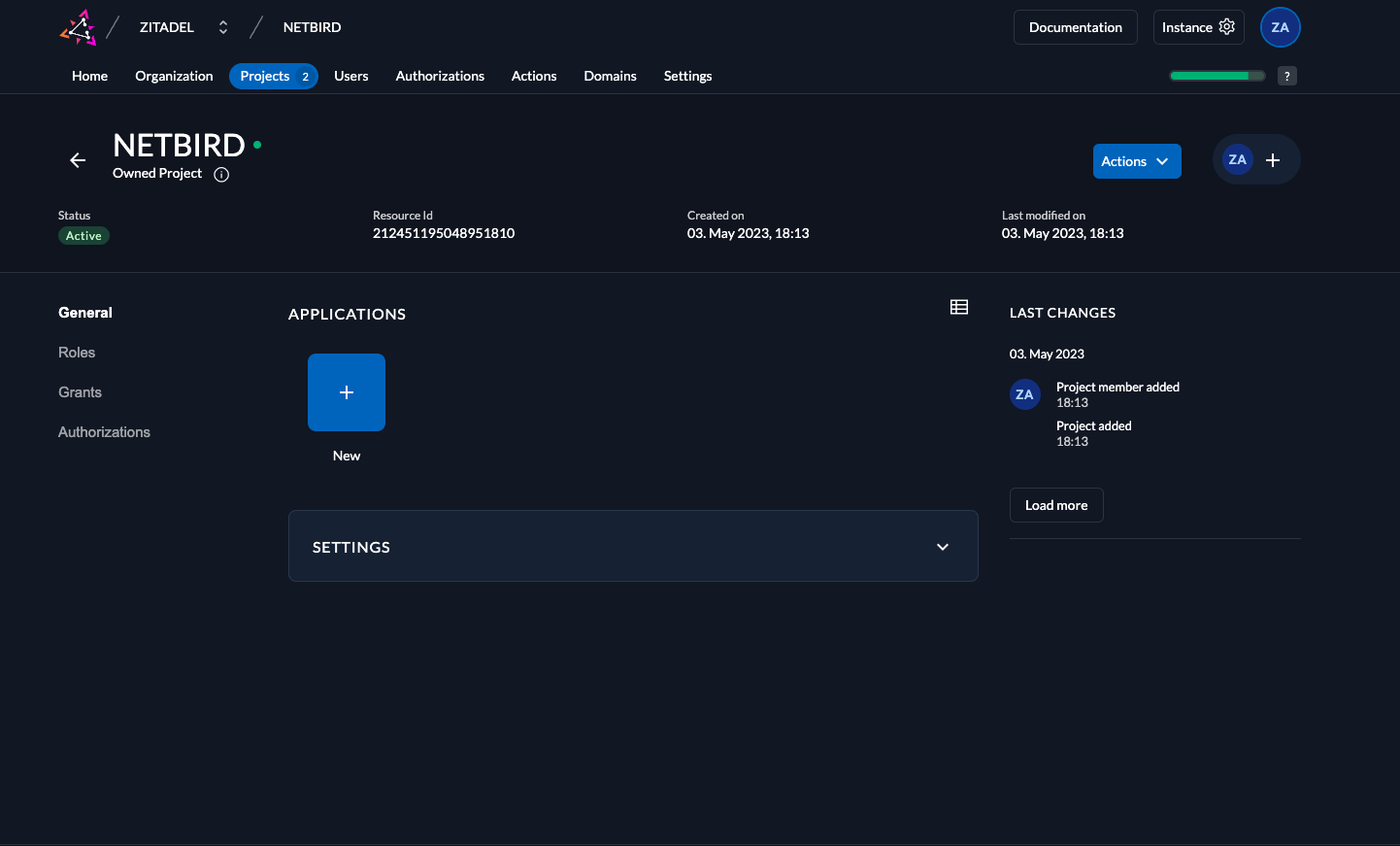
创建项目

zitadel-new-application.webp
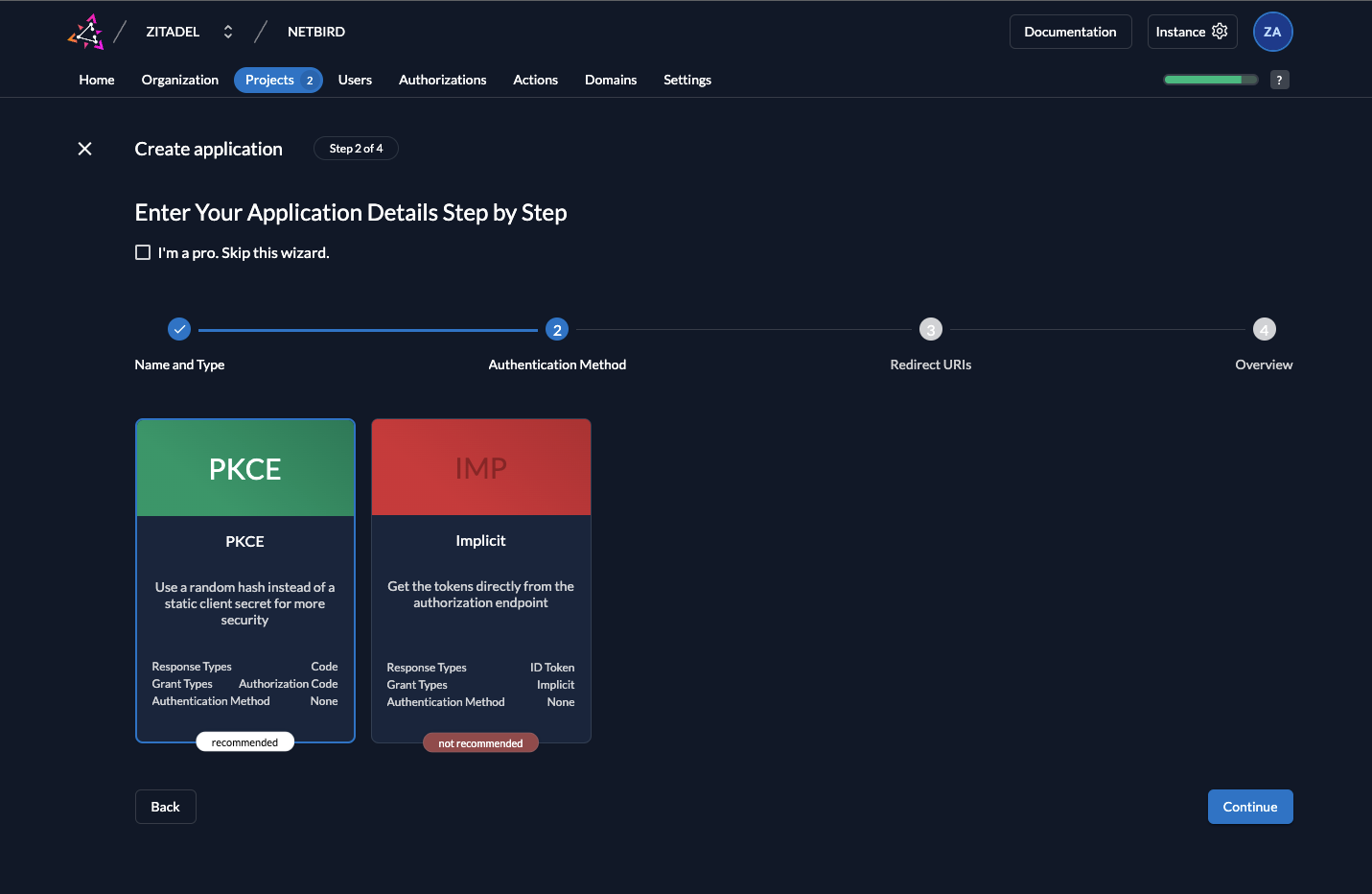
zitadel-new-application-auth.webp
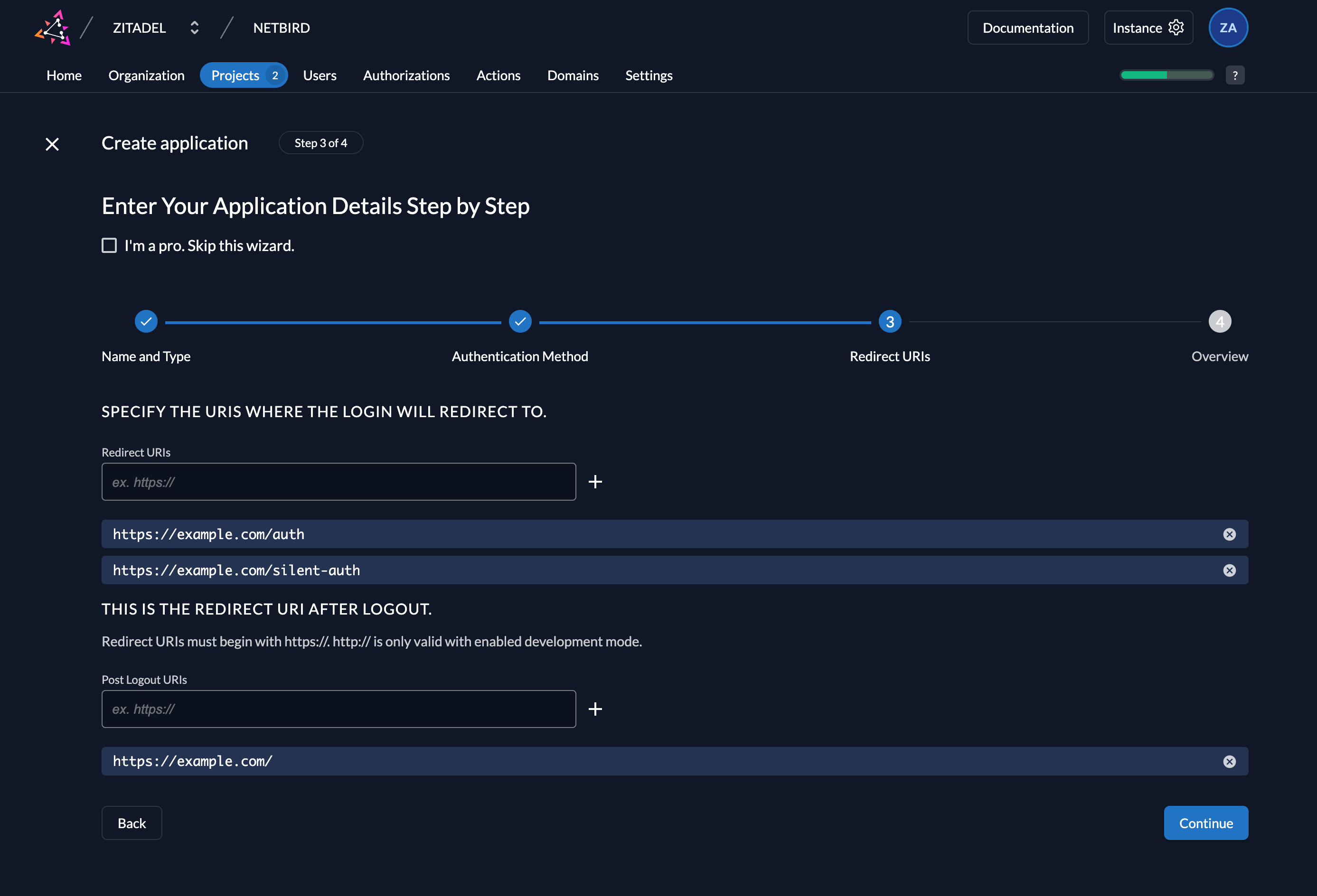
zitadel-new-application-uri.webp
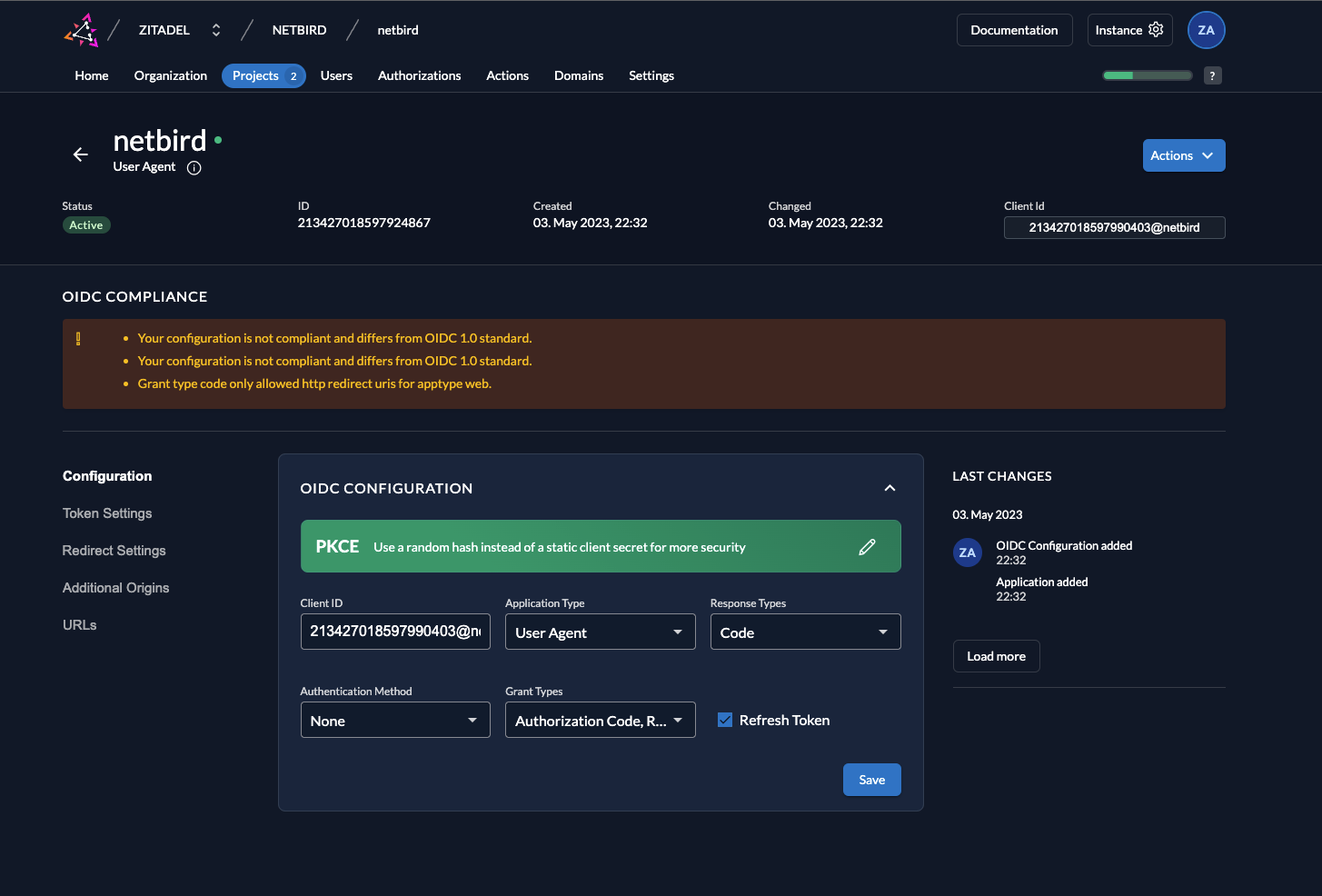
zitadel-new-application-overview.webp
- 配置 Token 应用 → Token Settings:
- Token 类型 `JWT`
- 勾选 **Add user roles to the access token** 
zitadel-token-settings.webp
- 开发模式重定向(仅开发环境) Redirect Settings 中开启 Development Mode。
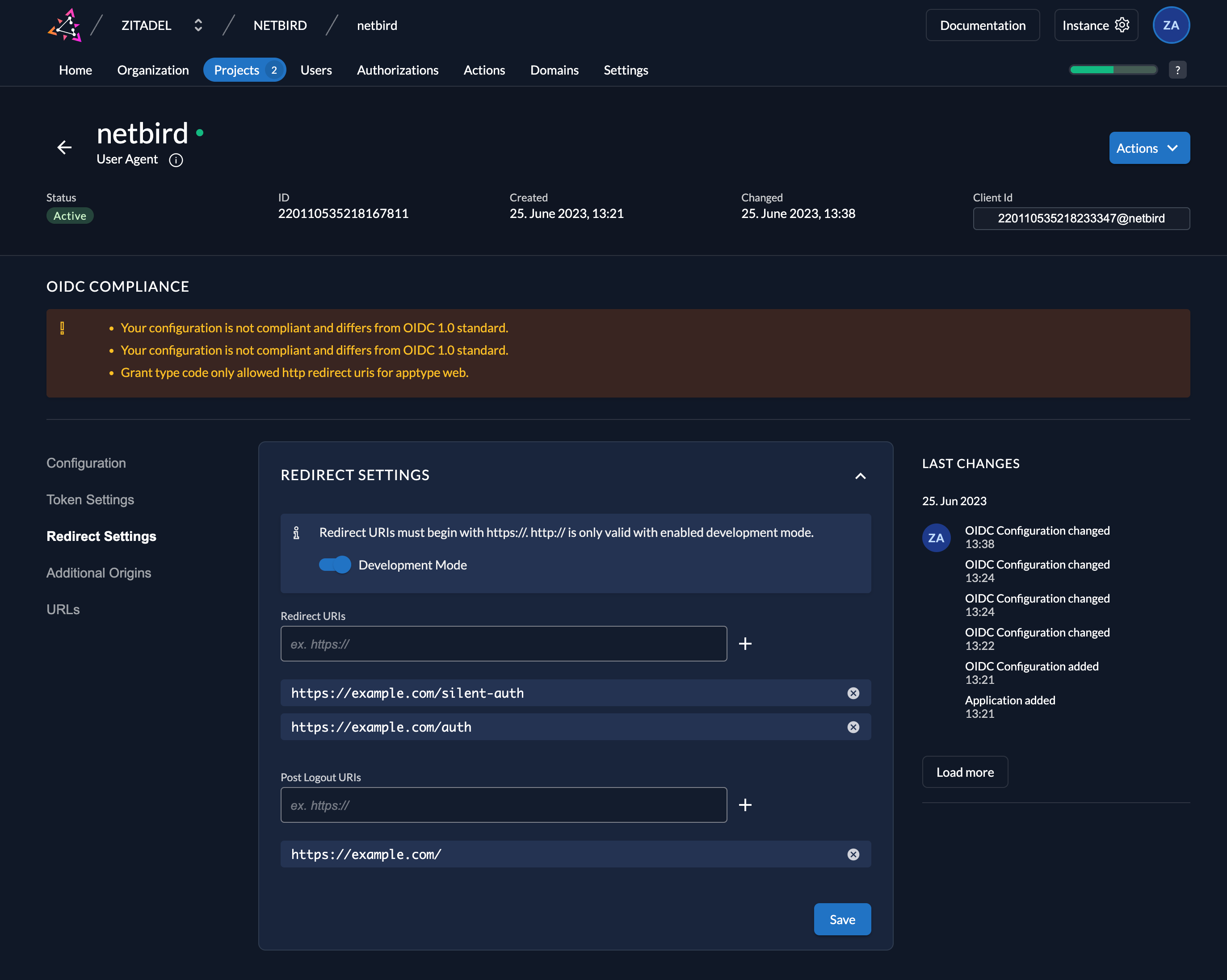
zitadel-redirect-settings.webp
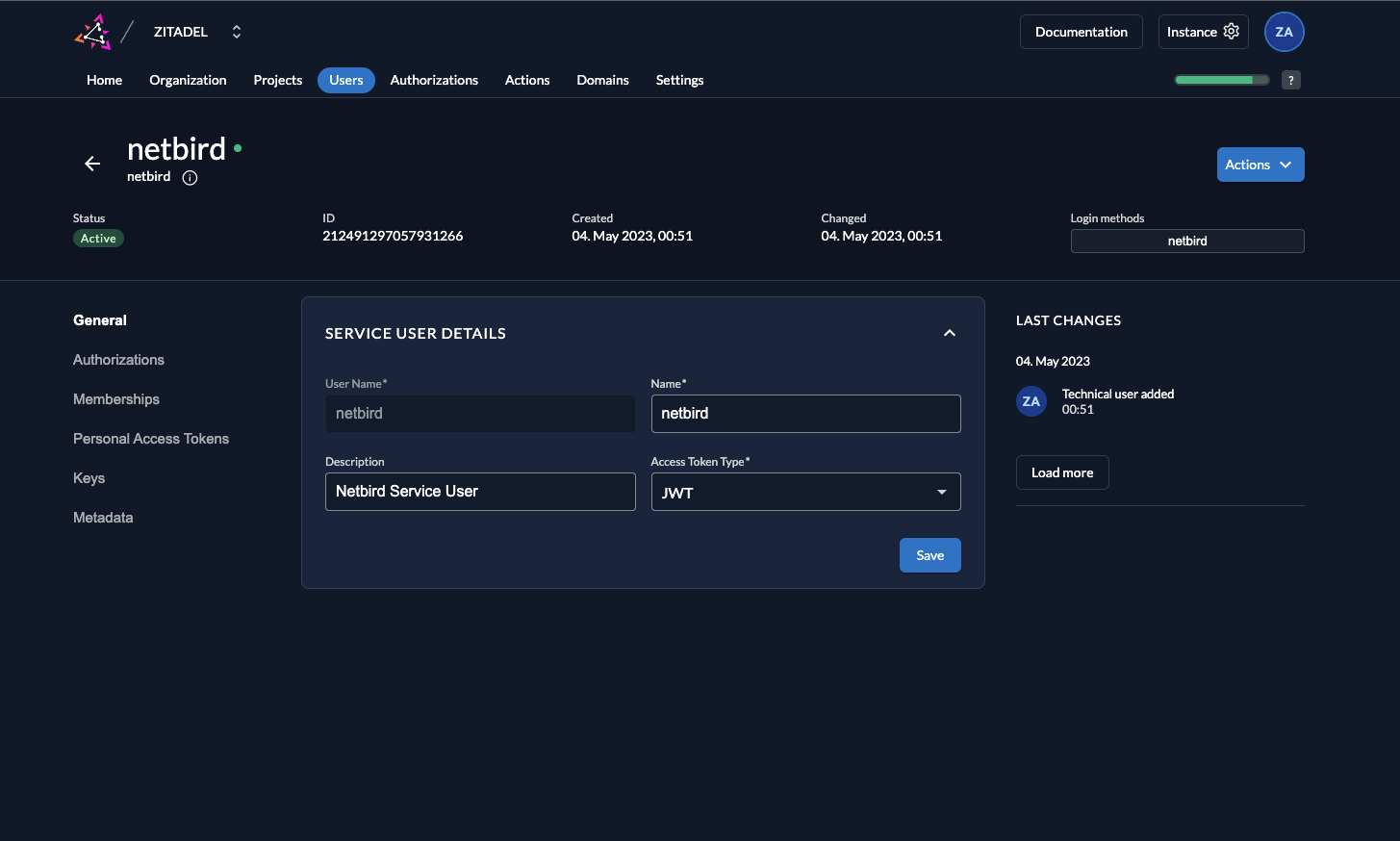
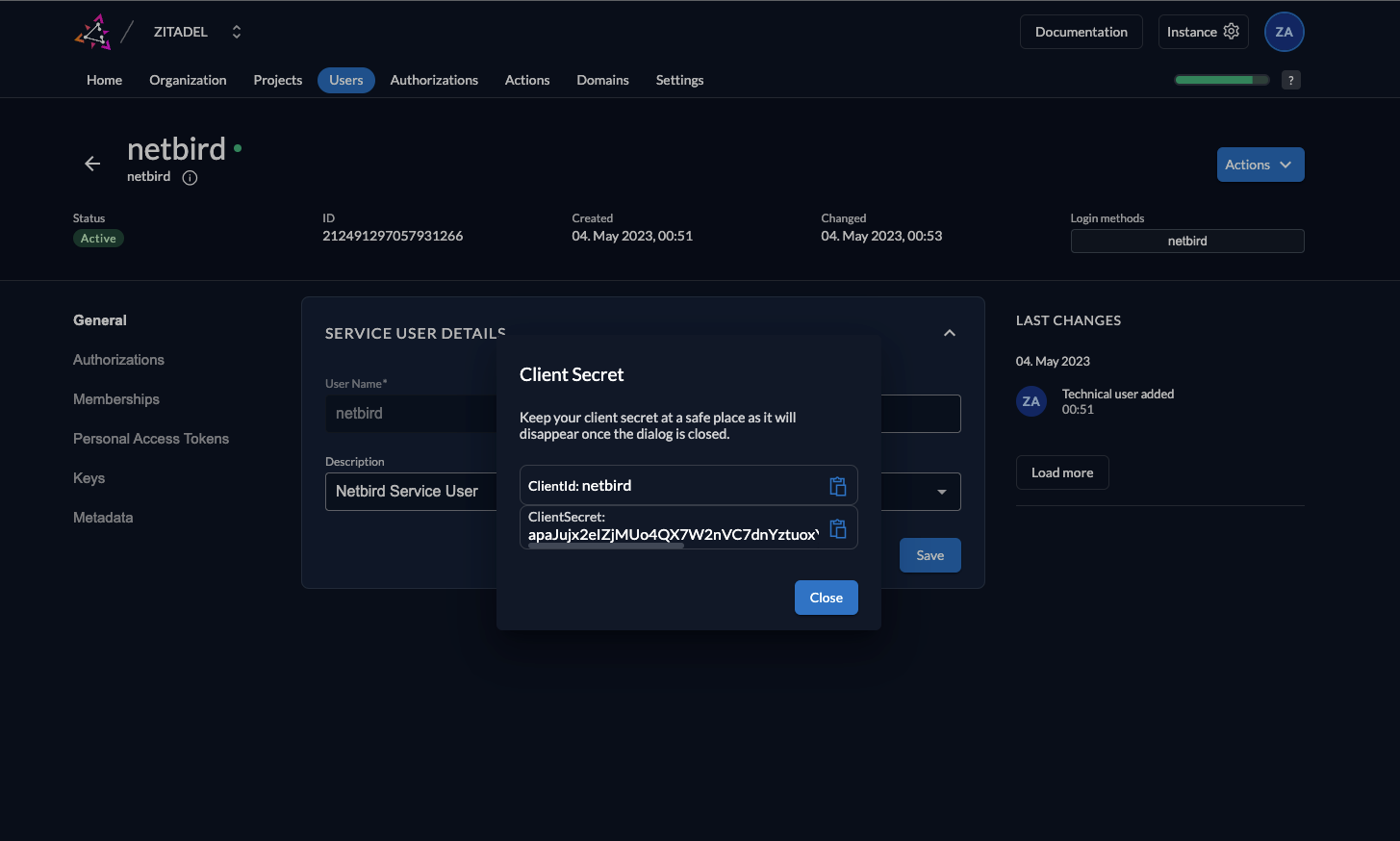
- 创建服务用户 Users → Service Users → New: 用户名/名称
netbird,描述Netbird Service User,Token 类型JWT。 生成 Client Secret 并保存。
zitadel-create-user.webp
zitadel-service-user-secret.webp
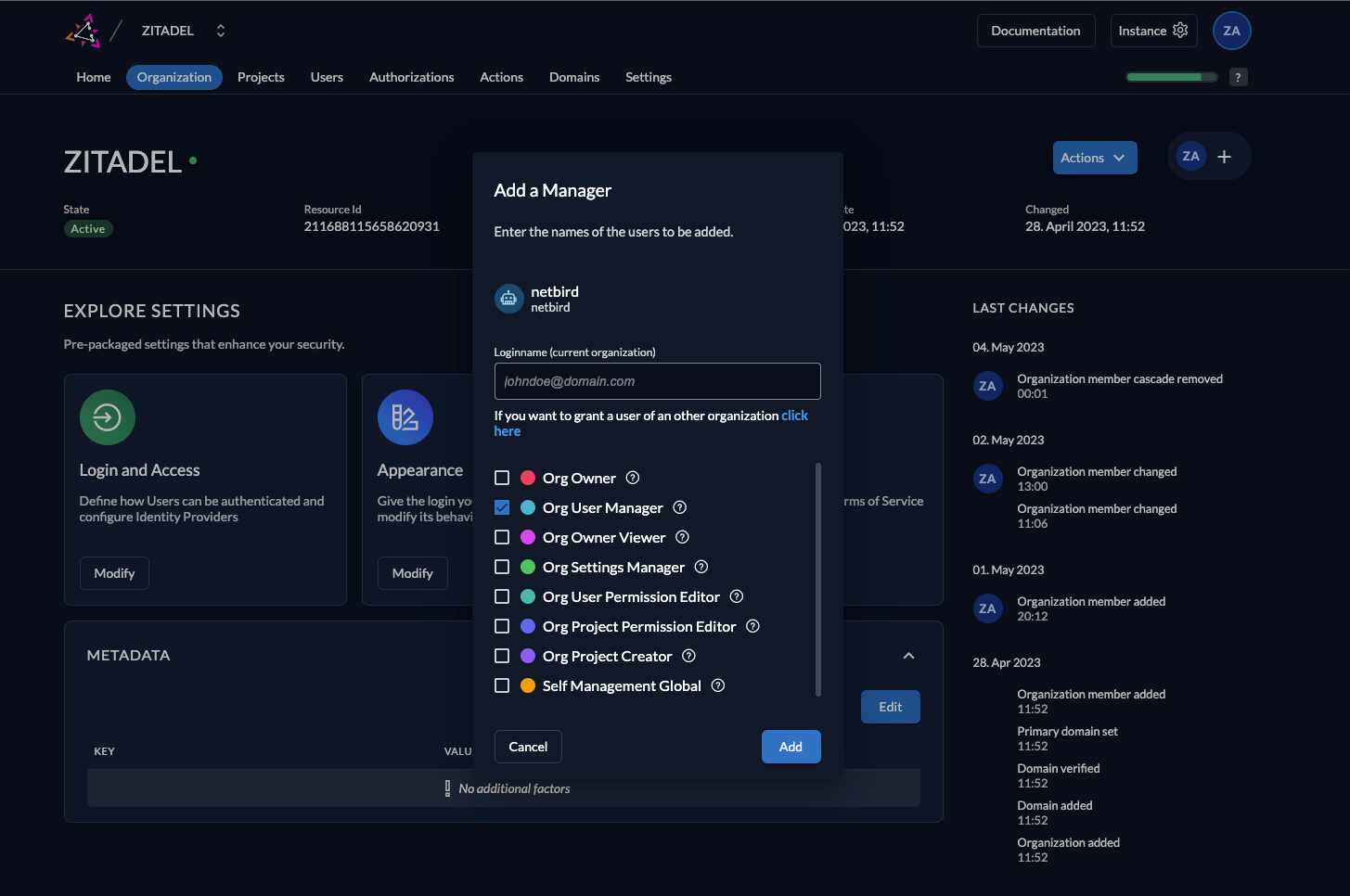
- 为服务用户赋权 Organization 中为
netbird赋予 Org User Manager 角色。
zitadel-service-account-role.webp
- 在
setup.env追加配置
# OIDC 配置端点
NETBIRD_AUTH_OIDC_CONFIGURATION_ENDPOINT="https://<你的域名>/.well-known/openid-configuration"
NETBIRD_USE_AUTH0=false

# 应用 Client ID
NETBIRD_AUTH_CLIENT_ID="<ZITADEL_CLIENT_ID>"
NETBIRD_AUTH_SUPPORTED_SCOPES="openid profile email offline_access api"
NETBIRD_AUTH_AUDIENCE=$NETBIRD_AUTH_CLIENT_ID

# 授权回调
NETBIRD_AUTH_REDIRECT_URI="/auth"
NETBIRD_AUTH_SILENT_REDIRECT_URI="/silent-auth"

# 设备授权
NETBIRD_AUTH_DEVICE_AUTH_PROVIDER="hosted"
NETBIRD_AUTH_DEVICE_AUTH_CLIENT_ID=$NETBIRD_AUTH_CLIENT_ID
NETBIRD_AUTH_DEVICE_AUTH_AUDIENCE=$NETBIRD_AUTH_CLIENT_ID

# 管理端对接 Zitadel
NETBIRD_MGMT_IDP="zitadel"
NETBIRD_IDP_MGMT_CLIENT_ID="<SERVICE_USER_CLIENT_ID>"
NETBIRD_IDP_MGMT_CLIENT_SECRET="<SERVICE_USER_CLIENT_SECRET>"
NETBIRD_IDP_MGMT_EXTRA_MANAGEMENT_ENDPOINT="https://<你的域名>/management/v1"
NETBIRD_MGMT_IDP_SIGNKEY_REFRESH=true
至此,Zitadel 侧完成,可回到自建流程。
Authentik
同样保留基础项,然后:
- 创建 Provider(OAuth2/OpenID) Applications → Providers → Create:
- 类型:`OAuth2/OpenID Provider`
- 名称:`Netbird`
- Authentication Flow:`default-authentication-flow`
- Authorization Flow:`default-provider-authorization-explicit-consent`
- 协议:Client type `Public`;Redirect(RegEx):`https://<domain>/.*`、`http://localhost:53000`
- Signing Key:选择证书(如 `authentik Self-signed Certificate`)
- 高级:Access code validity `10 分钟`;Subject mode `Based on the User's ID` 记录 **Client ID**。 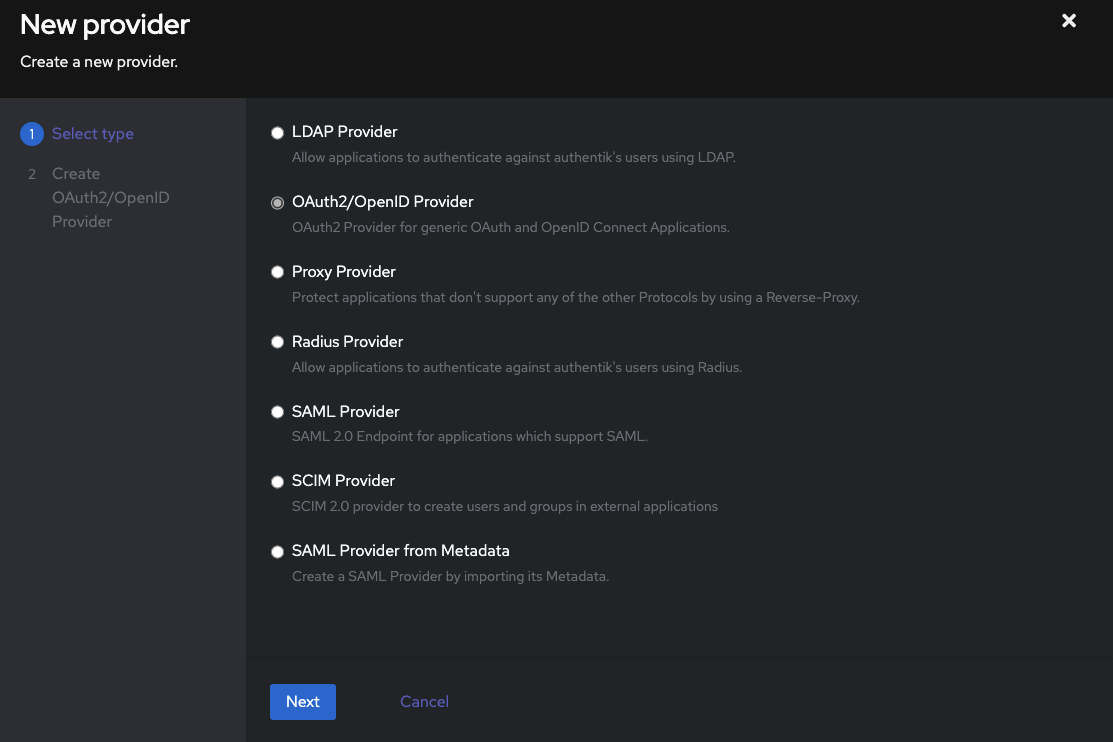
authentik-new-provider-type.webp
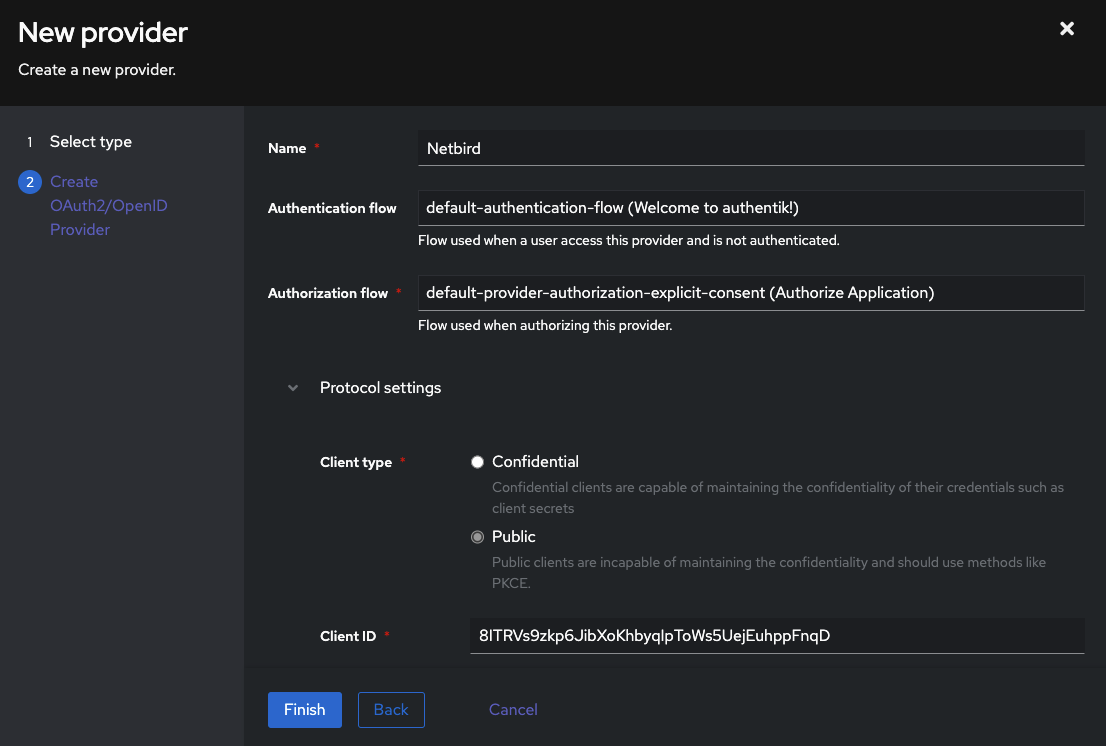
authentik-new-provider-config.webp
- 创建 External Application Applications → Applications → Create: Name
Netbird,Slugnetbird,Provider 选择上一步。

authentik-new-application.webp
- 创建服务账户 Directory → Users → Create Service Account: Username
Netbird,Create Group: Disable。 在 Directory → Tokens and App passwords 为其创建 App password。

authentik-new-service-account.webp
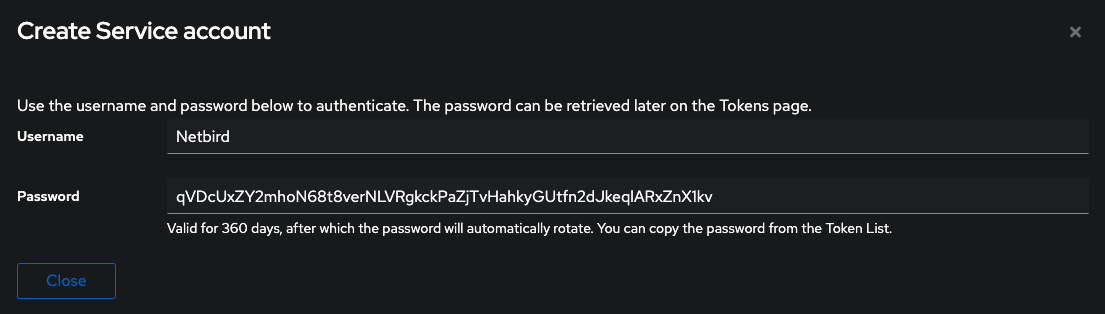
详情
- 授权服务账户 Directory → Groups → authentik Admins → Users → Add existing user,加入
Netbird。
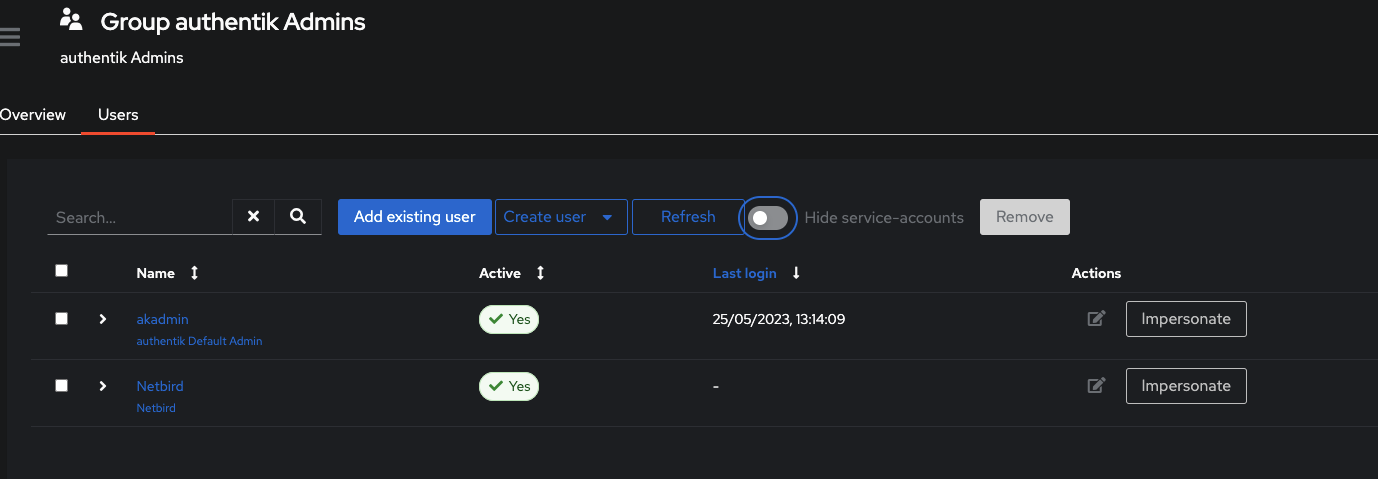
authentik-add-user-group.webp
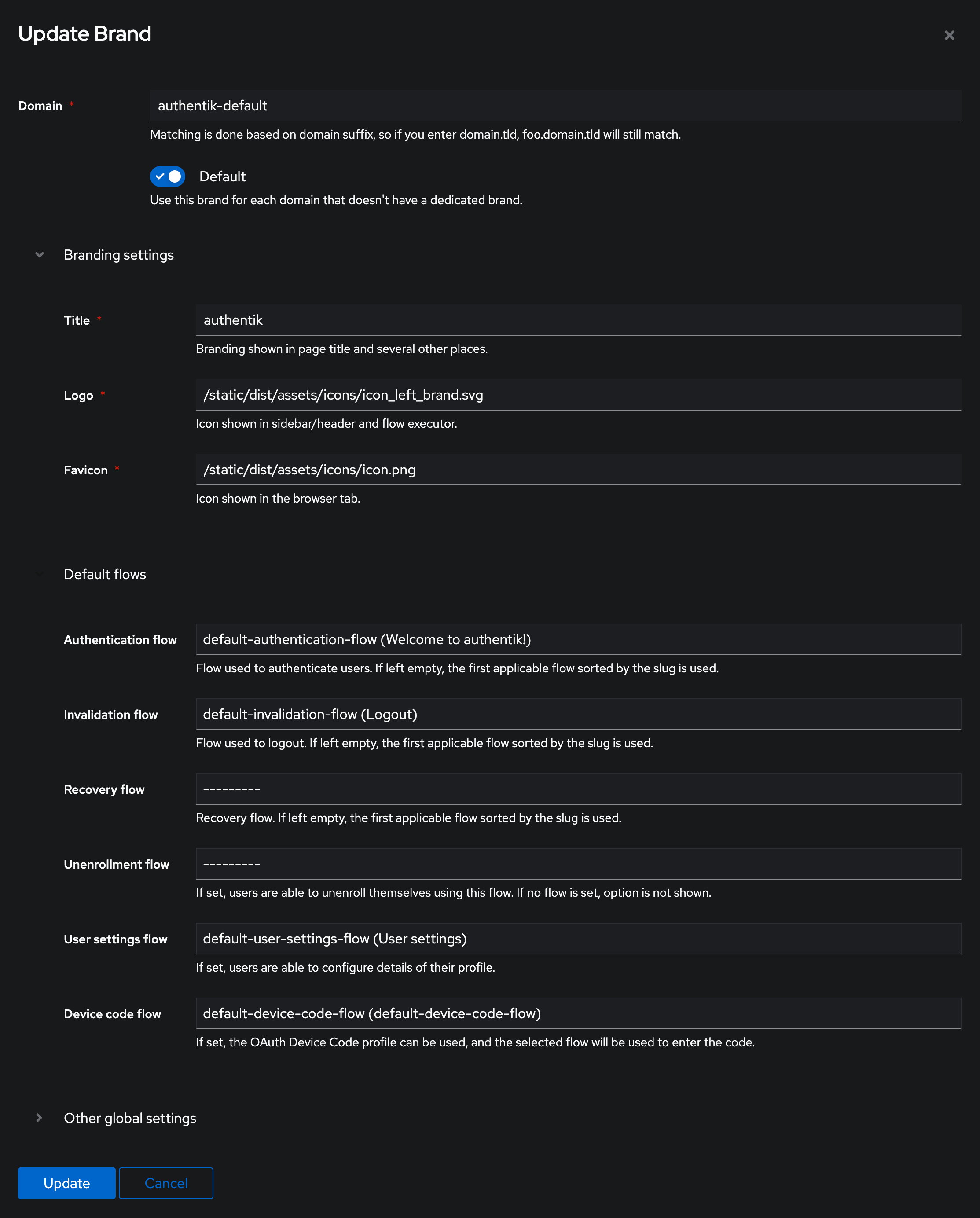
- 创建 Device Token 流程并绑定品牌 Flows and Stages → Flows → Create: Name
default-device-code-flow,TitleDevice Code Flow,DesignationStage Configuration,AuthenticationRequire authentication。 System → Brands 编辑authentik-default,将 Device code flow 设为default-device-code-flow。
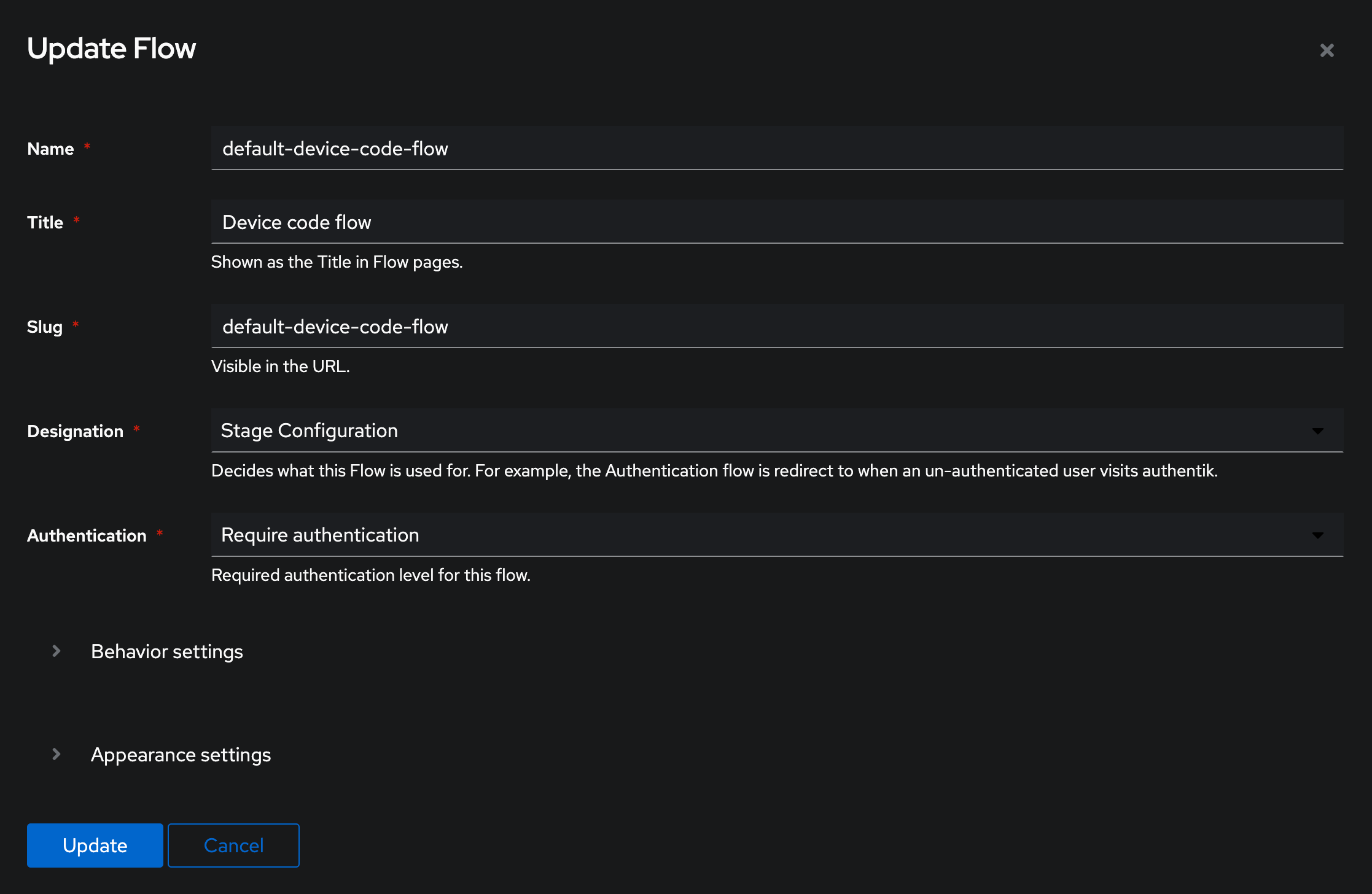
authentik-new-device-flow.webp
authentik-brand-device-flow.webp
- 在
setup.env追加配置
# OIDC 配置端点
NETBIRD_AUTH_OIDC_CONFIGURATION_ENDPOINT="https://<YOUR_AUTHENTIK_HOST_AND_PORT>/application/o/netbird/.well-known/openid-configuration"
NETBIRD_USE_AUTH0=false

# Client / Audience
NETBIRD_AUTH_CLIENT_ID="<PROVIDER_CLIENT_ID>"
NETBIRD_AUTH_SUPPORTED_SCOPES="openid profile email offline_access api"
NETBIRD_AUTH_AUDIENCE="<PROVIDER_CLIENT_ID>"

# 设备授权
NETBIRD_AUTH_DEVICE_AUTH_CLIENT_ID="<PROVIDER_CLIENT_ID>"
NETBIRD_AUTH_DEVICE_AUTH_AUDIENCE="<PROVIDER_CLIENT_ID>"

# 回调
NETBIRD_AUTH_REDIRECT_URI="/auth"
NETBIRD_AUTH_SILENT_REDIRECT_URI="/silent-auth"

# 管理端对接 Authentik
NETBIRD_MGMT_IDP="authentik"
NETBIRD_IDP_MGMT_CLIENT_ID="<PROVIDER_CLIENT_ID>"
NETBIRD_IDP_MGMT_EXTRA_USERNAME="Netbird"
NETBIRD_IDP_MGMT_EXTRA_PASSWORD="<SERVICE_ACCOUNT_PASSWORD>"

# 已知问题:禁用 PKCE 的 login 提示(参考 issue #3654)
NETBIRD_AUTH_PKCE_DISABLE_PROMPT_LOGIN=true
验证
.../.well-known/openid-configuration能返回 JSON 即表示成功。
生成配置与 docker-compose
生成部署文件:
./configure.sh该命令会导出环境变量并生成: artifacts/docker-compose.yml、artifacts/management.json、artifacts/turnserver.conf。
之后修改
setup.env需要再次运行./configure.sh才会生效。
进入目录:
cd artifacts如需走 Nginx 反代,可按下表调整端口(示例):
路径 | 协议 | 内部端口 | 外部端口 | 反代 URL |
|---|---|---|---|---|
/ | HTTP | dashboard:80 | 10080 | 127.0.0.1:10080 |
/signalexchange.SignalExchange/ | gRPC | signal:80 | 10081 | 127.0.0.1:10081 |
/api | HTTP | management:443 | 10083 | 127.0.0.1:10083 |
/management.ManagementService/ | gRPC | management:443 | 10083 | 127.0.0.1:10083 |
/relay | HTTP | relay:443 | 10084 | 127.0.0.1:10084 |
示例 docker-compose.yml 片段:
services:
  dashboard:
    image: netbirdio/dashboard:latest
    ports:
      - 10080:80
    environment:
      - NETBIRD_MGMT_API_ENDPOINT=https://vpn.example.com:443
      - NETBIRD_MGMT_GRPC_API_ENDPOINT=https://vpn.example.com:443
      - AUTH_AUDIENCE=338490954304520197
      - AUTH_CLIENT_ID=338490954304520197
      - AUTH_AUTHORITY=https://sso.example.com
      - USE_AUTH0=false
      - AUTH_SUPPORTED_SCOPES=openid profile email offline_access api
      - AUTH_REDIRECT_URI=/auth
      - AUTH_SILENT_REDIRECT_URI=/silent-auth
      - NETBIRD_TOKEN_SOURCE=accessToken
    volumes:
      - netbird-letsencrypt:/etc/letsencrypt/

  signal:
    image: netbirdio/signal:latest
    volumes:
      - netbird-signal:/var/lib/netbird
    ports:
      - 10081:80

  relay:
    image: netbirdio/relay:latest
    environment:
      - NB_LOG_LEVEL=info
      - NB_LISTEN_ADDRESS=:33080
      - NB_EXPOSED_ADDRESS=rels://vpn.example.com:33080/relay
      - NB_AUTH_SECRET=gJ5WI25foN/yherA6dio5i1a3zNYLelwESDA663IYZE
    ports:
      - 10084:33080

  management:
    image: netbirdio/management:latest
    depends_on:
      - dashboard
    volumes:
      - netbird-mgmt:/var/lib/netbird
      - netbird-letsencrypt:/etc/letsencrypt:ro
      - ./management.json:/etc/netbird/management.json
    ports:
      - 10083:443
    command: [
      "--port", "443",
      "--log-file", "console",
      "--log-level", "info",
      "--disable-anonymous-metrics=false",
      "--single-account-mode-domain=vpn.example.com",
      "--dns-domain=netbird.selfhosted"
    ]
    environment:
      - NETBIRD_STORE_ENGINE_POSTGRES_DSN=
      - NETBIRD_STORE_ENGINE_MYSQL_DSN=

  coturn:
    image: coturn/coturn:latest
    volumes:
      - ./turnserver.conf:/etc/turnserver.conf:ro
    network_mode: host
    command:
      - -c /etc/turnserver.conf
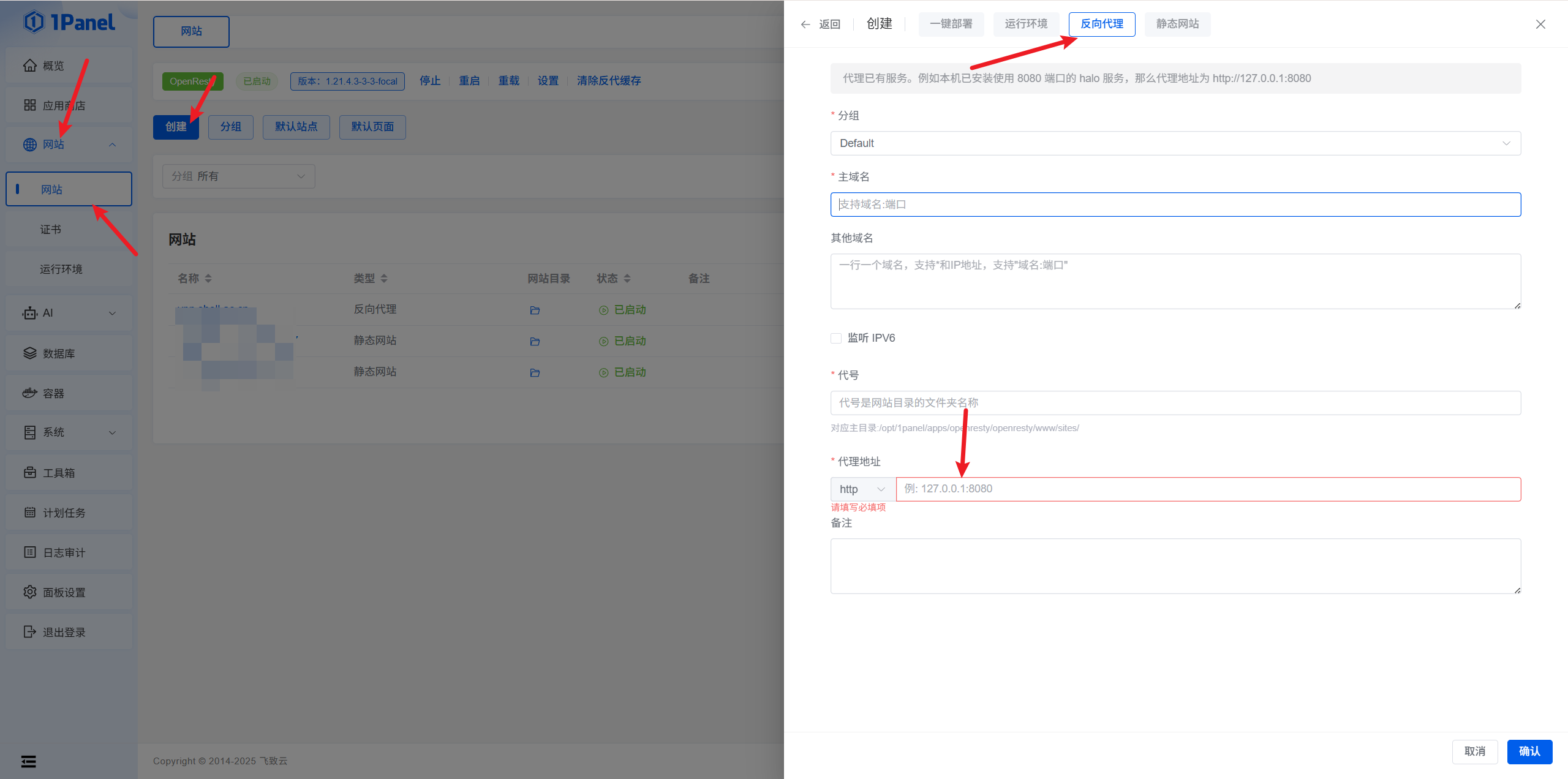
添加 Nginx 反代(1Panel 示例)
路径 | 协议 | 内部端口 | 外部端口 | 反代 URL |
|---|---|---|---|---|
/ | HTTP | dashboard:80 | 10080 | 127.0.0.1:10080 |
/signalexchange.SignalExchange/ | gRPC | signal:80 | 10081 | 127.0.0.1:10081 |
/api | HTTP | management:443 | 10083 | 127.0.0.1:10083 |
/management.ManagementService/ | gRPC | management:443 | 10083 | 127.0.0.1:10083 |
/relay | HTTP | relay:443 | 10084 | 127.0.0.1:10084 |

proxy-1.webp
proxy-2.webp
proxy-3.webp
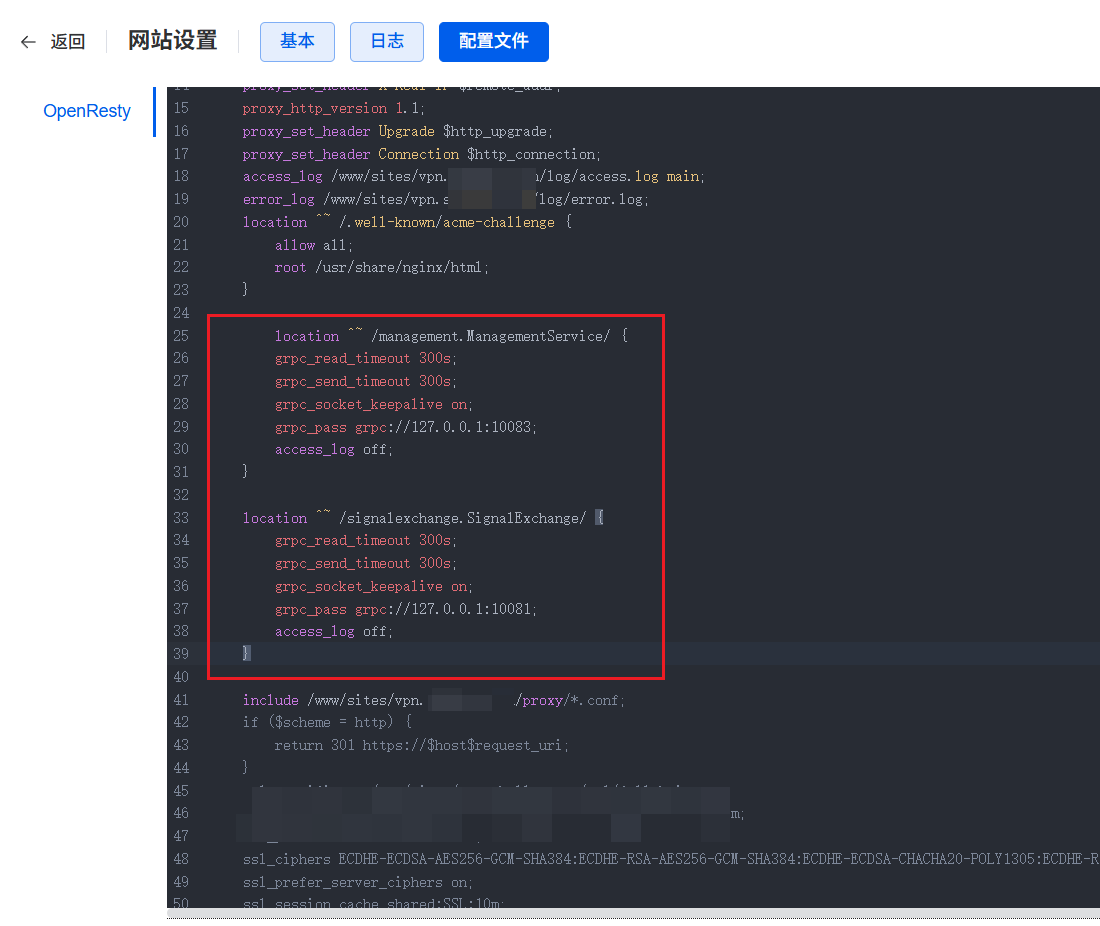
Nginx 片段(gRPC 转发):
location ^~ /management.ManagementService/ {
    grpc_read_timeout 300s;
    grpc_send_timeout 300s;
    grpc_socket_keepalive on;
    grpc_pass grpc://127.0.0.1:10083;
    access_log off;
}

location ^~ /signalexchange.SignalExchange/ {
    grpc_read_timeout 300s;
    grpc_send_timeout 300s;
    grpc_socket_keepalive on;
    grpc_pass grpc://127.0.0.1:10081;
    access_log off;
}
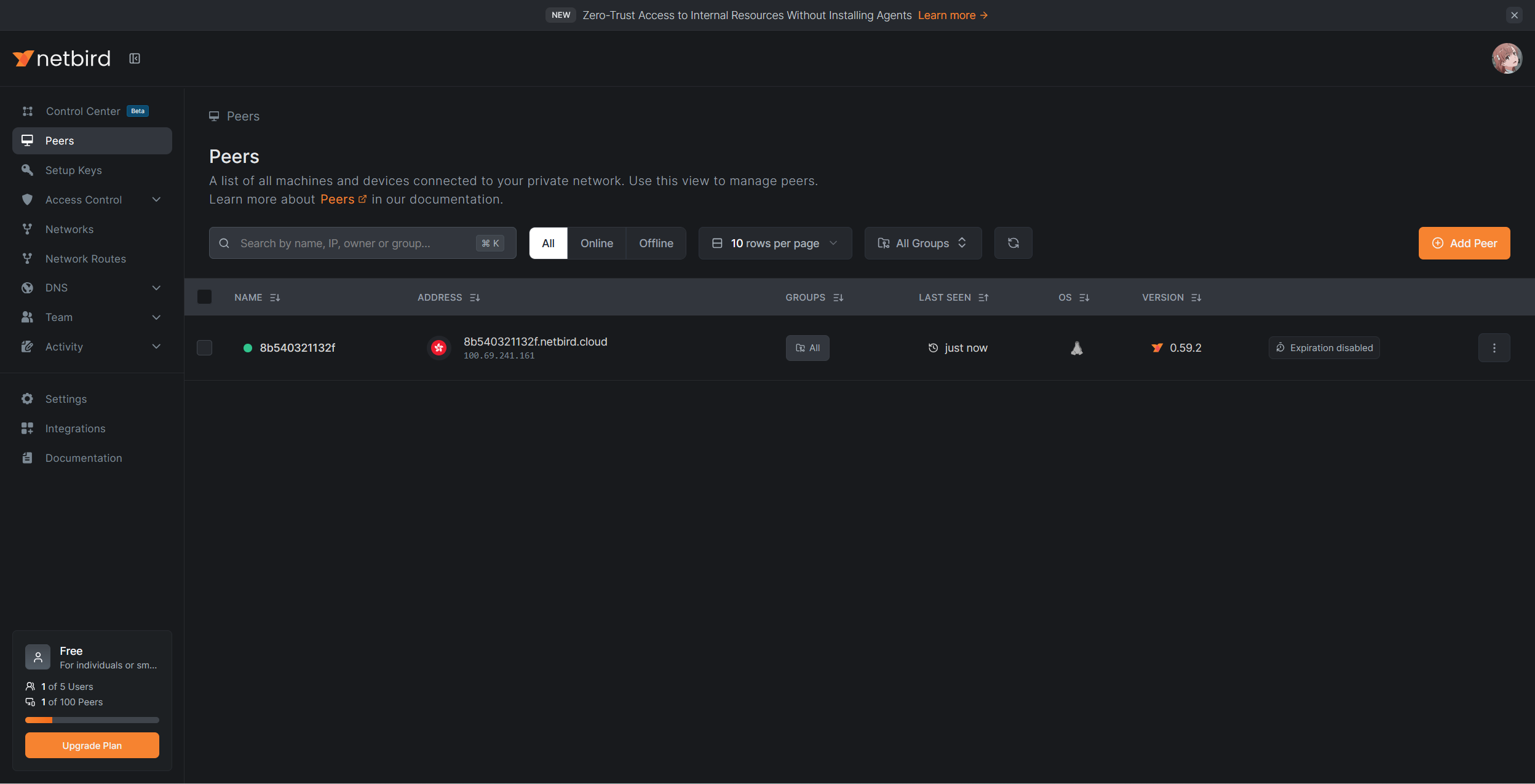
配置成功后,访问站点会跳转至 IDP 登录,完成后即可看到面板(下图为官方在线版示意):
netbird-peers.webp
常见问题(FAQ)
设备为什么会过期?
使用 SSO 登录默认 24 小时到期。可在设置中关闭或调整到期策略:

netbird-settings.webp
无法使用 SSO 认证客户端
报错示例:
Error: daemon up failed: sso login failed: waiting sso login failed with: rpc error: code = InvalidArgument desc = invalid jwt token, err: token could not be parsed: token has invalid claims: token used before issued
老实说博主没有什么能解决的办法并且博主也提了 issue 目前这个还没有官方回复如果各位遇到的话也可以继续开启和评论这个issue,如果你找到了解决办法不放贡献出你自己的一份力量,我只能告诉各位如果是只有个例设备无法认证那么如果那个客户端能使用 docker 部署,不妨试试 docker,博主就是有一台这样的问题使用 docker 就好了。
引用
netbird 官方文档 :https://docs.netbird.io/
netbird 官方文档图片 : https://docs.netbird.io/
netbird 官方 issue : https://github.com/netbirdio/netbird/issues/4500
1Panel部署NetBird:实现内网穿透+零信任组网:https://blog.jiaxiang.wang/articles/deploy-netbird-via-1panel-for-nat-traversal-and-zero-trust-network
原创声明:本文系作者授权腾讯云开发者社区发表,未经许可,不得转载。
如有侵权,请联系 cloudcommunity@tencent.com 删除。
目录
腾讯云开发者

Copyright © 2013 - 2026 Tencent Cloud. All Rights Reserved. 腾讯云 版权所有
深圳市腾讯计算机系统有限公司 ICP备案/许可证号:粤B2-20090059  粤公网安备44030502008569号
腾讯云计算(北京)有限责任公司 京ICP证150476号 | 京ICP备11018762号