NTP 在 IT 系统环境中的重要性及生产环境配置实践

NTP 在 IT 系统环境中的重要性及生产环境配置实践

用户5921339
发布于 2025-12-21 14:07:43
发布于 2025-12-21 14:07:43
来自公众号:IT人家
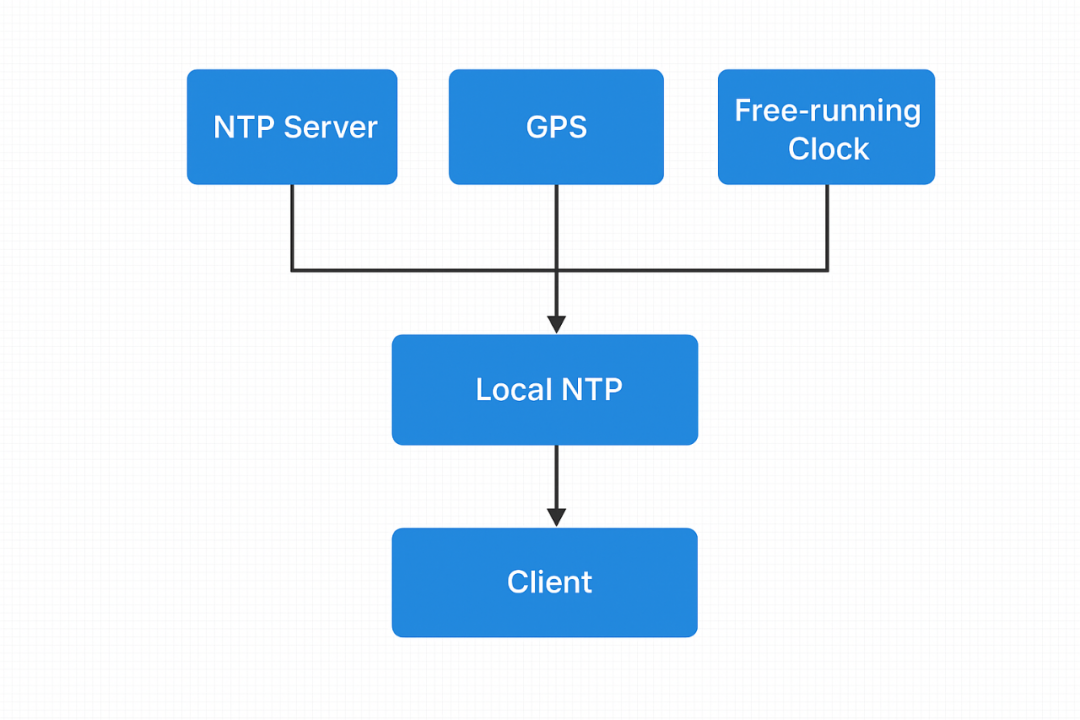
一、什么是 NTP?
NTP(Network Time Protocol,网络时间协议)是一种用于在网络中同步计算机系统时钟的协议,已有 40 多年的历史,被广泛应用于服务器、路由器、交换机和各种终端设备。
其主要功能是通过网络与标准时间源(如原子钟、GPS 或权威时间服务器)进行通信,使系统时间保持高度一致。
NTP 默认使用 UDP 123 端口进行通信,支持互联网和局域网内的时间同步,其时间精度在本地网络中通常可达到毫秒级,在互联网环境中也可达到数十毫秒级。
二、NTP的重要性
时间是一项非常关键的基础服务。在现代 IT 系统中,NTP 几乎是不可或缺的。
所有系统日志、应用日志、安全日志都依赖系统时间:
- Web 日志
- 数据库日志
- 操作系统日志
- 审计日志
- 安全日志
如果服务器时间不一致,将会导致日志顺序混乱、无法重现故障现场、审计追溯失效、安全取证困难等问题。在分布式系统中,多台服务器的时间偏差甚至可能造成严重误判
分布式系统依赖时间
现代 IT 架构大量采用分布式技术,例如:
- 微服务架构
- 分布式数据库
- Kubernetes 集群
- 分布式消息队列(Kafka/RabbitMQ)
- 分布式缓存(Redis Cluster)
- 区块链
- 分布式存储(Ceph/HDFS)
如果节点间时间不同步,可能会导致数据写入冲突、选举失败(如 Raft / Zookeeper)、事务异常、心跳超时误判、Token/Session 失效等问题,严重时可能直接导致整个集群不可用
三、ntp服务器配置
ntp.conf 示例(适用于 CentOS / RHEL / Rocky / Ubuntu 等):
# 漂移文件
driftfile /var/lib/ntp/drift

# 允许大时间漂移修正(首次启动)
tinker panic 0

# 默认拒绝所有访问,增强安全性
restrict default nomodify notrap nopeer noquery

# 允许本机
restrict 127.0.0.1
restrict ::1

# 局域网客户端允许访问(根据实际网段修改)
restrict 192.168.0.0 mask 255.255.255.0 nomodify notrap

# 上游时间服务器
server ntp1.aliyun.com iburst maxpoll 10 prefer
server ntp.sjtu.edu.cn iburst
server time.windows.com iburst

# 本地时钟作为兜底(防止断网失效)
server 127.127.1.0
fudge 127.127.1.0 stratum 10

# 关闭 ntpd 的客户端监控列表功能
disable monitor

# 指定监听网卡或者IP地址
interface listen eth0
interface listen 192.168.0.142
interface ignore wildcard
启动NTP服务
systemctl enable ntpd
systemctl start ntpd
四、相关命令
4.1 ntpq命令
查看NTP状态
# ntpq -pn
     remote           refid      st t when poll reach   delay   offset  jitter
==============================================================================
-118.31.40.99    100.100.61.91    2 u  997 1024  377   26.731   -1.520   2.157
+203.107.6.88    100.107.25.114   2 u  216 1024  377   40.192    2.637   1.899
*17.253.116.125  .MRS.            1 u    1   64  377   28.969    0.497   1.298
+20.189.79.72    10.0.6.24        3 u   42 1024  277   94.635    0.486   9.310
 17.253.116.253  .MRS.            1 u   64   64  377   27.030   -0.103   0.065
注释:
- remote:时间服务器名称/IP
- refid:NTP的来源,越权威越好(GPS / .PPS. / 原子钟)
- st (stratum):层级,数越小越好(1-5最好)原子钟通常是0级
- t:类型(u=unicast),一般都是 u
- when:距上次同步秒数,应小于 poll
- poll:同步间隔(秒),常见16/64/1024
- reach:连通性(8进制),≥ 377 最好
- delay:延迟(ms),越小越好
- offset:时间偏移(ms),越接近 0 越好
- jitter:抖动(ms),越小越稳定
查看选中时间源详细信息
ntpq -c rv
查看对等体
ntpq -c peers
4.2 ntpstat命令
查看同步状态
# ntpstat
synchronised to NTP server (17.253.116.125) at stratum 2
   time correct to within 20 ms
   polling server every 64 s
4.3 ntptime命令
查看内核时间
ntptime
4.4 ntpdate命令
从指定 NTP 服务器获取时间,并立刻修改本机时间(一次性,不持续),如:
ntpdate ntp1.aliyun.com
常用参数:
-u 使用 UDP(穿越防火墙更好)
-b 强制立即修改时间
-q 只查询,不修改
· · · · · END · · · · ·
本文参与 腾讯云自媒体同步曝光计划,分享自微信公众号。
原始发表:2025-12-05,如有侵权请联系 cloudcommunity@tencent.com 删除
目录
腾讯云开发者

Copyright © 2013 - 2026 Tencent Cloud. All Rights Reserved. 腾讯云 版权所有
深圳市腾讯计算机系统有限公司 ICP备案/许可证号:粤B2-20090059  粤公网安备44030502008569号
腾讯云计算(北京)有限责任公司 京ICP证150476号 | 京ICP备11018762号