如何让你开发的AI智能体越用越聪明?


如何让你开发的AI智能体越用越聪明?需要解答这个问题,就需要先来了解Agent的架构。Lilian Weng的智能体架构以大语言模型(LLM)为核心作为智能体的“大脑”。
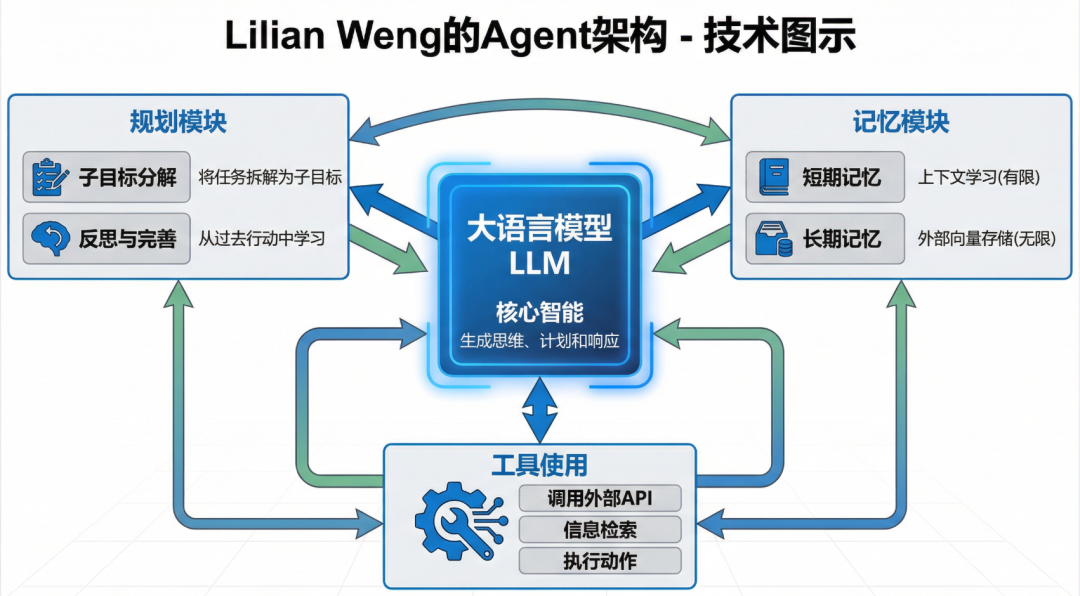
智能体(AI Agent)=大模型(LLM)+记忆(Memory)+规划(Planning)+工具使用(Tool Use)
- 规划(Planning)包括子目标分解(将大任务分解为小任务)和自我反思与完善(从错误中学习并改进)。
- 记忆(Memory)包含短期记忆(上下文学习)和长期记忆(通过外部向量存储进行信息检索)。
- 工具使用(Tool Use)赋予智能体调用外部API的能力,以获取额外信息或执行模型本身不具备的功能。
以上的三大模块组成了Agent,其中记忆就是让Agent越用越聪明的关键点,在这里我给大家推荐一个AI Memory 开源库:MemMachine。
链接:https://github.com/memmachine
官网:https://memmachine.ai/
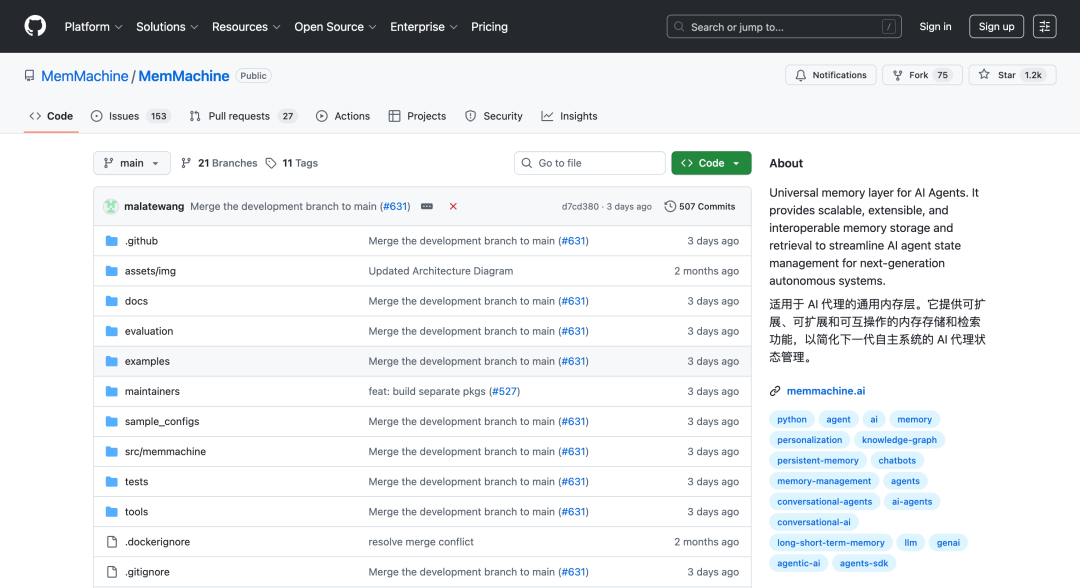
项目介绍
MemMachine 是为AI智能体打造的通用记忆层。它让AI应用能够学习、记忆并在不同会话间延续上下文,从而构建持续进化的用户档案。简单来说,它将普通的聊天机器人,升级为能真正理解你、与你共同成长的个性化助手。
它有什么特性?
- 多种内存类型:MemMachine 支持工作(短期)、持久(长期)和个性化(档案)内存类型。
- 开发者友好型 API:Python SDK、RESTful 和 MCP 接口及端点,集成起来非常简单。
技术架构如下:
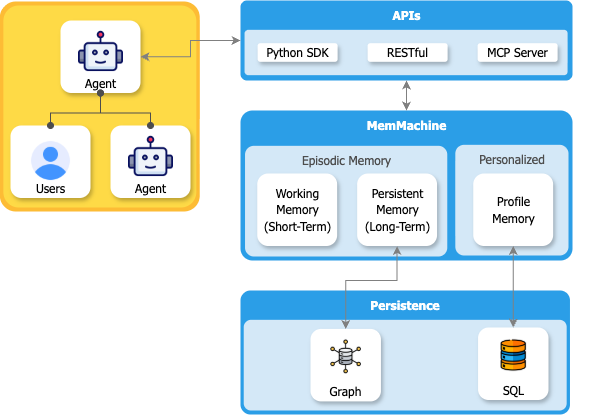
MemMachine 就像是给 AI 装了一个内存条,让它能像人一样记住过去、理解现在、预测未来。
- 记忆层:情景记忆(短期 + 长期)、个性化记忆(记住你的喜好习惯)
- 存储层:数据安全存放在两种数据库里,长期记忆使用的图数据库+个人信息记忆使用的关系型数据库
数据存储设计:
关系型数据库像一个电子档案柜,把数据存在一个个整齐的表格里。它擅长存储简单明了的信息,比如你的姓名、年龄、地址这些基本资料。就像你不会把所有东西都堆在桌子上一样,关系型数据库把不同类型的信息分类放在不同的表格里,查找起来既快又准,而且能保证信息不会出错。
图数据库像一张社交网络图,用 "节点" 代表人和事物,用 "边" 代表它们之间的关系。它特别擅长处理复杂的关系网络,比如谁是你的朋友、朋友的朋友喜欢什么、谁和谁有共同兴趣。就像你在社交软件上看到的好友关系图一样,图数据库能轻松发现隐藏的联系,帮你找到 "你可能认识的人" 或者 "你可能喜欢的东西"。
一起用的效果:
这两种数据库就像你的左脑和右脑,关系型数据库负责精确的事实记忆,图数据库负责智能的关系理解,在一起使用时能提供既准确又智能的服务。
使用指南
接下来介绍两种最通用接入方式:API接入、MCP接入。
API接入
前提条件:确保你的 FastAPI 应用程序正在运行。打开终端,导航到包含您的 app.py 文件的目录,并运行以下命令。输出应确认服务器正在监听请求。
uvicorn app:app --reload- 获取所有会话
最简单的方式是检查现有会话。这个 GET 请求不需要任何数据。由于还没有创建任何会话,你可能会看到一个空列表。
curl http://127.0.0.1:8080/v1/sessions- 创建记忆片段
POST /v1/memories :需要一个包含会话详情、生产者、接收者和记忆内容的 JSON 主体。
curl -X POST "http://127.0.0.1:8080/v1/memories" \
-H "Content-Type: application/json" \
-d '{
  "session": {
    "group_id": "test_group",
    "agent_id": ["test_agent"],
    "user_id": ["test_user"],
    "session_id": "session_123"
  },
  "producer": "test_user",
  "produced_for": "test_agent",
  "episode_content": "This is a simple test memory.",
  "episode_type": "message",
  "metadata": {}
}'
正确输出:收到一个空的 200 OK 响应,确认已成功添加。
- 搜索内存
POST /v1/memories/search :需要一个 JSON 正文来指定搜索查询和会话。
curl -X POST "http://127.0.0.1:8080/v1/memories/search" \
-H "Content-Type: application/json" \
-d '{
  "session": {
    "group_id": "test_group",
    "agent_id": ["test_agent"],
    "user_id": ["test_user"],
    "session_id": "session_123"
  },
  "query": "simple test memory",
  "filter": {},
  "limit": 5
}'
正确输出:看到一个 200 OK 响应,其中包含搜索结果,包括你刚刚添加的记忆片段。输出将以 JSON 对象的格式显示,确认你的记忆已被成功找到。
- 删除会话数据
DELETE /v1/memories :需要 JSON 主体来指定要删除哪个会话的数据。
curl -X DELETE "http://127.0.0.1:8080/v1/memories" \
-H "Content-Type: application/json" \
-d '{
  "session": {
    "group_id": "test_group",
    "agent_id": ["test_agent"],
    "user_id": ["test_user"],
    "session_id": "session_123"
  }
}'
MCP接入
前提条件:确保你的独立 MCP 服务器已启动并运行,可以使用以下示例命令来启动它:
MEMORY_CONFIG=config.yml uv run memmachine-mcp-http --host localhost --port 8080其中 config.yml 是你的 MemMachine 配置文件。 localhost 和 8080 是 MCP 服务器将监听请求的主机名和端口。
如果您想检查服务器是否运行正常,您可以使用 curl 命令,按照以下步骤查询服务器上可用的工具。
- 建立 SSE 连接并获取会话 ID
我们需要会话 ID 来与 MCP 服务器进行交互。可以通过建立 Server-Sent Events (SSE)连接来获取会话 ID。
curl -v -N http://localhost:8080/mcp/ -H "Accept: text/event-stream"示例响应:
* Host localhost:8080 was resolved.
* IPv6: ::1
* IPv4: 127.0.0.1
*   Trying [::1]:8080...
* connect to ::1 port 8080 from ::1 port 62212 failed: Connection refused
*   Trying 127.0.0.1:8080...
* Connected to localhost (127.0.0.1) port 8080
> GET /mcp/ HTTP/1.1
> Host: localhost:8080
> User-Agent: curl/8.7.1
> Accept: text/event-stream
>
* Request completely sent off
< HTTP/1.1 400 Bad Request
< date: Fri, 31 Oct 2025 21:58:56 GMT
< server: uvicorn
< content-type: application/json
< mcp-session-id: 8f82399b29ba42d495ff44d5a9cf7862
< content-length: 105
<
{"jsonrpc":"2.0","id":"server-error","error":{"code":-32600,"message":"Bad Request: Missing session ID"}}
在这个输出中查找 mcp-session-id 头部,可以看到会话 ID 是 8f82399b29ba42d495ff44d5a9cf7862 。
- 初始化会话
现在我们已经有了会话 ID,可以通过向 MCP 服务器发送 initialize 请求来初始化会话。
curl http://localhost:8080/mcp/ \
  -H "Content-Type: application/json" \
  -H "Accept: application/json, text/event-stream" \
  -H "mcp-session-id: 8f82399b29ba42d495ff44d5a9cf7862" \
  -d '{
    "jsonrpc": "2.0",
    "id": 1,
    "method": "initialize",
    "params": {
      "protocolVersion": "2024-11-05",
      "capabilities": {},
      "clientInfo": {
        "name": "curl-client",
        "version": "1.0.0"
      }
    }
  }'
示例响应:
event: message
data:
{
  "jsonrpc": "2.0",
  "id": 1,
  "result": {
    "protocolVersion": "2024-11-05",
    "capabilities": {
      "experimental": {},
      "prompts": {
        "listChanged": true
      },
      "resources": {
        "subscribe": false,
        "listChanged": true
      },
      "tools": {
        "listChanged": true
      }
    },
    "serverInfo": {
      "name": "MemMachine",
      "version": "1.16.0"
    }
  }
}- 发送初始化通知
初始化会话后,我们需要向 MCP 服务器发送 initialized 通知。
curl http://localhost:8080/mcp/ \
  -H "Content-Type: application/json" \
  -H "Accept: application/json, text/event-stream" \
  -H "mcp-session-id: 8f82399b29ba42d495ff44d5a9cf7862" \
  -d '{
    "jsonrpc": "2.0",
    "method": "notifications/initialized"
  }'
请求应成功且无任何错误。
- 列出可用工具
现在我们可以通过向 MCP 服务器发送 tools/list 请求来列出可用工具。
curl http://localhost:8080/mcp/   \
    -H "Content-Type: application/json" \
    -H "Accept: application/json, text/event-stream" \
    -H "mcp-session-id: 8f82399b29ba42d495ff44d5a9cf7862"   -d '{
    "jsonrpc": "2.0",
    "id": 2,
    "method": "tools/list",
    "params": {}
  }'
示例响应:
event: message
data:
{
  "jsonrpc": "2.0",
  "id": 2,
  "result": {
    "tools": [
      {
        "name": "add_memory",
        "description": "Store important new information about the user or conversation into memory. Use this automatically whenever the user shares new facts, preferences, plans, emotions, or other details that could be useful for future context. Include the **full conversation context** in the `content` field — not just a snippet. This tool writes to both short-term (episodic) and long-term (profile) memory, so that future interactions can recall relevant background knowledge even across different sessions.",
        "inputSchema": {
          "$defs": {
            "AddMemoryParam": {
              "description": "Parameters for adding memory.\n\nThis model is used by chatbots or agents to store important information\ninto memory for a specific user. The content should contain the **full\nconversational or contextual summary**, not just a short fragment.\n\nChatbots should call this when they learn new facts about the user,\nobserve recurring behaviors, or summarize recent discussions.",
              ...
}
总结
让AI智能体越用越聪明就是为它安装一个强大的记忆系统。通过集成 MemMachine 专业记忆层,Anget就能瞬间赋予长期记忆和个性化学习能力,将普通 Agent 升级为能真正理解用户并与之共同成长的AI智能体伙伴。
MemMachine 项目链接:
- GitHub: https://github.com/memmachine
- 官网: https://memmachine.ai/
本文参与 腾讯云自媒体同步曝光计划,分享自微信公众号。
原始发表:2025-12-03,如有侵权请联系 cloudcommunity@tencent.com 删除
目录
腾讯云开发者

Copyright © 2013 - 2026 Tencent Cloud. All Rights Reserved. 腾讯云 版权所有
深圳市腾讯计算机系统有限公司 ICP备案/许可证号:粤B2-20090059  粤公网安备44030502008569号
腾讯云计算(北京)有限责任公司 京ICP证150476号 | 京ICP备11018762号