【Oracle database】 Oracle数据库分区表基础

【Oracle database】 Oracle数据库分区表基础

master336
发布于 2026-06-15 19:36:39
发布于 2026-06-15 19:36:39
目录
- 使用场景
- 分区查询
- 范围分区表(range)
- 固定值域区间的分区
- 自动间隔的分区
- 列表分区表(list)
- 哈希分区表(hash)
- 组合分区表(range+hash,range+list)
- range+hash
- range+list
- 注意事项
- 附录
使用场景
数据量大时的一种分表(分区)方案,从数据库层面解决大数据量下性能问题(官方建议单表大于2GB),Oracle 对数据进行分区、分表空间的存储,以降低应用编程的复杂度,同时降低IO压力。
分区查询
-- 查询表分区,自动间隔分区会随着时间自动创建新的分区
select * from user_tab_partitions;
-- 查询分区表
select * from user_part_tables;
-- 查询二级分区表
select * from user_tab_subpartitions
--- 查询分区表数据(t1为查询的目标表,t1_p12为目标表的一个分区表)
SELECT * FROM t1 partition(t1_p12) ;
Oracle分区表分为如下四种:
范围分区表(range)
范围分区表即通过指定列的值域(大小)区间确定数据分区
固定值域区间的分区
create table T1 (
  id number,
  p_month number,
  username varchar2(50),
  inputdata date,
  constraint T1_id primary key (id)
)
partition by range(p_month)
(
  partition t1_p1 values less than (1),
  partition t1_p2 values less than (2),
  partition t1_p3 values less than (3),
  partition t1_p4 values less than (4),
  partition t1_p5 values less than (5),
  partition t1_p6 values less than (6),
  partition t1_p7 values less than (7),
  partition t1_p8 values less than (8),
  partition t1_p9 values less than (9),
  partition t1_p10 values less than (10),
  partition t1_p11 values less than (11),
  partition t1_p12 values less than (maxvalue)
);
如上sql,将表t1 字段列p_month进行值域划分了12个区:
t1_p1 : 列p_month的值 小于 1(第一个分区,仅有值域上限) … … t1_p11: 列p_month的值 小于 11(第十一个分区,值域下限为上一个分区的上限值(含)) t1_p12 :列p_month的值 大于等于 11 (最后一个分区,使用maxvalue代表最大上限值) 查看分区数据user_part_tables(分区数量及类型):

在这里插入图片描述
查看表分区规则user_tab_partitions
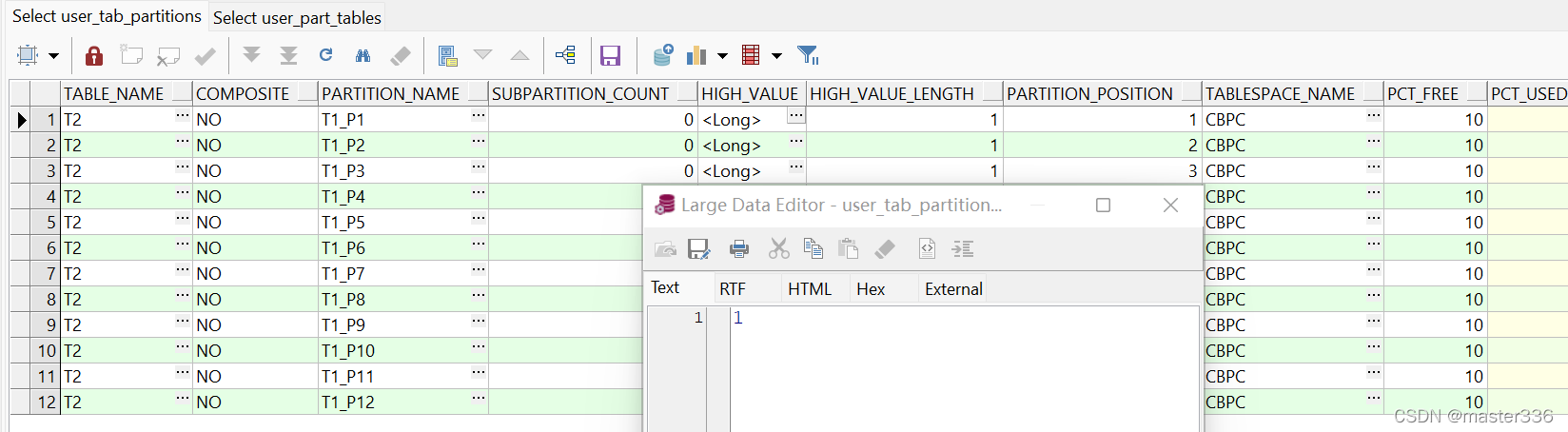
在这里插入图片描述
自动间隔的分区
自动间隔分区,通过时间划分进行分区的自动创建
create table T2 (
  id number,
  p_month number,
  username varchar2(50),
  inputdata date,
  constraint T2_id primary key (id)
)
partition by range(inputdata)
interval(NUMTOYMINTERVAL(1, 'MONTH'))
(
  partition t1_p1 values less than (to_date('2022-01-01','yyyy-MM-dd')),
   partition t1_p2 values less than (to_date('2022-01-15','yyyy-MM-dd'))
);
如上sql,通过inputdata的值域进行分区,同时interval(NUMTOYMINTERVAL(1, ‘MONTH’)) 按月自动间隔分区,间隔分区从指定分区(t1_p1 、t1_p2)之后进行间隔时间分区。如当将时间2022-01-30的数据插入时,已经创建的分区t1_p1 、t1_p2均不满足值域范围,将创建新的分区(命名以SYS_P开头)用于存储这条数据。 查看分区数据user_part_tables(分区数量及类型):

在这里插入图片描述
查看表分区规则user_tab_partitions
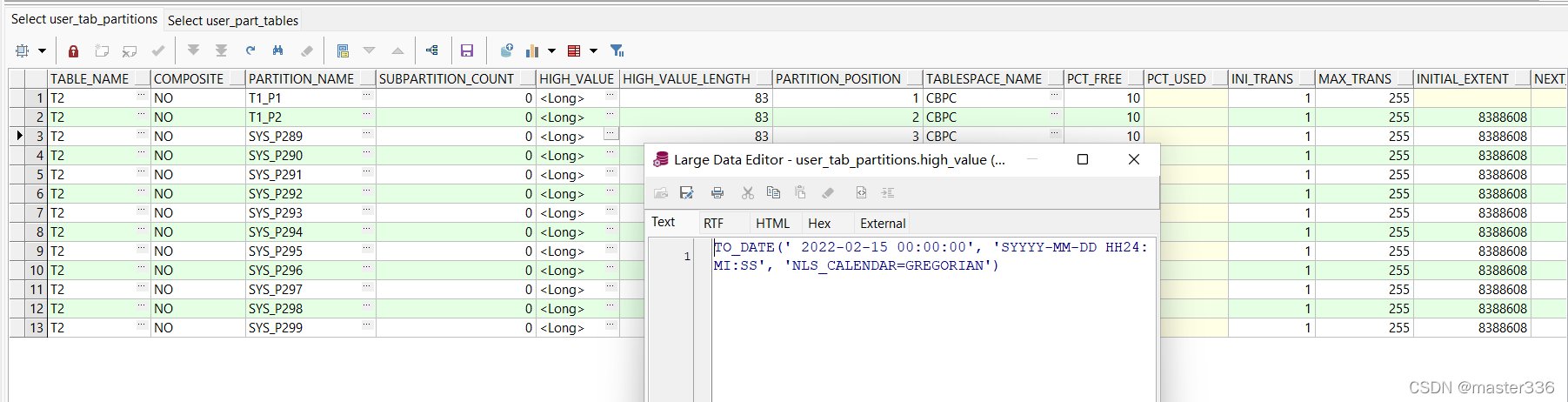
在这里插入图片描述
列表分区表(list)
对分区列的值进行分组,通过枚举的方式指定映射到不同的分区进行存储
create table T2 (
  id number,
  p_month number,
  username varchar2(50),
  inputdata date,
  constraint T2_id primary key (id)
)
partition by list(p_month)
(
  partition t2_hash_p1 values (1,3,5,7,9,11) ,
  partition t2_hash_p2 values (2,4,6,8,10),
    partition t2_hash_p3 values (default)
);
通过values指定分区所接受的值列表,用于匹配存储该分区的数据 使用default 代表默认分区的数据,在指定分区值列表之外的数据将落到该分区。
查看分区数据user_part_tables(分区数量及类型):

在这里插入图片描述
查看表分区规则user_tab_partitions

在这里插入图片描述
哈希分区表(hash)
对分区列的值进行hash计算,并将值映射到指定的分区上(根据分区个数哈希,理论上来说,只要算法ok,数据应该均分在各个分区上)
create table T2 (
  id number,
  p_month number,
  username varchar2(50),
  inputdata date,
  constraint T2_id primary key (id)
)
partition by hash(p_month)
(
  partition t2_hash_p1 ,
  partition t2_hash_p2
);
查看分区数据user_part_tables(分区数量及类型):

在这里插入图片描述
查看表分区规则user_tab_partitions

在这里插入图片描述
组合分区表(range+hash,range+list)
分区组合实际上是按照以上三种分区方式进行组合,先进行range范围的一级分区,然后对数据在进行hash或者list分区,然后再落到对应的二级分区上。
使用SUBPARTITIONS 说明二级分区个数时,并不意味着二级分区的数量受限,实际二级分区通过二级分区的规则决定 各值域(range)下的二级分区个数可以不相同。
range+hash
根据范围和哈希进行组合分区
create table T2 (
  id number,
  p_month number,
  username varchar2(50),
  inputdata date,
  constraint T2_id primary key (id)
)
partition by range(inputdata)
SUBPARTITION BY HASH(p_month) SUBPARTITIONS 2
(
  partition t1_p1 values less than (to_date('2022-01-01','yyyy-MM-dd'))(
    SUBPARTITION  t1_p1_h1,
    SUBPARTITION  t1_p1_h2
  ),
   partition t1_p2 values less than (to_date('2022-01-15','yyyy-MM-dd'))(
    SUBPARTITION  t1_p2_h1,
    SUBPARTITION  t1_p2_h2
  )
);
查看分区数据user_part_tables(分区数量及类型):

在这里插入图片描述
查看表分区规则user_tab_partitions

在这里插入图片描述
有二级分区,查询二级分区

在这里插入图片描述
range+list
通过组合range和list的方式对数据先进行范围分区,然后列表分区
create table T2 (
  id number,
  p_month number,
  username varchar2(50),
  inputdata date,
  constraint T2_id primary key (id)
)
partition by range(inputdata)
SUBPARTITION BY list(p_month)
(
  partition t1_p1 values less than (to_date('2022-01-01','yyyy-MM-dd'))(
    SUBPARTITION  t1_p1_h1 values(1,3,5,7,9,11),
    SUBPARTITION  t1_p1_h2 values(2,4,6,8,10),
    SUBPARTITION  t1_p1_h3 values(default)
  ),
   partition t1_p2 values less than (to_date('2022-01-15','yyyy-MM-dd'))(
   SUBPARTITION  t1_p2_h1 values(1,3,5,7,9,11),
    SUBPARTITION  t1_p2_h2 values(0,2,4,6,8,10)
  )
);
查看分区数据user_part_tables(分区数量及类型):

在这里插入图片描述
查看表分区规则user_tab_partitions

在这里插入图片描述
有二级分区,查询二级分区

在这里插入图片描述
注意事项
数据通过分区规则未找到对应分区时,将提示错误:ORA-14400: 插入的分区关键字未映射到任何分区
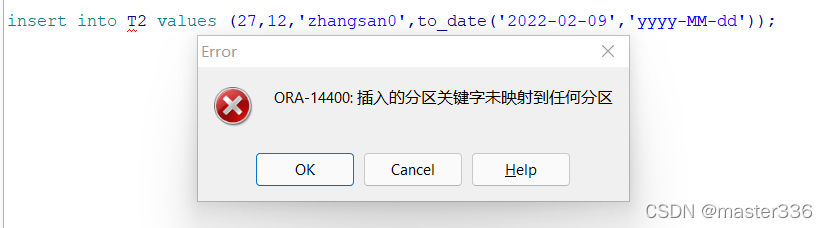
在这里插入图片描述
分区规则同时支持指定表空间,包括二级分区。
- 当未指定表空间时,默认当前用户表空间
- 当指定一级分区表空间,二级分区默认使用一级分区表空间
- 当二级表分区指定表空间,则声明优先。
遵照声明大于默认原则
Oracle分区默认最大支持1024K-1个(1048575)
如下:
create table T2 (
  id number,
  p_month number,
  username varchar2(50),
  inputdata date,
  constraint T2_id primary key (id)
)
partition by range(inputdata)
SUBPARTITION BY list(p_month)
(
  partition t1_p1 values less than (to_date('2022-01-01','yyyy-MM-dd')) tablespace  users (
    SUBPARTITION  t1_p1_h1 values(1,3,5,7,9,11),
    SUBPARTITION  t1_p1_h2 values(2,4,6,8,10),
    SUBPARTITION  t1_p1_h3 values(default)
  ) ,
   partition t1_p2 values less than (to_date('2022-01-15','yyyy-MM-dd')) tablespace  cbpc (
   SUBPARTITION  t1_p2_h1 values(1,3,5,7,9,11) tablespace  users,
    SUBPARTITION  t1_p2_h2 values(0,2,4,6,8,10)
  )
);
查看二级分区:

在这里插入图片描述
附录
- 测试数据
insert into T2 values (1,0,'zhangsan0',sysdate);
insert into T2 values (2,2,'zhangsan0',to_date('2022-01-10','yyyy-MM-dd'));
insert into T2 values (3,1,'zhangsan0',to_date('2022-02-10','yyyy-MM-dd'));
insert into T2 values (4,3,'zhangsan0',to_date('2022-03-10','yyyy-MM-dd'));
insert into T2 values (5,4,'zhangsan0',to_date('2022-04-10','yyyy-MM-dd'));
insert into T2 values (6,5,'zhangsan0',to_date('2022-05-10','yyyy-MM-dd'));
insert into T2 values (7,6,'zhangsan0',to_date('2022-06-10','yyyy-MM-dd'));
insert into T2 values (8,7,'zhangsan0',to_date('2022-07-10','yyyy-MM-dd'));
insert into T2 values (9,8,'zhangsan0',to_date('2022-08-10','yyyy-MM-dd'));
insert into T2 values (10,9,'zhangsan0',to_date('2022-09-10','yyyy-MM-dd'));
insert into T2 values (11,10,'zhangsan0',to_date('2022-10-10','yyyy-MM-dd'));
insert into T2 values (12,11,'zhangsan0',to_date('2022-11-10','yyyy-MM-dd'));
insert into T2 values (13,2,'zhangsan0',to_date('2022-12-10','yyyy-MM-dd'));
insert into T2 values (14,1,'zhangsan0',to_date('2022-01-10','yyyy-MM-dd'));
insert into T2 values (15,4,'zhangsan0',to_date('2022-02-10','yyyy-MM-dd'));
insert into T2 values (16,5,'zhangsan0',to_date('2022-05-10','yyyy-MM-dd'));

insert into T2 values (23,0,'zhangsan0',to_date('2022-06-10','yyyy-MM-dd'));
insert into T2 values (24,8,'zhangsan0',to_date('2022-07-10','yyyy-MM-dd'));
insert into T2 values (25,11,'zhangsan0',to_date('2022-08-10','yyyy-MM-dd'));
insert into T2 values (26,4,'zhangsan0',to_date('2022-09-10','yyyy-MM-dd'));
insert into T2 values (27,6,'zhangsan0',to_date('2022-01-09','yyyy-MM-dd'));
本文参与 腾讯云自媒体同步曝光计划,分享自作者个人站点/博客。
原始发表:2023-02-27,如有侵权请联系 cloudcommunity@tencent.com 删除
目录
腾讯云开发者

Copyright © 2013 - 2026 Tencent Cloud. All Rights Reserved. 腾讯云 版权所有
深圳市腾讯计算机系统有限公司 ICP备案/许可证号:粤B2-20090059  粤公网安备44030502008569号
腾讯云计算(北京)有限责任公司 京ICP证150476号 | 京ICP备11018762号