操作场景
本文为您介绍如何在安全增强内存型 M6ce 或安全增强标准型 S8ce 实例中构建 Tencent SGX 机密计算环境,并使用 Intel SGXSDK 验证 SGX 功能。
前提条件
已创建并登录 安全增强内存型 M6ce 实例或安全增强标准型 S8ce 实例。
如何创建实例,请参见 通过购买页创建实例。
如何登录实例,请参见 使用标准登录方式登录 Linux 实例(推荐)。
云服务器需外网访问能力,您可在创建云服务器时选择分配公网 IP,或在云服务器创建后为其配置 弹性公网 IP。
说明:
本文以使用操作系统为 TencentOS Server 3.1(TK4) 的实例为例,不同操作系统版本步骤存在一定区别,请根据您的实际情况操作。
安全增强标准型 S8ce 暂时处于白名单开放状态,如有需要,请联系 在线支持 处理。
安装 Intel SGXSDK
1. 执行以下命令,检查 kernel 版本。
uname -a
查看 kernel 版本是否低于5.4.119-19.0008:
是,请执行以下命令更新 kernel。
警告:
升级操作系统内核是一个比较复杂和风险较高的操作,可能导致系统不稳定或出现兼容性问题。在进行升级前,建议备份重要数据,了解升级过程和可能出现的问题,并谨慎操作。
yum update kernel
否,则请执行下一步。
2. 执行以下命令,安装 SGX runtime 所需的软件包。其中,SGX AESM 服务的默认安装目录为
/opt/intel/sgx-aesm-service。yum install \\libsgx-ae-le libsgx-ae-pce libsgx-ae-qe3 libsgx-ae-qve \\libsgx-aesm-ecdsa-plugin libsgx-aesm-launch-plugin libsgx-aesm-pce-plugin libsgx-aesm-quote-ex-plugin \\libsgx-dcap-default-qpl libsgx-dcap-default-qpl-devel libsgx-dcap-ql libsgx-dcap-ql-devel \\libsgx-dcap-quote-verify libsgx-dcap-quote-verify-devel libsgx-enclave-common libsgx-enclave-common-devel libsgx-epid-devel \\libsgx-launch libsgx-launch-devel libsgx-pce-logic libsgx-qe3-logic libsgx-quote-ex libsgx-quote-ex-devel \\libsgx-ra-network libsgx-ra-uefi libsgx-uae-service libsgx-urts sgx-ra-service \\sgx-aesm-service -y
3. 执行以下命令,安装 Intel SGXSDK。
wget https://mia-1251783334.cos.ap-shanghai.myqcloud.com/sgx_linux_x64_sdk_2.23.100.2.bin -O sgx_linux_x64_sdk_2.23.100.2.binchmod +x ./sgx_linux_x64_sdk_2.23.100.2.bin./sgx_linux_x64_sdk_2.23.100.2.bin
说明:
执行
./sgx_linux_x64_sdk时,需要选择安装目录,建议不要安装到当前目录,安装到/opt/intel/。此时,Intel SGXSDK 的默认安装目录为/opt/intel/sgxsdk。您可参见 Intel SGXSDK 用户手册开发 SGX 程序。4. SGX runtime 和 Intel SGXSDK 安装完成后,请重启实例。详情请参见 重启实例。
注意:
重启期间实例将无法正常提供服务,因此在重启之前,请确保云服务器已暂停业务请求。
配置腾讯云 SGX 远程证明服务
腾讯云 SGX 远程证明服务采用区域化部署,建议您访问 SGX 云服务器实例所在地域的远程证明服务,以获得最佳体验。
注意事项
腾讯云 SGX 远程证明服务部署在北京、上海、广州、南京、新加坡地域。
即便您的 SGX 云服务器实例不在上述地域,也依然可以正常使用 SGX 远程证明服务。只需就近选择任一已部署地域的服务进行访问即可,各地域间请求互通,不影响功能可用性。地域 | [Region-ID] |
北京 | bj |
上海 | sh |
广州 | gz |
南京 | nj |
新加坡 | sg |
Intel Ice Lake 仅支持基于 Intel SGX DCAP 远程证明方式,不支持 Intel EPID 远程证明方式。
腾讯云 SGX 远程证明服务升级
根据 Intel 相关公告,Intel 将于 北京时间 2026 年 4 月 30 日 23:00 完全停止 Intel® SGX PCS API 版本 2 和版本 3 的服务。 如您当前仍在使用 SGX 远程证明服务,请务必确保在此时间前升级至 Intel® SGX PCS API 版本 4。
升级 Intel® SGX PCS API 版本 4,您只需修改 /etc/sgx_default_qcnl.conf 配置文件中的远程证明服务 URL,将 v3 替换为 v4,保存后重新验证 SGX 远程证明功能即可。具体配置修改,请参见 操作步骤。
操作步骤
请根据以下步骤手动修改文件
/etc/sgx_default_qcnl.conf说明:
安装 Intel SGXSDK 后将自动生成远程证明服务的默认配置文件
/etc/sgx_default_qcnl.conf/etc/sgx_default_qcnl.conf属于 rpm 包 libsgx-dcap-default-qpl,其格式同时支持 toml 与 JSON 文件两种格式,下文将介绍两种情况下如何配置。若采用 JSON 配置 /etc/sgx_default_qcnl.conf:使用 VIM 编辑器,打开
/etc/sgx_default_qcnl.conf,找到pccs_url,将该行修改为如下内容:"pccs_url": "https://sgx-dcap-server-tc.[Region-ID].tencent.cn/sgx/certification/v4/"
"pccs_url": "https://sgx-dcap-server-tc.bj.tencent.cn/sgx/certification/v4/"
若采用 toml 配置
/etc/sgx_default_qcnl.conf:使用 VIM 编辑器,将 /etc/sgx_default_qcnl.conf 修改为如下内容:# PCCS server addressPCCS_URL=https://sgx-dcap-server-tc.[Region-ID].tencent.cn/sgx/certification/v4/# To accept insecure HTTPS cert, set this option to FALSEUSE_SECURE_CERT=TRUE
# PCCS server addressPCCS_URL=https://sgx-dcap-server-tc.bj.tencent.cn/sgx/certification/v4/# To accept insecure HTTPS cert, set this option to FALSEUSE_SECURE_CERT=TRUE
验证 SGX 功能示例
示例1:启动 Enclave
Intel SGXSDK 中提供了 SGX 示例代码用于验证 SGX 功能,默认目录为
/opt/intel/sgxsdk/SampleCode。本示例中的代码(SampleEnclave)效果为启动一个 Enclave,以验证是否正常使用安装的 SGXSDK,以及 SGX 云服务器实例的机密内存资源是否可用。1. 执行以下命令,设置 Intel SGXSDK 相关的环境变量。
source /opt/intel/sgxsdk/environment
2. 执行以下命令,编译示例代码 SampleEnclave。
cd /opt/intel/sgxsdk/SampleCode/SampleEnclave && make
3. 执行以下命令,运行编译出的可执行文件。
./app
返回如下图所示结果,则说明已启动成功。

示例2:SGX 远程证明
Intel SGX 的 code tree 提供了示例代码用于验证 SGX 远程证明功能(DCAP)。本示例为生成和验证 Quote,示例涉及 Quote 生成方(QuoteGenerationSample)和 Quote 验证方(QuoteVerificationSample)。
1. 执行以下命令,设置 Intel SGXSDK 相关的环境变量。
source /opt/intel/sgxsdk/environment
2. 依次执行以下命令,安装 git 并下载 intel sgx DCAP code tree。
cd /root && yum install git -y
git clone https://github.com/intel/SGXDataCenterAttestationPrimitives.gitgit checkout DCAP_1.20
3. 依次执行以下命令,编译并运行 Quote 生成方示例代码 QuoteGenerationSample。
3.1 进入 QuoteGenerationSample 目录。
cd /root/SGXDataCenterAttestationPrimitives/SampleCode/QuoteGenerationSample
3.2 编译 QuoteGenerationSample。
make
3.3 运行 QuoteGenerationSample 并生成 Quote。
./app
4. 执行以下命令,编译 Quote 验证方示例代码 QuoteVerificationSample。
cd /root/SGXDataCenterAttestationPrimitives/SampleCode/QuoteVerificationSample && make
5. 执行以下命令,对 QuoteVerificationSample Enclave 进行签名。
sgx_sign sign -key Enclave/Enclave_private_sample.pem -enclave enclave.so -out enclave.signed.so -config Enclave/Enclave.config.xmlsgx_sign sign -key ../QuoteGenerationSample/Enclave/Enclave_private_sample.pem -enclave enclave.so -out enclave.signed.so -config Enclave/Enclave.config.xml # DCAP_1.16新版本路径
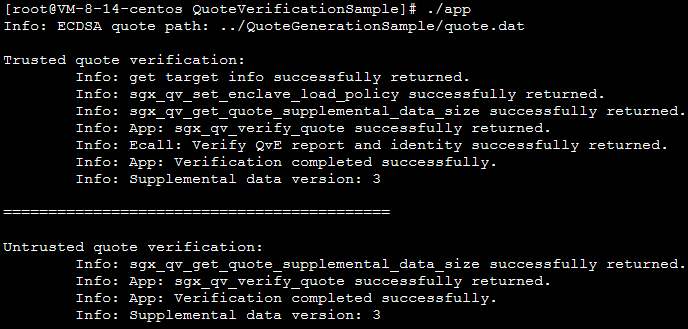
6. 执行以下命令,运行 QuoteVerificationSample 以验证 Quote。
./app
返回如下图所示结果,则说明已验证成功。