让 MCP 工具不再只回纯文本,而是直接在对话里渲染一个交互式界面——按钮、表单、图表、地图,都能内嵌在对话中。
本文档面向 MCP Server 开发者。如果您已有一个 MCP Server(已作为插件接入应用),想为某个 tool 添加交互式界面,本文说明协议契约、接入步骤、Host 能力边界与链路对接方式。
对话端遵循 MCP 官方 io.modelcontextprotocol/ui 协议扩展(ext-apps,specification 2026-01-26)渲染交互式界面。
一、协议核心概念
1.1 UI Resource
MCP Apps 的交互式界面是一份 HTML,作为 MCP Resource 暴露:
URI:建议使用 ui:// 前缀(与官方规范一致),例如 ui://my-server/dashboard;该 URI 由平台侧从 tool 的 _meta.ui.resourceUri 取到并下发到对话端,用于拉取 HTML。
MIME 必须 是 text/html;profile=mcp-app(对话端按 mime_type 以 text/html 开头选取 HTML 资源,避免误取同响应里的非 HTML 资源)。
资源的 _meta.ui.csp 用于声明 CSP 域名白名单;平台侧会映射为 ReadMCPResource 响应的 resource_meta,对话端据此生成内层 iframe 的 CSP。
1.2 App Tool
让 Host 知道某个 tool 关联了交互式界面,需要在 tool 定义里加 _meta.ui.resourceUri 指向 UI Resource。模型调用这个 tool 时,Host 自动渲染对应交互式界面。
1.3 Sandbox iframe
交互式界面运行在隔离的 iframe 中:界面拿不到主页面的数据,主页面也不会被界面影响。
代理页与业务域天然跨域,配合 iframe sandbox 与 postMessage 的 targetOrigin 锁定,实现 UI 隔离与权限边界;
代理页只转发消息、不理解语义,真正的资源拉取与工具调用由业务页 Host 完成后端调用;
iframe sandbox 属性:allow-scripts allow-same-origin allow-forms allow-popups;
CSP 由资源 resource_meta.ui.csp 生成并注入内层 iframe;
HTML 含 <script type="module"> 时改用 srcdoc 注入(与代理页同源,module 可正常执行),普通 script 走 document.write 注入。
1.4 消息通信
界面 HTML 通过 ext-apps 库拿到一个 App 实例,与 Host 之间走 JSON-RPC over postMessage。Host 与界面之间的通信都是异步消息,没有任何 DOM/全局变量泄漏到主页面。
二、接入步骤
1. Server 端注册 tool:tool 定义里加 _meta.ui.resourceUri = 'ui:///'。
2. Server 端注册 resource handler:返回 mimeType: 'text/html;profile=mcp-app',text 字段塞 HTML。
3. Server 端 tool 实现:在 CallToolResult 里也带 _meta.ui.resourceUri,并把交互式界面需要的数据放在 structuredContent。
4. HTML 模板:head 用 color-scheme: light dark + light-dark() 兜底;script 里 new App({ autoResize: true }).connect(),挂 app.ontoolresult 处理工具结果、app.ontoolinput 处理数据未就绪场景。
5. 联调:在支持的入口触发该 tool,看交互式界面渲染与反向调用效果。
三、完整的加载 & 交互流程
以"用户输入 查看有哪些 todo → 模型调用 show_todos → 用户在交互式界面里点添加"为例:
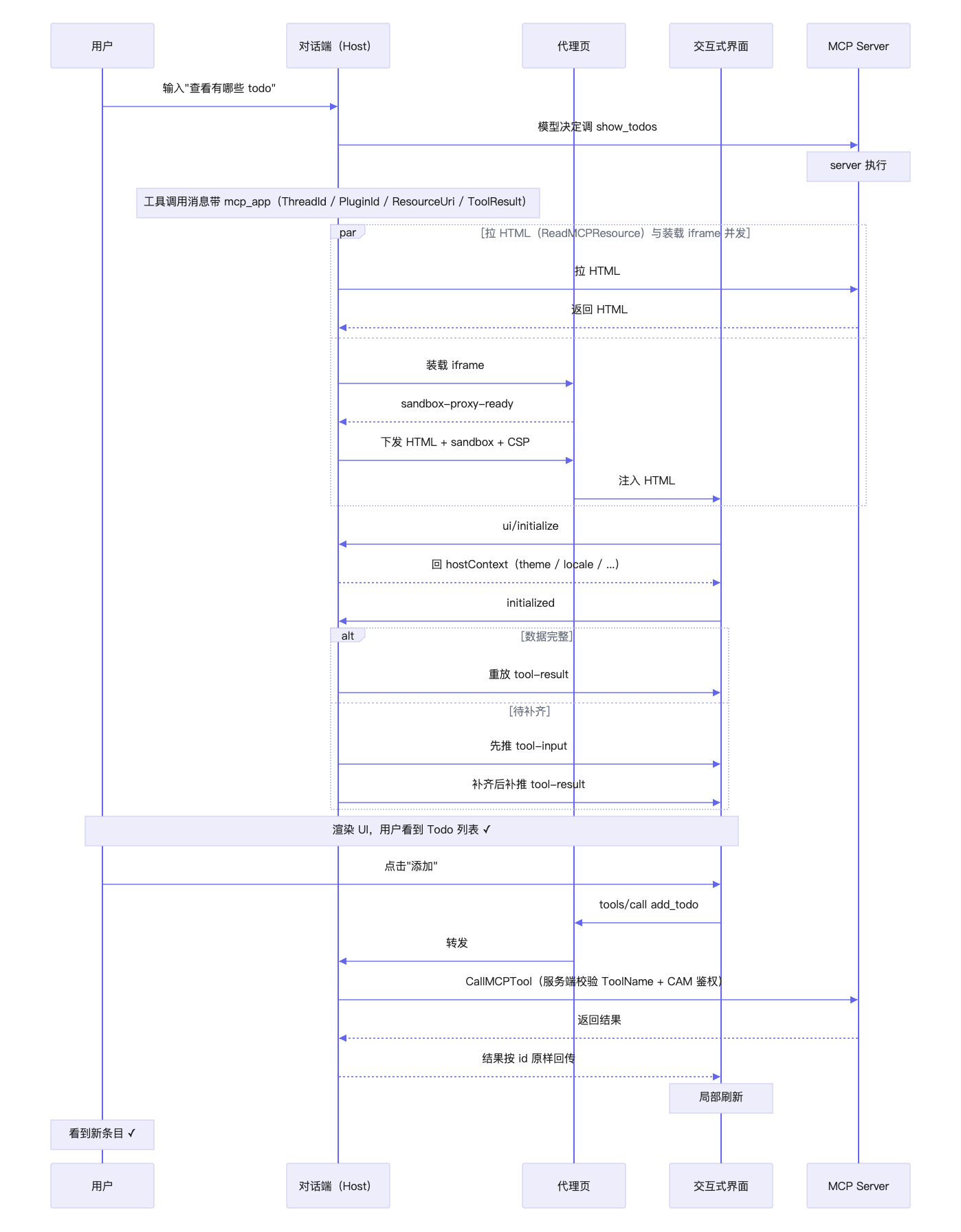
要点:
1. HTML 由 Host 预取:拿到 ResourceUri 后 Host 主动拉取 HTML(与 iframe 装载并发),两者都就绪时才把 HTML 下发给代理页注入,交互式界面启动后无需再回拉资源。
2. toolResult 由 Host 推送、不是交互式界面拉取:握手完成后 Host 主动重放工具结果,保证交互式界面状态与对话上下文同步。
3. 数据可能分步到达:structuredContent 未就绪时先推 tool-input,补齐后再补推 tool-result,交互式界面需幂等处理。
4. 反向工具调用不经过模型:由 Host 调后端接口,可在原对话结束之后的历史会话里继续发生;ThreadId / PluginId 由 Host 从会话上下文补齐,交互式界面无需感知。
5. isError: true 是业务失败(接口层仍为成功响应),界面需自行判断并给出提示。
四、Server 端接入示例
const { Server } = require('@modelcontextprotocol/sdk/server/index.js');const {CallToolRequestSchema,ListToolsRequestSchema,ListResourcesRequestSchema,ReadResourceRequestSchema,} = require('@modelcontextprotocol/sdk/types.js');const UI_MIME = 'text/html;profile=mcp-app';const TODO_URI = 'ui://my-todo/list';const server = new Server({ name: 'my-todo', version: '0.1.0' },{ capabilities: { tools: {}, resources: {} } },);const todos = [];server.setRequestHandler(ListToolsRequestSchema, async () => ({tools: [{name: 'show_todos',description: '展示待办列表交互式界面',inputSchema: { type: 'object', properties: {} },// 关键:声明 UI Resource,Host 见到此字段就渲染交互式界面_meta: { ui: { resourceUri: TODO_URI } },},{name: 'add_todo',description: 'Add a new todo',inputSchema: {type: 'object',properties: { title: { type: 'string' } },required: ['title'],},},],}));server.setRequestHandler(CallToolRequestSchema, async req => {if (req.params.name === 'show_todos') {return {content: [{ type: 'text', text: `${todos.length} todos` }],// structuredContent 会作为 toolResult 推送给交互式界面structuredContent: { items: todos },// 关键:tool result 也带 _meta.ui,让 Host 关联到交互式界面_meta: { ui: { resourceUri: TODO_URI } },};}if (req.params.name === 'add_todo') {todos.push({ id: todos.length + 1, title: req.params.arguments.title });return {content: [{ type: 'text', text: 'Added' }],structuredContent: { items: todos },};}});server.setRequestHandler(ListResourcesRequestSchema, async () => ({resources: [{ uri: TODO_URI, name: 'todo-list', mimeType: UI_MIME }],}));server.setRequestHandler(ReadResourceRequestSchema, async req => {if (req.params.uri === TODO_URI) {return {contents: [{uri: TODO_URI,text: HTML, // 见「五、App(HTML)开发」mimeType: UI_MIME,_meta: {ui: {// CSP:声明交互式界面运行时需要的外部域名。平台侧会把它映射为// ReadMCPResource 响应的 resource_meta,对话端据此生成内层 iframe 的 CSP。// **未列出的域名将被浏览器拦截。**csp: {// 允许通过 ESM 远端引入 ext-apps(script-src / connect-src 都需要 esm.sh);// 离线/内网改为自托管 SDK 时,把 esm.sh 换成自托管域名resourceDomains: ['https://esm.sh'],// 如交互式界面还会调外部 API(fetch / WebSocket),把对应域名加这里connectDomains: ['https://esm.sh'],},},},}],};}});
structuredContent 是交互式界面的数据来源,Host 在握手完成后把完整 CallToolResult 推给交互式界面。
注意:
structuredContent 为空、或只含 viewUUID / _meta 等标识字段时,被视为数据残缺:交互式界面先加载外壳,等 ToolResult 补齐后再补推一次 tool-result。因此交互式界面必须同时挂载 ontoolinput 与 ontoolresult,并按 _meta.viewUUID 做幂等去重。
五、App(HTML)开发
5.1 HTML 模板
<!DOCTYPE html><html><head><meta charset="utf-8" /><style>/* 主题跟随宿主:light-dark() 兜底 + data-theme 显式锁定 */:root {color-scheme: light dark;--bg: light-dark(#fff, #1e1e1e);--fg: light-dark(#1a1a1a, #e6e6e6);}html[data-theme="light"] { color-scheme: light }html[data-theme="dark"] { color-scheme: dark }body { margin: 0; padding: 12px; background: var(--bg); color: var(--fg); }</style></head><body><ul id="list"></ul><button id="add">添加</button><script type="module">// 远端 ESM 引入 ext-apps(自带依赖的 bundle,浏览器直接 import)// 锁版本到 1.x;生产环境建议改成具体 patch 版(如 @1.7.4)import { App } from 'https://esm.sh/@modelcontextprotocol/ext-apps@1/app-with-deps';const app = new App({name: 'todo-app',version: '1.0.0',autoResize: true, // 自动按内容上报 size-changed});function render(items) {const list = document.getElementById('list');list.textContent = '';for (const t of items) {const li = document.createElement('li');li.textContent = t.title;list.appendChild(li);}}// 数据主通道:Host 在握手后推送完整 CallToolResult(可能延后到达,需幂等)let lastUuid = '';app.ontoolresult = (r) => {const uuid = (r && r._meta && r._meta.viewUUID) || '';if (uuid && uuid === lastUuid) return; // 去重lastUuid = uuid;if (r?.structuredContent?.items) render(r.structuredContent.items);};// 数据未就绪时先收到 tool-input(仅含上下文标识),渲染骨架屏即可app.ontoolinput = (input) => {console.log('[mcp-app] tool-input', input); // { toolInput: { thread_id, plugin_id, resource_uri } }};// 主题:从 initialize 结果取 hostContext.theme(当前版本后续不再推送变更)function applyTheme(theme) {if (!theme) return;document.documentElement.setAttribute('data-theme', theme);document.documentElement.style.colorScheme = theme;}document.getElementById('add').onclick = async () => {// 反向调用同一插件下的工具:服务端按 plugin 工具列表校验 + CAM 鉴权const res = await app.callServerTool({name: 'add_todo',arguments: { title: `todo ${Date.now()}` },});if (res?.isError) { console.warn('调用失败', res); return; }if (res?.structuredContent?.items) render(res.structuredContent.items);};await app.connect();applyTheme(app.hostContext?.theme);</script></body></html>
六、Host 侧 iframe 模板
以下为装载交互式界面的 iframe 实现模板。
6.1 外层 iframe(业务页)
<iframesrc="https://example.com/proxy"sandbox="allow-scripts allow-forms"referrerpolicy="no-referrer"title="代理页"style="width: 100%; height: 50px; border: 0"></iframe>
src 指向自供的代理页,与业务页不同域(本地联调可用同源副本);
iframe 必须有正常高度:height: 0 / display: none 会导致代理页不加载 → 收不到 sandbox-proxy-ready → HTML 永不注入(死锁)。初始给 50px 占位,随后按交互式界面上报的 size-changed 撑开,上限 600px,超出后交互式界面内部滚动;
实例标识用 ResourceUri:同一条 mcp_app 会随 content.added / message.done / response.completed 多次更新,标识不稳定会导致 iframe 重建、重复拉取 HTML。
Host 需要下发与应答:向代理页下发 sandbox-resource-ready(HTML + sandbox + CSP),并应答交互式界面上抛的 ui/initialize、tools/call 等 JSON-RPC 请求(完整时序见第三章)。
6.2 代理页(sandbox 代理)
<!doctype html><html><head><meta charset="utf-8" /><meta name="color-scheme" content="light dark" /><title>MCP-App Proxy</title><style>html, body { margin: 0; height: 100%; width: 100%; }body { display: flex; flex-direction: column; background: #fff; }iframe { border: 0; padding: 0; width: 100%; height: 100%;overflow: auto; /* 内容超过外层高度上限时内部滚动 */ }</style></head><body><script>var PROXY_READY_NOTIFICATION = 'ui/notifications/sandbox-proxy-ready';var RESOURCE_READY_NOTIFICATION = 'ui/notifications/sandbox-resource-ready';var OWN_ORIGIN = location.origin;var hostOrigin = ''; // 握手后锁定的业务页 origin// 允许的业务页 origin 白名单(新增域名在此追加)var ALLOWED_ORIGINS = ['https://adp.cloud.tencent.com'];var inner = document.createElement('iframe');inner.setAttribute('sandbox', 'allow-scripts allow-same-origin allow-forms');document.body.appendChild(inner);function isAllowedOrigin (origin) {return !!origin && ALLOWED_ORIGINS.indexOf(origin) !== -1;}// 注入界面 HTML:module script 用 srcdoc(document.write 注入的 module 不执行)function renderHtml (html) {if (typeof html !== 'string') return;var isModuleScript = /<script[^>]*type\\s*=\\s*["']module["']/i.test(html);var doc = inner.contentDocument || (inner.contentWindow && inner.contentWindow.document);if (isModuleScript || !doc) {inner.srcdoc = html;} else {doc.open(); doc.write(html); doc.close();}}// 承接 Host 下发的资源:设置权限 + CSP,再注入 HTMLfunction handleResourceReady (params) {params = params || {};if (typeof params.sandbox === 'string') inner.setAttribute('sandbox', params.sandbox);if (typeof params.allow === 'string') inner.setAttribute('allow', params.allow);if (typeof params.csp === 'string' && params.csp) inner.setAttribute('csp', params.csp);renderHtml(params.html);}window.addEventListener('message', function (event) {var data = event.data;// 方向 A:Host(业务页)→ 本代理页if (event.source === window.parent) {if (!isAllowedOrigin(event.origin)) return; // 非白名单来源直接拒绝hostOrigin = event.origin;if (data && data.method === RESOURCE_READY_NOTIFICATION) {handleResourceReady(data.params); // 本地消费,不下发给交互式界面return;}// sandbox-* 前缀通知由代理页自身消费,不转发if (data && typeof data.method === 'string' &&data.method.indexOf('ui/notifications/sandbox-') === 0) return;// 其余 Host → 交互式界面的 JSON-RPC 透明转发if (inner && inner.contentWindow) inner.contentWindow.postMessage(data, OWN_ORIGIN);return;}// 方向 B:交互式界面 → 本代理页 → Host(initialize / tools / call / size-changed 等原样上抛)if (event.source === (inner && inner.contentWindow)) {if (event.origin !== OWN_ORIGIN) return;if (hostOrigin) window.parent.postMessage(data, hostOrigin); // 不用 '*'}});// 通知 Host:代理页已就绪,可以下发交互式界面资源window.parent.postMessage({ jsonrpc: '2.0', method: PROXY_READY_NOTIFICATION, params: {} }, '*');</script></body></html>
要点:
1. 只转发不理解:代理页不解析业务语义,ui/initialize、tools/call 等均由业务页 Host 处理;sandbox-* 前缀通知由代理页本地消费。
2. origin 双向锁定:入向校验业务域白名单(本地联调时可额外放行 localhost / 127.0.0.1),出向用握手锁定的 hostOrigin,不用 *;内层交互式界面与代理页同源,但与业务域跨域,因此对业务域仍隔离。
3. module script 用 srcdoc:document.write 注入的内联 <script type="module"> 不会执行,检测到 module 时改用 srcdoc(同源,module 可正常执行)。
七、实时消息(WS)链路对接
Host 通过 WebSocket 接收实时消息,mcp_app 作为消息的一个 Content 下推。下面是 Host(对话端)侧的对接方式。
7.1 事件与消息结构
WS 下行事件字段为 PascalCase:
事件 | payload | 对话端处理 |
content.added | { MessageId, ContentIndex, Content } | 预置该 Content(预热,此时可能只有 ResourceUri,ToolResult 未到位) |
message.added / message.done | { Message: { MessageId, Type, Contents } } | 按 MessageId 合并到对应消息;message.done 会补齐 ToolResult |
response.completed | { Response: { RecordId, Messages } } | 全量重放本轮消息 |
mcp_app Content 的结构:
{"Type": "mcp_app","McpApp": {"ThreadId": "thread_xxx","PluginId": "plugin_xxx","ResourceUri": "ui://my-todo/list","ToolResult": "{\\"content\\":[{\\"type\\":\\"text\\",\\"text\\":\\"3 todos\\"}],\\"structuredContent\\":{\\"items\\":[{\\"id\\":1,\\"title\\":\\"写周报\\"}]},\\"_meta\\":{\\"viewUUID\\":\\"v1\\"}}"}}
ToolResult 是完整 CallToolResult 的 JSON 字符串,可随 message.done 才补齐;
ThreadId / PluginId / ResourceUri 是后续拉取 HTML 与调用工具的必需参数。
7.2 一个实时链路的事件序列
// 1) 预热:只有资源标识,无数据 → 交互式界面先加载外壳{ "Type": "content.added", "MessageId": "rpl_001", "ContentIndex": 0,"Content": { "Type": "mcp_app","McpApp": { "ThreadId": "thread_xxx", "PluginId": "plugin_xxx","ResourceUri": "ui://my-todo/list" } } }// 2) 工具执行完:补 ToolResult → 对话端补推 ui/notifications/tool-result{ "Type": "message.done", "Message": { "MessageId": "rpl_001", "Type": "tool_call","Contents": [ { "Type": "mcp_app", "McpApp": { "ThreadId": "thread_xxx","PluginId": "plugin_xxx", "ResourceUri": "ui://my-todo/list","ToolResult": "{...structuredContent...}" } } ] } }// 3) 本轮结束:全量重放(同一条消息再次到达){ "Type": "response.completed", "Response": { "RecordId": "rec_001", "Messages": [ ... ] } }
7.3 对话端消费要点
1. 两种消息承载:mcp_app 既可挂在 tool_call 消息的 Contents 里,也可挂在 reply 消息里,两者渲染逻辑一致;只在开头列出的入口生效。
2. 实例标识用 ResourceUri:同一条 mcp_app 消息会经历 content.added → message.done → response.completed 多次更新,若标识依赖 MessageId,会导致 iframe 重建并重复拉取 HTML。
3. HTML 按 {ThreadId}:{PluginId}:{Uri} 缓存:Host 会缓存拉取结果,同一资源在多次重放中只请求一次。
4. 结果按 viewUUID 幂等:ToolResult 补齐后会再补推一次 tool-result,交互式界面侧需按 _meta.viewUUID 去重(见第四节注意事项)。
7.4 云 API(CAPI)接口对接
(1)ReadMCPResource —— 拉取界面 HTML
Host 拿到 ResourceUri 后立即请求;HTML 到手后等代理页就绪再下发,交互式界面启动后无需再回拉。
import jsonreq = models.ReadMCPResourceRequest()req.ThreadId = thread_id # 来自 mcp_app 内容req.PluginId = plugin_idreq.Uri = "ui://my-todo/list"resp = client.ReadMCPResource(req)# 取 HTML:只认 MimeType 以 text/html 开头的资源html_content = next(c for c in resp.Contents if c.MimeType.startswith("text/html"))html = html_content.Textresource_meta = resp.ResourceMeta # 用于生成内层 iframe 的 CSP
{"Contents": [{ "Uri": "ui://my-todo/list","MimeType": "text/html;profile=mcp-app","Text": "<!DOCTYPE html>..." }],"ResourceMeta": "{\\"ui\\":{\\"csp\\":{\\"connectDomains\\":[\\"https://esm.sh\\"],\\"resourceDomains\\":[\\"https://esm.sh\\"]}}}"}
ThreadId / PluginId 缺失时 Host 直接判失败,不发请求;
只取 MimeType 以 text/html 开头的资源,避免误取同响应里的非 HTML 资源;
交互式界面的 HTML 由 {ThreadId}:{PluginId}:{Uri} 唯一决定,可自行缓存,多次重放无需重复请求。
(2)CallMCPTool —— 调用 MCP 工具
用于交互式界面反向调用工具,也可由接入方在服务端主动发起(该调用不经过模型,可在原对话结束之后的历史会话里继续发生)。
req = models.CallMCPToolRequest()req.ThreadId = thread_idreq.PluginId = plugin_idreq.ToolName = "add_todo"req.Arguments = json.dumps({"title": "写周报"}) # Arguments 为 JSON 字符串resp = client.CallMCPTool(req)result = json.loads(resp.Result) # 完整 CallToolResult
{"Result": "{\\"content\\":[{\\"type\\":\\"text\\",\\"text\\":\\"Added\\"}],\\"structuredContent\\":{\\"items\\":[]}}"}
Host 把 Result 解析后按原 JSON-RPC id 回给交互式界面,结构原样透传(含 structuredContent / isError / _meta);
ThreadId / PluginId 缺失 → 回错误码 -32001;接口异常 → 回 -32000,server 不会被实际调用。
(3)DescribeConversationMessageList —— 历史消息与交互式界面重建
刷新页面、重新进入会话等场景走历史消息接口,mcp_app 内容与其 ToolResult 一并返回,用于重建交互式界面。
req = models.DescribeConversationMessageListRequest()req.ConversationId = conversation_idreq.RecordId = record_id or "" # 翻页游标,空表示从最新开始req.Limit = 50 # 单次最多 50resp = client.DescribeConversationMessageList(req)
{"MessageList": [{"MessageId": "rpl_001","Type": "tool_call","Contents": [{ "Type": "mcp_app","McpApp": {"ThreadId": "thread_xxx","PluginId": "plugin_xxx","ResourceUri": "ui://my-todo/list","ToolResult": "{\\"structuredContent\\":{\\"items\\":[{\\"id\\":1,\\"title\\":\\"写周报\\"}]},\\"_meta\\":{\\"viewUUID\\":\\"v1\\"}}"} }]}],"FirstRecordId": "rec_001","LastRecordId": "rec_050","HasMoreBefore": true,"HasMoreAfter": false}
历史场景要点:
1. 数据已内联:历史消息里 ToolResult 是完整的 CallToolResult,握手完成后直接重放 ui/notifications/tool-result,交互式界面立即渲染,无需等实时补齐。
2. 仍需幂等:ToolResult 可能在翻页/重放中重复到达,交互式界面按 _meta.viewUUID 去重。
3. 与实时链路同构:历史消息与实时推送携带的 mcp_app 结构一致(均含 ThreadId / PluginId / ResourceUri / ToolResult),渲染逻辑复用一套。
八、安全模型
8.1 Sandbox 隔离
第三方 HTML 跑在隔离的 sandbox iframe 中:业务页 → 代理页 → 界面。
iframe sandbox 属性:allow-scripts allow-same-origin allow-forms allow-popups。
资源 _meta.ui.csp 生成 CSP 后注入内层 iframe,未声明的域名一律被浏览器拦截。
代理页只接受白名单业务域的消息;自建宿主或使用私有化 / 自定义域名时,需把业务域名加入代理页白名单。
8.2 授权机制
反向 tools/call 无前端授权弹窗,改为服务端校验:
校验 | 说明 |
能力边界 | ToolName 必须属于当前 PluginId 的工具列表,不在列表内直接拒绝。 |
归属校验 | 后端按 ThreadId 校验会话归属,不一致直接拒绝。 |
鉴权 | 由服务端用对应 ToolId 装配 CAM 鉴权。 |
身份字段 | 应用 / 用户 / Agent 等身份信息由后端从会话态补齐,前端不接受也不提交。 |
ThreadId / PluginId 缺失时,Host 直接拒绝调用并回错误码 -32001,server 不会被实际调用。
8.3 外链与日志
ui/open-link:Host 用 window.open 打开,当前版本不做 scheme 校验,建议只传
http:// 或 https://。notifications/message(sendLog):Host 只上抛给宿主页面,当前未做界面展示。
九、机制小结
Server 契约:UI Resource(text/html;profile=mcp-app) + tool _meta.ui.resourceUri+ CallToolResult.structuredContent + resource_meta.ui.csp↓对话触发:模型调该 tool → 消息 Content.Type = 'mcp_app'↓ (WS:content.added 预热 → message.done 补 ToolResult → response.completed 重放)Host 渲染:ReadMCPResource → 双层沙箱 iframe → ui/initialize → 重放 tool-input / tool-result↓反向交互:交互式界面 tools/call → CallMCPTool → 结果回传交互式界面
环节 | 责任方 | 关键点 |
声明 UI Resource | MCP Server | MIME = text/html;profile=mcp-app |
关联 tool 与交互式界面 | MCP Server | _meta.ui.resourceUri |
提供渲染数据 | MCP Server | CallToolResult.structuredContent |
声明 CSP 域名 | MCP Server | resource_meta.ui.csp.{resourceDomains,connectDomains} |
交互式界面开发 | MCP Server | ext-apps SDK 1.x;同时处理 ontoolinput 与 ontoolresult 并按 viewUUID 幂等 |
渲染与鉴权 | 对话端 | 双层沙箱 iframe;tools/call 服务端按 plugin 工具列表校验 + CAM 鉴权 |
十、参考资源
协议与 SDK
MCP Apps spec & 参考实现:modelcontextprotocol/ext-apps(npm:@modelcontextprotocol/ext-apps)
MCP Apps protocol types:spec.types.ts
MCP TypeScript SDK:modelcontextprotocol/typescript-sdk(npm:@modelcontextprotocol/sdk)
MCP 主协议规范:Model Context Protocol
官方示例 server:ext-apps/examples
Web 标准


