背景
MQTT 标准规范定义了 Topic Filter 的概念,允许订阅者基于 MQTT Topic Name 的层级结构和通配符来选择需要接收的消息。虽然 Topic 和通配符提供了较强的过滤能力,但在灰度发布、A/B 测试、系统升级等场景中,仅依赖 Topic 过滤仍无法满足更灵活的业务需求。
实现原理
MQTT 5.0协议引入了 Subscribe User Property 机制,本产品基于此机制扩展支持了 Subscribe User Property 的过滤语义,从而支持更细粒度的消息过滤能力。当订阅消息时,如果 Subscribe User Properties 中包含 Key 为
$where,Value 为合法的 WHERE 子句,MQTT Server 将在推送消息时依据该 WHERE 子句对消息进行过滤,仅将满足条件的消息投递给订阅者。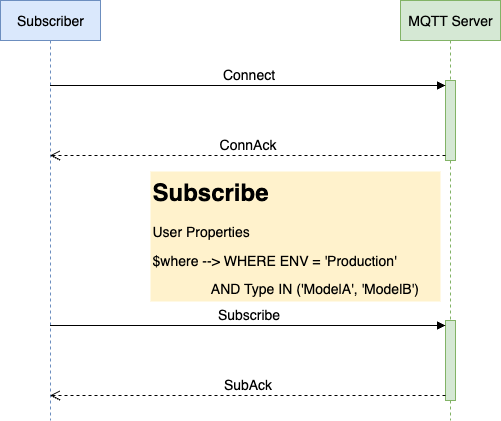
基本工作流程
1. 订阅与声明:订阅者发起 Subscribe 请求,在 User Property 中声明过滤条件($where)。
2. 条件解析:服务端解析并校验 WHERE 子句的有效性。
3. 消息匹配:当有消息发布时,服务端对匹配主题的消息应用所有订阅者的过滤条件。
4. 精准投递:仅将满足条件的消息投递给订阅者。
SQL 过滤语法
WHERE 子句用于对消息属性进行过滤。过滤条件可以引用消息中可用的用户属性和 MQTT 系统属性。服务端不会解析消息 Payload,也不支持在 WHERE 子句中直接引用 Topic。
WHERE 子句通过 Subscribe User Property 传递,User Property 的 Key 必须为
$where,Value 为合法的 WHERE 子句。可过滤字段
字段 | 类型 | 来源 | 缺省值 | 说明 |
用户属性名称 | String | PUBLISH 消息中的 User Property | NULL | 用户属性的 Key 可直接作为过滤字段名,例如 k1、deviceType |
$QoS | Long | 发布消息的 QoS | NULL | 表示发布消息的 QoS 等级 |
$Retain | Boolean | 发布消息的 Retain 标志 | false | 表示发布消息是否为 Retain 消息 |
$PublisherClientId | String | 发布端 Client ID | NULL | 表示发布该消息的客户端 ID |
支持的操作符
类型 | 操作符 | 示例 | 说明 |
比较运算符 | =, !=, >, >=, <, <= | WHERE $QoS > 0 | 比较数值或字符串 |
逻辑运算符 | AND, OR, NOT | WHERE temperature > 25 AND humidity < 70 | 组合多个过滤条件 |
范围判断 | IN | WHERE $PublisherClientId IN ('client1', 'client2') | 判断字段值是否在指定列表中 |
空值判断 | IS NULL | WHERE $PublisherClientId IS NULL | 判断字段值是否为 NULL |
模式匹配 | LIKE | WHERE deviceType LIKE 'sensor/%' | 对消息属性执行通配符匹配 |
条件表达式 | CASE WHEN...THEN...ELSE...END | WHERE CASE WHEN $QoS > 0 THEN 'important' ELSE 'normal' END = 'important' | 根据条件返回不同结果 |
支持的函数
类型 | 函数示例 | 说明 |
字符串函数 | UPPER()、LOWER()、LENGTH() | 处理字符串 |
数学函数 | ABS() | 计算绝对值 |
条件函数 | COALESCE() | 返回参数中第一个非 NULL 值 |
注意事项
1. 每个 Subscribe 请求的 User Properties 中,最多只能有一个 Key 为
$where 的属性。如果存在多个 $where 属性,仅第一个属性生效。2. 对于消息中的 User Property,如果存在多个同名的 Key-Value 对,仅取最后一个 Value 参与过滤表达式计算。
3. 如果过滤表达式引用的用户属性不存在,该字段的值将被视为
NULL。4. 系统属性的缺省值按照以下规则处理:
$QoS 缺省值为 NULL;$Retain 缺省值为 false;$PublisherClientId 缺省值为 NULL。5. 字符串字面量必须使用单引号表示,例如:
WHERE deviceType = 'sensor'。6. WHERE 子句只能过滤消息属性,不支持引用消息 Payload。例如,不支持
payload.temp > 30 或 payload.location IS NULL。示例
package com.tencent.tdmq.mqtt.quickstart.paho.v5.async;import java.nio.ByteBuffer;import java.nio.charset.StandardCharsets;import java.util.ArrayList;import java.util.List;import java.util.concurrent.TimeUnit;import org.eclipse.paho.mqttv5.client.IMqttToken;import org.eclipse.paho.mqttv5.client.MqttAsyncClient;import org.eclipse.paho.mqttv5.client.MqttCallback;import org.eclipse.paho.mqttv5.client.MqttConnectionOptions;import org.eclipse.paho.mqttv5.client.MqttDisconnectResponse;import org.eclipse.paho.mqttv5.client.persist.MemoryPersistence;import org.eclipse.paho.mqttv5.common.MqttException;import org.eclipse.paho.mqttv5.common.MqttMessage;import org.eclipse.paho.mqttv5.common.MqttSubscription;import org.eclipse.paho.mqttv5.common.packet.MqttProperties;import org.eclipse.paho.mqttv5.common.packet.UserProperty;public class BasicQuickStart {public static void main(String[] args) throws MqttException, InterruptedException {String serverUri = "tcp://mqtt-xxx.mqtt.tdmqcloud.com:1883";String clientId = "deviceBasic";String topic = "home/room/1";String[] topicFilters = new String[] {"home/#"};int[] qos = new int[] {1};MqttAsyncClient client = new MqttAsyncClient(serverUri, clientId, new MemoryPersistence());MqttConnectionOptions options = new MqttConnectionOptions();options.setUserName("YOUR-USERNAME");options.setPassword("YOUR-PASSWORD".getBytes(StandardCharsets.UTF_8));options.setCleanStart(true);options.setSessionExpiryInterval(TimeUnit.DAYS.toSeconds(1));client.setCallback(new MqttCallback() {@Overridepublic void disconnected(MqttDisconnectResponse response) {System.out.println("Disconnected: " + response.getReasonString());}@Overridepublic void mqttErrorOccurred(MqttException e) {e.printStackTrace();}@Overridepublic void messageArrived(String s, MqttMessage message) throws Exception {byte[] payload = message.getPayload();String content;if (4 == payload.length) {ByteBuffer buf = ByteBuffer.wrap(payload);content = String.valueOf(buf.getInt());} else {content = new String(payload, StandardCharsets.UTF_8);}System.out.printf("Message arrived, topic=%s, QoS=%d content=[%s], properties=%s%n",topic, message.getQos(), content, message.getProperties());}@Overridepublic void deliveryComplete(IMqttToken token) {}@Overridepublic void connectComplete(boolean reconnect, String serverURI) {System.out.println(reconnect ? "Reconnected" : "Connected" + " to " + serverURI);}@Overridepublic void authPacketArrived(int i, MqttProperties properties) {}});client.connect(options).waitForCompletion();try {// SubscribeMqttSubscription[] subscriptions = new MqttSubscription[topicFilters.length];for (int i = 0; i < topicFilters.length; i++) {subscriptions[i] = new MqttSubscription(topicFilters[i], qos[i]);}MqttProperties subscribeProperties = new MqttProperties();List<UserProperty> userProperties = new ArrayList<>();UserProperty userProperty = new UserProperty("$where", "where $QoS = 1 AND k1 = 'v1'");userProperties.add(userProperty);subscribeProperties.setUserProperties(userProperties);client.subscribe(subscriptions, null, null, subscribeProperties).waitForCompletion();} catch (MqttException e) {e.printStackTrace();}int total = 128;for (int i = 0; i < total; i++) {byte[] payload = new byte[4];ByteBuffer buffer = ByteBuffer.wrap(payload);buffer.putInt(i);MqttMessage message = new MqttMessage(payload);message.setQos(1);MqttProperties properties = new MqttProperties();properties.setContentType("application/json");properties.setResponseTopic("response/topic");message.setProperties(properties);System.out.printf("Prepare to publish message %d%n", i);// P2P topic format: {first-topic}/p2p/{target-client-id}client.publish(topic, message);System.out.printf("Published message %d%n", i);TimeUnit.MILLISECONDS.sleep(100);}TimeUnit.MINUTES.sleep(3);client.disconnect();}}


