功能概述
交错式思考模式,即将慢思考和工具调用能力相结合,模型在输出最终回答前,可先交错进行多轮次的思考和工具调用,以增强 Agent 工作场景下输出的稳定性与复杂任务的执行能力,并获得更高质量的回答。
适用场景
适用于需要慢思考(high/low)模式下,进行工具调用(tool call)的场景。
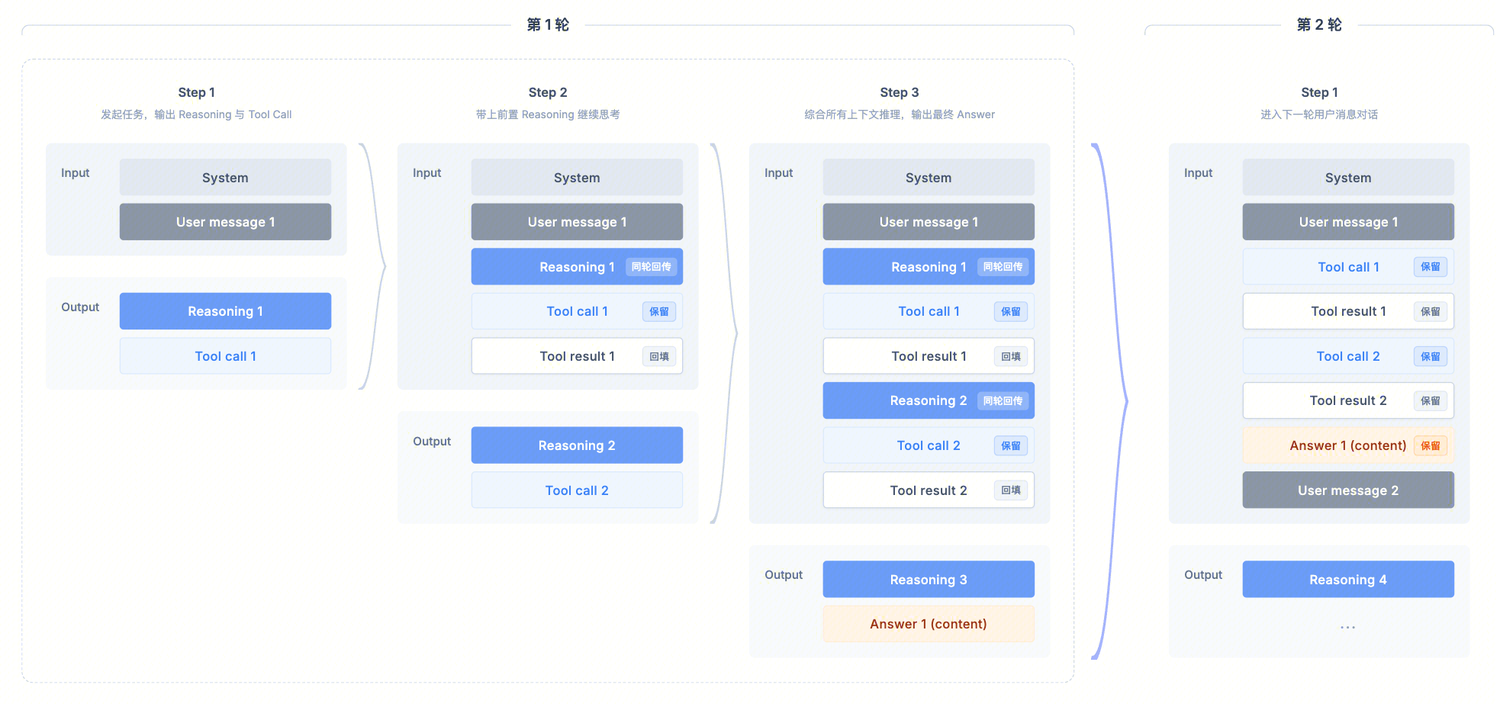
此场景下的调用模式如下图所示:
API 示例
请求侧主要字段(常用)
model:模型名称,例如 hy3-preview。messages:消息数组,支持 system/user/assistant/tool 等角色。reasoning_effort:控制模型的思考深度与推理开销(high/low),如您追求最佳效果,请务必设置为 high。tool_choice:工具选择策略,当前仅支持 auto。tools:传入工具定义列表。stream:是否流式(true/false)。响应侧主要字段(常用)
reasoning_content:推理内容,用于继续交错思考,延续模型的思维链,在慢思考结合工具调用的场景下,开发者需要在下次调用 API 时回填此内容。content:最终回答内容。tool_calls:模型输出的工具调用指令。开发者调用流程
建议严格遵循此开发者调用流程:
step1:发起首次请求(仅包含 system/user 等内容)。
step2:API 输出 assistant 消息,其中可能包含:
tool_callsreasoning_contentstep3:业务方执行工具。
step4:将工具结果以 role=
tool 回填,并将同一轮内的 reasoning_content 也回传到 API,使模型可以根据这些信息继续思考推理。step5:在 step4 的基础上,模型可能继续发起新的 tool call 或输出最终用户答案;若模型发起新的 tool call,则继续重复步骤 3~5,直到模型输出最终用户答案。
注意:
step2 中输出的推理内容(
reasoning_content)用于交错思考的必要信息,在多步调用时,必须回填给模型进行推理,否则将影响效果。调用示例(慢思考 + 工具调用)
本示例仅用于说明完整流程与字段回传逻辑;实际使用时,请根据业务部署环境和业务字段调整具体值(此案例仅用于理解流程,不代表模型能力边界)。
1. 首次请求(用户提问)
说明:
请求:
curl -X POST 'https://tokenhub.tencentmaas.com/v1/chat/completions' \\-H 'Content-Type: application/json' \\-H 'Authorization: Bearer YOUR_API_KEY' \\-d '{"model": "hy3-preview","messages": [{ "role": "system", "content": "你是一个 Agent,必须按步骤推理并调用工具完成任务。" },{ "role": "user", "content": "深圳今天天气怎么样?" }],"stream": false,"tool_choice": "auto","reasoning_effort": "high","tools": [{"type": "function","function": {"name": "get_weather","description": "获取某地天气信息,输入 location。","parameters": {"type": "object","properties": { "location": { "type": "string" } },"required": ["location"]}}}]}'
from openai import OpenAIclient = OpenAI(api_key="YOUR_API_KEY",base_url="https://tokenhub.tencentmaas.com/v1",)tools = [{"type": "function","function": {"name": "get_weather","description": "获取某地天气信息,输入 location。","parameters": {"type": "object","properties": {"location": {"type": "string"}},"required": ["location"],},},}]messages = [{"role": "system", "content": "你是一个 Agent,必须按步骤推理并调用工具完成任务。"},{"role": "user", "content": "深圳今天天气怎么样?"},]# OpenAI Python SDK 类型签名严格,非标字段(如 reasoning_effort)需通过 extra_body 透传resp1 = client.chat.completions.create(model="hy3-preview",messages=messages,tools=tools,tool_choice="auto",extra_body={"reasoning_effort": "high"},)msg1 = resp1.choices[0].messageprint("第 1 轮 assistant.reasoning_content:", getattr(msg1, "reasoning_content", ""))print("第 1 轮 tool_calls:", msg1.tool_calls)
import OpenAI from 'openai';const client = new OpenAI({apiKey: 'YOUR_API_KEY',baseURL: 'https://tokenhub.tencentmaas.com/v1',});const tools = [{type: 'function',function: {name: 'get_weather',description: '获取某地天气信息,输入 location。',parameters: {type: 'object',properties: { location: { type: 'string' } },required: ['location'],},},}];const messages = [{ role: 'system', content: '你是一个 Agent,必须按步骤推理并调用工具完成任务。' },{ role: 'user', content: '深圳今天天气怎么样?' },];const resp1 = await client.chat.completions.create({model: 'hy3-preview',messages,tools,tool_choice: 'auto',reasoning_effort: 'high',});const msg1 = resp1.choices[0].message;console.log('第 1 轮 reasoning_content:', msg1.reasoning_content);console.log('第 1 轮 tool_calls:', msg1.tool_calls);
import okhttp3.*;import com.google.gson.*;import java.util.*;public class InterleavedThinking {static final String URL = "https://tokenhub.tencentmaas.com/v1/chat/completions";static final String API_KEY = "YOUR_API_KEY";static final OkHttpClient HTTP = new OkHttpClient();static final Gson GSON = new Gson();/** 通用 chat 调用,返回原始 JSON 响应字符串。 */static String chat(List<Map<String, Object>> messages, List<Map<String, Object>> tools) throws Exception {Map<String, Object> body = new HashMap<>();body.put("model", "hy3-preview");body.put("messages", messages);body.put("tools", tools);body.put("tool_choice", "auto");body.put("reasoning_effort", "high");body.put("stream", false);Request req = new Request.Builder().url(URL).header("Authorization", "Bearer " + API_KEY).post(RequestBody.create(GSON.toJson(body), MediaType.parse("application/json"))).build();try (Response resp = HTTP.newCall(req).execute()) {return resp.body().string();}}public static void main(String[] args) throws Exception {List<Map<String, Object>> tools = List.of(Map.of("type", "function","function", Map.of("name", "get_weather","description", "获取某地天气信息,输入 location。","parameters", Map.of("type", "object","properties", Map.of("location", Map.of("type", "string")),"required", List.of("location")))));List<Map<String, Object>> messages = new ArrayList<>();messages.add(Map.of("role", "system", "content", "你是一个 Agent,必须按步骤推理并调用工具完成任务。"));messages.add(Map.of("role", "user", "content", "深圳今天天气怎么样?"));// 第 1 轮:模型决定是否调用工具String r1 = chat(messages, tools);System.out.println("第 1 轮响应:" + r1);// 接下来按响应里的 reasoning_content / tool_calls 回填到 messages,参见第 2 步}}
package mainimport ("bytes""encoding/json""fmt""io""net/http")const (URL = "https://tokenhub.tencentmaas.com/v1/chat/completions"APIKEY = "YOUR_API_KEY")// 通用 chat 调用func chat(messages []map[string]interface{}, tools []map[string]interface{}) (map[string]interface{}, error) {body, _ := json.Marshal(map[string]interface{}{"model": "hy3-preview","messages": messages,"tools": tools,"tool_choice": "auto","reasoning_effort": "high","stream": false,})req, _ := http.NewRequest("POST", URL, bytes.NewBuffer(body))req.Header.Set("Authorization", "Bearer "+APIKEY)req.Header.Set("Content-Type", "application/json")resp, err := http.DefaultClient.Do(req)if err != nil {return nil, err}defer resp.Body.Close()data, _ := io.ReadAll(resp.Body)var out map[string]interface{}json.Unmarshal(data, &out)return out, nil}func main() {tools := []map[string]interface{}{{"type": "function","function": map[string]interface{}{"name": "get_weather","description": "获取某地天气信息,输入 location。","parameters": map[string]interface{}{"type": "object","properties": map[string]interface{}{"location": map[string]string{"type": "string"},},"required": []string{"location"},},},}}messages := []map[string]interface{}{{"role": "system", "content": "你是一个 Agent,必须按步骤推理并调用工具完成任务。"},{"role": "user", "content": "深圳今天天气怎么样?"},}// 第 1 轮:模型决定是否调用工具r1, _ := chat(messages, tools)fmt.Printf("第 1 轮响应: %+v\\n", r1)// 接下来按响应里的 reasoning_content / tool_calls 回填到 messages,参见第 2 步}
响应:
{"id": "31be91fe574e41e49616352366b4fa1b","object": "chat.completion","created": 1776057110,"model": "hy3-preview","choices": [{"index": 0,"message": {"role": "assistant","content": "我来帮你查询深圳今天的天气情况。","reasoning_content": "用户问的是\\"深圳今天天气怎么样?\\",这是一个简单的天气查询请求。我需要使用get_weather函数来获取深圳的天气信息。根据函数描述,这个函数需要一个location参数,用户已经明确提供了\\"深圳\\"作为地点。所以,我应该直接调用get_weather函数,参数location设为\\"深圳\\"。不需要额外的推理步骤,因为用户的问题很直接。现在,我准备调用函数。","tool_calls": [{"id": "chatcmpl-tool-b39c6375f812783a","type": "function","function": {"name": "get_weather","arguments": "{\\"location\\": \\"深圳\\"}"}}]},"finish_reason": "tool_calls"}],"usage": {"prompt_tokens": 209,"completion_tokens": 111,"total_tokens": 320}}
2. 回填工具结果(在同一轮中延续思维链)
假设工具执行返回的结果为:
Cloudy,气温 7~13°C。您需要在请求中,回填工具执行结果,同时保留首次请求中响应体里获取的 reasoning_content。请求:
curl -X POST 'https://tokenhub.tencentmaas.com/v1/chat/completions' \\-H 'Content-Type: application/json' \\-H 'Authorization: Bearer YOUR_API_KEY' \\-d '{"model": "hy3-preview","messages": [{ "role": "system", "content": "你是一个 Agent,必须按步骤推理并调用工具完成任务。" },{ "role": "user", "content": "深圳今天天气怎么样?" },{"role": "assistant","content": "我来帮你查询深圳今天的天气情况。","reasoning_content": "用户问的是\\"深圳今天天气怎么样?\\"...","tool_calls": [{"id": "chatcmpl-tool-b39c6375f812783a","type": "function","function": {"name": "get_weather","arguments": "{\\"location\\": \\"深圳\\"}"}}]},{"role": "tool","tool_call_id": "chatcmpl-tool-b39c6375f812783a","content": "Cloudy,气温 7~13°C"}],"stream": false,"tool_choice": "auto","reasoning_effort": "high","tools": [{"type": "function","function": {"name": "get_weather","description": "获取某地天气信息,输入 location。","parameters": {"type": "object","properties": { "location": { "type": "string" } },"required": ["location"]}}}]}'
# 接续上一步:把第 1 轮的 assistant 消息(含 reasoning_content + tool_calls)# 与工具结果一起回填到 messagesimport json# 第 1 轮 assistant 消息的回写:reasoning_content 必须保留assistant_msg = {"role": "assistant","content": msg1.content,"reasoning_content": getattr(msg1, "reasoning_content", ""),"tool_calls": [{"id": tc.id,"type": tc.type,"function": {"name": tc.function.name,"arguments": tc.function.arguments,},} for tc in (msg1.tool_calls or [])],}messages.append(assistant_msg)# 业务侧执行工具,把结果以 role=tool 回填for tc in (msg1.tool_calls or []):args = json.loads(tc.function.arguments)# 这里替换为真实业务逻辑tool_result = "Cloudy,气温 7~13°C"messages.append({"role": "tool","tool_call_id": tc.id,"content": tool_result,})# 第 2 轮:把工具结果送回模型,模型继续思考并输出最终回答resp2 = client.chat.completions.create(model="hy3-preview",messages=messages,tools=tools,tool_choice="auto",extra_body={"reasoning_effort": "high"},)print("最终回答:", resp2.choices[0].message.content)
// 接续上一步:把第 1 轮的 assistant 消息(含 reasoning_content + tool_calls)// 与工具结果一起回填到 messagesconst assistantMsg = {role: 'assistant',content: msg1.content,reasoning_content: msg1.reasoning_content,tool_calls: msg1.tool_calls,};messages.push(assistantMsg);for (const tc of msg1.tool_calls || []) {const args = JSON.parse(tc.function.arguments);// 这里替换为真实业务逻辑const toolResult = 'Cloudy,气温 7~13°C';messages.push({role: 'tool',tool_call_id: tc.id,content: toolResult,});}const resp2 = await client.chat.completions.create({model: 'hy3-preview',messages,tools,tool_choice: 'auto',reasoning_effort: 'high',});console.log('最终回答:', resp2.choices[0].message.content);
// 接续 main():把第 1 轮 assistant 消息和工具结果回填,再发起第 2 轮请求// 完整流程示意(仅展示消息构造,HTTP 调用复用上一步的 chat() 函数)// 1. 解析第 1 轮响应JsonObject r1Obj = JsonParser.parseString(r1).getAsJsonObject();JsonObject msg1 = r1Obj.getAsJsonArray("choices").get(0).getAsJsonObject().getAsJsonObject("message");// 2. 把 assistant 消息(含 reasoning_content)整体回写到 messagesMap<String, Object> assistantEntry = new LinkedHashMap<>();assistantEntry.put("role", "assistant");assistantEntry.put("content", msg1.has("content") ? msg1.get("content").getAsString() : "");if (msg1.has("reasoning_content")) {assistantEntry.put("reasoning_content", msg1.get("reasoning_content").getAsString());}if (msg1.has("tool_calls")) {assistantEntry.put("tool_calls", GSON.fromJson(msg1.get("tool_calls"), List.class));}messages.add(assistantEntry);// 3. 业务侧执行工具,把工具结果以 role=tool 回填for (JsonElement el : msg1.getAsJsonArray("tool_calls")) {JsonObject call = el.getAsJsonObject();String toolResult = "Cloudy,气温 7~13°C"; // 这里替换为真实业务逻辑messages.add(Map.of("role", "tool","tool_call_id", call.get("id").getAsString(),"content", toolResult));}// 4. 第 2 轮:把工具结果送回模型String r2 = chat(messages, tools);System.out.println("第 2 轮响应:" + r2);
// 接续 main():把第 1 轮 assistant 消息和工具结果回填,再发起第 2 轮请求// 完整流程示意(仅展示消息构造,HTTP 调用复用上一步的 chat() 函数)// 1. 从第 1 轮响应中取出 assistant 消息msg1Wrap := r1["choices"].([]interface{})[0].(map[string]interface{})msg1 := msg1Wrap["message"].(map[string]interface{})// 2. 把 assistant 消息(含 reasoning_content)整体回写到 messagesmessages = append(messages, msg1)// 3. 业务侧执行工具,把工具结果以 role=tool 回填toolCalls, _ := msg1["tool_calls"].([]interface{})for _, c := range toolCalls {call := c.(map[string]interface{})toolResult := "Cloudy,气温 7~13°C" // 这里替换为真实业务逻辑messages = append(messages, map[string]interface{}{"role": "tool","tool_call_id": call["id"],"content": toolResult,})}// 4. 第 2 轮:把工具结果送回模型r2, _ := chat(messages, tools)fmt.Printf("第 2 轮响应: %+v\\n", r2)
响应:
之后,模型会根据实际推理结果继续输出(可能继续 tool_calls,也可能输出最终答案),在获得最终答案前,每次调用都需遵循上述流程,通过“保留 reasoning_content + 回填 tool 输出”以维持大模型的思维链。
{"id": "ae8941415e154a3c9749f0cf897469a4","object": "chat.completion","created": 1776057913,"model": "hy3-preview","choices": [{"index": 0,"message": {"role": "assistant","content": "根据查询结果,深圳今天的天气是**多云**,气温在 **7°C 到 13°C** 之间。今天天气比较凉爽,建议适当增添衣物,注意保暖哦!🧥","reasoning_content": "用户询问深圳今天的天气,我已经调用了get_weather工具获取了深圳的天气信息。结果显示是\\"Cloudy,气温 7~13°C\\"。\\n\\n现在我需要用中文回复用户,告诉他深圳今天的天气情况。天气是多云(Cloudy),气温在7到13摄氏度之间。\\n\\n我应该简洁明了地回复用户。"},"finish_reason": "stop"}],"usage": {"prompt_tokens": 340,"completion_tokens": 114,"total_tokens": 454}}


