RoomParticipantStore 是 AtomicXCore 中专用于房间参与者管理的模块。该模块为多人房间场景提供了核心能力,支持构建完整的成员管理体系。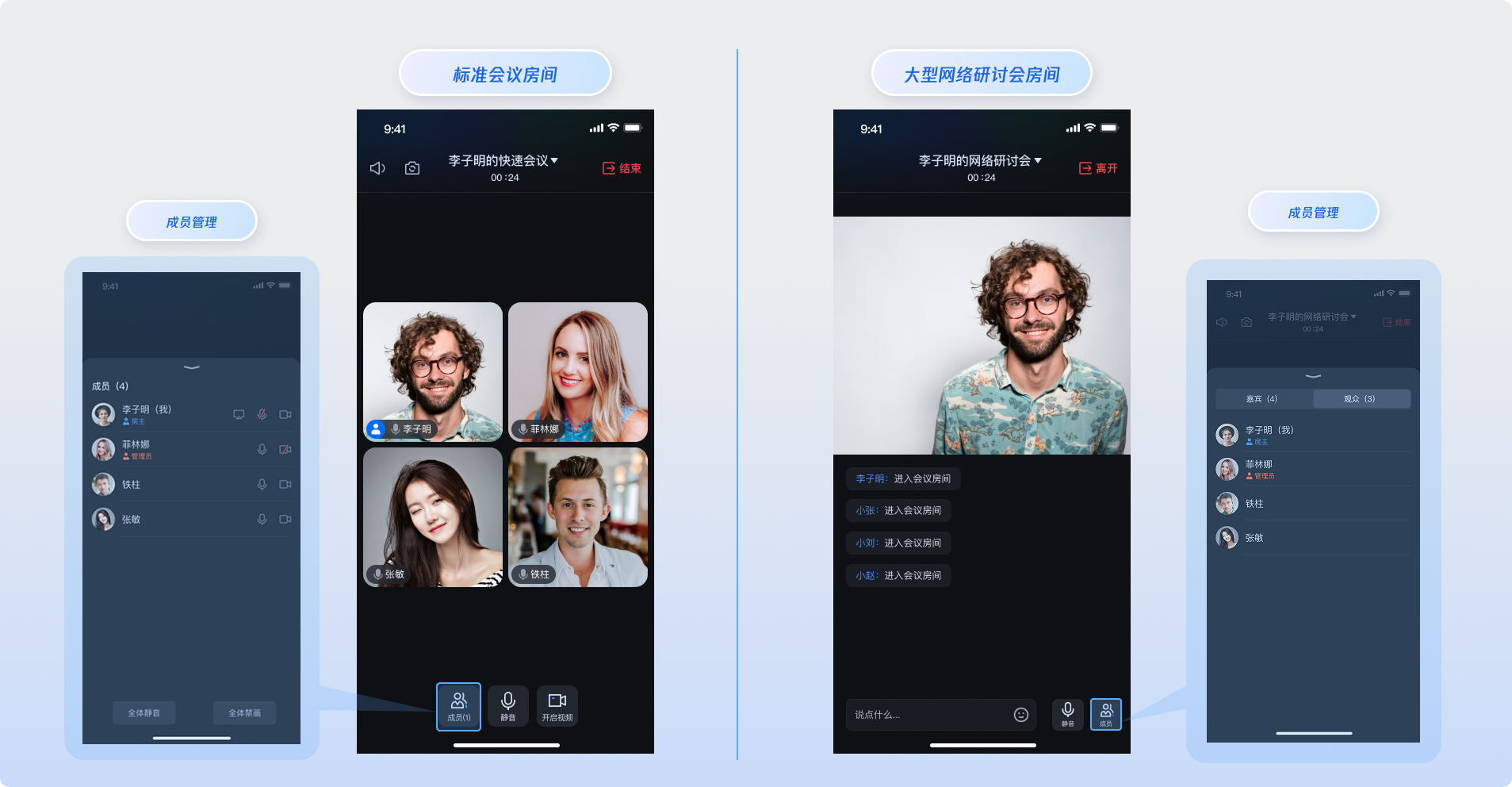
房间模式说明
在开始使用成员管理功能之前,需要了解
AtomicXCore 中房间模块支持的两种房间模式,不同模式下的成员管理功能有所区别:标准房间模式(Standard Room) | 网络研讨会房间模式(Webinar Room) |
适用场景:小型会议、团队协作、朋友聊天等。 成员特点:所有成员都是参与者,可以自由开启/关闭音视频设备。 管理特点:扁平化管理,房主可设置管理员进行协助管理。 | 适用场景:网络研讨会、在线培训等。 成员特点: 嘉宾(Participants):可以开启音视频设备,参与互动。 观众(Audience):只能观看,无法开启音视频设备。 管理特点:分层管理,支持观众与嘉宾身份转换。 |
核心功能
获取参与者列表:获取并展示当前房间内所有参与者信息。
获取观众列表:获取网络研讨会房间模式下的观众列表信息。
搜索房间内成员:搜索所在房间内的指定用户。
将观众提升为参与者:网络研讨会房间模式下,可以将观众提升为参与者,提升为参与者的用户可以开启麦克风与其他房间内的参与者互动。
将参与者降级为观众:网络研讨会房间模式下,可以将参与者降级为观众, 降级为观众的用户无法与房间内的参与者进行语音互动。
转移房主身份:房主可以将房主身份转移给房间内任意一名参与者。
设置/撤销管理员:房主可以设置参与者为管理员,同时也可撤销房间内的管理员。
将参与者移出房间:房主或者管理员可以将房间内任意一名参与者移出房间。
更新参与者信息:房间内所有人都可以更新自己的参与者信息。
音视频设备管理:支持申请/邀请打开摄像头、麦克风,关闭远端摄像头、麦克风,以及房主和管理员设置全体静音,全体禁用摄像头功能。
功能对比
功能 | 标准房间模式 | 网络研讨会房间模式 |
获取参与者列表 | 获取所有房间成员 | 获取嘉宾列表 |
获取观众列表 | 不适用 | 获取观众列表 |
搜索房间内成员 | 支持 | 支持 |
将观众提升为嘉宾 | 不适用 | 支持 |
将嘉宾降级为观众 | 不适用 | 支持 |
转移房主身份 | 支持 | 支持 |
设置/撤销管理员 | 支持 | 支持 |
移出房间 | 支持 | 支持 |
更新参与者信息 | 支持 | 支持 |
音视频设备管理 | 支持 | 支持 |
核心概念
在开始集成之前,需要通过下表了解
RoomParticipantStore 相关的核心概念:核心概念 | 核心职责与描述 |
代表参与者的核心数据模型,封装了参与者的完整信息和状态管理能力。 核心功能包括: 参与者基本信息管理(用户 ID、用户名称、用户头像、房间内角色身份)。 参与者设备状态管理(麦克风状态,摄像头状态,屏幕分享状态,消息状态)。 | |
代表参与者状态管理的核心数据结构,负责维护房间内与参与者相关状态信息。 核心属性: participantList 存储了当前所在房间的所有参与者信息集合。participantListCursor 代表房间内参与者列表的分页快照。localParticipant代表自身所在房间内的参与者信息。 | |
代表房间内和参与者相关的实时事件。主要事件分为三大类:参与者进退房事件、 参与者身份改变事件,参与者设备控制事件。 | |
这是参与者控制相关的核心类。功能包含:控制房间内参与者音视频状态、执行参与者管理操作,并通过 addRoomParticipantListener 方法来接收实时事件。 |
实现步骤
步骤1:组件集成
步骤2:获取参与者列表
在加入房间后,调用
RoomParticipantStore的getParticipantList接口获取到房间内参与者列表。import 'package:atomic_x_core/atomicxcore.dart';Future<void> getParticipantList() async {// 1. 业务逻辑说明// 前提:需要先完成进房操作,通过进房的roomID创建RoomParticipantStore实例final participantStore = RoomParticipantStore.create("your_room_id");// 2. 首次获取参与者列表(从头开始)// 支持分页加载,可以通过 cursor 参数实现增量获取final String? initialCursor = null; // null 表示从第一页开始获取final result = await participantStore.getParticipantList(initialCursor);if (result.isSuccess) {print("成功获取参与者列表,数量: ${result.data?.length ?? 0}");} else {print("获取参与者列表失败 [错误码: ${result.errorCode}]: ${result.errorMessage}");}}
步骤3:获取观众列表
在进入的房间类型为
webinar类型时,可以通过调用RoomParticipantStore的getAudienceList接口获取房间内的观众列表。import 'package:atomic_x_core/atomicxcore.dart';Future<void> getAudienceList() async {// 前提:需要先完成进房操作,并且进房时 roomType 设置为 webinar 类型// 通过进房的 roomID 创建 RoomParticipantStore 实例final participantStore = RoomParticipantStore.create("your_room_id");// 首次获取观众列表(从头开始)// 支持分页加载,可以通过 cursor 参数实现增量获取final String? initialCursor = null; // null 表示从第一页开始获取final result = await participantStore.getAudienceList(initialCursor);if (result.isSuccess) {print("获取观众列表成功,观众数量: ${result.data?.length ?? 0}");} else {print("获取观众列表失败 [错误码: ${result.errorCode}]: ${result.errorMessage}");}}
步骤4:搜索房间内成员
进入房间成功后,可以通过调用
RoomParticipantStore的searchUsers接口搜索房间内的成员。import 'package:atomic_x_core/atomicxcore.dart';Future<void> searchUsers() async {// 前提:需要先完成进房操作// 通过进房的 roomID 创建 RoomParticipantStore 实例final participantStore = RoomParticipantStore.create("your_room_id");// 通过用户名称为关键字搜索房间内成员final keyword = "userName";final result = await participantStore.searchUsers(keyword);if (result.isSuccess) {print("搜索房间成员成功,成员数量: ${result.data?.length ?? 0}");} else {print("搜索房间成员失败 [错误码: ${result.errorCode}]: ${result.errorMessage}");}}
步骤5:将观众提升为参与者
作为房主或管理员,调用
RoomParticipantStore的promoteAudienceToParticipant接口可以将房间内的观众提升成为参与者。import 'package:atomic_x_core/atomicxcore.dart';Future<void> promoteAudienceToParticipant(String userID) async {// 前提:需要先完成进房操作// 通过进房的 roomID 创建 RoomParticipantStore 实例final participantStore = RoomParticipantStore.create("your_room_id");// 调用 RoomParticipantStore 提升观众为参与者接口// 注意:只有房主或管理员才有权限执行此操作final result = await participantStore.promoteAudienceToParticipant(userID);if (result.isSuccess) {print("提升为参与者成功");} else {print("提升为参与者失败 [错误码: ${result.errorCode}]: ${result.errorMessage}");}}
作为房间内成员订阅
RoomParticipantStore的RoomParticipantListener中的onAudiencePromotedToParticipant事件,被动接收观众提升为参与者的变化通知。import 'package:atomic_x_core/atomicxcore.dart';late RoomParticipantListener _listener;void addParticipantListener() {// 前提:需要先完成进房操作,通过进房的 roomID 创建 RoomParticipantStore 实例final participantStore = RoomParticipantStore.create("your_room_id");// 订阅参与者事件_listener = RoomParticipantListener(onAudiencePromotedToParticipant: (userInfo) {print("观众被提升为参与者,userID: ${userInfo.userID}, userName: ${userInfo.userName}");},);participantStore.addRoomParticipantListener(_listener);}void removeParticipantListener() {final participantStore = RoomParticipantStore.create("your_room_id");participantStore.removeRoomParticipantListener(_listener);}
步骤6:将参与者降级为观众
作为房主或管理员,调用
RoomParticipantStore的demoteParticipantToAudience接口可以将房间内的参与者降级成为观众。import 'package:atomic_x_core/atomicxcore.dart';Future<void> demoteParticipantToAudience(String userID) async {// 前提:需要先完成进房操作// 通过进房的 roomID 创建 RoomParticipantStore 实例final participantStore = RoomParticipantStore.create("your_room_id");// 调用 RoomParticipantStore 降级参与者为观众接口// 注意:只有房主或管理员才有权限执行此操作final result = await participantStore.demoteParticipantToAudience(userID);if (result.isSuccess) {print("降级为观众成功");} else {print("降级为观众失败 [错误码: ${result.errorCode}]: ${result.errorMessage}");}}
作为房间内成员订阅
RoomParticipantStore的RoomParticipantListener中的onParticipantDemotedToAudience事件,被动接收参与者降级为观众的变化通知。import 'package:atomic_x_core/atomicxcore.dart';late RoomParticipantListener _listener;void addParticipantListener() {// 前提:需要先完成进房操作,通过进房的 roomID 创建 RoomParticipantStore 实例final participantStore = RoomParticipantStore.create("your_room_id");// 订阅参与者事件_listener = RoomParticipantListener(onParticipantDemotedToAudience: (userInfo) {print("参与者被降级为观众,userID: ${userInfo.userID}, userName: ${userInfo.userName}");},);participantStore.addRoomParticipantListener(_listener);}void removeParticipantListener() {final participantStore = RoomParticipantStore.create("your_room_id");participantStore.removeRoomParticipantListener(_listener);}
步骤7:房主转移
作为房主:调用
RoomParticipantStore的transferOwner接口可以将房主身份直接转移给房间内任意一位参与者,转移后原房主身份将变为普通参与者,一个房间内有且仅有一名房主。import 'package:atomic_x_core/atomicxcore.dart';Future<void> transferOwner(String userID) async {// 1. 业务逻辑说明// 前提:需要先完成进房操作,通过进房的roomID创建RoomParticipantStore实例final participantStore = RoomParticipantStore.create("your_room_id");// 2. 调用 RoomParticipantStore 转移房主接口// 注意:只有当前房主才有权限执行此操作,转移后原房主将变为普通用户final result = await participantStore.transferOwner(userID);if (result.isSuccess) {print("房主权限转移成功,新房主: $userID");} else {print("转移房主权限失败 [错误码: ${result.errorCode}]: ${result.errorMessage}");}}
作为参与者:监听
RoomParticipantListener中的onOwnerChanged事件,被动接收房主变化通知。import 'package:atomic_x_core/atomicxcore.dart';late RoomParticipantListener _participantListener;void subscribeParticipantEvent() {// 1. 业务逻辑说明// 前提:需要先完成进房操作,通过进房的roomID创建RoomParticipantStore实例final participantStore = RoomParticipantStore.create("your_room_id");// 2. 创建参与者事件监听器// RoomParticipantListener 用于接收所有参与者相关的事件_participantListener = RoomParticipantListener(onOwnerChanged: (RoomUser newOwner, RoomUser oldOwner) {print("房主变更通知,newOwner: ${newOwner.userName}, oldOwner: ${oldOwner.userName}");},);// 3. 添加监听器participantStore.addRoomParticipantListener(_participantListener);}void unsubscribeParticipantEvent() {// 4. 移除监听器,避免内存泄漏final participantStore = RoomParticipantStore.create("your_room_id");participantStore.removeRoomParticipantListener(_participantListener);}
步骤8:设置/撤销管理员
作为房主:调用
RoomParticipantStore的setAdmin接口指定房间内任意成员成为管理员,也可以调用revokeAdmin接口将管理员身份撤销。import 'package:atomic_x_core/atomicxcore.dart';// 业务逻辑说明// 前提:需要先完成进房操作,通过进房的roomID创建RoomParticipantStore实例final participantStore = RoomParticipantStore.create("your_room_id");/// 设置用户为管理员Future<void> setUserAsAdmin(String userID) async {final result = await participantStore.setAdmin(userID);if (result.isSuccess) {print("成功设置用户 $userID 为管理员");} else {print("设置管理员失败 [错误码: ${result.errorCode}]: ${result.errorMessage}");}}/// 撤销用户的管理员权限Future<void> revokeUserAdmin(String userID) async {final result = await participantStore.revokeAdmin(userID);if (result.isSuccess) {print("成功撤销用户 $userID 的管理员权限");} else {print("撤销管理员失败 [错误码: ${result.errorCode}]: ${result.errorMessage}");}}
作为参与者:监听
RoomParticipantListener中的onAdminSet和onAdminRevoked事件,被动接收参与者身份变化通知。import 'package:atomic_x_core/atomicxcore.dart';// 业务逻辑说明// 前提:需要先完成进房操作,通过进房的roomID创建RoomParticipantStore实例final participantStore = RoomParticipantStore.create("your_room_id");late RoomParticipantListener _participantListener;/// 订阅参与者相关事件void subscribeParticipantEvents() {_participantListener = RoomParticipantListener(onAdminSet: (RoomUser userInfo) {print("设置管理员事件通知,userInfo: ${userInfo.userName}");},onAdminRevoked: (RoomUser userInfo) {print("撤销管理员事件通知,userInfo: ${userInfo.userName}");},);participantStore.addRoomParticipantListener(_participantListener);}/// 取消订阅参与者相关事件void unsubscribeParticipantEvents() {participantStore.removeRoomParticipantListener(_participantListener);}
步骤9:将参与者移出房间
作为房主和管理员:调用
RoomParticipantStore的 kickUser 可以将房间内参与者移出房间。import 'package:atomic_x_core/atomicxcore.dart';// 业务逻辑说明// 前提:需要先完成进房操作,通过进房的roomID创建RoomParticipantStore实例final participantStore = RoomParticipantStore.create("your_room_id");Future<void> kickUser(String userID) async {// 1. 业务逻辑说明// kickUser 接口用于将指定用户移出房间// 注意:只有房主或管理员才有权限执行此操作// 被移出的用户将立即离开房间,并收到相应的通知// 2. 调用 RoomParticipantStore 移出用户接口final result = await participantStore.kickUser(userID);if (result.isSuccess) {print("用户移出成功,被移出用户: $userID");} else {print("移出用户失败 [错误码: ${result.errorCode}]: ${result.errorMessage}");}}
作为参与者:监听
RoomParticipantListener中的onKickedFromRoom事件,被动接收参与者被移出房间通知。import 'package:atomic_x_core/atomicxcore.dart';// 业务逻辑说明// 前提:需要先完成进房操作,通过进房的roomID创建RoomParticipantStore实例final participantStore = RoomParticipantStore.create("your_room_id");late RoomParticipantListener _participantListener;/// 订阅参与者相关事件void subscribeParticipantEvent() {_participantListener = RoomParticipantListener(onKickedFromRoom: (KickedOutOfRoomReason reason, String message) {print("已被移出房间,被移出原因:$reason, 额外信息:$message");},);participantStore.addRoomParticipantListener(_participantListener);}/// 取消订阅参与者相关事件void unsubscribeParticipantEvent() {participantStore.removeRoomParticipantListener(_participantListener);}
步骤10:更新参与者信息
在加入房间后,调用
RoomParticipantStore的updateParticipantNameCard、updateParticipantMetaData更新您在房间里的参与者信息,包含:参与者名片信息,参与者自定义信息。import 'package:atomic_x_core/atomicxcore.dart';// 业务逻辑说明// 前提:需要先完成进房操作,通过进房的roomID创建RoomParticipantStore实例final participantStore = RoomParticipantStore.create("your_room_id");Future<void> updateParticipantNameCard(String userID, String nameCard) async {// 1. 业务逻辑说明// updateParticipantNameCard 接口用于更新指定参与者的名片信息// 名片通常用于显示用户的自定义昵称或标识// 注意:通常只有管理员或用户本人才能修改名片// 2. 调用 RoomParticipantStore 更新名片接口final result = await participantStore.updateParticipantNameCard(userID: userID,nameCard: nameCard,);if (result.isSuccess) {print("名片更新成功,用户: $userID, 新名片: $nameCard");} else {print("名片更新失败 [错误码: ${result.errorCode}]: ${result.errorMessage}");}}Future<void> updateParticipantMetaData(String userID, Map<String, String> metaData) async {// 1. 业务逻辑说明// updateParticipantMetaData 接口用于更新指定参与者的自定义信息// 存储自定义的业务数据,如用户标签、扩展属性等// 注意:自定义信息的键值对数量和大小有限制,键长度不能超过 50 字节,值长度不超过 200 字节// 2. 调用 RoomParticipantStore 更新自定义信息接口final result = await participantStore.updateParticipantMetaData(userID: userID,metaData: metaData,);if (result.isSuccess) {print("自定义信息数据更新成功,用户: $userID, 键数量: ${metaData.length}");} else {print("自定义信息更新失败 [错误码: ${result.errorCode}]: ${result.errorMessage}");}}
步骤11:邀请打开设备
作为房主和管理员:调用
RoomParticipantStore的inviteToOpenDevice接口,邀请房间内参与者打开摄像头,麦克风。import 'package:atomic_x_core/atomicxcore.dart';// 业务逻辑说明// 前提:需要先完成进房操作,通过进房的roomID创建RoomParticipantStore实例final participantStore = RoomParticipantStore.create("your_room_id");Future<void> inviteUserToOpenDevice(String userID, DeviceType device, {int timeout = 30}) async {// 1. 业务逻辑说明// inviteToOpenDevice 接口用于邀请指定用户开启某个设备// 通常用于管理员邀请参与者开启麦克风、摄像头或屏幕共享// 被邀请的用户会收到邀请通知,可以选择接受或拒绝// 2. 调用 RoomParticipantStore 邀请开启设备接口final result = await participantStore.inviteToOpenDevice(userID: userID,device: device,timeout: timeout,);if (result.isSuccess) {print("设备邀请发送成功,用户: $userID, 设备: $device");} else {print("设备邀请发送失败 [错误码: ${result.errorCode}]: ${result.errorMessage}");}}
作为参与者:
监听
RoomParticipantListener中的onDeviceInvitationReceived事件,被动接收邀请打开设备通知。接收到邀请打开设备通知后调用
RoomParticipantStore的acceptOpenDeviceInvitation或者declineOpenDeviceInvitation接口接受或拒绝邀请。import 'package:atomic_x_core/atomicxcore.dart';// 业务逻辑说明// 前提:需要先完成进房操作,通过进房的roomID创建RoomParticipantStore实例final participantStore = RoomParticipantStore.create("your_room_id");late RoomParticipantListener _participantListener;/// 订阅参与者相关事件void subscribeDeviceInvitationEvent() {_participantListener = RoomParticipantListener(onDeviceInvitationReceived: (invitation) {print("收到设备邀请 - 设备: ${invitation.device}, 发送者: ${invitation.senderUserName}");// 处理接受、拒绝设备邀请},);participantStore.addRoomParticipantListener(_participantListener);}/// 取消订阅(在不需要时调用)void unsubscribeDeviceInvitationEvent() {participantStore.removeRoomParticipantListener(_participantListener);}Future<void> acceptOpenDeviceInvitation(String userID, DeviceType device) async {// 处理接受邀请final result = await participantStore.acceptOpenDeviceInvitation(userID: userID,device: device,);if (result.isSuccess) {print("接受设备邀请成功 - 设备: $device");} else {print("接受设备邀请失败 [错误码: ${result.errorCode}]: ${result.errorMessage}");}}Future<void> declineOpenDeviceInvitation(String userID, DeviceType device) async {// 处理拒绝邀请final result = await participantStore.declineOpenDeviceInvitation(userID: userID,device: device,);if (result.isSuccess) {print("拒绝设备邀请成功 - 设备: $device");} else {print("拒绝设备邀请失败 [错误码: ${result.errorCode}]: ${result.errorMessage}");}}
步骤12:关闭远端参与者设备
作为房主和管理员:调用
RoomParticipantStore的closeParticipantDevice可以主动关闭远端参与者的摄像头,麦克风。import 'package:atomic_x_core/atomicxcore.dart';// 业务逻辑说明// 前提:需要先完成进房操作,通过进房的roomID创建RoomParticipantStore实例final participantStore = RoomParticipantStore.create("your_room_id");Future<void> closeParticipantDevice(String userID, DeviceType device) async {// 1. 业务逻辑说明// closeParticipantDevice 接口用于房主或管理员关闭指定参与者的某个设备// 被关闭的用户会收到设备被关闭通知// 2. 调用 RoomParticipantStore 关闭参与者设备接口final result = await participantStore.closeParticipantDevice(userID: userID,device: device,);if (result.isSuccess) {print("关闭参与者设备成功 - 用户: $userID, 设备: $device");} else {print("关闭参与者设备失败: [错误码: ${result.errorCode}]: ${result.errorMessage}");}}
作为参与者:监听
RoomParticipantListener中的onParticipantDeviceClosed事件,被动接收设备被关闭通知,并在 UI 上做出提示。import 'package:atomic_x_core/atomicxcore.dart';// 业务逻辑说明// 前提:需要先完成进房操作,通过进房的roomID创建RoomParticipantStore实例final participantStore = RoomParticipantStore.create("your_room_id");late RoomParticipantListener _participantListener;/// 订阅参与者相关事件void subscribeDeviceClosedEvent() {_participantListener = RoomParticipantListener(onParticipantDeviceClosed: (device, operatorUser) {print("设备被关闭 - 设备: $device, 操作者: ${operatorUser.userName}");},);participantStore.addRoomParticipantListener(_participantListener);}/// 取消订阅(在不需要时调用)void unsubscribeDeviceClosedEvent() {participantStore.removeRoomParticipantListener(_participantListener);}
步骤13:申请打开设备
作为参与者:调用
RoomParticipantStore的requestToOpenDevice接口,可以在房间被房主或管理员设置全体静音,全体禁画的场景下,主动申请打开摄像头,麦克风。import 'package:atomic_x_core/atomicxcore.dart';// 业务逻辑说明// 前提:需要先完成进房操作,通过进房的roomID创建RoomParticipantStore实例final participantStore = RoomParticipantStore.create("your_room_id");Future<void> requestToOpenDevice(DeviceType device, {int timeout = 30}) async {// 1. 业务逻辑说明// requestToOpenDevice 接口用于请求开启某个设备// 通常用于参与者申请开启麦克风、摄像头或屏幕共享// 房主和管理员会收到申请通知,可以选择同意或拒绝// 2. 调用 RoomParticipantStore 请求开启设备接口final result = await participantStore.requestToOpenDevice(device: device,timeout: timeout,);if (result.isSuccess) {print("设备开启请求发送成功 - 设备: $device");} else {print("设备开启请求发送失败 [错误码: ${result.errorCode}]: ${result.errorMessage}");}}
作为房主和管理员:
监听
RoomParticipantListener中的onDeviceRequestReceived事件,被动接收申请打开设备通知。接收到申请打开设备通知后,调用
RoomParticipantStore的approveOpenDeviceRequest或者rejectOpenDeviceRequest接口,批准或者拒绝申请。import 'package:atomic_x_core/atomicxcore.dart';// 业务逻辑说明// 前提:需要先完成进房操作,通过进房的roomID创建RoomParticipantStore实例final participantStore = RoomParticipantStore.create("your_room_id");late RoomParticipantListener _participantListener;/// 订阅参与者相关事件void subscribeDeviceRequestEvent() {_participantListener = RoomParticipantListener(onDeviceRequestReceived: (request) {print("收到设备请求 - 用户: ${request.senderUserName}, 设备: ${request.device}");// 批准、拒绝开启设备请求操作},);participantStore.addRoomParticipantListener(_participantListener);}/// 取消订阅(在不需要时调用)void unsubscribeDeviceRequestEvent() {participantStore.removeRoomParticipantListener(_participantListener);}Future<void> approveOpenDeviceRequest(DeviceType device, String userID) async {// 批准开启请求final result = await participantStore.approveOpenDeviceRequest(device: device,userID: userID,);if (result.isSuccess) {print("批准设备请求成功 - 用户: $userID, 设备: $device");} else {print("批准设备请求失败: ${result.errorMessage}");}}Future<void> rejectOpenDeviceRequest(DeviceType device, String userID) async {// 拒绝开启请求final result = await participantStore.rejectOpenDeviceRequest(device: device,userID: userID,);if (result.isSuccess) {print("拒绝设备请求成功 - 用户: $userID, 设备: $device");} else {print("拒绝设备请求失败: [错误码: ${result.errorCode}]: ${result.errorMessage}");}}
步骤14:全体静音、全体禁画
作为房主和管理员:调用
RoomParticipantStore的disableAllDevices接口设置全员静音与全员禁用摄像头。开启后,房间内参与者的音视频开启权限将被限制,无法自主打开麦克风或摄像头设备。import 'package:atomic_x_core/atomicxcore.dart';// 业务逻辑说明// 前提:需要先完成进房操作,通过进房的roomID创建RoomParticipantStore实例final participantStore = RoomParticipantStore.create("your_room_id");Future<void> disableAllDevices(DeviceType device, bool disable) async {// 1. 业务逻辑说明// disableAllDevices 接口用于房主或管理员设置房间禁用、解禁房间内全体成员麦克风,摄像头// 设置后房间内参与者会收到禁用、解禁通知// 2. 调用 RoomParticipantStore 禁用、解禁全体设备接口final result = await participantStore.disableAllDevices(device: device,disable: disable,);final action = disable ? "禁用" : "启用";if (result.isSuccess) {print("$action所有$device成功");} else {print("$action所有$device失败 [错误码: ${result.errorCode}]: ${result.errorMessage}");}}
作为参与者:监听
RoomParticipantListener中的onAllDevicesDisabled事件,可以监听全员静音或禁画指令,并在 UI 界面同步受控状态。受限状态下,摄像头与麦克风的主动开启功能将被锁定,参与者需发起开启申请,待房主或管理员核准授权后方可使用。import 'package:atomic_x_core/atomicxcore.dart';// 业务逻辑说明// 前提:需要先完成进房操作,通过进房的roomID创建RoomParticipantStore实例final participantStore = RoomParticipantStore.create("your_room_id");late RoomParticipantListener _participantListener;/// 设置全局设备事件监听void subscribeAllDevicesDisabledEvent() {_participantListener = RoomParticipantListener(onAllDevicesDisabled: (device, disable, operatorUser) {final action = disable ? "禁用" : "启用";print("所有$device被$action - 操作者: ${operatorUser.userName}");},);participantStore.addRoomParticipantListener(_participantListener);}/// 取消订阅(在不需要时调用)void unsubscribeAllDevicesDisabledEvent() {participantStore.removeRoomParticipantListener(_participantListener);}
步骤15:监听参与者事件及状态
订阅
RoomParticipantListener参与者相关的被动事件。以订阅参与者加入房间、离开房间为例,示例代码如下:import 'package:atomic_x_core/atomicxcore.dart';// 业务逻辑说明// 前提:需要先完成进房操作,通过进房的roomID创建RoomParticipantStore实例final participantStore = RoomParticipantStore.create("your_room_id");late RoomParticipantListener _participantListener;/// 设置参与者事件监听void subscribeParticipantEvent() {_participantListener = RoomParticipantListener(onParticipantJoined: (participant) {print("参与者加入房间 - 用户: ${participant.userName}, ID: ${participant.userID}");},onParticipantLeft: (participant) {print("参与者离开房间 - 用户: ${participant.userName}, ID: ${participant.userID}");},);participantStore.addRoomParticipantListener(_participantListener);}/// 取消订阅(在不需要时调用)void unsubscribeParticipantEvent() {participantStore.removeRoomParticipantListener(_participantListener);}
订阅
RoomParticipantState参与者相关的属性状态变化。以订阅房间内正在说话的用户为例,示例代码如下:import 'package:atomic_x_core/atomicxcore.dart';// 业务逻辑说明// 前提:需要先完成进房操作,通过进房的roomID创建RoomParticipantStore实例final participantStore = RoomParticipantStore.create("your_room_id");/// 使用 ValueListenableBuilder 监听参与者状态Widget buildSpeakingUsersWidget() {return ValueListenableBuilder(valueListenable: participantStore.state.speakingUsers,builder: (context, speakingUsers, child) {print("说话用户状态变更 - 当前说话用户数: ${speakingUsers.length}");// 根据 speakingUsers 构建 UIreturn Container();},);}
API 文档
Store | 功能描述 | API文档 |
RoomParticipantStore | 房间内参与者管理:设置管理员 / 转移房主 / 获取参与者列表 / 移出房间 / 参与者设备控制(例如关闭、邀请打开摄像头、麦克风等)/ 申请打开设备(例如申请打开摄像头、麦克风等)。 |


