功能简介
腾讯云媒体处理(MPS)AIGC 聚合平台提供文生视频、图生视频(首帧 / 首尾帧)能力,已聚合可灵(Kling)、海螺(Hailuo)、Vidu、混元(Hunyuan)等主流视频生成模型,开发者通过同一套 API 即可调用不同模型并获取生成结果。
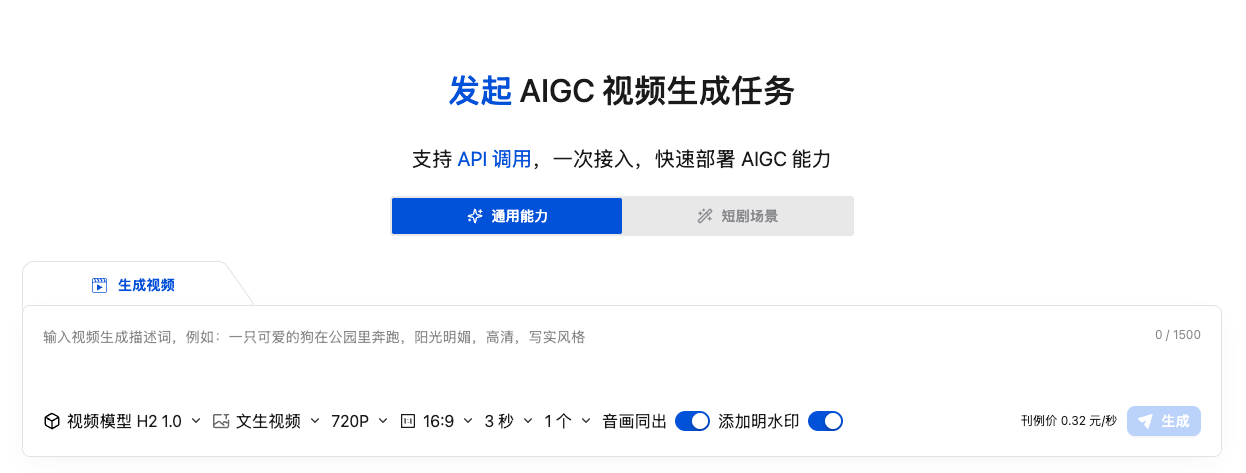
说明:
计费说明
前置条件
1. 开通服务
1. 登录 腾讯云媒体处理控制台,按照引导开通 MPS 服务。
2. 获取 API 密钥:前往 API 密钥管理 获取 SecretId 和 SecretKey。
3. (可选)如需将生成结果存到 COS,还需开通对象存储 (COS) 并创建存储桶,授权 MPS_QcsRole 角色。可参考 账号授权相关 文档。
2. 安装依赖
本指南的代码示例使用 axios 作为 HTTP 客户端,但它不是必须的。您可以根据项目情况选择以下任一方式发送 HTTP 请求。
方案 | 是否需要安装 | 适用场景 |
axios(本文示例默认) | npm install axios | 已有项目在用 axios,或偏好其 API 风格。 |
Node.js 原生 fetch | 无需安装(Node.js ≥ 18 内置) | 零依赖、现代项目推荐。 |
Node.js 原生 https | 无需安装 | 兼容老版本 Node.js(< 18)。 |
如果您选择 axios:
npm install axios
如果您选择原生 fetch(Node.js ≥ 18,零依赖),将代码中的 axios.post(...) 替换为:
// 替换 axios.post 调用// 原: const resp = await axios.post(`https://${MPS_HOST}`, payload, { headers });// return resp.data;// 改为:const resp = await fetch(`https://${MPS_HOST}`, {method: 'POST',headers: headers,body: JSON.stringify(payload)});return await resp.json();
说明:
Node.js 内置的
crypto 模块即可完成签名,无需额外安装。签名部分无外部依赖。3. 密钥配置
{"tencentCloud": {"secretId": "您的 SecretId","secretKey": "您的 SecretKey","region": "ap-guangzhou"}}
注意:
安全提醒:密钥绝对不要硬编码到代码中或提交到 Git,建议使用环境变量或独立的配置文件(加入
.gitignore)。API 概览
接口 | Action | 功能 | 请求频率限制 |
CreateAigcVideoTask | 根据 prompt(+ 首帧图片)生成视频。 | 10 次/秒 | |
DescribeAigcVideoTask | 轮询视频生成进度和结果。 | 50 次/秒 |
说明:
通用信息:
请求域名:mps.tencentcloudapi.com
请求方式:POST(application/json)
API 版本:2019-06-12
签名方法:TC3-HMAC-SHA256
签名机制 (TC3-HMAC-SHA256)
腾讯云 API 3.0 使用 TC3-HMAC-SHA256 签名认证。签名过程如下:
1. 构建规范请求 (CanonicalRequest):拼接请求方法、URI、QueryString、Headers、Payload Hash。
2. 构建待签字符串 (StringToSign):拼接算法、时间戳、CredentialScope、CanonicalRequest Hash。
3. 计算签名 (Signature):用 SecretKey 逐级 HMAC 派生签名密钥,再对 StringToSign 签名。
4. 构建 Authorization Header:组装最终的认证头。
注意事项
1. 生成结果仅存储 12 小时
图片和视频的 URL 只有12小时有效期,务必在生成后及时下载或转存到自己的 COS/服务器。
2. 频率限制
图片创建/查询:20次/秒
视频创建:10次/秒
视频查询:50次/秒
建议实现并发控制和请求队列,避免触发限流。
3. 图片输入要求
推荐小于7M(图片生成)/10M(视频生成)。
支持格式:jpeg、png、webp。
图片 URL 必须外网可访问。
4. Prompt 长度限制
图片 Prompt:最好不要超过1000字符
视频 Prompt:最好不要超过2000字符
5. COS 存储
使用 StoreCosParam 可将结果直接存到指定 COS 桶,需要:
开通 COS 服务。
创建存储桶。
授权 MPS_QcsRole 角色访问该桶。
核心代码实现
1. 签名工具 (tencent-sign.js)
/*** 腾讯云 API 签名工具 (TC3-HMAC-SHA256)*/const crypto = require('crypto');function sha256(message) {return crypto.createHash('sha256').update(message).digest('hex');}function hmac256(key, message) {return crypto.createHmac('sha256', key).update(message).digest();}/*** 生成腾讯云 API V3 签名* @param {string} secretId - 腾讯云 SecretId* @param {string} secretKey - 腾讯云 SecretKey* @param {string} service - 服务名,如 'mps'* @param {string} action - 接口名,如 'CreateAigcVideoTask'* @param {string} payload - 请求体 JSON 字符串* @param {string} region - 地域,如 'ap-guangzhou'* @param {string} [version] - API 版本号,默认 '2019-06-12'* @returns {{ headers: object }} - 包含完整签名的请求头*/function signRequest(secretId, secretKey, service, action, payload, region, version) {const timestamp = Math.floor(Date.now() / 1000);const date = new Date(timestamp * 1000).toISOString().split('T')[0];// ===== 步骤1: 拼接规范请求串 =====const httpRequestMethod = 'POST';const canonicalUri = '/';const canonicalQueryString = '';const contentType = 'application/json';const canonicalHeaders =`content-type:${contentType}\\n` +`host:${service}.tencentcloudapi.com\\n` +`x-tc-action:${action.toLowerCase()}\\n`;const signedHeaders = 'content-type;host;x-tc-action';const hashedRequestPayload = sha256(payload);const canonicalRequest =`${httpRequestMethod}\\n${canonicalUri}\\n${canonicalQueryString}\\n` +`${canonicalHeaders}\\n${signedHeaders}\\n${hashedRequestPayload}`;// ===== 步骤2: 拼接待签名字符串 =====const algorithm = 'TC3-HMAC-SHA256';const credentialScope = `${date}/${service}/tc3_request`;const hashedCanonicalRequest = sha256(canonicalRequest);const stringToSign =`${algorithm}\\n${timestamp}\\n${credentialScope}\\n${hashedCanonicalRequest}`;// ===== 步骤3: 计算签名 =====const secretDate = hmac256(`TC3${secretKey}`, date);const secretService = hmac256(secretDate, service);const secretSigning = hmac256(secretService, 'tc3_request');const signature = crypto.createHmac('sha256', secretSigning).update(stringToSign).digest('hex');// ===== 步骤4: 拼接 Authorization =====const authorization =`${algorithm} Credential=${secretId}/${credentialScope}, ` +`SignedHeaders=${signedHeaders}, Signature=${signature}`;return {headers: {'Authorization': authorization,'Content-Type': contentType,'Host': `${service}.tencentcloudapi.com`,'X-TC-Action': action,'X-TC-Timestamp': String(timestamp),'X-TC-Version': version || '2019-06-12','X-TC-Region': region || ''}};}module.exports = { signRequest };
2. MPS API 封装 (mps-api.js)
const axios = require('axios');const { signRequest } = require('./tencent-sign');const MPS_HOST = 'mps.tencentcloudapi.com';const SERVICE = 'mps';/*** 通用 MPS API 调用函数*/async function callMpsApi(action, params, config) {const payload = JSON.stringify(params);const { headers } = signRequest(config.tencentCloud.secretId,config.tencentCloud.secretKey,SERVICE,action,payload,config.tencentCloud.region);const resp = await axios.post(`https://${MPS_HOST}`, payload, { headers });return resp.data;}// =============================================// 视频生成// =============================================/*** 创建 AIGC 生视频任务* @param {string} prompt - 视频描述(最大 2000 字符)* @param {string} imageUrl - 首帧图片 URL(可选,用于图生视频)* @param {object} options - 额外选项* @param {string} options.modelName - 模型名称,可选 'Kling' / 'Hunyuan' / 'Hailuo' / 'Vidu' 等* @param {string} options.modelVersion - 模型版本号,如 Kling: '2.0'/'2.1'/'2.5'/'3.0'* @param {number} options.duration - 视频时长(秒),Kling: 5/10, Hailuo: 6/10* @param {boolean} options.enableAudio - 是否启用音画同出(部分模型支持)* @param {string} options.resolution - 分辨率,如 '720P' / '1080P'* @param {string} options.aspectRatio - 宽高比,如 '16:9' / '9:16'* @param {string} options.lastImageUrl - 尾帧图片 URL(部分模型支持首尾帧生成)* @param {object} options.storeCos - COS 存储参数* @returns {{ Response: { TaskId: string, RequestId: string } }}*/async function createVideoTask(prompt, imageUrl, options = {}) {const config = options._config; // 传入配置对象const params = {ModelName: options.modelName || 'Kling',ModelVersion: options.modelVersion || '3.0',Prompt: prompt,Duration: options.duration || 5};// 首帧图片(图生视频)if (imageUrl) {params.ImageUrl = imageUrl;}// 尾帧图片if (options.lastImageUrl) {params.LastImageUrl = options.lastImageUrl;}// 音画同出 & 分辨率 & 宽高比const extraParams = {};if (options.enableAudio) {extraParams.EnableAudio = true;}if (options.resolution) {extraParams.Resolution = options.resolution;}if (options.aspectRatio) {extraParams.AspectRatio = options.aspectRatio;}if (Object.keys(extraParams).length > 0) {params.ExtraParameters = extraParams;}// COS 存储if (options.storeCos) {params.StoreCosParam = options.storeCos;}const result = await callMpsApi('CreateAigcVideoTask', params, config);return result;}/*** 查询 AIGC 生视频任务* @param {string} taskId - 创建任务时返回的 TaskId* @param {object} config - 配置对象* @returns {{ Response: { Status: string, VideoUrls: string[], Resolution: string, Message: string, RequestId: string } }}* Status: 'WAIT' | 'RUN' | 'DONE' | 'FAIL'* VideoUrls: 任务完成时返回视频 URL 列表(⚠️ 视频仅存储 12 小时)* Resolution: 输出视频分辨率,如 '1920x1088'*/async function describeVideoTask(taskId, config) {const params = { TaskId: taskId };const result = await callMpsApi('DescribeAigcVideoTask', params, config);return result;}module.exports = {callMpsApi,createVideoTask,describeVideoTask};
完整使用流程
1. 生成视频(图生视频 + 音画同出)
async function generateVideo() {// 第1步: 创建视频生成任务(使用图片作为首帧)console.log('🎬 正在创建视频生成任务...');const createResult = await callMpsApi('CreateAigcVideoTask', {ModelName: 'Kling',ModelVersion: '3.0',Prompt: 'The woman slowly turns her head and smiles, cinematic, smooth camera movement, photorealistic',ImageUrl: 'https://example.com/your-image.png', // 首帧图片Duration: 5, // 5秒视频ExtraParameters: {EnableAudio: true // 启用音画同出}});const taskId = createResult.Response.TaskId;console.log(`✅ 任务创建成功, TaskId: ${taskId}`);// 第2步: 轮询查询任务状态let status = 'WAIT';let videoUrls = [];while (status === 'WAIT' || status === 'RUN') {await new Promise(resolve => setTimeout(resolve, 5000));const queryResult = await callMpsApi('DescribeAigcVideoTask', {TaskId: taskId});status = queryResult.Response.Status;console.log(`⏳ 任务状态: ${status}`);if (status === 'DONE') {videoUrls = queryResult.Response.VideoUrls;const resolution = queryResult.Response.Resolution;console.log('🎉 视频生成成功!');console.log(`📹 视频URL: ${videoUrls}`);console.log(`📐 分辨率: ${resolution}`);} else if (status === 'FAIL') {console.error('❌ 生成失败:');}}return videoUrls;}generateVideo().catch(console.error);
2. 带任务队列的生产级用法
在实际项目中,建议实现任务队列控制并发数,避免超过 API 频率限制:
/*** 带重试和超时的轮询函数* @param {string} taskId - 任务 ID* @param {string} type - 'image' | 'video'* @param {number} timeout - 超时时间(毫秒),默认 30 分钟* @param {number} interval - 轮询间隔(毫秒),默认 5000*/async function pollTaskResult(taskId, type = 'image', timeout = 1800000, interval = 5000) {const action = type === 'image' ? 'DescribeAigcImageTask' : 'DescribeAigcVideoTask';const urlField = type === 'image' ? 'ImageUrls' : 'VideoUrls';const startTime = Date.now();while (Date.now() - startTime < timeout) {const result = await callMpsApi(action, { TaskId: taskId });const resp = result.Response;if (resp.Status === 'DONE') {return {success: true,urls: resp[urlField] || [],resolution: resp.Resolution || null};}if (resp.Status === 'FAIL') {return {success: false,error: resp.Message || '任务失败'};}// WAIT 或 RUN,继续等待await new Promise(resolve => setTimeout(resolve, interval));}return { success: false, error: '轮询超时' };}// 使用示例async function main() {// 创建图片任务const imgTask = await callMpsApi('CreateAigcImageTask', {ModelName: 'Hunyuan',ModelVersion: '3.0',Prompt: 'A dramatic scene...',EnhancePrompt: true});const imgResult = await pollTaskResult(imgTask.Response.TaskId, 'image');if (imgResult.success) {console.log('图片:', imgResult.urls[0]);// 用图片作为首帧,继续生成视频const vidTask = await callMpsApi('CreateAigcVideoTask', {ModelName: 'Kling',ModelVersion: '3.0',Prompt: 'The character walks forward...',ImageUrl: imgResult.urls[0],Duration: 5,ExtraParameters: { EnableAudio: true }});const vidResult = await pollTaskResult(vidTask.Response.TaskId, 'video');if (vidResult.success) {console.log('视频:', vidResult.urls[0]);console.log('分辨率:', vidResult.resolution);}}}main().catch(console.error);
配置文件参考
以下是一个完整的配置示例,涵盖图片和视频生成的所有可配置项:
{"tencentCloud": {"secretId": "您的 SecretId","secretKey": "您的 SecretKey","region": "ap-guangzhou"},"cosOutput": {"bucket": "your-bucket-name-1234567890","region": "ap-guangzhou","outputDir": "/aigc-output/"},"mps": {"imageGeneration": {"enabled": true,"modelName": "Hunyuan","modelVersion": "3.0"},"videoGeneration": {"enabled": true,"modelName": "Kling","modelVersion": "3.0","duration": 5,"enableAudio": true}},"concurrency": {"maxImageTasks": 2,"maxVideoTasks": 1,"pollIntervalMs": 5000}}
常见问题
创建任务报 InvalidParameter.ViolationContent 错误?
Prompt 内容触发了内容审核拦截,请检查 prompt 是否包含违规内容。
创建任务报 AuthFailure 错误?
签名验证失败。请检查:
SecretId / SecretKey 是否正确。
时间戳是否准确(本地时间需与服务器时间同步)。
签名算法实现是否正确。
轮询一直返回 WAIT/RUN 状态?
图片生成通常1~3分钟,视频生成通常3~5分钟。建议设置合理的超时时间(如30分钟)。
EnableAudio 不生效?
音画同出能力仅部分模型的特定版本支持(如 Kling 3.0)。请确认所用模型和版本是否支持此功能。
Duration 参数不起作用?
不同模型支持不同的时长值(见上表),传入不支持的值可能被忽略或报错。
附录:HTTP 原始请求示例
如果您使用其他语言(Python / Go / Java 等),可以参考以下 HTTP 原始请求格式:
创建视频生成任务
POST / HTTP/1.1Host: mps.tencentcloudapi.comContent-Type: application/jsonAuthorization: TC3-HMAC-SHA256 Credential=xxx/2026-03-31/mps/tc3_request, SignedHeaders=content-type;host;x-tc-action, Signature=xxxX-TC-Action: CreateAigcVideoTaskX-TC-Version: 2019-06-12X-TC-Timestamp: 1743436800X-TC-Region: ap-guangzhou{"ModelName": "Kling","ModelVersion": "3.0","Prompt": "The woman gently turns around, her silk dress flowing in the breeze","ImageUrl": "https://example.com/first-frame.png","Duration": 5,"ExtraParameters": {"EnableAudio": true,"Resolution": "1080P"}}
查询任务
POST / HTTP/1.1Host: mps.tencentcloudapi.comContent-Type: application/jsonX-TC-Action: DescribeAigcVideoTaskX-TC-Version: 2019-06-12{"TaskId": "4-AigcVideo-c3b145ec76xxxx94ac55b9e63be17d"}


