R绘图|染色体SNP指数图绘制


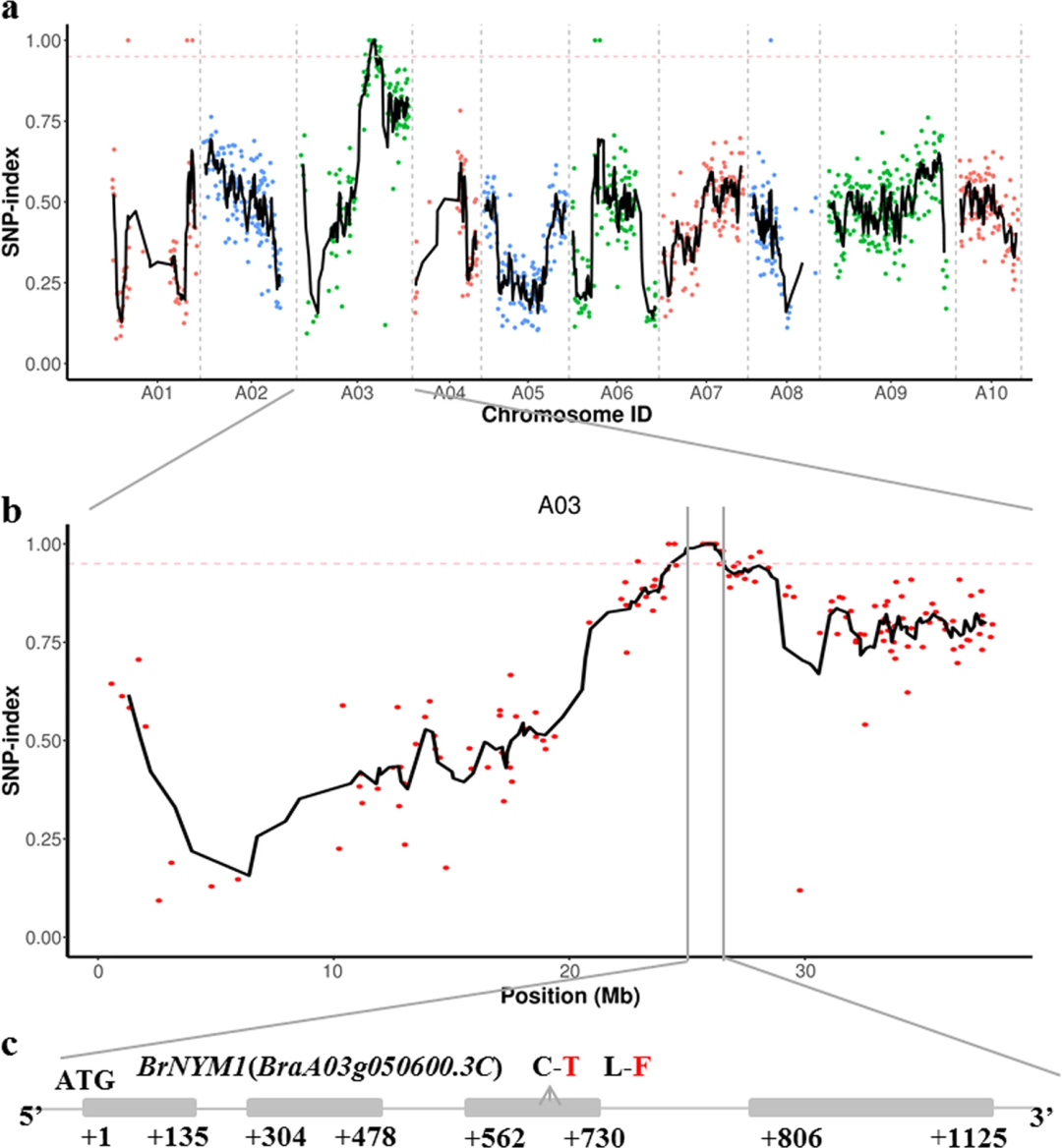
前几天,老师让我画一个这样的图。
原文链接[1]
粗略一看,似乎没有什么特别困难的地方,好像之前也看到过类似的图,但是看到老师发来的链接才发现这居然是Nature出版期刊(Horticulture Research)的配图。volume)上的配图!
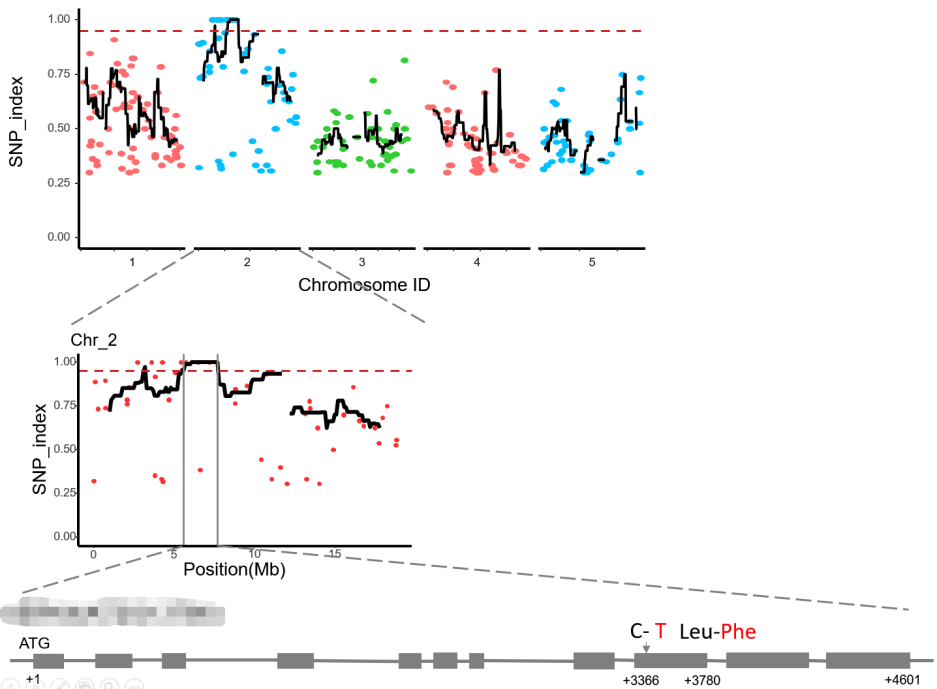
该配图一共由三个图组成,不同染色体的SNP-index[2]对其位置作整图、单一染色体的SNP-index对其位置作细节图以及对应的基因结构图。
a、b两图也差不多,都是由散点图和线图构成。
1 数据读取
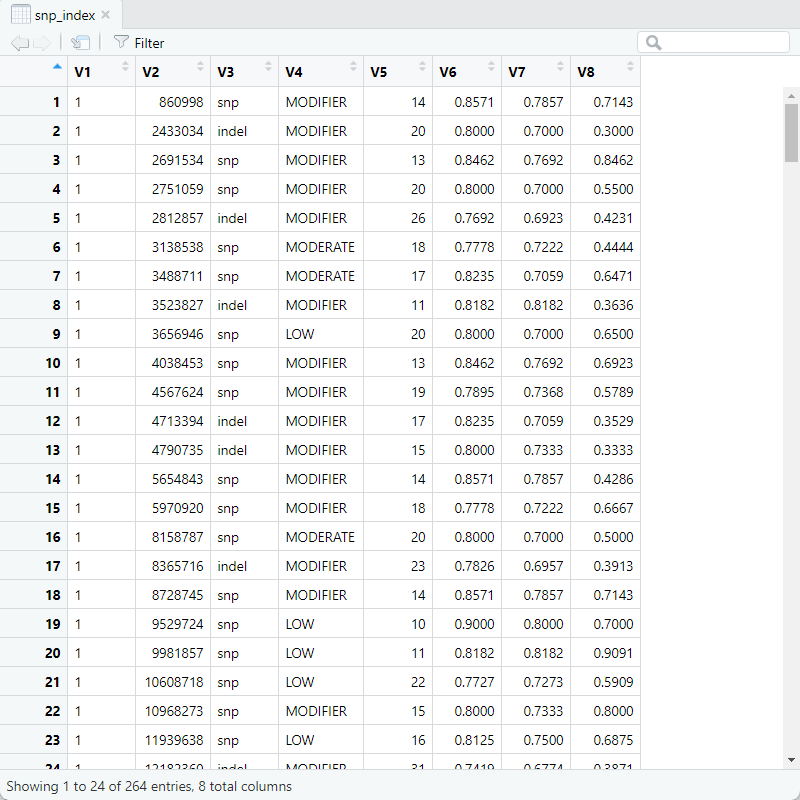
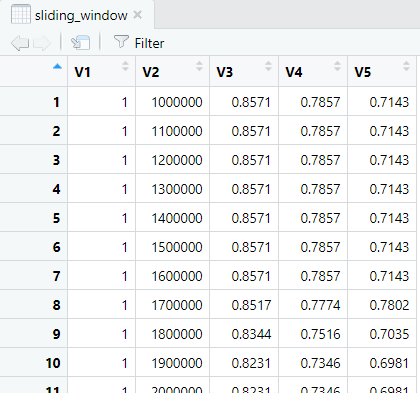
# 一个是SNP-index值,另一个是SNP-index滑窗值。
snp_index <- read.delim("./snp_index.tsv", header=FALSE)
sliding_window <- read.delim("./sliding_window.tsv", header=FALSE)

# 在snp_index中需要用到数据有:V1(所在的染色体位置)、V2(在某条染色体上的特定位置)、V8(SNP-index值);
# 在sliding_window中需要用到的数据有:V1(所在的染色体位置)、V2(在某条染色体上的特定位置)、V5(滑窗区域中的SNP-index均值);
snp_index
sliding_window
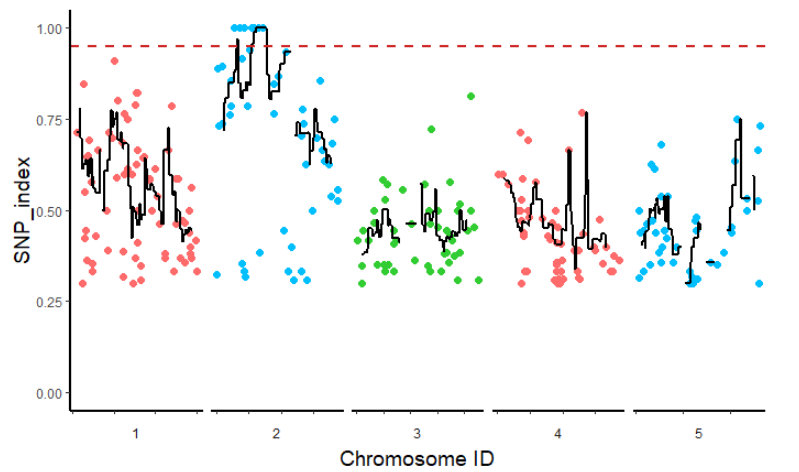
2 作整图及美化
library(ggplot2)  # 加载绘图包ggplot2
library(eoffice)  # 为了后续将绘制好的图保存为ppt的可编辑格式

p1 <- ggplot()+
# 散点图,设置点的颜色与大小
  geom_point(data = snp_index,aes(x = V2, y = V8,color = factor(V1)),size = 2)+
  scale_color_manual(values = c("#FF6A6A", "#00BFFF", "#32CD32","#FF6A6A", "#00BFFF"))+
# 线图,设置线的粗细
  geom_line(data = sliding_window, aes(x = V2, y = V5), size = 1)+
# 设置纵坐标轴的刻度范围
   ylim(0,1)+
# 将图按照所在的染色体位置进行分面;ncol设置列数,将五条染色体的结果水平分布;strip.position设置标签的位置;scales设置横坐标的比例尺自由变化,跟随染色的大小变化。
  facet_wrap( ~ V1,ncol = 5,strip.position = "bottom",scales = "free_x")+
# 添加值为0.95的垂直于y轴的辅助线,并设置颜色,指定线的类型,改变线条的粗细
  geom_hline(yintercept=0.95, colour="#CD2626", linetype="dashed", size = 0.8)+
# 修改主题
  theme_classic()+
# 修改坐标,axis.text.x指定x轴的数字不显示;strip.background设置标签的背景为空白;strip.placement将坐标轴的刻度向外显示;axis.line.x设置x轴的类型、颜色以及粗细;axis.line.y设置y轴的类型、颜色以及粗细;axis.title.x、axis.title.y设置x、y轴标签字体的大小;legend.position设置图列不显示
  theme(axis.text.x = element_blank(), strip.background = element_blank(), strip.placement = "outside",axis.line.x=element_line(linetype=1,color="black",size=1),axis.line.y=element_line(linetype=1,color="black",size=1),axis.title.x = element_text(size = 14),axis.title.y = element_text(size = 14), legend.position = 'none')+
# 设置横纵坐标的名字
  labs(x="Chromosome ID",y="SNP_index")
# 将图片保存为ppt
topptx(p1, filename = "SNP_ALL.pptx",
       width = 6, height = 4)
3 作细节图及美化
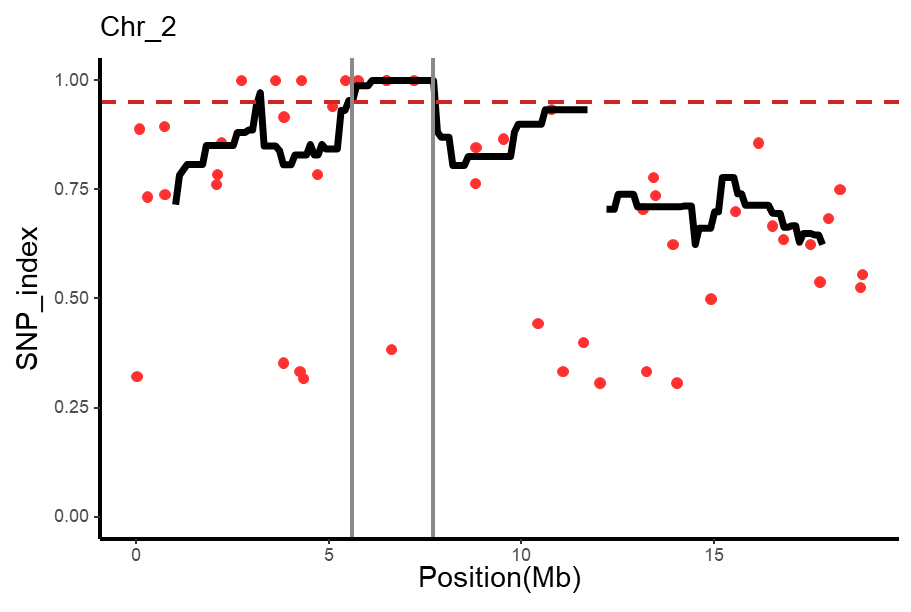
细节图即是突出显示某一条染色体上的具体情况,以2号染色体为例,与上图的绘制方法基本一致,但是需要取消分面。
library(tidyverse)
snp_index_2 <- filter(snp_index, V1 == "2")
sliding_window_2 <- filter(sliding_window, V1 == "2")

p2 <- ggplot()+
  geom_point(data = snp_index_2,aes(x = V2/1000000, y = V8),size = 2,color = "#FF3030")+
   ylim(0,1)+
  geom_line(data = sliding_window_2, aes(x = V2/1000000, y = V5), size = 1.5)+
  geom_hline(yintercept=0.95, colour="#CD2626", linetype="dashed", size = 0.8)+
  geom_vline(xintercept=c(5.6,7.7), colour="#8B8989",size = 0.8)+
  theme_classic()+
  theme(axis.line.x=element_line(linetype=1,color="black",size=1),axis.line.y=element_line(linetype=1,color="black",size=1),axis.title.x = element_text(size = 14),axis.title.y = element_text(size = 14), legend.position = 'none')+
  labs(x="Position(Mb)",y="SNP_index",title = "Chr_2")
topptx(p2, filename = "SNP_2.pptx",
       width = 6, height = 4)
4 PPT处理
前面通过eoffice包将图导入ppt中,再制作基因结构图,便大功告成!
参考资料 [1] 原文链接: https://www.nature.com/articles/s41438-019-0223-6
[2] 什么是“SNP-index”?: https://www.sohu.com/a/396023729_769248
本文参与 腾讯云自媒体同步曝光计划,分享自微信公众号。
原始发表:2022-02-15,如有侵权请联系 cloudcommunity@tencent.com 删除
目录
腾讯云开发者

Copyright © 2013 - 2026 Tencent Cloud. All Rights Reserved. 腾讯云 版权所有
深圳市腾讯计算机系统有限公司 ICP备案/许可证号:粤B2-20090059  粤公网安备44030502008569号
腾讯云计算(北京)有限责任公司 京ICP证150476号 | 京ICP备11018762号