层叠、优先级和继承

层叠、优先级和继承

Cellinlab
发布于 2023-05-17 17:59:29
发布于 2023-05-17 17:59:29
# 层叠
CSS 本质上就是声明规则,即在各种条件下,我们希望产生特定的效果。如果某个元素有这个类,则应用这些样式。要想预测规则最终的效果,就需要理解 CSS 里的层叠。
Wombat Coffee Roasters
<html>
  <header id="demo0-header">
    <h1 id="demo0-page-title" class="demo0-title">Wombat Coffee Roasters</h1>
    <nav>
      <ul id="demo0-main-nav" class="demo0-nav">
        <li><a href="/">Home</a></li>
        <li><a href="/coffees">Coffees</a></li>
        <li><a href="/brewers">Brewers</a></li>
        <li><a href="/specials" class="demo0-featured">Specials</a></li>
      </ul>
    </nav>
  </header>
</html>
<script>
</script>
<style>
#demo0-header h1 {
  font-family: serif;
}
#demo0-header #demo0-page-title {
  font-family: sans-serif;
}
#demo0-header .demo0-title {
  font-family: monospace;
}
</style>
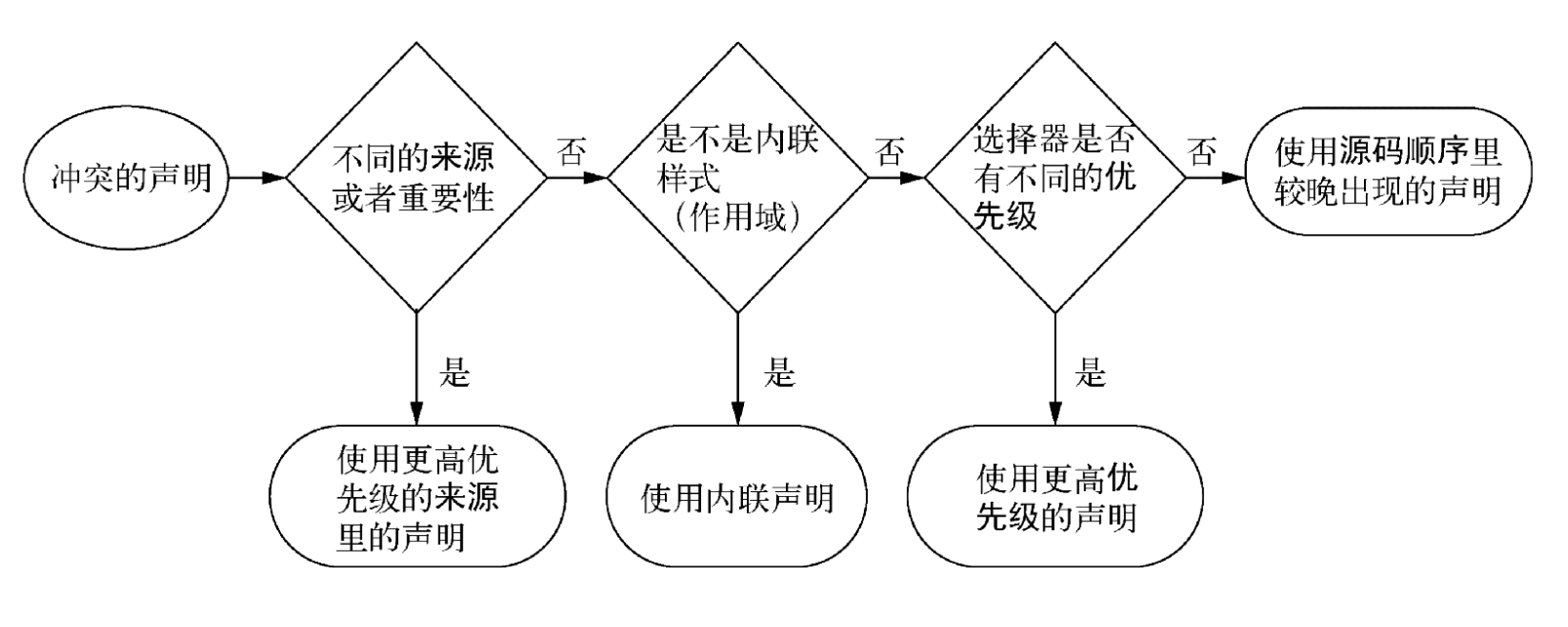
层叠指的就是一系列规则。它决定了如何解决冲突,是CSS语言的基础。当声明冲突时,层叠会依据三种条件解决冲突:
- 样式表的来源:当声明冲突时,层叠会依据三种条件解决冲突。
- 选择器优先级:哪些选择器比另一些选择器更重要。
- 源码顺序:样式在样式表里的声明顺序。
# 样式表的来源
- 作者样式
- 用于覆盖用户代理的样式
- 用户代理样式(即浏览器默认样式)
- 不同浏览器实现有差异
!important声明- 标记
!important会被当做更高优先级的来源
- 标记
因此,总体优先级由高到低排列:作者的 !important > 作者 > 用户代理。
Wombat Coffee Roasters
<html>
  <header id="demo1-header">
    <h1 id="demo1-page-title" class="demo1-title">Wombat Coffee Roasters</h1>
    <nav>
      <ul id="demo1-main-nav" class="demo1-nav">
        <li><a href="/">Home</a></li>
        <li><a href="/coffees">Coffees</a></li>
        <li><a href="/brewers">Brewers</a></li>
        <li><a href="/specials" class="demo1-featured">Specials</a></li>
      </ul>
    </nav>
  </header>
</html>
<script>
</script>
<style>
#demo1-header h1 {
  color: #2f4f4f;
  margin-bottom: 10px;
}
#demo1-main-nav {
  margin-top: 10px;
  list-style: none;
  padding-left: 0;
}
#demo1-main-nav li {
  display: inline-block;
}
#demo1-main-nav a {
  color: white;
  background-color: #13a4a4;
  padding: 5px;
  border-radius: 2px;
  text-decoration: none;
}
</style>
# 理解优先级
浏览器将优先级分为两部分:HTML 的行内样式和选择器样式。
- 行内样式
- 用 HTML 的 style 属性写样式,这个声明只会作用于当前元素
- 行内样式属于“带作用域的”声明,会覆盖任何来自样式表或者
<style>标签的样式 - 行内样式没有选择器,直接作用于所在的元素
- 可以通过
!important在样式表里覆盖行内声明
Wombat Coffee Roasters
<html>
  <header id="demo2-header">
    <h1 id="demo2-page-title" class="demo2-title">Wombat Coffee Roasters</h1>
    <nav>
      <ul id="demo2-main-nav" class="demo2-nav">
        <li><a href="/">Home</a></li>
        <li><a href="/coffees">Coffees</a></li>
        <li><a href="/brewers">Brewers</a></li>
        <li><a href="/specials" class="demo2-featured" style="background-color: orange;">Specials</a></li>
      </ul>
    </nav>
  </header>
</html>
<script>
</script>
<style>
#demo2-header h1 {
  color: #2f4f4f;
  margin-bottom: 10px;
}
#demo2-main-nav {
  margin-top: 10px;
  list-style: none;
  padding-left: 0;
}
#demo2-main-nav li {
  display: inline-block;
}
#demo2-main-nav a {
  color: white;
  background-color: #13a4a4;
  padding: 5px;
  border-radius: 2px;
  text-decoration: none;
}
</style>- 选择器优先级
- id 选择器比类选择器优先级高
- 类选择器比标签选择器高
- 伪类选择器(如
:hover)和属性选择器(如[type="input"])与一个类选择器的优先级相同 - 通用选择器(
*)和组合选择器(>、+、~)对优先级没有影响
- 优先级标记 一个常用的表示优先级的方式是用数值形式来标记。如,
1,2,2表示选择器由 1 个 id、2 个类、2 个标签组成。
# 源码顺序
如果两个声明的来源和优先级相同,出现晚的(包括在样式表出现较晚或者位于页面较晚引入的样式表中)声明胜出。
# 最佳实践
- 在选择器中不要使用 id
- 当需要覆盖这个选择器时,通常找不到另一个有意义的 id,于是就会复制原来的选择器,然后加上另一个类
- 不要使用
!important- 比 id 更难覆盖,一旦使用,需要覆盖原先的声明,就需要再加上一个
!important,而且依然要处理优先级问题
- 比 id 更难覆盖,一旦使用,需要覆盖原先的声明,就需要再加上一个
- 创建一个用于分发的 JS 模块(如 NPM 包)时,强烈建议不要在 JS 里使用行内样式
- 否则,使用者要么全盘接受,要么动用
!important覆盖 - 正确的做法是在包里包含一个样式表。如果组件要频繁修改样式,可以通过 JS 给元素添加或者删除类来实现。
- 否则,使用者要么全盘接受,要么动用
# 继承
如果一个元素的某个属性没有层叠值,则可能会继承某个祖先元素的值。继承属性从DOM树的父节点传递到后代节点。
但不是所有的属性都能被继承。默认情况下,只有特定的一些属性能被继承,通常是我们希望被继承的那些。它们主要是跟文本相关的属性:color、font、font-family、font-size、font-weight、font-variant、font-style、line-height、letter-spacing、text-align、text-indent、text-transform、white-space 以及word-spacing。
还有一些其他的属性也可以被继承,比如列表属性:list-style、list-style-type、list-style-position 以及 list-style-image。表格的边框属性border-collapse 和 border-spacing 也能被继承。
# 特殊值
inherit关键字- 用继承代替一个层叠值。可以用它来覆盖另一个值,这样该元素就会继承其父元素的值。
- 还可以使用
inherit关键字强制继承一个通常不会被继承的属性,比如边框和内边距。
initial关键字- 撤销作用于某个元素的样式
- 每一个 CSS 属性都有初始(默认)值。如果将
initial值赋给某个属性,那么就会有效地将其重置为默认值,这种操作相当于硬复位了该值
本文参与 腾讯云自媒体同步曝光计划,分享自作者个人站点/博客。
原始发表:2022/3/24,如有侵权请联系 cloudcommunity@tencent.com 删除
目录
腾讯云开发者

Copyright © 2013 - 2026 Tencent Cloud. All Rights Reserved. 腾讯云 版权所有
深圳市腾讯计算机系统有限公司 ICP备案/许可证号:粤B2-20090059  粤公网安备44030502008569号
腾讯云计算(北京)有限责任公司 京ICP证150476号 | 京ICP备11018762号