69.[HarmonyOS NEXT 实战案例九] 旅游景点网格布局(上)
原创
69.[HarmonyOS NEXT 实战案例九] 旅游景点网格布局(上)
原创
全栈若城
发布于 2025-06-06 09:08:12
发布于 2025-06-06 09:08:12
HarmonyOS NEXT 实战案例九 旅游景点网格布局(上)
项目已开源,开源地址: https://gitcode.com/nutpi/HarmonyosNextCaseStudyTutorial , 欢迎fork & star
效果演示
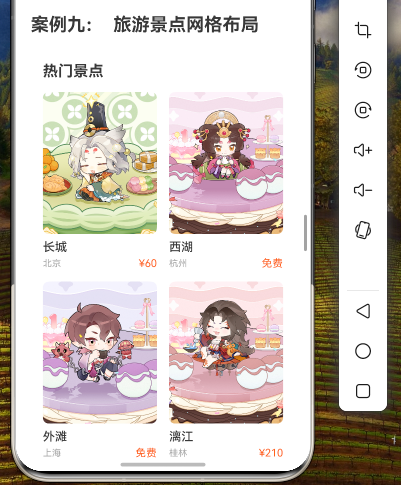
1. 概述
本教程将详细讲解如何使用HarmonyOS NEXT中的GridRow和GridCol组件实现旅游景点网格布局。通过网格布局,我们可以以美观、规整的方式展示各种旅游景点信息,为用户提供良好的浏览体验。
本教程将涵盖以下内容:
- 旅游景点数据结构设计
- 数据准备
- 整体布局实现
- GridRow和GridCol组件配置
- 景点卡片实现
- 布局效果分析
2. 数据结构设计
首先,我们需要定义旅游景点的数据结构,包含景点的基本信息:
// 旅游景点数据类型
export interface SpotType {
  id: number;         // 景点ID
  name: string;       // 景点名称
  image: Resource;    // 景点图片
  location: string;   // 景点位置
  price: number;      // 门票价格
  rating: number;     // 评分
  tags: string[];     // 标签
  description: string; // 景点描述
}
3. 数据准备
接下来,我们准备一些示例数据用于展示:
// 旅游景点数据
private spots: SpotType[] = [
  {
    id: 1,
    name: '长城',
    image: $r('app.media.great_wall'),
    location: '北京',
    price: 60,
    rating: 4.8,
    tags: ['历史', '文化', '世界遗产'],
    description: '长城是中国古代的伟大防御工程,也是世界上最伟大的建筑之一。'
  },
  {
    id: 2,
    name: '西湖',
    image: $r('app.media.west_lake'),
    location: '杭州',
    price: 0,
    rating: 4.7,
    tags: ['自然', '风景', '文化'],
    description: '西湖是中国浙江省杭州市区西面的淡水湖,被誉为人间天堂。'
  },
  {
    id: 3,
    name: '故宫',
    image: $r('app.media.forbidden_city'),
    location: '北京',
    price: 80,
    rating: 4.9,
    tags: ['历史', '文化', '世界遗产'],
    description: '故宫是中国明清两代的皇家宫殿,是世界上现存规模最大、保存最为完整的木质结构古建筑之一。'
  },
  {
    id: 4,
    name: '黄山',
    image: $r('app.media.huangshan'),
    location: '安徽',
    price: 190,
    rating: 4.8,
    tags: ['自然', '风景', '世界遗产'],
    description: '黄山以奇松、怪石、云海、温泉、冬雪五绝著称于世,被誉为"天下第一奇山"。'
  },
  {
    id: 5,
    name: '张家界',
    image: $r('app.media.zhangjiajie'),
    location: '湖南',
    price: 248,
    rating: 4.7,
    tags: ['自然', '风景', '世界遗产'],
    description: '张家界以其独特的石英砂岩峰林地貌闻名于世,被誉为"三千奇峰,八百秀水"。'
  },
  {
    id: 6,
    name: '九寨沟',
    image: $r('app.media.jiuzhaigou'),
    location: '四川',
    price: 190,
    rating: 4.9,
    tags: ['自然', '风景', '世界遗产'],
    description: '九寨沟以其彩池、瀑布、雪山、森林闻名于世,被誉为"童话世界"。'
  },
  {
    id: 7,
    name: '丽江古城',
    image: $r('app.media.lijiang'),
    location: '云南',
    price: 80,
    rating: 4.6,
    tags: ['历史', '文化', '古镇'],
    description: '丽江古城是中国历史文化名城,以其独特的纳西族建筑和水系闻名于世。'
  },
  {
    id: 8,
    name: '鼓浪屿',
    image: $r('app.media.gulangyu'),
    location: '厦门',
    price: 35,
    rating: 4.5,
    tags: ['文化', '海岛', '音乐'],
    description: '鼓浪屿是厦门的一个小岛,以其钢琴文化和欧式建筑闻名,被誉为"钢琴之岛"。'
  }
];
4. 布局实现
4.1 整体布局结构
我们将使用Column作为最外层容器,包含顶部搜索栏、分类标签栏和景点网格列表:
build() {
  Column() {
    // 顶部搜索栏
    this.SearchBar()

    // 分类标签栏
    this.CategoryTabs()

    // 景点网格列表
    this.SpotGrid()
  }
  .width('100%')
  .height('100%')
  .backgroundColor('#F5F5F5')
}
4.2 顶部搜索栏
@Builder
private SearchBar() {
  Row() {
    // 搜索框
    Row() {
      Image($r('app.media.ic_search'))
        .width(20)
        .height(20)
        .margin({ right: 8 })

      TextInput({ placeholder: '搜索目的地、景点' })
        .layoutWeight(1)
        .backgroundColor('transparent')
        .placeholderColor('#999999')
        .fontSize(14)
        .height('100%')
    }
    .width('85%')
    .height(40)
    .backgroundColor(Color.White)
    .borderRadius(20)
    .padding({ left: 12, right: 12 })

    // 筛选按钮
    Image($r('app.media.ic_filter'))
      .width(24)
      .height(24)
      .margin({ left: 12 })
  }
  .width('100%')
  .padding({ left: 16, right: 16, top: 12, bottom: 12 })
  .backgroundColor('#1976D2')
}
4.3 分类标签栏
@State currentCategory: string = '推荐';
private categories: string[] = ['推荐', '热门', '自然风光', '历史文化', '主题公园', '海岛', '古镇'];

@Builder
private CategoryTabs() {
  Scroll(ScrollDirection.Horizontal) {
    Row() {
      ForEach(this.categories, (category: string) => {
        Text(category)
          .fontSize(14)
          .fontColor(this.currentCategory === category ? '#1976D2' : '#666666')
          .fontWeight(this.currentCategory === category ? FontWeight.Bold : FontWeight.Normal)
          .padding({ left: 16, right: 16, top: 12, bottom: 12 })
          .backgroundColor(this.currentCategory === category ? '#E3F2FD' : 'transparent')
          .borderRadius(16)
          .margin({ right: 8 })
          .onClick(() => {
            this.currentCategory = category;
          })
      })
    }
    .padding({ left: 16, right: 16 })
  }
  .scrollBar(BarState.Off)
  .width('100%')
}
4.4 景点网格列表
这是本教程的核心部分,我们使用GridRow和GridCol组件实现景点网格列表:
@Builder
private SpotGrid() {
  Scroll() {
    Column() {
      // 推荐景点标题
      Row() {
        Text('推荐景点')
          .fontSize(18)
          .fontWeight(FontWeight.Bold)
          .fontColor('#333333')

        Blank()

        Text('查看更多 >')
          .fontSize(14)
          .fontColor('#1976D2')
      }
      .width('100%')
      .padding({ left: 16, right: 16, top: 16, bottom: 8 })

      // 使用GridRow和GridCol实现网格布局
      GridRow({
        columns: { xs: 1, sm: 2, md: 3, lg: 4 },
        gutter: { x: 16, y: 16 }
      }) {
        ForEach(this.spots, (spot: SpotType) => {
          GridCol() {
            this.SpotCard(spot)
          }
        })
      }
      .width('100%')
      .padding(16)
    }
    .width('100%')
  }
  .scrollBar(BarState.Off)
  .scrollable(ScrollDirection.Vertical)
  .width('100%')
  .layoutWeight(1)
}
4.5 景点卡片实现
@Builder
private SpotCard(spot: SpotType) {
  Column() {
    // 景点图片
    Stack() {
      Image(spot.image)
        .width('100%')
        .height(160)
        .borderRadius({ topLeft: 8, topRight: 8 })
        .objectFit(ImageFit.Cover)

      // 价格标签
      Text(spot.price === 0 ? '免费' : `¥${spot.price}`)
        .fontSize(12)
        .fontColor(Color.White)
        .backgroundColor(spot.price === 0 ? '#4CAF50' : '#FF5722')
        .borderRadius(4)
        .padding({ left: 6, right: 6, top: 2, bottom: 2 })
        .position({ x: 8, y: 8 })
    }
    .width('100%')

    // 景点信息
    Column() {
      // 景点名称和评分
      Row() {
        Text(spot.name)
          .fontSize(16)
          .fontWeight(FontWeight.Bold)
          .fontColor('#333333')
          .maxLines(1)
          .textOverflow({ overflow: TextOverflow.Ellipsis })

        Blank()

        Row() {
          Image($r('app.media.ic_star'))
            .width(16)
            .height(16)
            .margin({ right: 4 })

          Text(spot.rating.toString())
            .fontSize(14)
            .fontColor('#FFB300')
        }
      }
      .width('100%')
      .margin({ bottom: 8 })

      // 景点位置
      Row() {
        Image($r('app.media.ic_location'))
          .width(16)
          .height(16)
          .margin({ right: 4 })

        Text(spot.location)
          .fontSize(14)
          .fontColor('#666666')
      }
      .width('100%')
      .margin({ bottom: 8 })

      // 景点标签
      Row() {
        ForEach(spot.tags, (tag: string, index: number) => {
          if (index < 3) { // 最多显示3个标签
            Text(tag)
              .fontSize(12)
              .fontColor('#1976D2')
              .backgroundColor('#E3F2FD')
              .borderRadius(4)
              .padding({ left: 6, right: 6, top: 2, bottom: 2 })
              .margin({ right: 4 })
          }
        })
      }
      .width('100%')
    }
    .width('100%')
    .padding(12)
  }
  .width('100%')
  .backgroundColor(Color.White)
  .borderRadius(8)
}
5. GridRow和GridCol配置详解
在本案例中,我们使用了GridRow和GridCol组件实现网格布局。下面详细解析其配置:
5.1 GridRow配置
GridRow({
  columns: { xs: 1, sm: 2, md: 3, lg: 4 },
  gutter: { x: 16, y: 16 }
})columns:定义不同屏幕尺寸下的列数xs: 1:极小屏幕(如小型手机)显示1列sm: 2:小屏幕(如大型手机)显示2列md: 3:中等屏幕(如平板)显示3列lg: 4:大屏幕(如桌面)显示4列
gutter:定义网格间的间距x: 16:水平间距为16像素y: 16:垂直间距为16像素
5.2 GridCol配置
在本案例中,我们使用了默认的GridCol配置,没有指定span属性,这意味着每个景点卡片占据一个网格单元。
GridCol() {
  this.SpotCard(spot)
}
如果需要某些景点卡片占据更多的空间,可以通过span属性进行配置:
GridCol({
  span: { xs: 1, sm: 2, md: 1, lg: 1 }
}) {
  this.SpotCard(spot)
}
这样配置后,在小屏幕(sm)上,该景点卡片会占据2列,而在其他屏幕尺寸上占据1列。
6. 布局效果分析
6.1 响应式布局
通过GridRow的columns配置,我们实现了响应式布局,使应用能够适应不同屏幕尺寸的设备:
屏幕尺寸 | 列数 | 效果 |
|---|---|---|
极小屏幕(xs) | 1列 | 每行显示1个景点卡片 |
小屏幕(sm) | 2列 | 每行显示2个景点卡片 |
中等屏幕(md) | 3列 | 每行显示3个景点卡片 |
大屏幕(lg) | 4列 | 每行显示4个景点卡片 |
6.2 网格间距
通过GridRow的gutter配置,我们设置了网格间的间距为16像素,使布局更加美观、清晰。
6.3 景点卡片设计
每个景点卡片包含以下元素:
- 景点图片:展示景点的视觉效果
- 价格标签:显示门票价格或免费标识
- 景点名称:突出显示景点名称
- 评分:使用星星图标和数字展示评分
- 位置:显示景点所在地
- 标签:展示景点的特点和分类
这种设计使用户能够快速获取景点的关键信息,便于做出选择。
7. GridRow和GridCol组件详解
7.1 GridRow组件
GridRow是HarmonyOS NEXT提供的网格行容器组件,用于创建网格布局。它具有以下主要属性:
属性 | 类型 | 描述 |
|---|---|---|
columns | number | { xs?: number, sm?: number, md?: number, lg?: number, xl?: number, xxl?: number } | 当前行的总列数 |
gutter | number | { x?: number, y?: number } | 栅格间隔 |
breakpoints | { value: number, reference: BreakpointsReference }[] | 自定义断点值 |
7.2 GridCol组件
GridCol是HarmonyOS NEXT提供的网格列容器组件,用于在GridRow中创建网格列。它具有以下主要属性:
属性 | 类型 | 描述 |
|---|---|---|
span | number | { xs?: number, sm?: number, md?: number, lg?: number, xl?: number, xxl?: number } | 列宽度 |
offset | number | { xs?: number, sm?: number, md?: number, lg?: number, xl?: number, xxl?: number } | 列偏移量 |
order | number | { xs?: number, sm?: number, md?: number, lg?: number, xl?: number, xxl?: number } | 列顺序 |
8. 完整代码
@Entry
@Component
struct TravelSpotGrid {
  // 旅游景点数据类型
  interface SpotType {
    id: number;         // 景点ID
    name: string;       // 景点名称
    image: Resource;    // 景点图片
    location: string;   // 景点位置
    price: number;      // 门票价格
    rating: number;     // 评分
    tags: string[];     // 标签
    description: string; // 景点描述
  }

  // 旅游景点数据
  private spots: SpotType[] = [
    {
      id: 1,
      name: '长城',
      image: $r('app.media.great_wall'),
      location: '北京',
      price: 60,
      rating: 4.8,
      tags: ['历史', '文化', '世界遗产'],
      description: '长城是中国古代的伟大防御工程,也是世界上最伟大的建筑之一。'
    },
    {
      id: 2,
      name: '西湖',
      image: $r('app.media.west_lake'),
      location: '杭州',
      price: 0,
      rating: 4.7,
      tags: ['自然', '风景', '文化'],
      description: '西湖是中国浙江省杭州市区西面的淡水湖,被誉为人间天堂。'
    },
    {
      id: 3,
      name: '故宫',
      image: $r('app.media.forbidden_city'),
      location: '北京',
      price: 80,
      rating: 4.9,
      tags: ['历史', '文化', '世界遗产'],
      description: '故宫是中国明清两代的皇家宫殿,是世界上现存规模最大、保存最为完整的木质结构古建筑之一。'
    },
    {
      id: 4,
      name: '黄山',
      image: $r('app.media.huangshan'),
      location: '安徽',
      price: 190,
      rating: 4.8,
      tags: ['自然', '风景', '世界遗产'],
      description: '黄山以奇松、怪石、云海、温泉、冬雪五绝著称于世,被誉为"天下第一奇山"。'
    },
    {
      id: 5,
      name: '张家界',
      image: $r('app.media.zhangjiajie'),
      location: '湖南',
      price: 248,
      rating: 4.7,
      tags: ['自然', '风景', '世界遗产'],
      description: '张家界以其独特的石英砂岩峰林地貌闻名于世,被誉为"三千奇峰,八百秀水"。'
    },
    {
      id: 6,
      name: '九寨沟',
      image: $r('app.media.jiuzhaigou'),
      location: '四川',
      price: 190,
      rating: 4.9,
      tags: ['自然', '风景', '世界遗产'],
      description: '九寨沟以其彩池、瀑布、雪山、森林闻名于世,被誉为"童话世界"。'
    },
    {
      id: 7,
      name: '丽江古城',
      image: $r('app.media.lijiang'),
      location: '云南',
      price: 80,
      rating: 4.6,
      tags: ['历史', '文化', '古镇'],
      description: '丽江古城是中国历史文化名城,以其独特的纳西族建筑和水系闻名于世。'
    },
    {
      id: 8,
      name: '鼓浪屿',
      image: $r('app.media.gulangyu'),
      location: '厦门',
      price: 35,
      rating: 4.5,
      tags: ['文化', '海岛', '音乐'],
      description: '鼓浪屿是厦门的一个小岛,以其钢琴文化和欧式建筑闻名,被誉为"钢琴之岛"。'
    }
  ];

  @State currentCategory: string = '推荐';
  private categories: string[] = ['推荐', '热门', '自然风光', '历史文化', '主题公园', '海岛', '古镇'];

  build() {
    Column() {
      // 顶部搜索栏
      this.SearchBar()

      // 分类标签栏
      this.CategoryTabs()

      // 景点网格列表
      this.SpotGrid()
    }
    .width('100%')
    .height('100%')
    .backgroundColor('#F5F5F5')
  }

  @Builder
  private SearchBar() {
    Row() {
      // 搜索框
      Row() {
        Image($r('app.media.ic_search'))
          .width(20)
          .height(20)
          .margin({ right: 8 })

        TextInput({ placeholder: '搜索目的地、景点' })
          .layoutWeight(1)
          .backgroundColor('transparent')
          .placeholderColor('#999999')
          .fontSize(14)
          .height('100%')
      }
      .width('85%')
      .height(40)
      .backgroundColor(Color.White)
      .borderRadius(20)
      .padding({ left: 12, right: 12 })

      // 筛选按钮
      Image($r('app.media.ic_filter'))
        .width(24)
        .height(24)
        .margin({ left: 12 })
    }
    .width('100%')
    .padding({ left: 16, right: 16, top: 12, bottom: 12 })
    .backgroundColor('#1976D2')
  }

  @Builder
  private CategoryTabs() {
    Scroll(ScrollDirection.Horizontal) {
      Row() {
        ForEach(this.categories, (category: string) => {
          Text(category)
            .fontSize(14)
            .fontColor(this.currentCategory === category ? '#1976D2' : '#666666')
            .fontWeight(this.currentCategory === category ? FontWeight.Bold : FontWeight.Normal)
            .padding({ left: 16, right: 16, top: 12, bottom: 12 })
            .backgroundColor(this.currentCategory === category ? '#E3F2FD' : 'transparent')
            .borderRadius(16)
            .margin({ right: 8 })
            .onClick(() => {
              this.currentCategory = category;
            })
        })
      }
      .padding({ left: 16, right: 16 })
    }
    .scrollBar(BarState.Off)
    .width('100%')
  }

  @Builder
  private SpotGrid() {
    Scroll() {
      Column() {
        // 推荐景点标题
        Row() {
          Text('推荐景点')
            .fontSize(18)
            .fontWeight(FontWeight.Bold)
            .fontColor('#333333')

          Blank()

          Text('查看更多 >')
            .fontSize(14)
            .fontColor('#1976D2')
        }
        .width('100%')
        .padding({ left: 16, right: 16, top: 16, bottom: 8 })

        // 使用GridRow和GridCol实现网格布局
        GridRow({
          columns: { xs: 1, sm: 2, md: 3, lg: 4 },
          gutter: { x: 16, y: 16 }
        }) {
          ForEach(this.spots, (spot: SpotType) => {
            GridCol() {
              this.SpotCard(spot)
            }
          })
        }
        .width('100%')
        .padding(16)
      }
      .width('100%')
    }
    .scrollBar(BarState.Off)
    .scrollable(ScrollDirection.Vertical)
    .width('100%')
    .layoutWeight(1)
  }

  @Builder
  private SpotCard(spot: SpotType) {
    Column() {
      // 景点图片
      Stack() {
        Image(spot.image)
          .width('100%')
          .height(160)
          .borderRadius({ topLeft: 8, topRight: 8 })
          .objectFit(ImageFit.Cover)

        // 价格标签
        Text(spot.price === 0 ? '免费' : `¥${spot.price}`)
          .fontSize(12)
          .fontColor(Color.White)
          .backgroundColor(spot.price === 0 ? '#4CAF50' : '#FF5722')
          .borderRadius(4)
          .padding({ left: 6, right: 6, top: 2, bottom: 2 })
          .position({ x: 8, y: 8 })
      }
      .width('100%')

      // 景点信息
      Column() {
        // 景点名称和评分
        Row() {
          Text(spot.name)
            .fontSize(16)
            .fontWeight(FontWeight.Bold)
            .fontColor('#333333')
            .maxLines(1)
            .textOverflow({ overflow: TextOverflow.Ellipsis })

          Blank()

          Row() {
            Image($r('app.media.ic_star'))
              .width(16)
              .height(16)
              .margin({ right: 4 })

            Text(spot.rating.toString())
              .fontSize(14)
              .fontColor('#FFB300')
          }
        }
        .width('100%')
        .margin({ bottom: 8 })

        // 景点位置
        Row() {
          Image($r('app.media.ic_location'))
            .width(16)
            .height(16)
            .margin({ right: 4 })

          Text(spot.location)
            .fontSize(14)
            .fontColor('#666666')
        }
        .width('100%')
        .margin({ bottom: 8 })

        // 景点标签
        Row() {
          ForEach(spot.tags, (tag: string, index: number) => {
            if (index < 3) { // 最多显示3个标签
              Text(tag)
                .fontSize(12)
                .fontColor('#1976D2')
                .backgroundColor('#E3F2FD')
                .borderRadius(4)
                .padding({ left: 6, right: 6, top: 2, bottom: 2 })
                .margin({ right: 4 })
            }
          })
        }
        .width('100%')
      }
      .width('100%')
      .padding(12)
    }
    .width('100%')
    .backgroundColor(Color.White)
    .borderRadius(8)
  }
}
9. 总结
本教程详细讲解了如何使用HarmonyOS NEXT中的GridRow和GridCol组件实现旅游景点网格布局。通过合理的数据结构设计、精心的UI设计和灵活的GridRow配置,我们实现了一个美观、响应式的旅游景点展示页面。
原创声明:本文系作者授权腾讯云开发者社区发表,未经许可,不得转载。
如有侵权,请联系 cloudcommunity@tencent.com 删除。
原创声明:本文系作者授权腾讯云开发者社区发表,未经许可,不得转载。
如有侵权,请联系 cloudcommunity@tencent.com 删除。
评论
登录后参与评论
推荐阅读
目录
腾讯云开发者

Copyright © 2013 - 2026 Tencent Cloud. All Rights Reserved. 腾讯云 版权所有
深圳市腾讯计算机系统有限公司 ICP备案/许可证号:粤B2-20090059  粤公网安备44030502008569号
腾讯云计算(北京)有限责任公司 京ICP证150476号 | 京ICP备11018762号