
单击qTableWidget pyqt5中的特定单元格后,特定单元格的背景色不会改变。
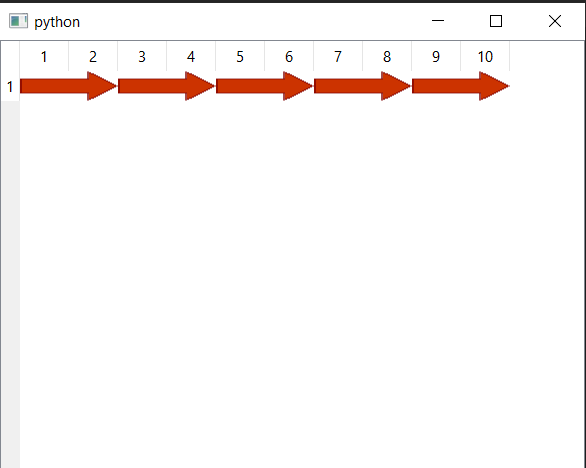
因此,我有一个具有1行和多列的表,我使用自定义委托函数来显示图像缩略图。我还包括设置的背景颜色功能,当我点击它。但是,它不会改变项目背景的颜色。我必须使用自定义委托函数,这样我的图标图像就可以从不同的单元格中彼此粘合在一起,而没有任何额外的空格。
我的代码如下所示
import random

from PyQt5 import QtCore, QtGui, QtWidgets


imagePath2 = "arrowREDHead.png"
imagePath = "arrowREDBody.png"
class IconDelegate(QtWidgets.QStyledItemDelegate):
    def paint(self, painter, option, index):
        icon = index.data(QtCore.Qt.DecorationRole)
        mode = QtGui.QIcon.Normal
        if not (option.state & QtWidgets.QStyle.State_Enabled):
            mode = QtGui.QIcon.Disabled
        elif option.state & QtWidgets.QStyle.State_Selected:
            mode = QtGui.QIcon.Selected
        state = (
            QtGui.QIcon.On
            if option.state & QtWidgets.QStyle.State_Open
            else QtGui.QIcon.Off
        )
        pixmap = icon.pixmap(option.rect.size(), mode, state)
        painter.drawPixmap(option.rect, pixmap)

    def sizeHint(self, option, index):
        return QtCore.QSize(20, 20)


class MainWindow(QtWidgets.QMainWindow):
    def __init__(self, parent=None):
        super().__init__(parent)

        table = QtWidgets.QTableWidget(1, 10)
        delegate = IconDelegate(table)
        table.setItemDelegate(delegate)

        self.setCentralWidget(table)

        for j in range(table.columnCount()):

            if(j % 2 == 0):

                pixmap = QtGui.QPixmap(imagePath)
                icon = QtGui.QIcon(pixmap)

                it = QtWidgets.QTableWidgetItem()
                it.setIcon(icon)
                table.setItem(0, j, it)

            else:
                pixmap = QtGui.QPixmap(imagePath2)
                icon = QtGui.QIcon(pixmap)
                it = QtWidgets.QTableWidgetItem()
                it.setIcon(icon)
                table.setItem(0, j, it)
                table.item(0, 1).setBackground(QtGui.QColor(100,100,150))


        table.resizeRowsToContents()
        table.resizeColumnsToContents()
        table.setShowGrid(False)
        table.itemClicked.connect(self.sequenceClicked)

    def sequenceClicked(self, item):
        self.itemClicked = item
        print("item", item)
        item.setBackground(QtGui.QColor(255, 215, 0))


if __name__ == "__main__":
    import sys

    app = QtWidgets.QApplication(sys.argv)
    w = MainWindow()
    w.show()
    sys.exit(app.exec_())
这是在图标之间有空白的图像,它不是一个看起来完美的箭头,这就是为什么我使用自定义委托函数将图标粘在一起,让它看起来像一个完美的箭头。

这个图像具有箭头的完美外观,因为它通过使用委托函数在单元格之间没有任何间隙。然而,它不允许我改变细胞的背景颜色。
这是arrowHead的图像

这是arrowBody的图像

回答 1
Stack Overflow用户
发布于 2022-01-01 17:37:16
与任何重写函数一样,如果未调用基本实现,则将忽略默认行为。
paint()是负责绘制项目的任何方面,包括其背景的函数。因为在您的重写中,您只是绘制像素映射,所以其他所有东西都丢失了,所以解决方案是调用基本实现,然后绘制像素映射。
但是,在这种特殊情况下,这不是正确的选择,因为基本实现已经绘制了项的装饰,并且在某些条件下(假设像素映射有一个alpha通道),它可能会导致图像重叠。
有三种可能的解决办法。
使用QStyle函数忽略图标
在本例中,我们执行基本实现所做的操作,即使用drawControl调用样式CE_ItemViewItem函数,但在此之前修改选项,删除与图标相关的任何内容:
    def paint(self, painter, option, index):
        # create a new option (as the existing one should not be modified)
        # and initialize it for the current index
        option = QtWidgets.QStyleOptionViewItem(option)
        self.initStyleOption(option, index)

        # remove anything related to the icon
        option.features &= ~option.HasDecoration
        option.decorationSize = QtCore.QSize()
        option.icon = QtGui.QIcon()

        if option.widget:
            style = option.widget.style()
        else:
            style = QtWidgets.QApplication.style()
        # call the drawing function for view items
        style.drawControl(style.CE_ItemViewItem, option, painter, option.widget)

        # proceed with the custom drawing of the pixmap
        icon = index.data(QtCore.Qt.DecorationRole)
        # ...
更新委托中的图标信息
QStyledItemDelegate总是在其大多数函数的开头调用initStyleOption,包括paint和sizeHint。通过重写该函数,我们可以更改绘图的某些方面,包括图标对齐和定位。
在这种特殊情况下,我们知道我们只有两种类型的图标,而且它们必须对齐或左对,这取决于图像,这足以更新适当的装饰大小(基于图标的最佳大小),然后根据列对齐。
class IconDelegate(QtWidgets.QStyledItemDelegate):
    def initStyleOption(self, option, index):
        super().initStyleOption(option, index)
        option.decorationSize = option.icon.actualSize(option.rect.size())
        if index.column() & 1:
            option.decorationPosition = option.Left
            option.decorationAlignment = QtCore.Qt.AlignLeft|QtCore.Qt.AlignVCenter
        else:
            option.decorationPosition = option.Right
            option.decorationAlignment = QtCore.Qt.AlignRight|QtCore.Qt.AlignVCenter
注意:这种方法只有在图像都有相同的比率,并且行高不被手动更改的情况下才能工作。
对图像使用自定义角色
Qt使用角色来存储和检索每个索引的各个方面(字体、背景等),并且可以定义用户角色来存储自定义数据。
setIcon()实际上使用DecorationRole在项中设置了一个QIcon,而委托使用它来绘制它。如果为该角色返回的数据为空/无效,则不会绘制图标。
如果我们不使用setIcon(),而是使用自定义角色将图标存储在项中,那么默认的绘图函数显然不会绘制任何装饰,但是我们仍然可以从委托访问它。
# we usually define roles right after the imports, as they're constants
ImageRole = QtCore.Qt.UserRole + 1

class IconDelegate(QtWidgets.QStyledItemDelegate):
    def paint(self, painter, option, index):
        super().paint(painter, option, index)
        icon = index.data(ImageRole)
        # ...

class MainWindow(QtWidgets.QMainWindow):
    def __init__(self, parent=None):
        # ...
                it = QtWidgets.QTableWidgetItem()
it.setData(ImageRole, pixmap)https://stackoverflow.com/questions/70544359
复制相似问题
腾讯云开发者

Copyright © 2013 - 2026 Tencent Cloud. All Rights Reserved. 腾讯云 版权所有
深圳市腾讯计算机系统有限公司 ICP备案/许可证号:粤B2-20090059  粤公网安备44030502008569号
腾讯云计算(北京)有限责任公司 京ICP证150476号 | 京ICP备11018762号