
如何手动更新角以使用eslint并移除tslint
如何手动更新角以使用eslint并移除tslint
提问于 2022-06-20 09:44:35
我以前曾试图从tslint转换为eslint,但我从未通过ng add @angular-eslint/schematics。
因为我是在一个旧的角度版本(8),我想我会等到我更新,我现在刚刚更新到最新的(14)。
现在我已经更新了,我仍然无法运行上面的。我得到..。
        $ ng add @angular-eslint/schematics
    Skipping installation: Package already installed

            All @angular-eslint dependencies have been successfully installed

            Please see https://github.com/angular-eslint/angular-eslint for how to add ESLint configuration to your project.

    UPDATE package.json (7380 bytes)
    ⠏ Installing packages (npm)...npm WARN config global `--global`, `--local` are deprecated. Use `--location=global` instead.
    npm WARN ERESOLVE overriding peer dependency
    npm WARN While resolving: myApp@undefined
    npm WARN Found: eslint@7.32.0
    npm WARN node_modules/eslint
    npm WARN   dev eslint@"^8.17.0" from the root project
    npm WARN   15 more (@angular-eslint/builder, ...)
    npm WARN
    npm WARN Could not resolve dependency:
    npm WARN peer eslint@"^2 || ^3 || ^4 || ^5 || ^6 || ^7.2.0" from eslint-plugin-import@2.22.1
    npm WARN node_modules/eslint-plugin-import
    npm WARN   dev eslint-plugin-import@"2.22.1" from the root project
    npm WARN ERESOLVE overriding peer dependency
    npm WARN While resolving: myApp@undefined
    npm WARN Found: eslint@7.32.0
    npm WARN node_modules/eslint
    npm WARN   dev eslint@"^8.17.0" from the root project
    npm WARN   15 more (@angular-eslint/builder, ...)
    npm WARN
    npm WARN Could not resolve dependency:
    npm WARN peer eslint@"^6.0.0 || ^7.0.0" from eslint-plugin-jsdoc@30.7.6
    npm WARN node_modules/eslint-plugin-jsdoc
    npm WARN   dev eslint-plugin-jsdoc@"30.7.6" from the root project
    npm ERR! code ERESOLVE
    npm ERR! ERESOLVE could not resolve
    npm ERR!
    npm ERR! While resolving: @ngrx/effects@13.2.0
    npm ERR! Found: @angular/core@14.0.2
    npm ERR! node_modules/@angular/core
    npm ERR!   @angular/core@"^14.0.2" from the root project
    npm ERR!   peer @angular/core@"14.0.2" from @angular/animations@14.0.2
    npm ERR!   node_modules/@angular/animations
    npm ERR!     @angular/animations@"^14.0.2" from the root project
    npm ERR!     peerOptional @angular/animations@"14.0.2" from @angular/platform-browser@14.0.2
    npm ERR!     node_modules/@angular/platform-browser
    npm ERR!       @angular/platform-browser@"^14.0.2" from the root project
    npm ERR!       3 more (@angular/forms, @angular/platform-browser-dynamic, @angular/router)
    npm ERR!   12 more (@angular/common, @angular/compiler, @angular/forms, ...)
    npm ERR!
    npm ERR! Could not resolve dependency:
    npm ERR! peer @angular/core@"^13.0.0" from @ngrx/effects@13.2.0
    npm ERR! node_modules/@ngrx/effects
    npm ERR!   @ngrx/effects@"^13.2.0" from the root project
    npm ERR!
    npm ERR! Conflicting peer dependency: @angular/core@13.3.11
    npm ERR! node_modules/@angular/core
    npm ERR!   peer @angular/core@"^13.0.0" from @ngrx/effects@13.2.0
    npm ERR!   node_modules/@ngrx/effects
    npm ERR!     @ngrx/effects@"^13.2.0" from the root project
    npm ERR!
    npm ERR! Fix the upstream dependency conflict, or retry
    npm ERR! this command with --force, or --legacy-peer-deps
    npm ERR! to accept an incorrect (and potentially broken) dependency resolution.
    npm ERR!
    npm ERR! See C:\Users\peter\AppData\Local\npm-cache\eresolve-report.txt for a full report.

    npm ERR! A complete log of this run can be found in:
    npm ERR!     C:\Users\peter\AppData\Local\npm-cache\_logs\2022-06-20T09_30_09_455Z-debug-0.log
    ✖ Package install failed, see above.
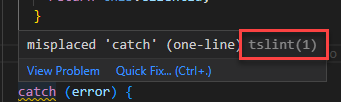
The Schematic workflow failed. See above.在源代码中,如果我创建了一个错误,我仍然可以看到它是tslint捡起来的。
我的角度依赖关系是
"devDependencies": {
"@angular-devkit/architect": "^0.1400.2",
"@angular-devkit/build-angular": "^14.0.2",
"@angular-devkit/core": "^14.0.2",
"@angular-devkit/schematics": "^14.0.2",
"@angular-eslint/builder": "14.0.0-alpha.3",
"@angular-eslint/eslint-plugin": "14.0.0-alpha.3",
"@angular-eslint/eslint-plugin-template": "14.0.0-alpha.3",
"@angular-eslint/schematics": "14.0.0-alpha.3",
"@angular-eslint/template-parser": "14.0.0-alpha.3",
"@angular/cli": "^14.0.2",
"@angular/compiler": "^14.0.2",
"@angular/compiler-cli": "^14.0.2",
"@angular/language-service": "^14.0.2",
"@ionic/angular-toolkit": "^2.0.0",
所以,我已经弄坏了一些东西,我想知道如何才能解决这个问题,并进行更新。
回答 1
Stack Overflow用户
回答已采纳
发布于 2022-06-20 10:35:56
在运行ng add命令后,安装依赖项时所得到的错误来自@ngrx/效果。这个软件包需要角13,但你已经安装了角14。它的接缝@ngrx/effects还不支持角14,请检查此版本的14.0.0-rc.0。
还要检查vscode插件,确保禁用茨林特和安装/启用埃斯林。我也给你换了你的皮棉配置。
如果同时安装了这两个插件,它会时不时地抛出奇怪的错误。
页面原文内容由Stack Overflow提供。腾讯云小微IT领域专用引擎提供翻译支持
原文链接:
https://stackoverflow.com/questions/72685084
复制相关文章
相似问题
腾讯云开发者

Copyright © 2013 - 2026 Tencent Cloud. All Rights Reserved. 腾讯云 版权所有
深圳市腾讯计算机系统有限公司 ICP备案/许可证号:粤B2-20090059  粤公网安备44030502008569号
腾讯云计算(北京)有限责任公司 京ICP证150476号 | 京ICP备11018762号