
如何在python (VScode)中创建多个终端
如何在python (VScode)中创建多个终端
提问于 2022-06-29 00:46:26
如何在python (VScode)中创建多个终端,以便在多个终端中同时运行相同的代码。我还需要知道如何同时打开多个.py文件(同时运行)。
我找到了一些运行.py文件的方法,类似于:
start /b python bot_1或
start bot_1
start bot_2
甚至无需使用修补程序就可以导入这些机器人
import bot1, bot2但不起作用。我试过用壳牌,但也没能让它起作用。
回答 2
Stack Overflow用户
发布于 2022-06-29 01:10:29
尝试multiprocessing将数据传递给其他cpu,同时运行它们。
请注意,交付数据将花费一些时间。
如果您的机器人很简单,或者不需要sleep,那么一个接一个地运行它们会更快。
bot1.py
from time import sleep

def bot1(num):
    sleep(2)
    print(f'This is bot1, num: {num}')
bot2.py
from time import sleep

def bot2():
    sleep(2)
    print('This is bot2')
main.py
import multiprocessing as mp
import bot1, bot2

if __name__ == '__main__':
    process_list = []
    for i in range(5):
        process_list.append(mp.Process(target=bot1, args=(i,)))
    process_list.append(mp.Process(target=bot2))

    for p in process_list:
        p.start()
    for p in process_list:
        p.join()
输出
[Running] python -u "d:\Documents\python\projects\test\main.py"
This is bot1, num: 0
This is bot1, num: 2
This is bot1, num: 3
This is bot1, num: 1
This is bot2
This is bot1, num: 4

[Done] exited with code=0 in 2.257 secondsStack Overflow用户
发布于 2022-06-29 02:54:48
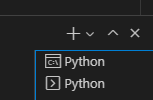
您可以单击终端上的加号来打开新的终端。
在运行文件时,可以在另一个终端中手动输入代码执行文件。
例如,
from time import sleep


def a():
sleep(10)
print("sleep")

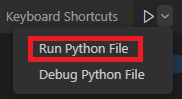
a()首先,我们可以使用Run Python File
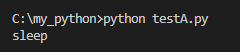
另一方面,我们可以在另一个终端中使用命令python testA.py。
页面原文内容由Stack Overflow提供。腾讯云小微IT领域专用引擎提供翻译支持
原文链接:
https://stackoverflow.com/questions/72794596
复制相关文章
相似问题
腾讯云开发者

Copyright © 2013 - 2026 Tencent Cloud. All Rights Reserved. 腾讯云 版权所有
深圳市腾讯计算机系统有限公司 ICP备案/许可证号:粤B2-20090059  粤公网安备44030502008569号
腾讯云计算(北京)有限责任公司 京ICP证150476号 | 京ICP备11018762号