
将水晶报表导出到.NET中的pdf时出错“数据库登录失败”
将水晶报表导出到.NET中的pdf时出错“数据库登录失败”
提问于 2021-11-18 13:50:20
我们已经在.NET中构建了一个web服务来将一个水晶报告导出到pdf中,并且它在开发机器上按预期工作,但是一旦我们在生产服务器中使用IIS部署,就会出现错误“数据库登录失败”。
下面的是为将晶体报告导出到pdf而开发的代码
public class CryRepWebService : System.Web.Services.WebService
    {
        [WebMethod]
        public string InvoiceReportCry(int Invoiceid, int docType, string Proj)
        {
            string project;
            int docTypes;
            int InvoiceIds;
            try
            {
                ReportDocument cryRpt = new ReportDocument();
                cryRpt.Load(Server.MapPath("~/Reports/myreport.rpt"));
                string USERNAME = "useruser";//Default user Name
                string PWD = "pwdpwd$";//Default pwd Name
                string DSN_NAME = "mydsn";
                string INITIAL_CATALOG = "dbname";
                string serverName = (string)Registry.GetValue(@"HKEY_LOCAL_MACHINE\SOFTWARE\ODBC\ODBC.INI\" + DSN_NAME, "Server", null);
                cryRpt.SetDatabaseLogon(USERNAME, PWD, serverName, INITIAL_CATALOG);
                // create the connection information
                ConnectionInfo conRpt = new ConnectionInfo();
                conRpt.ServerName = serverName;
                conRpt.DatabaseName = INITIAL_CATALOG;
                conRpt.UserID = USERNAME;
                conRpt.Password =PWD;
                // apply connection information to the report tables
                Tables rptTables = cryRpt.Database.Tables;
                for (int i = 0; i < rptTables.Count; i++)
                {
                    CrystalDecisions.CrystalReports.Engine.Table rptTable = rptTables[i];
                    TableLogOnInfo tblInfo = rptTable.LogOnInfo;
                    tblInfo.ConnectionInfo = conRpt;
                    // next table
                }
                // if the report contains sub reports, you will need to set the connection info there too
                if (cryRpt.Subreports.Count > 0)
                {
                    for (int i = 0; i < cryRpt.Subreports.Count; i++)
                    {
                        using (ReportDocument rptSub = cryRpt.OpenSubreport(cryRpt.Subreports[i].Name))
                        {
                            Tables rptTables1 = rptSub.Database.Tables;
                            for (int j = 0; j < rptTables.Count; j++)
                            {
                                CrystalDecisions.CrystalReports.Engine.Table rptTable = rptTables1[i];
                                TableLogOnInfo tblInfo = rptTable.LogOnInfo;
                                tblInfo.ConnectionInfo = conRpt;
                                // next table
                            }
                            rptSub.Close();
                        }
                    }
                }
                ParameterValues crParameterValues = new ParameterValues();
                ParameterDiscreteValue crParameterDiscreteValue = new ParameterDiscreteValue();
                ParameterDiscreteValue crParameterDiscreteValue1 = new ParameterDiscreteValue();
                ParameterDiscreteValue crParameterDiscreteValue2 = new ParameterDiscreteValue();

                cryRpt.SetParameterValue("@Invoiceid", Invoiceid);
                cryRpt.SetParameterValue("@docType", docType);
                cryRpt.SetParameterValue("@Proj", Proj);
                project = Proj;
                docTypes = docType;
                InvoiceIds = Invoiceid;
                bool folderExists = Directory.Exists(@"D:\CrystalReports\Test_Pdf");
                if (!folderExists)
                    Directory.CreateDirectory(@"D:\CrystalReports\Test_Pdf");
                cryRpt.ExportToDisk(ExportFormatType.PortableDocFormat, @"D:\CrystalReports\Test_Pdf\test-" + Invoiceid + ".pdf");
                return project + InvoiceIds + docTypes;
            }
            catch (Exception ex)
            {
                ExceptionLogging.SendErrorToText(ex);
                return null;
            }
        }
}下面的是两个环境的技术规范:
开发系统:
Windows 7 Professional (64-bit)
Visual Studio 2015       Sql
Server 2012
ODBC Driver - Sql Server
SAP Crystal Reports 2016 (SP6) (version 14.2.6.2839)
SAP Crystal Reports runtime engine for .NET Framework(64-bit)(version 13.0.30.3805)
SAP Crystal Reports, version for Microsoft Visual Studio (version 13.0.30.3805)
IIS (7.5)
生产服务器:
  Windows Server 2012 R2 Standard (64-bit)
  Visual Studio 2015
  Sql Server 2019
  ODBC Driver - Sql Server Native Client 10.0
  SAP Crystal Reports 2016 (SP4) (version 14.2.4.2410)
  SAP Crystal Reports 2016 (SP9) update (version 14.2.9.3791)
  SAP Crystal Reports runtime engine for .NET Framework(64-bit) (version 13.0.30.3805)
  SAP Crystal Reports, version for Microsoft Visual Studio (version 13.0.30.3805)
  IIS (8.5)
有人能帮我们找个办法试试吗。
提前谢谢。
丸红A
回答 1
Stack Overflow用户
发布于 2021-11-19 06:32:39
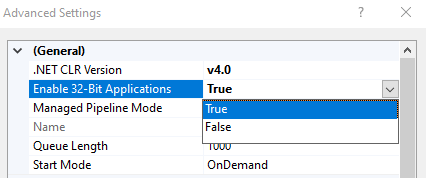
尝试在IIS服务器的应用程序池中启用32位应用程序。
- 打开IIS并单击左侧窗口中的应用程序池。
- 右键单击要为其启用32位应用程序的应用程序池,然后单击上下文菜单中的高级设置选项。在高级设置窗口中的
- ,查找
Enable 32-Bit Applications属性,将其设置为True并单击OK按钮。
页面原文内容由Stack Overflow提供。腾讯云小微IT领域专用引擎提供翻译支持
原文链接:
https://stackoverflow.com/questions/70021052
复制相关文章
相似问题
腾讯云开发者

Copyright © 2013 - 2026 Tencent Cloud. All Rights Reserved. 腾讯云 版权所有
深圳市腾讯计算机系统有限公司 ICP备案/许可证号:粤B2-20090059  粤公网安备44030502008569号
腾讯云计算(北京)有限责任公司 京ICP证150476号 | 京ICP备11018762号