
我可以使用seaborn.countplot显示数据吗?
我可以使用seaborn.countplot显示数据吗?
提问于 2020-07-12 17:23:06
我很难用海运显示一些人力资源分数数据。我想使用一个计数图来可视化与雇员在y轴上的数据,得分类别作为色调,以及他们在x轴上分数的值范围。
import pandas as pd
import numpy as np
import seaborn as sns
import matplotlib.pyplot as plt

btraits = {'Behavioural Traits': ['Communicaiton', 'Teamwork', 'Leadership', 'Negotiation', 'Agreeableness'],
'James':[0,-2,0,-2,-2],
'John':[2,0,0,2,-1],
'Gary':[0,-1,0,1,-3],
'Raymond':[3,-5,0,1,0]}
df = pd.DataFrame(btraits)
df.set_index('Behavioural Traits', inplace=True)

sns.countplot(data=btraits, y='columns', hue='index')回答 2
Stack Overflow用户
回答已采纳
发布于 2020-07-12 19:42:25
import pandas as pd
import seaborn as sns
import matplotlib.pyplot as plt

btraits = {'Behavioural Traits': ['Communicaiton', 'Teamwork', 'Leadership', 'Negotiation', 'Agreeableness'],
           'James': [0,-2,0,-2,-2],
           'John': [2,0,0,2,-1],
           'Gary': [0,-1,0,1,-3],
           'Raymond': [3,-5,0,1,0]}

df = pd.DataFrame(btraits)
df.set_index('Behavioural Traits', inplace=True)

                    James  John  Gary  Raymond
Behavioural Traits
Communicaiton           0     2     0        3
Teamwork               -2     0    -1       -5
Leadership              0     0     0        0
Negotiation            -2     2     1        1
Agreeableness          -2    -1    -3        0

# stack the columns
dfs = df.stack().reset_index().rename(columns={'level_1': 'names', 0: 'values'})

   Behavioural Traits    names  values
0       Communicaiton    James       0
1       Communicaiton     John       2
2       Communicaiton     Gary       0
3       Communicaiton  Raymond       3
4            Teamwork    James      -2
5            Teamwork     John       0
6            Teamwork     Gary      -1
7            Teamwork  Raymond      -5
8          Leadership    James       0
9          Leadership     John       0
10         Leadership     Gary       0
11         Leadership  Raymond       0
12        Negotiation    James      -2
13        Negotiation     John       2
14        Negotiation     Gary       1
15        Negotiation  Raymond       1
16      Agreeableness    James      -2
17      Agreeableness     John      -1
18      Agreeableness     Gary      -3
19      Agreeableness  Raymond       0
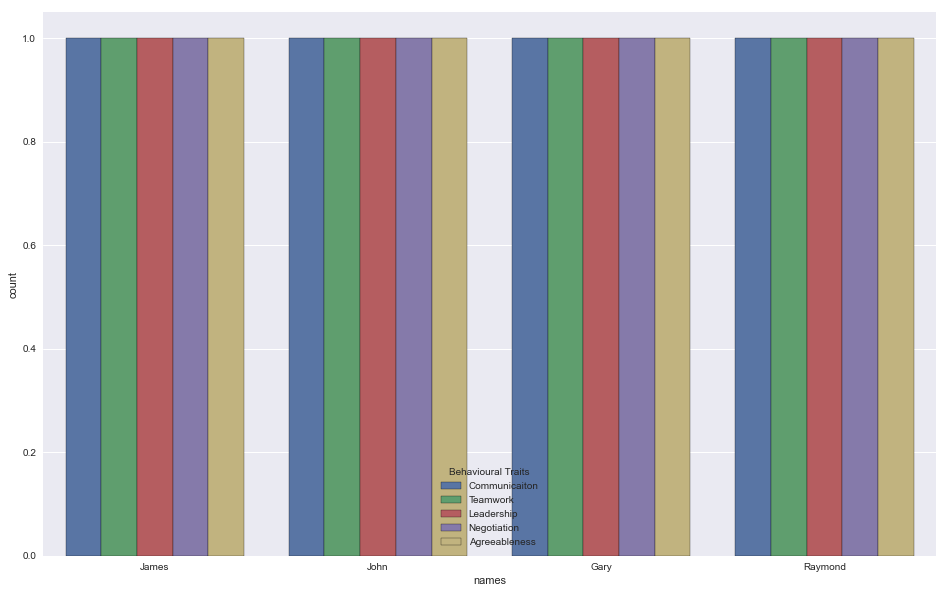
计数图
sns.countplot(data=dfs, x='names', hue='Behavioural Traits')
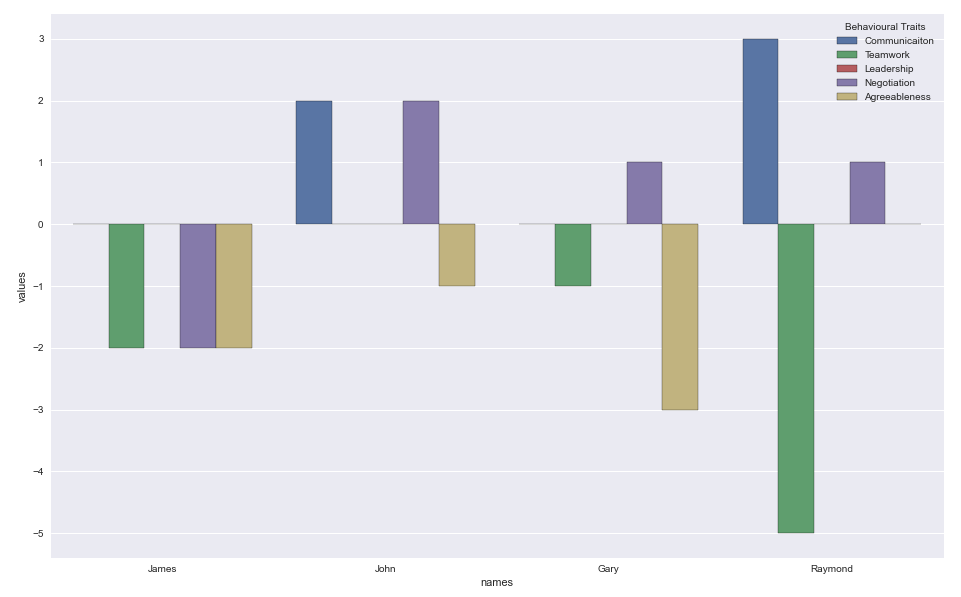
桶形
sns.barplot(x='names', y='values', hue='Behavioural Traits', data=dfs)
Stack Overflow用户
发布于 2020-07-12 20:24:37
Countplot基本上返回事件的计数。
您可以为每个分类变量尝试barplot。例:sns.barplot(x=df.index,y='James',data=df)
页面原文内容由Stack Overflow提供。腾讯云小微IT领域专用引擎提供翻译支持
原文链接:
https://stackoverflow.com/questions/62864233
复制相关文章
相似问题
腾讯云开发者

Copyright © 2013 - 2026 Tencent Cloud. All Rights Reserved. 腾讯云 版权所有
深圳市腾讯计算机系统有限公司 ICP备案/许可证号:粤B2-20090059  粤公网安备44030502008569号
腾讯云计算(北京)有限责任公司 京ICP证150476号 | 京ICP备11018762号