
使用屏幕上的可单击链接对列表中的本机创建部分作出反应。
我试图在Settings Page中创建一个类似于React Native的
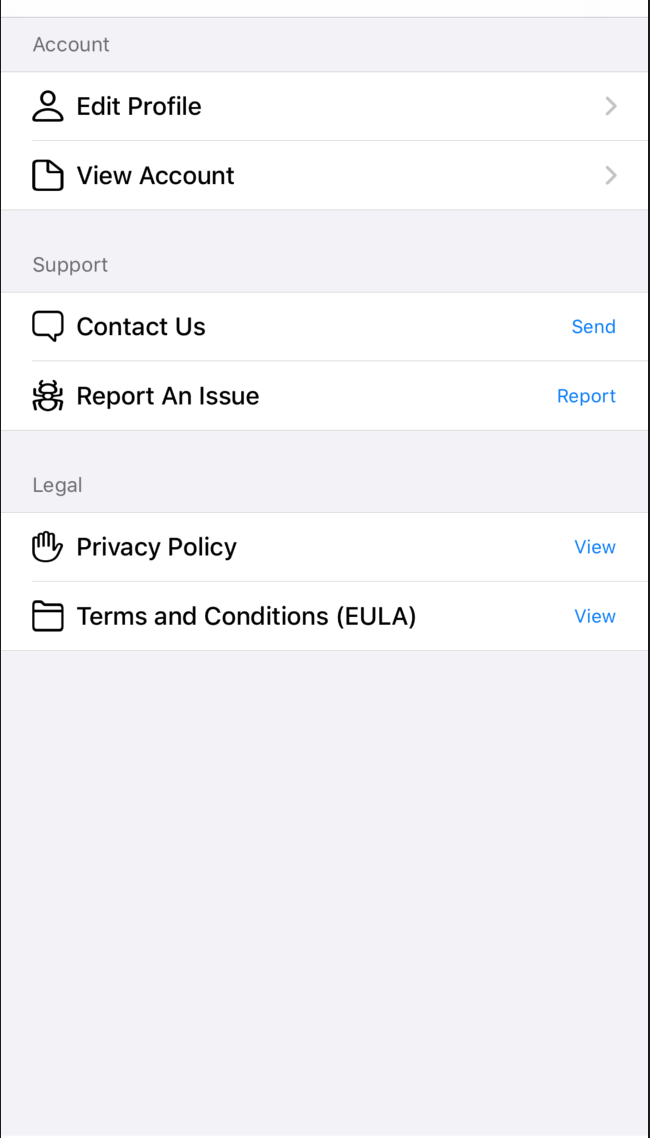
在react native中使用react native,但我不确定如何传入navigation以链接到另一个view。
例如
- 当我单击
Edit Profile时,这应该会带我到另一个页面。 - 当我点击
Privacy policy时,这应该会打开带有链接的网页。
更新代码
settingsNavigator.js
import React from 'react';
import { createStackNavigator } from "@react-navigation/stack";

import SettingsScreen from "../screens/settingsScreen";
import EditProfileScreen from "../screens/editProfileScreen"

const SettingsStack = createStackNavigator();

const SettingsNavigator = () => (
    <SettingsStack.Navigator>
        <SettingsStack.Screen name="Settings" component={SettingsScreen} options={{ headerShown: false }} />
        <SettingsStack.Screen name="EditProfileScreen" component={EditProfileScreen} options={{ title: 'Edit Profile' }} />
    </SettingsStack.Navigator>
)

export default SettingsNavigator
settingScreen.js
import React from 'react';
import { Text, StyleSheet, TouchableOpacity, Linking } from 'react-native';
import { Card } from 'react-native-paper'

import Screen from '../Components/Screen'

function SettingsScreen({navigation}) {
    return (
        <Screen style={styles.screen}>
            <TouchableOpacity onPress={() => navigation.navigate("EditProfileScreen")}>
                <Card style={styles.list} >
                    <Text>Edit Profile</Text>
                </Card>
            </TouchableOpacity>
        </Screen>
    )
}

const styles = StyleSheet.create({
    list: {
        padding: 20,
        backgroundColor: 'white',
        borderRadius: 5,
        marginTop: 10,
      },
})

export default SettingsScreen
editProfileScreen
import React from 'react';
import { Text, StyleSheet} from 'react-native';

import Screen from '../Components/Screen'

function EditProfileScreen({navigation}) {
    return (
        <Screen style={styles.screen}>
            <Text>Edit Profile Screen</Text>
        </Screen>
    )
}

const styles = StyleSheet.create({

})

export default EditProfileScreen
错误得到:
The action 'NAVIGATE' with payload {"name":"EditProfileScreen"} was not handled by any navigator.

Do you have a screen named 'EditProfileScreen'?回答 3
Stack Overflow用户
发布于 2021-01-09 21:40:40
使用反应导航从一个屏幕导航到另一个屏幕,并在浏览器中使用react-native open的Linking组件。
工作应用程序: 世博小吃
应用程序输出:
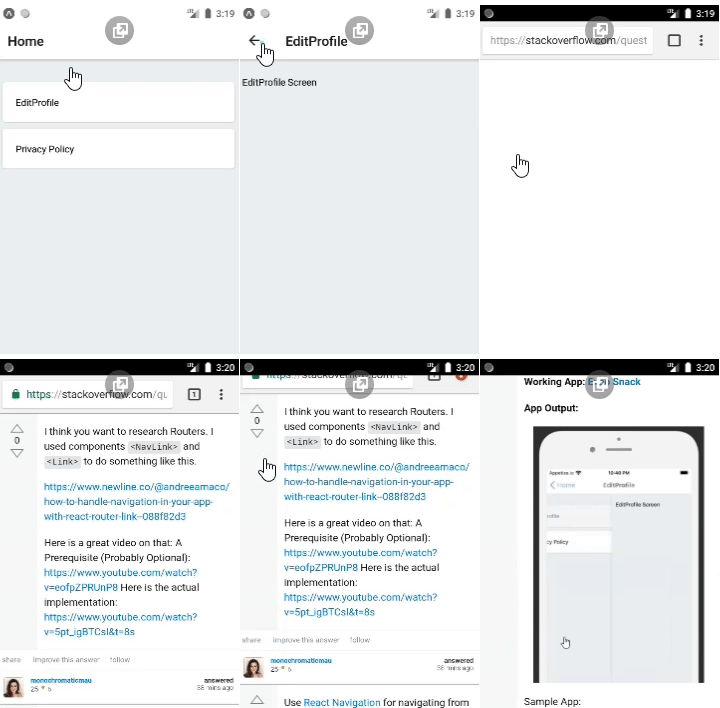
示例应用程序:
import * as React from 'react';
import {
  Text,
  View,
  StyleSheet,
  TouchableOpacity,
  Linking,
} from 'react-native';
import Constants from 'expo-constants';

import { Card } from 'react-native-paper';

import { NavigationContainer } from '@react-navigation/native';
import { createStackNavigator } from '@react-navigation/stack';
const Stack = createStackNavigator();

const url =
  'https://stackoverflow.com/questions/65647568/react-native-creating-sections-in-a-list-with-clickable-link-to-screen#65647648';

export default function App() {
  return (
    <NavigationContainer>
      <Stack.Navigator>
        <Stack.Screen name={'Home'} component={Home} />

        <Stack.Screen name={'EditProfile'} component={EditProfile} />
      </Stack.Navigator>
    </NavigationContainer>
  );
}

const Home = ({ navigation }) => {
  return (
    <View style={styles.container}>
      <TouchableOpacity onPress={() => navigation.navigate('EditProfile')}>
        <Card style={styles.list}>
          <Text>EditProfile</Text>
        </Card>
      </TouchableOpacity>
      <TouchableOpacity onPress={() => Linking.openURL(url)}>
        <Card style={styles.list}>
          <Text>Privacy Policy</Text>
        </Card>
      </TouchableOpacity>
    </View>
  );
};
const EditProfile = ({ navigation }) => {
  return (
    <View style={styles.container}>
      <Text style={styles.text}>EditProfile Screen</Text>
    </View>
  );
};


const styles = StyleSheet.create({
  container: {
    flex: 1,
    paddingTop: Constants.statusBarHeight,
    backgroundColor: '#ecf0f1',
    padding: 8,
  },
  list: {
    padding: 20,
    backgroundColor: 'white',
    borderRadius: 5,
    marginTop: 10,
  },
});Stack Overflow用户
发布于 2021-01-09 21:11:07
这取决于您使用的导航模块。我推荐反应导航。使用React,您可以通过props.Provided访问每个屏幕上的导航对象--屏幕存在于堆栈中,或者您以前导航过。
您可以浏览onPress事件处理程序,如下所示:
onPress={() => navigation.navigate('EditProfile')}不要忘了事先阅读道具上的导航。
function SettingsPage({ navigation }) {
  return (
    <View style={{ flex: 1 }}>
     // UI THINGS
    </View>
  );
}Stack Overflow用户
发布于 2021-01-09 21:11:24
我觉得你想研究路由器。我使用组件<NavLink>和<Link>来做这样的事情。
下面是一个很好的视频:一个先决条件(可能是可选的):https://www.youtube.com/watch?v=eofpZPRUnP8,这里是实际的实现:igBTCsI&t=8s
https://stackoverflow.com/questions/65647568
复制相似问题
腾讯云开发者

Copyright © 2013 - 2026 Tencent Cloud. All Rights Reserved. 腾讯云 版权所有
深圳市腾讯计算机系统有限公司 ICP备案/许可证号:粤B2-20090059  粤公网安备44030502008569号
腾讯云计算(北京)有限责任公司 京ICP证150476号 | 京ICP备11018762号