
旋转界面方向时将contentOffset保持在UICollectionView中
我正在尝试处理UICollectionViewController中的接口方向更改。我想要实现的是,在一个接口旋转之后,我想拥有相同的contentOffset。意思是,它应该与边界变化的比率相对应。
从纵向开始,内容偏移量为{bounds.size.width * 2,0}…
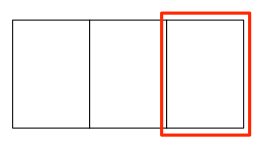
…应该以{bounds.size.width * 2,0} (反之亦然)在景观中产生内容偏移。
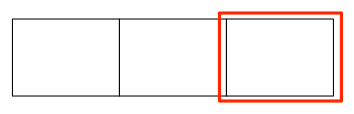
计算新的偏移量不是问题,但不知道,在哪里(或何时)设置它,以获得一个顺利的动画。我这样做的目的是使willRotateToInterfaceOrientation:duration:中的布局无效,并在didRotateFromInterfaceOrientation:中重置内容偏移量
- (void)willRotateToInterfaceOrientation:(UIInterfaceOrientation)toInterfaceOrientation
                                duration:(NSTimeInterval)duration;
{
    self.scrollPositionBeforeRotation = CGPointMake(self.collectionView.contentOffset.x / self.collectionView.contentSize.width,
                                                    self.collectionView.contentOffset.y / self.collectionView.contentSize.height);
    [self.collectionView.collectionViewLayout invalidateLayout];
}

- (void)didRotateFromInterfaceOrientation:(UIInterfaceOrientation)fromInterfaceOrientation;
{
    CGPoint newContentOffset = CGPointMake(self.scrollPositionBeforeRotation.x * self.collectionView.contentSize.width,
                                           self.scrollPositionBeforeRotation.y * self.collectionView.contentSize.height);
    [self.collectionView newContentOffset animated:YES];
}
这会改变旋转后的内容偏移量。
我如何在轮调期间设置它?我试图在willAnimateRotationToInterfaceOrientation:duration:中设置新的内容偏移量,但这会导致非常奇怪的行为。
在我的GitHub项目中可以找到一个例子。
回答 24
Stack Overflow用户
发布于 2017-04-10 12:05:17
您可以在视图控制器中这样做:
override func viewWillTransition(to size: CGSize, with coordinator: UIViewControllerTransitionCoordinator) {
    super.viewWillTransition(to: size, with: coordinator)

    guard let collectionView = collectionView else { return }
    let offset = collectionView.contentOffset
    let width = collectionView.bounds.size.width

    let index = round(offset.x / width)
    let newOffset = CGPoint(x: index * size.width, y: offset.y)

    coordinator.animate(alongsideTransition: { (context) in
        collectionView.reloadData()
        collectionView.setContentOffset(newOffset, animated: false)
    }, completion: nil)
}Stack Overflow用户
发布于 2014-03-11 20:25:04
解决方案1,“只管折断”
如果只需要确保contentOffset以正确的位置结束,则可以创建UICollectionViewLayout的子类并实现targetContentOffsetForProposedContentOffset:方法。例如,您可以这样做来计算页面:
- (CGPoint)targetContentOffsetForProposedContentOffset:(CGPoint)proposedContentOffset
{
    NSInteger page = ceil(proposedContentOffset.x / [self.collectionView frame].size.width);
    return CGPointMake(page * [self.collectionView frame].size.width, 0);
}
但是你将要面对的问题是,这个过渡的动画是非常奇怪的。我对我的案子所做的(几乎和你的一样)是:
解决方案2,“光滑动画”
1)首先,我设置了单元格大小,它可以由收集器视图:布局: size sizeForItemAtIndexPath:委托方法管理,如下所示:
- (CGSize)collectionView:(UICollectionView *)collectionView
                  layout:(UICollectionViewLayout  *)collectionViewLayout
  sizeForItemAtIndexPath:(NSIndexPath *)indexPath
{
    return [self.view bounds].size;
}
注意,self.view边界将根据设备的旋转而变化。
2)当设备即将旋转时,我在集合视图的顶部添加一个带有所有大小掩码的imageView。这个视图实际上会隐藏collectionView的怪异之处(因为它就在上面),而且由于willRotatoToInterfaceOrientation:方法是在动画块中调用的,所以它会相应地旋转。我还将根据显示的contentOffset保留下一个indexPath,以便在旋转完成后修复contentOffset:
- (void)willRotateToInterfaceOrientation:(UIInterfaceOrientation)toInterfaceOrientation
                                duration:(NSTimeInterval)duration
{
    // Gets the first (and only) visible cell.
    NSIndexPath *indexPath = [[self.collectionView indexPathsForVisibleItems] firstObject];
    KSPhotoViewCell *cell = (id)[self.collectionView cellForItemAtIndexPath:indexPath];

    // Creates a temporary imageView that will occupy the full screen and rotate.
    UIImageView *imageView = [[UIImageView alloc] initWithImage:[[cell imageView] image]];
    [imageView setFrame:[self.view bounds]];
    [imageView setTag:kTemporaryImageTag];
    [imageView setBackgroundColor:[UIColor blackColor]];
    [imageView setContentMode:[[cell imageView] contentMode]];
    [imageView setAutoresizingMask:0xff];
    [self.view insertSubview:imageView aboveSubview:self.collectionView];

    // Invalidate layout and calculate (next) contentOffset.
    contentOffsetAfterRotation = CGPointMake(indexPath.item * [self.view bounds].size.height, 0);
    [[self.collectionView collectionViewLayout] invalidateLayout];
}
注意,我的UICollectionViewCell子类有一个公共imageView属性。
3)最后,最后一步是将内容偏移“抓取”到有效页面,并删除临时图像视图。
- (void)didRotateFromInterfaceOrientation:(UIInterfaceOrientation)fromInterfaceOrientation
{
    [self.collectionView setContentOffset:contentOffsetAfterRotation];
    [[self.view viewWithTag:kTemporaryImageTag] removeFromSuperview];
}Stack Overflow用户
发布于 2014-03-18 20:58:32
上面的“快速”回答对我没有用,因为它经常不会在旋转之前看到的项目上结束。因此,我导出了一个流布局,它使用一个焦点项(如果设置了)来计算内容偏移量。我在willAnimateRotationToInterfaceOrientation中设置项目,并在didRotateFromInterfaceOrientation中清除它。嵌入调整似乎需要在IOS7上,因为集合视图可以在顶部栏下进行布局。
@interface HintedFlowLayout : UICollectionViewFlowLayout
@property (strong)NSIndexPath* pathForFocusItem;
@end

@implementation HintedFlowLayout

-(CGPoint)targetContentOffsetForProposedContentOffset:(CGPoint)proposedContentOffset
{
    if (self.pathForFocusItem) {
        UICollectionViewLayoutAttributes* layoutAttrs = [self layoutAttributesForItemAtIndexPath:self.pathForFocusItem];
        return CGPointMake(layoutAttrs.frame.origin.x - self.collectionView.contentInset.left, layoutAttrs.frame.origin.y-self.collectionView.contentInset.top);
    }else{
        return [super targetContentOffsetForProposedContentOffset:proposedContentOffset];
    }
}
@endhttps://stackoverflow.com/questions/13490065
复制相似问题
腾讯云开发者

Copyright © 2013 - 2026 Tencent Cloud. All Rights Reserved. 腾讯云 版权所有
深圳市腾讯计算机系统有限公司 ICP备案/许可证号:粤B2-20090059  粤公网安备44030502008569号
腾讯云计算(北京)有限责任公司 京ICP证150476号 | 京ICP备11018762号