
统一:光线广播没有检测到对象以进行突出显示。
在对象选择方面,我遵循了这个教程。但是,当我导入我的.obj资产并尝试选择/高亮显示它们时,光线传送器似乎不会将它们拾取起来。当鼠标单击我的.obj对象时,什么都不会发生。我增加了必要的对撞机(盒子对撞机,甚至网格对撞机),什么也没有发生。
我做错了什么?
我没有从源代码中更改代码。我只是将我的目标文件导入到场景中,并添加了必要的物理信息。
我想做的就是通过.obj高亮显示我的onMouseDown文件。
AppRoot.cs:
using UnityEngine;
using System;

public class TransformObject
{
    ///////////////////////////////////////////////////////////////////////////
    #region Variables

    // variables

    #if UNITY_STANDALONE_WIN || UNITY_STANDALONE_OSX || UNITY_WEBPLAYER
    private float RotationSpeed = 1500;
    private float MoveSpeed = 50.0f;
    private float ZoomSpeed = 15.3f;
    #endif // UNITY_STANDALONE_WIN || UNITY_STANDALONE_OSX || UNITY_WEBPLAYER

    public float MinDist = 2.0f;
    public float MaxDist = 50.0f;

    private Transform mMoveObject = null;

    #endregion
    ///////////////////////////////////////////////////////////////////////////

    ///////////////////////////////////////////////////////////////////////////
    #region Public methods

    /// <summary>
    ///
    /// </summary>
    public TransformObject()
    {
        EnabledMoving = true;
    }

    /// <summary>
    /// Sets transform that will be used as "center" of the rotate / pan / zoom
    /// </summary>
    public void SetTransformRotateAround(Transform goMove)
    {
        mMoveObject = goMove;
        if (mMoveObject == null)
        {
            Debug.LogWarning("Error! Cannot find object!");
            return;
        }
    }

    public void Update()
    {
        if (!EnabledMoving)
        {
            return;
        }

        Vector3 dir = mMoveObject.position - Camera.main.transform.position;
        float dist = Math.Abs(dir.magnitude);

        Vector3 camDir = Camera.main.transform.forward;
        Vector3 camLeft = Vector3.Cross(camDir, Vector3.down);
        Vector3 camDown = Vector3.Cross(camDir, camLeft);
        //Vector3 camUp = Vector3.Cross(camLeft, camDir);

    #if UNITY_STANDALONE_WIN || UNITY_STANDALONE_OSX || UNITY_WEBPLAYER

        float dx = Input.GetAxis("Mouse X");
        float dy = Input.GetAxis("Mouse Y");

        // rotate
        if (Input.GetMouseButton(0))
        {
            mMoveObject.Rotate(camLeft, dy * RotationSpeed * Time.deltaTime, Space.World);
            mMoveObject.Rotate(Vector3.down, dx * RotationSpeed * Time.deltaTime, Space.Self);
        }

        // move
        if (Input.GetMouseButton(1))
        {
            Vector3 camPos = Camera.main.transform.position;
            camPos += -camLeft * MoveSpeed * dx * Time.deltaTime;
            camPos += -camDown * MoveSpeed * dy * Time.deltaTime;
            Camera.main.transform.position = camPos;
        }

        // zoom
        if (Input.GetAxis("Mouse ScrollWheel") > 0)
        {
            if (dist > MinDist)
            {
                mMoveObject.Translate(-dir * ZoomSpeed * Time.deltaTime, Space.World);
            }
        }

        if (Input.GetAxis("Mouse ScrollWheel") < 0)
        {
            if (dist < MaxDist)
            {
                mMoveObject.Translate(dir * ZoomSpeed * Time.deltaTime, Space.World);
            }
        }

    #endif // UNITY_STANDALONE_WIN || UNITY_STANDALONE_OSX || UNITY_WEBPLAYER
    }
    #endregion
    ///////////////////////////////////////////////////////////////////////////

    ///////////////////////////////////////////////////////////////////////////
    #region Properties
    /// <summary>
    /// Gets or set value indicating if transformation is enabled
    /// </summary>
    public bool EnabledMoving
    {
        get;
        set;
    }

    /// <summary>
    /// Gets game object that moves around
    /// </summary>
    public Transform MoveObject
    {
        get
        {
            return mMoveObject;
        }
    }

    #endregion
    ///////////////////////////////////////////////////////////////////////////
}
TransformObject.cs
using UnityEngine;
using System;

public class TransformObject
{
    ///////////////////////////////////////////////////////////////////////////
    #region Variables

    // variables

    #if UNITY_STANDALONE_WIN || UNITY_STANDALONE_OSX || UNITY_WEBPLAYER
    private float RotationSpeed = 1500;
    private float MoveSpeed = 50.0f;
    private float ZoomSpeed = 15.3f;
    #endif // UNITY_STANDALONE_WIN || UNITY_STANDALONE_OSX || UNITY_WEBPLAYER

    public float MinDist = 2.0f;
    public float MaxDist = 50.0f;

    private Transform mMoveObject = null;

    #endregion
    ///////////////////////////////////////////////////////////////////////////

    ///////////////////////////////////////////////////////////////////////////
    #region Public methods

    /// <summary>
    ///
    /// </summary>
    public TransformObject()
    {
        EnabledMoving = true;
    }

    /// <summary>
    /// Sets transform that will be used as "center" of the rotate / pan / zoom
    /// </summary>
    public void SetTransformRotateAround(Transform goMove)
    {
        mMoveObject = goMove;
        if (mMoveObject == null)
        {
            Debug.LogWarning("Error! Cannot find object!");
            return;
        }
    }

    public void Update()
    {
        if (!EnabledMoving)
        {
            return;
        }

        Vector3 dir = mMoveObject.position - Camera.main.transform.position;
        float dist = Math.Abs(dir.magnitude);

        Vector3 camDir = Camera.main.transform.forward;
        Vector3 camLeft = Vector3.Cross(camDir, Vector3.down);
        Vector3 camDown = Vector3.Cross(camDir, camLeft);
        //Vector3 camUp = Vector3.Cross(camLeft, camDir);

    #if UNITY_STANDALONE_WIN || UNITY_STANDALONE_OSX || UNITY_WEBPLAYER

        float dx = Input.GetAxis("Mouse X");
        float dy = Input.GetAxis("Mouse Y");

        // rotate
        if (Input.GetMouseButton(0))
        {
            mMoveObject.Rotate(camLeft, dy * RotationSpeed * Time.deltaTime, Space.World);
            mMoveObject.Rotate(Vector3.down, dx * RotationSpeed * Time.deltaTime, Space.Self);
        }

        // move
        if (Input.GetMouseButton(1))
        {
            Vector3 camPos = Camera.main.transform.position;
            camPos += -camLeft * MoveSpeed * dx * Time.deltaTime;
            camPos += -camDown * MoveSpeed * dy * Time.deltaTime;
            Camera.main.transform.position = camPos;
        }

        // zoom
        if (Input.GetAxis("Mouse ScrollWheel") > 0)
        {
            if (dist > MinDist)
            {
                mMoveObject.Translate(-dir * ZoomSpeed * Time.deltaTime, Space.World);
            }
        }

        if (Input.GetAxis("Mouse ScrollWheel") < 0)
        {
            if (dist < MaxDist)
            {
                mMoveObject.Translate(dir * ZoomSpeed * Time.deltaTime, Space.World);
            }
        }

    #endif // UNITY_STANDALONE_WIN || UNITY_STANDALONE_OSX || UNITY_WEBPLAYER
    }
    #endregion
    ///////////////////////////////////////////////////////////////////////////

    ///////////////////////////////////////////////////////////////////////////
    #region Properties
    /// <summary>
    /// Gets or set value indicating if transformation is enabled
    /// </summary>
    public bool EnabledMoving
    {
        get;
        set;
    }

    /// <summary>
    /// Gets game object that moves around
    /// </summary>
    public Transform MoveObject
    {
        get
        {
            return mMoveObject;
        }
    }

    #endregion
    ///////////////////////////////////////////////////////////////////////////
}
Constants.cs:
using System;
using System.Collections.Generic;
using System.Linq;
using System.Text;

public class Constants
{
    public const float cMaxRayCastDistance = 1000.0f;
}回答 3
Stack Overflow用户
发布于 2013-12-09 22:45:03
其原因是"femur_left_1_7_dist/default“和"femur_left_1_7_prox/default”没有对撞机。因此,解决这个问题有两种方法:
- 在项目视图中选择"femur_left_1_7_dist“和"femur_left_1_7_prox",在导入设置中的检查器中选择"Generate”并按"Apply“按钮:
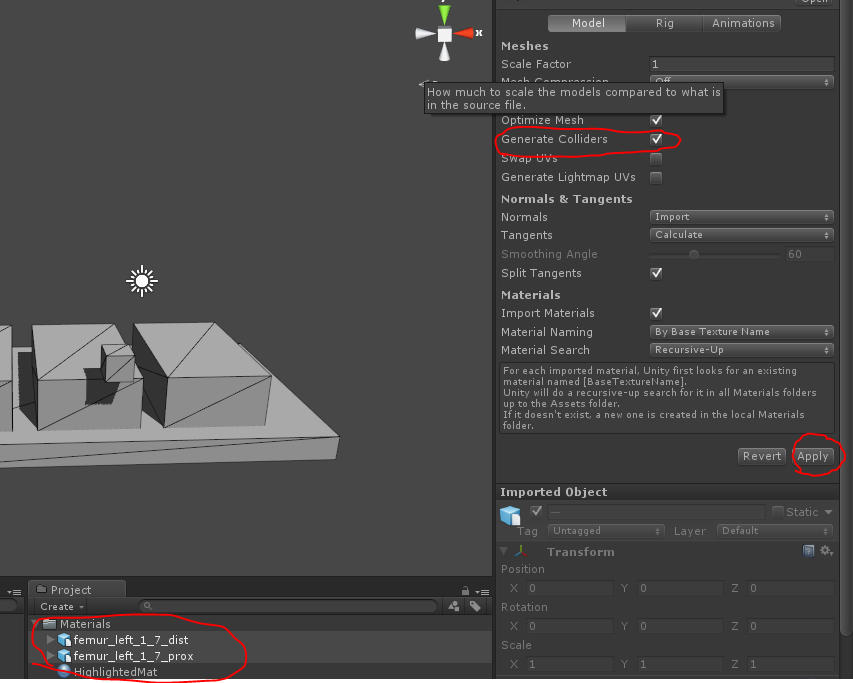
或
- 在场景中选择"femur_left_1_7_dist/default“,然后按下”Component/物理学/Box Collider";参见这里的结果:fix.zip
Stack Overflow用户
发布于 2013-12-06 19:22:56
造成这种情况的原因可能有几个,但以下是一些需要检查的事情。
- 确保您的GameObject有一个对撞机组件附加到它。
- 确保GameObjects层不被设置为忽略Raycast。
- 确保你是从正确的相机光线投射。
本教程似乎是使用默认相机的Raycast,确保您有一个相机在现场,它的标签设置为主相机。
Stack Overflow用户
发布于 2013-12-07 10:11:21
我在一个场景中使用了您的代码,其中有三个立方体(room0到room2)和一个平面(平面),它工作得很好。
但是您的代码有点奇怪,特别是TransformObject类。这个类应该是一个MonoBehaviour (脚本),并作为一个组件添加到与AppRoot脚本相同的GameObject中。
您甚至可以通过在RequireComponentAttribute上使用AppRoot类使其自动化。
那么,为什么您的代码在您的情况下不能工作呢?
- 在运行代码时是否尝试使用调试器来查看SelectObjectByMousePos()和SelectedObject是否被调用?
- 你想要使用的材料可能不适用于你的网格:试着用你的脚本和立方体(像我一样)来代替你的.obj
- 重写您的代码,以便TransformObject是一个TransformObject脚本。
- 如果您关注执行顺序,请参阅以下页面:http://docs.unity3d.com/Documentation/Components/class-ScriptExecution.html
- 检查碰撞矩阵,可能会禁用一些层到层的碰撞检测。
编辑:用非凸对撞机进行光线投射吗?
https://stackoverflow.com/questions/20431431
复制相似问题
腾讯云开发者

Copyright © 2013 - 2026 Tencent Cloud. All Rights Reserved. 腾讯云 版权所有
深圳市腾讯计算机系统有限公司 ICP备案/许可证号:粤B2-20090059  粤公网安备44030502008569号
腾讯云计算(北京)有限责任公司 京ICP证150476号 | 京ICP备11018762号