
复活节彩蛋-字母间距
复活节彩蛋-字母间距
提问于 2014-04-08 14:38:51
我做了一个小复活节彩蛋。当您悬停在h1标题上时,会创建字母,并将动画字母降到页面底部。我想在秋天的时候在字母之间留出更多的间距,这样它们就不会都在一起了。
为此,我做到了:
                myspan.css({
                    "color" : "Navy",
                    "position": "absolute",
                    "margin" : "20px",
                    "padding" : "20px",
                    "left": $(this).position().left,
                    "top": parent.height()
                });
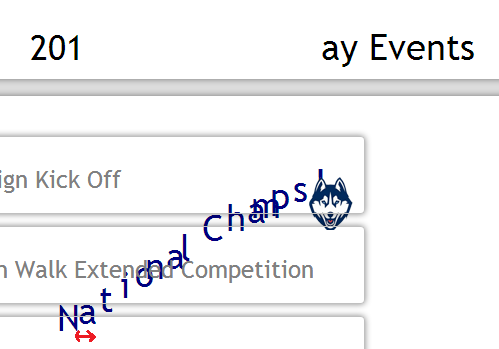
,但它不起作用。有什么想法吗?下面是代码:
            $(".title").lettering(); //splits H1 letters into individual spans
            $("h1 span").mouseenter(function () {

                var colors = ["White"],
                    rand = Math.floor((Math.random()*colors.length-1)+1),
                    string = "National Champs!",
                    letter = string.charAt(index),
                    myspan = $(document.createElement('span')),

                    parent = $(this).parent(),
                    val = $(this);

                if (index >= string.length) {
                    index = 0;
                }
                else {
                    index++;
                }

                myspan.append(letter);
                parent.append(myspan);
                myspan.css({
                    "color" : "Navy",
                    "position": "absolute",
                    "margin" : "20px",
                    "padding" : "20px",
                    "left": $(this).position().left,
                    "top": parent.height()
                });
                myspan.animate({"top": $(window).outerHeight()}, 9000, "linear", function() {
                    $(this).remove();
                });

                val.css({"color" : colors[rand]});

                setTimeout(function() {
                    val.css({"color" : "black"});
                    val.css({"font-size" : 35});
                    //index =0;
                },2000);
            });
编辑:
我做到了
myspan.css({
                    "color" : "Navy",
                    "position": "absolute",
                    "letter-spacing" : "2px",
                    "left": $(this).position().left,
                    "top": parent.height()
                });
这不管用
回答 2
Stack Overflow用户
回答已采纳
发布于 2014-04-08 14:45:40
使用css属性letter-spacing可能会有所帮助。
letter-spacing:2pxStack Overflow用户
发布于 2014-04-08 15:01:08
您需要为letter-spacing提供单元,仅值2并不意味着什么。我假设您是在考虑像素,所以在这种情况下,应该是:
myspan.css({
    "color" : "Navy",
    "position": "absolute",
    "letter-spacing" : "2px",
    "left": $(this).position().left,
    "top": parent.height()
});请看这个:https://developer.mozilla.org/en-US/docs/Web/CSS/letter-spacing
页面原文内容由Stack Overflow提供。腾讯云小微IT领域专用引擎提供翻译支持
原文链接:
https://stackoverflow.com/questions/22940342
复制相关文章
相似问题
腾讯云开发者

Copyright © 2013 - 2026 Tencent Cloud. All Rights Reserved. 腾讯云 版权所有
深圳市腾讯计算机系统有限公司 ICP备案/许可证号:粤B2-20090059  粤公网安备44030502008569号
腾讯云计算(北京)有限责任公司 京ICP证150476号 | 京ICP备11018762号