
SignalR网站在IIS上部署时返回404
在IIS中部署SignalR 1.3.1 .NET 4.0 WebForms网站时,我遇到了问题。该站点在Visual 2010中运行良好,但在使用已部署版本时返回“404-文件或目录未找到”。在幕后,404是在客户端请求negotiate.json文件的~/signalr/协商URL时出现的。以下是IIS的外观:
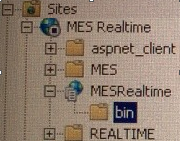
请注意,这里的bin文件夹只是我的.dll和.pdb的SignalR 1.3.1 .NET 4.0 WebForms网站。它没有别的东西了。
以下是我的Global.asax.cs代码:
    protected void Application_Start(object sender, EventArgs e)
    {
        // Register the error handling pipeline module
        GlobalHost.HubPipeline.AddModule(new ErrorHandlingPipelineModule());

        // Register the default hubs route: ~/signalr/hubs
        RouteTable.Routes.MapHubs(new HubConfiguration { EnableCrossDomain = true });
    }
以下是我的SignalR集线器代码:
public class EppafHub : Hub
{
    /// <summary>
    /// Sends notifications for new vehicle launches.
    /// </summary>
    public void SendVehicleUpdates()
    {
        try
        {
            Clients.All.SyncVehicleUpdates();
        }
        catch (Exception ex)
        {

            throw;
        }
    }
}
以下是我的WPF客户端代码:
ServicePointManager.DefaultConnectionLimit = 10;

// Establish a connection to the hub
var hubConnection = new HubConnection("http://MyServer:MyPort/");
hubProxy = hubConnection.CreateHubProxy("EppafHub");

// Subscribe to the server events
hubProxy.On("SyncVehicleUpdates", new Action(() => SynchronizeVehicleUpdates()));

// Start the connection to the hub
hubConnection.Start().Wait();
当我试图启动hubConnection时,我会得到404错误。我做错了什么?有什么方法可以从IIS浏览集线器,看看是部署问题还是代码问题?我看到了类似的问题,但没有一个解决方案对我有用。
我还直接在SignalR服务器上安装了各种IIS包。
我还使用以下命令清除了Asp.NET缓存:
net stop w3svc
Remove-Item -Path "C:\Windows\Microsoft.NET\Framework64\v4.0.30319\Temporary ASP.NET Files\root\*" -Force -Recurse
net start w3svc回答 3
Stack Overflow用户
发布于 2015-01-30 18:23:17
原来,这是操作系统的问题。在Windows 2008 R2中,一切都运行良好,而在Windows 2008中不工作。
Stack Overflow用户
发布于 2014-10-14 23:55:06
我得到了同样的错误,并将SignalR包添加到IIS计算机中解决了这个问题( IIS与我的dev不同)。
- 从nuget.exe下载http://nuget.org/nuget.exe。
- 启动cmd shell (作为管理员)并导航到您的web目录。(不确定这是必需的,但这是我为使它发挥作用所做的工作的一部分。) c:\inetpub\wwwroot>Nuget安装Microsoft.AspNet.SignalR c:\inetpub\wwwroot>Nuget安装Microsoft.Owin.Cors
- 在cmd外壳导航门中 C:\Windows\Microsoft.NET\Framework\v4.0.3031
- 运行aspnet_regiis命令: C:\Windows\Microsoft.NET\Framework\v4.0.3031>aspnet_regiis -i
- 由于我运行的是独立服务器,而且Windows7默认锁定了所有传入端口,所以我使用以下方法打开端口: http添加urlacl url=http://1xx.168.1.42:58938/ user=everyone
- 我还在2013年通过发布到磁盘打包了我的SignalR客户端页面。Web.config和packages.config文件可能是您所缺少的。
packages.config:
<?xml version="1.0" encoding="utf-8"?>
<packages>
  <package id="jQuery" version="1.6.4" targetFramework="net45" />
  <package id="Microsoft.AspNet.SignalR.JS" version="2.1.2" targetFramework="net45" />
</packages>
web.config:
<?xml version="1.0" encoding="utf-8"?>
<!--
  For more information on how to configure your ASP.NET application, please visit
  http://go.microsoft.com/fwlink/?LinkId=169433
  -->
<configuration>
  <system.web>
    <compilation debug="true" targetFramework="4.5" />
    <httpRuntime targetFramework="4.5" />
  </system.web>
</configuration>您还可以尝试在packages.config站点上使用来自MoveShape演示的更具包容性的SignalR。
<?xml version="1.0" encoding="utf-8"?>
<packages>
  <package id="jQuery" version="1.10.2" targetFramework="net45" />
  <package id="jQuery.UI.Combined" version="1.10.3" targetFramework="net45" />
  <package id="Microsoft.AspNet.Cors" version="5.0.0" targetFramework="net45" />
  <package id="Microsoft.AspNet.SignalR" version="2.1.2" targetFramework="net45" />
  <package id="Microsoft.AspNet.SignalR.Core" version="2.1.2" targetFramework="net45" />
  <package id="Microsoft.AspNet.SignalR.JS" version="2.1.2" targetFramework="net45" />
  <package id="Microsoft.AspNet.SignalR.SystemWeb" version="2.1.2" targetFramework="net45" />
  <package id="Microsoft.Owin" version="3.0.0" targetFramework="net45" />
  <package id="Microsoft.Owin.Cors" version="3.0.0" targetFramework="net45" />
  <package id="Microsoft.Owin.Host.SystemWeb" version="2.0.1" targetFramework="net45" />
  <package id="Microsoft.Owin.Security" version="2.0.1" targetFramework="net45" />
  <package id="Microsoft.Web.Infrastructure" version="1.0.0.0" targetFramework="net45" />
  <package id="Newtonsoft.Json" version="6.0.4" targetFramework="net45" />
  <package id="Owin" version="1.0" targetFramework="net45" />
</packages>Stack Overflow用户
发布于 2014-11-03 21:59:12
检查以确保您的IIS服务器配置了无扩展URL处理程序。
https://stackoverflow.com/questions/24292989
复制相似问题
腾讯云开发者

Copyright © 2013 - 2026 Tencent Cloud. All Rights Reserved. 腾讯云 版权所有
深圳市腾讯计算机系统有限公司 ICP备案/许可证号:粤B2-20090059  粤公网安备44030502008569号
腾讯云计算(北京)有限责任公司 京ICP证150476号 | 京ICP备11018762号