
如何用自适应语言在UIVisualEffectView中实现UITableView
我想要实现UIVisualEffectView,将模糊效果应用于视图,以显示其背后的视图。
这种背景模糊的视图是嵌入在UITableViewController中的UINavigationController,它要么在iPad上的弹出窗口中显示,要么在iPhone上以全屏幕模式显示,这要归功于iOS 8自适应segues (现为Popover)。当这个视图控制器在弹出器中时,我希望背景模糊在弹出器下面的内容,而当它呈现全屏时,我希望背景模糊以前的视图控制器。
我曾试图实施这一计划,但没有取得成功。我甚至不能让模糊效果为波波夫工作。我认为这段代码能起作用:
//In viewDidLoad on the UITableViewController subclass:
let effectView = UIVisualEffectView(effect: UIBlurEffect(style: .Light))
effectView.frame = tableView.frame
tableView.addSubview(effectView)我还尝试将子视图添加到tableView.backgroundView中,尝试将backgroundView设置为我的effectView,我尝试使用Autolayout约束而不是设置框架,但是没有什么效果。你能帮我完成你想要的行为吗?
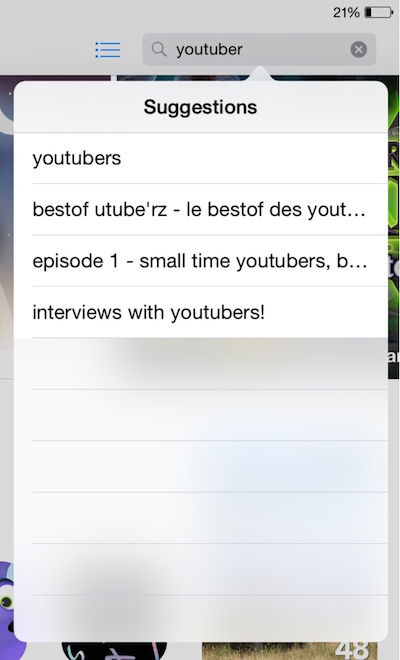
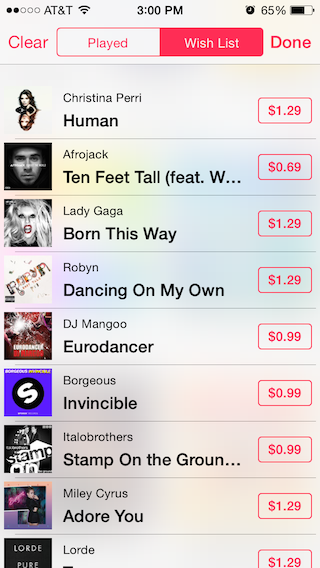
我试图获得的一个例子是:
iPad弹出:
iPhone模态展示:
回答 4
Stack Overflow用户
发布于 2014-09-04 23:00:42
我终于找到了解决办法。我必须创建两种不同的语言--一种用于仅在iPad上调用的Popover演示文稿,另一种用于iPhone的显示样式设置为超全屏(这很重要)。
在正在呈现的表视图控制器中,在viewDidLoad中,此代码将应用所需的模糊效果(以及奖励,除非它们没有禁用透明度效果):
if (!UIAccessibilityIsReduceTransparencyEnabled()) {
    tableView.backgroundColor = UIColor.clear
    let blurEffect = UIBlurEffect(style: .light)
    let blurEffectView = UIVisualEffectView(effect: blurEffect)
    tableView.backgroundView = blurEffectView

    //if inside a popover
    if let popover = navigationController?.popoverPresentationController {
        popover.backgroundColor = UIColor.clear
    }

    //if you want translucent vibrant table view separator lines
    tableView.separatorEffect = UIVibrancyEffect(blurEffect: blurEffect)
}这会使表格背景像在屏幕截图中一样出现。iPhone的诀窍是确保它显示在屏幕上,而iPad的诀窍是删除popoverPresentationController中的backgroundColor。
Stack Overflow用户
发布于 2015-01-23 06:13:37
一个使用Adaptivity添加模糊信息的快速示例:
extension ViewController: UIPopoverPresentationControllerDelegate {

 override func prepareForSegue(segue: UIStoryboardSegue, sender: AnyObject?) {

    // Grab the destination view controller and set the presentation delegate
    let viewController = segue.destinationViewController as UIViewController
    viewController.popoverPresentationController?.delegate = self
    viewController.presentationController?.delegate = self
  }

  // Note: Only called for FormSheet and Popover
  func adaptivePresentationStyleForPresentationController(controller: UIPresentationController) -> UIModalPresentationStyle {
    switch controller.presentedViewController {
    case let vc as PopoverViewController:
      return .None // Keep the popover in Compact screens
    default:
      return .OverFullScreen
    }
  }

  func presentationController(controller: UIPresentationController, viewControllerForAdaptivePresentationStyle style: UIModalPresentationStyle) -> UIViewController? {
    // This is a custom method on UIViewController
    controller.presentedViewController.createBlur()

    // Wrap in a Navigation Controller, the controller should add a title and bar buttons
    if !(presentedViewController is UINavigationController) {
      return UINavigationController(rootViewController: presentedViewController)
    }
  }
}

extension UIViewController {
  func createBlur(effectStyle: UIBlurEffectStyle = .Light) {
    if !UIAccessibilityIsReduceTransparencyEnabled() {
      view.backgroundColor = UIColor.clearColor()

      let blurView = UIVisualEffectView(effect: UIBlurEffect(style: effectStyle))
      blurView.autoresizingMask = UIViewAutoresizing.FlexibleHeight | UIViewAutoresizing.FlexibleWidth
      blurView.frame = view.bounds

      view.insertSubview(blurView, atIndex: 0)
    }
  }
}

extension UITableViewController {
  override func createBlur(effectStyle: UIBlurEffectStyle = defaultBlurEffectStyle) {
    if !UIAccessibilityIsReduceTransparencyEnabled() {
      tableView.backgroundColor = UIColor.clearColor()

      let blurEffect = UIBlurEffect(style: effectStyle)
      tableView.backgroundView = UIVisualEffectView(effect: blurEffect)
      tableView.separatorEffect = UIVibrancyEffect(forBlurEffect: blurEffect)
    }
  }
}Stack Overflow用户
发布于 2015-05-22 12:29:08
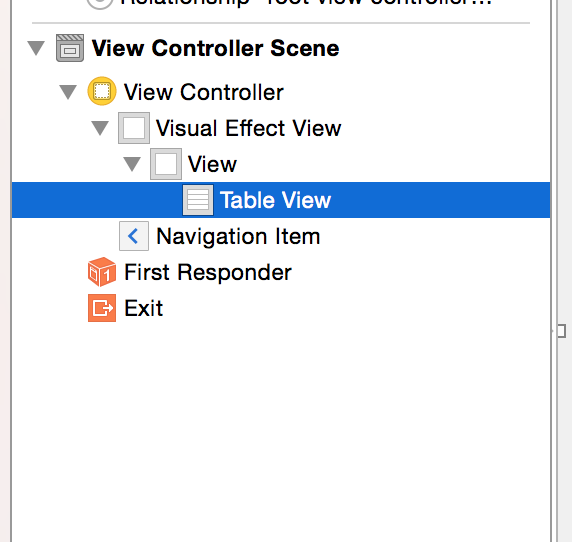
对于我来说(在ios8 +中)最好的解决方案是在故事板中使用一个UIVisualEffectView,并使它成为我的ViewController的根视图。然后将我的表视图添加到
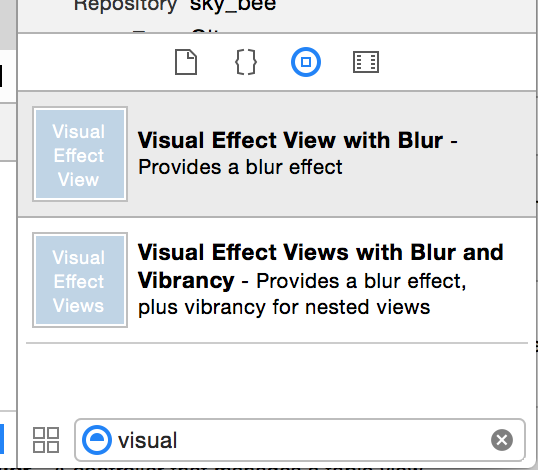
要找到视觉效果视图,请转到右下角的组件选择器(不确定名称),然后搜索VisualEffectView
这似乎是一个容易得多的方法,并符合苹果公司的建议,尽可能多地在故事板上做
https://stackoverflow.com/questions/24424165
复制相似问题
腾讯云开发者

Copyright © 2013 - 2026 Tencent Cloud. All Rights Reserved. 腾讯云 版权所有
深圳市腾讯计算机系统有限公司 ICP备案/许可证号:粤B2-20090059  粤公网安备44030502008569号
腾讯云计算(北京)有限责任公司 京ICP证150476号 | 京ICP备11018762号