
如何调整调整UICollectionView大小的自动调整位置?
如何调整调整UICollectionView大小的自动调整位置?
提问于 2016-02-05 10:42:23
我有以下设置,位于两个标头之间的UICollectionView调整大小以适应其所有单元格。它基本上是表格格式的2x2布局。
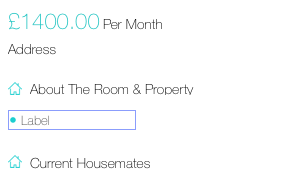
现在,一旦加载了数据,我将使用以下方法来调整UICollectionView的大小。
- (void)loadContent {

[self.collectionViewAboutProperty reloadData];

[self.labelAddress setText:stringAddress];

float totRows = [self.dictAboutProperty count];

float cHeight = ceil(totRows/2.0);

float collectionHeight = (cHeight * 20) + (cHeight * 5);

[self.collectionViewAboutProperty setFrame:CGRectMake(self.collectionViewAboutProperty.frame.origin.x, self.collectionViewAboutProperty.frame.origin.y, self.collectionViewAboutProperty.frame.size.width, collectionHeight)];

}问题是,当上述情况发生时,它会与底部标头重叠。似乎完全忽略了底部标头上的Autolayout约束。在从上面的UICollectionView设置为大约25像素的空间的那一刻
如何使其在加载内容和集合视图时对下面的视图进行动态调整,以满足约束?
谢谢
回答 1
Stack Overflow用户
回答已采纳
发布于 2016-02-05 13:08:21
[self.labelAddress setText:stringAddress];

float totRows = [self.dictAboutProperty count];

    float cHeight = ceil(totRows/2.0);

    float collectionHeight = (cHeight * 20) + (cHeight * 5);

    [self.collectionViewAboutProperty setFrame:CGRectMake(self.collectionViewAboutProperty.frame.origin.x, self.collectionViewAboutProperty.frame.origin.y, self.collectionViewAboutProperty.frame.size.width, collectionHeight)];
    [self.collectionViewAboutProperty reloadData];
会解决你的问题。
页面原文内容由Stack Overflow提供。腾讯云小微IT领域专用引擎提供翻译支持
原文链接:
https://stackoverflow.com/questions/35222063
复制相关文章
相似问题
腾讯云开发者

Copyright © 2013 - 2026 Tencent Cloud. All Rights Reserved. 腾讯云 版权所有
深圳市腾讯计算机系统有限公司 ICP备案/许可证号:粤B2-20090059  粤公网安备44030502008569号
腾讯云计算(北京)有限责任公司 京ICP证150476号 | 京ICP备11018762号