
样品NSImage和保持质量(迅速3)
样品NSImage和保持质量(迅速3)
提问于 2016-12-21 17:33:31
我编写了一个NSImage扩展,允许我对图像进行随机采样。我希望这些样品保持与原始图像相同的质量。然而,他们似乎是别名或稍微模糊。下面是一个例子--右边的原始图和左边的随机样本:
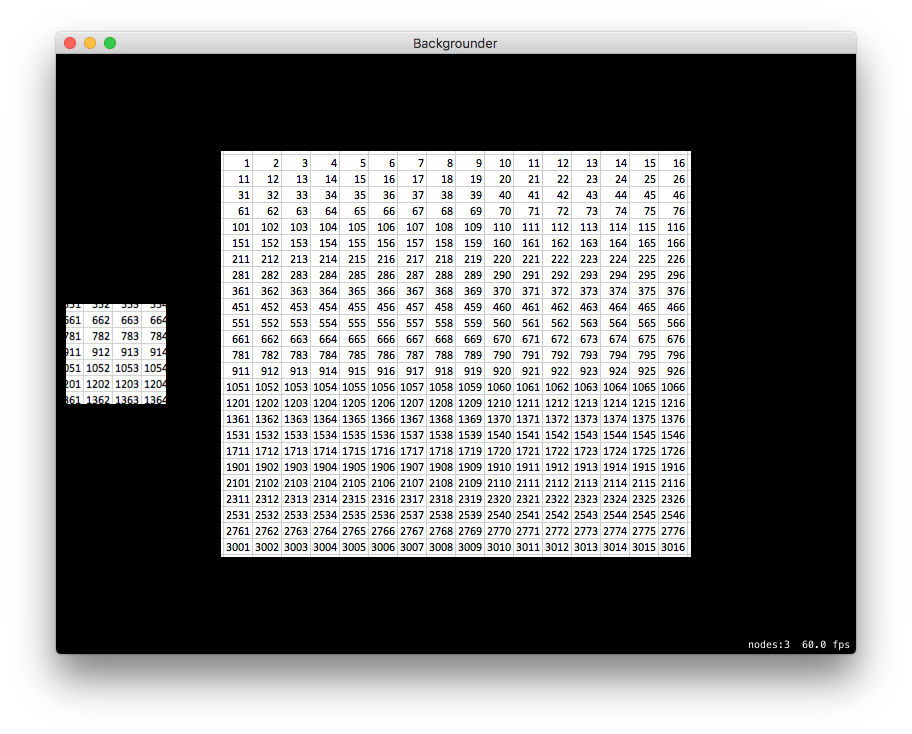
我现在正在SpriteKit玩这个游戏。下面是我创建原始图像的方法:
    let bg = NSImage(imageLiteralResourceName: "ref")
    let tex = SKTexture(image: bg)
    let sprite = SKSpriteNode(texture: tex)
    sprite.position = CGPoint(x: size.width/2, y:size.height/2)
    addChild(sprite)
下面是我如何创建示例:
    let sample = bg.sample(size: NSSize(width: 100, height: 100))
    let sampletex = SKTexture(image:sample!)
    let samplesprite = SKSpriteNode(texture:sampletex)
    samplesprite.position = CGPoint(x: 60, y:size.height/2)
    addChild(samplesprite)
下面是创建示例的NSImage扩展(和randomNumber func):
extension NSImage {

    /// Returns the height of the current image.
    var height: CGFloat {
        return self.size.height
    }

    /// Returns the width of the current image.
    var width: CGFloat {
        return self.size.width
    }

    func sample(size: NSSize) -> NSImage? {
        // Resize the current image, while preserving the aspect ratio.
        let source = self

        // Make sure that we are within a suitable range
        var checkedSize    = size
        checkedSize.width  = floor(min(checkedSize.width,source.size.width * 0.9))
        checkedSize.height = floor(min(checkedSize.height, source.size.height * 0.9))

        // Get random points for the crop.
        let x = randomNumber(range: 0...(Int(source.width) - Int(checkedSize.width)))
        let y = randomNumber(range: 0...(Int(source.height) - Int(checkedSize.height)))

        // Create the cropping frame.
        var frame = NSRect(x: x, y: y, width: Int(checkedSize.width), height: Int(checkedSize.height))

        // let ref = source.cgImage.cropping(to:frame)
        let ref = source.cgImage(forProposedRect: &frame, context: nil, hints: nil)
        let rep = NSBitmapImageRep(cgImage: ref!)

        // Create a new image with the new size
        let img = NSImage(size: checkedSize)

        // Set a graphics context
        img.lockFocus()
        defer { img.unlockFocus() }

        // Fill in the sample image
        if rep.draw(in: NSMakeRect(0, 0, checkedSize.width, checkedSize.height),
                    from: frame,
                    operation: NSCompositingOperation.copy,
                    fraction: 1.0,
                    respectFlipped: false,
                    hints: [NSImageHintInterpolation:NSImageInterpolation.high.rawValue]) {
            // Return the cropped image.
            return img
        }

        // Return nil in case anything fails.
        return nil
    }

}

func randomNumber(range: ClosedRange<Int> = 0...100) -> Int {
    let min = range.lowerBound
    let max = range.upperBound
    return Int(arc4random_uniform(UInt32(1 + max - min))) + min
}
我尝试了10种不同的方法,结果似乎总是有点模糊的样本。我甚至检查了屏幕上的污点。:)
如何创建一个NSImage示例,以保留原始源图像部分的确切质量?
回答 1
Stack Overflow用户
回答已采纳
发布于 2016-12-22 16:26:43
在这种情况下,将插值模式切换到NSImageInterpolation.none显然就足够了。
正确地处理绘制目标也很重要。由于cgImage(forProposedRect:...)可能会更改建议的rect,因此应该使用基于rect的目标rect。基本上,您应该使用frame的副本,该副本由(-x,-y)偏移,因此它相对于(0,0)而不是(x,y)。
页面原文内容由Stack Overflow提供。腾讯云小微IT领域专用引擎提供翻译支持
原文链接:
https://stackoverflow.com/questions/41268646
复制相关文章
相似问题
腾讯云开发者

Copyright © 2013 - 2026 Tencent Cloud. All Rights Reserved. 腾讯云 版权所有
深圳市腾讯计算机系统有限公司 ICP备案/许可证号:粤B2-20090059  粤公网安备44030502008569号
腾讯云计算(北京)有限责任公司 京ICP证150476号 | 京ICP备11018762号