
B‘从ANSI 1252到UTF-8的记录失败,错误:“无效参数”。巨蟒
我正在尝试将一个shapefile读入一个GeoDataFrame中。
通常我就是这么做的,效果很好:
import pandas as pd

import geopandas as gpd
from shapely.geometry import Point

df = gpd.read_file("wild_fires/nbac_2016_r2_20170707_1114.shp")但是这次它给了我一个错误:b'Recode from ANSI 1252 to UTF-8 failed with the error: "Invalid argument".'
完全错误:
---------------------------------------------------------------------------
CPLE_AppDefinedError                      Traceback (most recent call last)
<ipython-input-14-adcad0275d30> in <module>()
----> 1 df_wildfires_2016 = gpd.read_file("wild_fires/nbac_2016_r2_20170707_1114.shp")

/usr/local/lib/python3.6/site-packages/geopandas/io/file.py in read_file(filename, **kwargs)
     19     """
     20     bbox = kwargs.pop('bbox', None)
---> 21     with fiona.open(filename, **kwargs) as f:
     22         crs = f.crs
     23         if bbox is not None:

/usr/local/lib/python3.6/site-packages/fiona/__init__.py in open(path, mode, driver, schema, crs, encoding, layer, vfs, enabled_drivers, crs_wkt)
    163         c = Collection(path, mode, driver=driver, encoding=encoding,
    164                        layer=layer, vsi=vsi, archive=archive,
--> 165                        enabled_drivers=enabled_drivers)
    166     elif mode == 'w':
    167         if schema:

/usr/local/lib/python3.6/site-packages/fiona/collection.py in __init__(self, path, mode, driver, schema, crs, encoding, layer, vsi, archive, enabled_drivers, crs_wkt, **kwargs)
    151             if self.mode == 'r':
    152                 self.session = Session()
--> 153                 self.session.start(self)
    154             elif self.mode in ('a', 'w'):
    155                 self.session = WritingSession()

fiona/ogrext.pyx in fiona.ogrext.Session.start (fiona/ogrext2.c:8432)()

fiona/_err.pyx in fiona._err.GDALErrCtxManager.__exit__ (fiona/_err.c:1861)()

CPLE_AppDefinedError: b'Recode from ANSI 1252 to UTF-8 failed with the error: "Invalid argument".'
一段时间以来,我一直在试图弄清楚为什么我会犯错误,但似乎找不到答案。
这些数据是从我只下载了2016年链接:http://cwfis.cfs.nrcan.gc.ca/datamart/download/nbac?token=78e9bd6af67f71204e18cb6fa4e47515的网页获得的。
有人能帮我吗?谢谢。
回答 4
Stack Overflow用户
发布于 2017-11-14 01:42:25
似乎您的shapefile包含非UTF字符,这些字符会导致Fiona.open()调用失败(geopandas使用Fiona打开文件)。
解决此错误的方法是打开Shapefile (例如QGis ),然后选择save as,并将Encoding选项指定为"UTF-8":
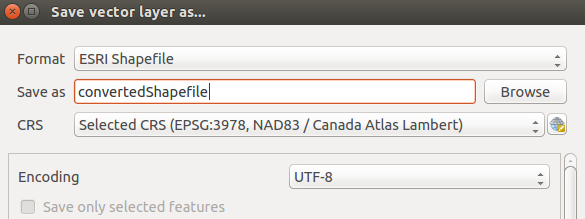
完成此操作后,在调用df = gpd.read_file("convertedShape.shp")时没有出错。
另一种无需使用QGis或类似的方法是再次读取和保存您的Shapefile (有效地转换为所需的格式)。使用OGR,您可以这样做:
from osgeo import ogr

driver = ogr.GetDriverByName("ESRI Shapefile")
ds = driver.Open("nbac_2016_r2_20170707_1114.shp", 0) #open your shapefile
#get its layer
layer = ds.GetLayer()

#create new shapefile to convert
ds2 = driver.CreateDataSource('convertedShape.shp')
#create a Polygon layer, as the one your Shapefile has
layer2 = ds2.CreateLayer('', None, ogr.wkbPolygon)
#iterate over all features of your original shapefile
for feature in layer:
   #and create a new feature on your converted shapefile with those features
   layer2.CreateFeature(feature)

ds = layer = ds2 = layer2 = None这也允许在转换后使用df = gpd.read_file("convertedShape.shp")成功打开。希望这能有所帮助。
Stack Overflow用户
发布于 2018-11-12 15:47:48
with fiona.open(file, encoding="UTF-8") as f:为我工作过。
Stack Overflow用户
发布于 2018-03-28 02:16:29
既然已经安装了GDAL,我建议使用CLI将文件转换为UTF-8:
ogr2ogr output.shp input.shp -lco ENCODING=UTF-8对我来说很有魅力。它比QGIS或Python快得多,可以在集群环境中应用。
https://stackoverflow.com/questions/47243879
复制相似问题
腾讯云开发者
