
React虚拟化的表不呈现为表
React虚拟化的表不呈现为表
提问于 2018-03-07 19:46:58
我有一个基于演示编写的超级基本示例,它不起作用:
import React from 'react';
import {
  Table,
  Column,
} from 'react-virtualized'

function MyTable(props) {
  return (
    <Table
      width={ 900 }
      height={ 500 }
      headerHeight={ 30 }
      rowHeight={ 30 }
      rowCount={ props.list.length }
      rowGetter={ ({ index }) => props.list[index] }
    >
      <Column
        width={ 250 }
        dataKey={ 'id' }
        headerRenderer={ ({ dataKey }) => 'Id' }
      />
      <Column
        width={ 250 }
        dataKey={ 'title' }
        headerRenderer={ ({ dataKey }) => 'Title' }
      />
    </Table>
  );
}
其结果是:
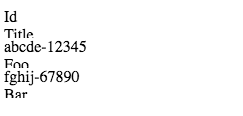
我肯定我错过了什么,我缺少了什么,为什么它不显示为一张桌子?
回答 2
Stack Overflow用户
回答已采纳
发布于 2018-03-07 20:54:38
您没有导入CSS。Table组件是唯一需要CSS来设计柔性盒布局的组件。
查看医生们
// Most of react-virtualized's styles are functional (eg position, size).
// Functional styles are applied directly to DOM elements.
// The Table component ships with a few presentational styles as well.
// They are optional, but if you want them you will need to also import the CSS file.
// This only needs to be done once; probably during your application's bootstrapping process.
import 'react-virtualized/styles.css'

// You can import any component you want as a named export from 'react-virtualized', eg
import { Column, Table } from 'react-virtualized'Stack Overflow用户
发布于 2018-12-21 22:38:40
如果需要,还可以为表提供自己的样式。在作为导入链接回类的css中,可以定义react虚拟化内建类,如下所示:
:global {
  .ReactVirtualized__Table {

  }

  .ReactVirtualized__Table__headerColumn {

  }

  .ReactVirtualized__Table__headerRow {

  }

  .ReactVirtualized__Table__row {

  }

  .ReactVirtualized__Table__rowColumn {

  }
}
我建议使用flex来操作表的外观。希望这能有所帮助。
页面原文内容由Stack Overflow提供。腾讯云小微IT领域专用引擎提供翻译支持
原文链接:
https://stackoverflow.com/questions/49160070
复制相关文章
相似问题
腾讯云开发者

Copyright © 2013 - 2026 Tencent Cloud. All Rights Reserved. 腾讯云 版权所有
深圳市腾讯计算机系统有限公司 ICP备案/许可证号:粤B2-20090059  粤公网安备44030502008569号
腾讯云计算(北京)有限责任公司 京ICP证150476号 | 京ICP备11018762号