
VBA代码以查找其旁边的值复制值并粘贴在不同的单元格中
我是VBA编码的新手,我寻找一种方法,在A列中找到一个特定的文本,复制它旁边的下一个可用单词(C列),并将它粘贴到同一个工作表中的A10单元格中。
我在堆栈溢出处找到了一个代码,它找到了我在A列上寻找的单词,它告诉我C列上的下一个值是什么,但我不能让它粘贴到单元格A10上。
现在,由于单词"Title_product“旁边有多个标题,所以每当它在C列上找到标题时,它都会在查找结果中添加一个"AND”。例如:在A列中,有2行的单词为"Title_product“,C列的书名是book 1和Book 2。我希望单元格A10中的值是:”Book1和Book2“--如果这样做太多了--不要担心,如果它可以将C列中的标题粘贴到工作表的某个位置,那么我就可以使用Excel公式了。
This is the code that I was trying to modify:
Public Sub FindingValues()
Dim val As Variant
val = "Title_product"
Set c = Cells.Find(val, LookIn:=xlValues, MatchCase:=False)
If Not c Is Nothing Then
    Do
        MsgBox "Value of val is found at " & c.Address & vbCrLf & c.Offset(0, 1).Value & vbCrLf & c.Offset(0, 2).Value
        Set c = Cells.FindNext(c)
    Loop While Not c Is Nothing And c.Address <> firstaddress
End If
End Sub
非常感谢!
回答 2
Stack Overflow用户
发布于 2018-08-17 16:21:14
您可能不小心删除了行firstAddress = c.Address -实际上,firstAddress只是一个零长度的String。
除此之外,添加一个result变量,当在A列中找到"Title_Product“时,该变量将C列的值连接在一起,然后在循环后将result写入Range("A10")。
Public Sub FindingValues()
    Dim val As String, result As String, firstAddress As String
    Dim c As Range

    val = "Title_product"
    Set c = Sheets("MySheetName").Range("A:A").Find(val, LookIn:=xlValues, MatchCase:=False)

    If Not c Is Nothing Then
        firstAddress = c.Address

        Do
            If Len(result) > 0 Then
                result = result & " and " & c.Offset(, 2).Text
            Else
                result = c.Offset(, 2).Text
            End If

            Set c = Cells.FindNext(c)
        Loop While Not c Is Nothing And c.Address <> firstAddress
    End If

    Sheets("MySheetName").Range("A10").Value = result
End Sub
样本数据
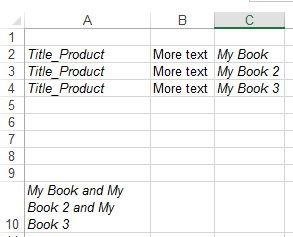
Stack Overflow用户
发布于 2018-08-17 16:04:38
我用不同的方法来解决这个问题,只需迭代A列,而不是使用Find。需要注意的一点是,如果您正在搜索A列,并将输出打印到A列,这可能是一个问题:我会考虑在其他地方打印您的输出(例如,将outputCell更改为其他地方)。
Sub FindingValues()
Dim valStr As String, found() As String, outputStr As String
Dim outputCell As Range
Dim ws As Worksheet
Dim x As Long, foundCt As Long, lastRow As Long

'define the sheet to be worked on
Set ws = ActiveWorkbook.ActiveSheet

'define the output cell
Set outputCell = ws.Cells(10, 1) 'A10

'define the text to search for
valStr = "Title_product"

'find last row to use
lastRow = ws.Cells(ws.Rows.Count, 1).End(xlUp).Row

'change the array size to match the number of possible results
ReDim found(lastRow) As String

'loop through all cells in column A
For x = 1 To lastRow

    'check cells in column A for valStr
    If InStr(LCase(ws.Cells(x, 1).Text), LCase(valStr)) Then

        'if found, store found values in array
        foundCt = foundCt + 1
        found(foundCt) = ws.Cells(x, 3).Text

    End If

Next x

'format the output based on the number of found items
'(Book 1 | Book 1 and Book 2 | Book 1, Book 2, and Book 3)

'if no results were found
If found(1) = "" Then
    outputStr = "..."

'if one result was found
ElseIf found(1) <> "" And found(2) = "" Then
    outputStr = found(1)

'if two results were found
ElseIf found(1) <> "" And found(2) <> "" And found(3) = "" Then
    outputStr = found(1) & " and " & found(2)

'if three or more results were found
Else
    outputStr = found(1)
    For x = 2 To foundCt - 1
        outputStr = outputStr & ", " & found(x)
    Next x
    outputStr = outputStr & ", and " & found(foundCt)
End If

'print the output to the output cell
outputCell.Formula = outputStr

End Subhttps://stackoverflow.com/questions/51898727
复制相似问题
腾讯云开发者

Copyright © 2013 - 2026 Tencent Cloud. All Rights Reserved. 腾讯云 版权所有
深圳市腾讯计算机系统有限公司 ICP备案/许可证号:粤B2-20090059  粤公网安备44030502008569号
腾讯云计算(北京)有限责任公司 京ICP证150476号 | 京ICP备11018762号