
作为小部件的颤振侧抽屉
作为小部件的颤振侧抽屉
提问于 2018-08-27 09:14:47
我正在尝试在我的颤音应用程序中将侧抽屉实现为一个小部件。
home.dart
import '../widgets/navigation_drawer_widget.dart'; //imported the nav drawer class from widgets directory

class HomePage extends StatelessWidget {
  @override
  Widget build(BuildContext context) {
    return DefaultTabController(length: 2,
        child: Scaffold(
          drawer: DrawerWidget(),
          appBar: AppBar(
            title: Text('Home'),
            bottom: TabBar(tabs: <Widget>[
              Tab(
                icon: Icon(Icons.access_time),
                text: 'Tab 1',
              ),
              Tab(
                icon: Icon(Icons.calendar_today),
                text: 'Tab 2',
              )
            ]),
          ),
          body: TabBarView(children: <Widget>[
            Tab1(),
            Tab2()
          ]),
        )
    );
  }
}
我的抽屉小部件** navigation_drawer_widget.dart**文件
import 'package:flutter/material.dart';

class DrawerWidget extends StatelessWidget {
  @override
  Widget build(BuildContext context) {
    return Column(
      children: <Widget>[
        AppBar(
          automaticallyImplyLeading: false,
          title: Text('Menu'),
        ),
        ListTile(
          leading: Icon(Icons.home),
          title: Text('Home'),
          onTap: () {
            Navigator.pushReplacementNamed(context, '/home');
          },
        ),
        ListTile(
          leading: Icon(Icons.person),
          title: Text('My Profile'),
          onTap: () {
            Navigator.pushReplacementNamed(context, '/profile');
          },
        ),
        ListTile(
          leading: Icon(Icons.school),
          title: Text('My Education'),
          onTap: () {
            Navigator.pushReplacementNamed(context, '/education');
          },
        ),
      ],
    );
  }
}
但是当我点击导航汉堡图标时,它会显示出这样的东西
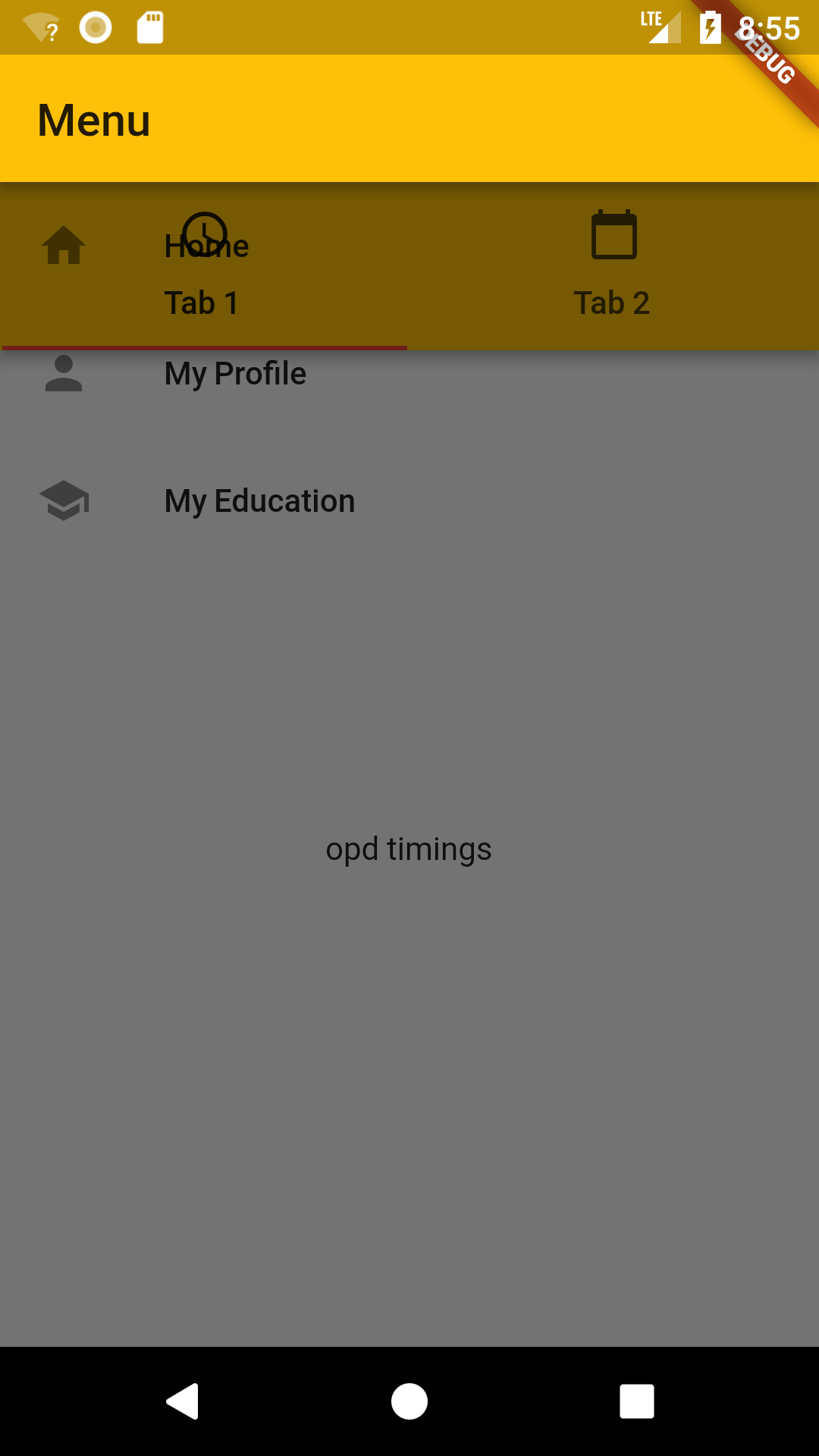
如您所见,导航抽屉变得透明,并延伸到整个页面的宽度。如果我将抽屉代码移到主页(而不是执行DrawerWidget() ),它将显示出正常的ol导航抽屉。
知道这里发生了什么吗?
回答 3
Stack Overflow用户
回答已采纳
发布于 2018-08-27 09:48:25
如果您想要默认的材料设计抽屉,则需要将Column包装在DrawerWidget中,并使用Drawer。
从医生那里:
抽屉可以是任意的Widget,但通常最好使用材料库中的
Drawer小部件,后者遵循材料设计规范。
Stack Overflow用户
发布于 2019-03-26 17:52:59
您可以将Drawer声明为Widget而不是Class,然后在文件中导入。
Widget myDrawer = Drawer(
  child: ListView(
    padding: EdgeInsets.zero,
    children: <Widget>[
      DrawerHeader(...),
      ListTile(...)
    ],
  ),
);
然后只是:
import 'mydrawer.dart';

class MyApp extends StatelessWidget {
  @override
  Widget build(BuildContext context) {
    return Scaffold(
      appBar: AppBar(...),
      body: Container(...),
      drawer: myDrawer
    );
  }
}Stack Overflow用户
发布于 2019-11-20 12:23:48
使用容器更改透明抽屉
示例:
 class DrawerWidget extends StatelessWidget {
  @override
  Widget build(BuildContext contx) {
    return Container(
      color: Colors.amber[600],
      child: Column(
        children: <Widget>[
          AppBar(automaticallyImplyLeading: false, title: Text('menu')),
          ListTile(
            leading: Icon(Icons.home),
            title: Text('Home'),
            onTap: () {
              Navigator.pushReplacementNamed(contx, '/home');
            },
          ),
          ListTile(
            leading: Icon(Icons.person),
            title: Text('My Profile'),
            onTap: () {
              Navigator.pushReplacementNamed(contx, '/profile');
            },
          ),
          ListTile(
            leading: Icon(Icons.school),
            title: Text('My Education'),
            onTap: () {
              Navigator.pushReplacementNamed(contx, '/education');
            },
          ),
        ],
      ),
    );
  }
}页面原文内容由Stack Overflow提供。腾讯云小微IT领域专用引擎提供翻译支持
原文链接:
https://stackoverflow.com/questions/52036065
复制相关文章
相似问题
腾讯云开发者

Copyright © 2013 - 2026 Tencent Cloud. All Rights Reserved. 腾讯云 版权所有
深圳市腾讯计算机系统有限公司 ICP备案/许可证号:粤B2-20090059  粤公网安备44030502008569号
腾讯云计算(北京)有限责任公司 京ICP证150476号 | 京ICP备11018762号