
Vue本机总是执行App.js而不是.vue。
我完成了安装vue本机的第一个过程,并遵循了Hello教程(https://vue-native.io/getting-started.html)的“入门”,但是App.vue从来没有执行过,只有App.js。如果删除App.js,就会得到一个错误:
“无法解决”./../App“从"node_modules\expo\AppEntry.js"”
我如何解决这个问题,使它工作,并遵循本教程的任何问题?
文件夹结构:
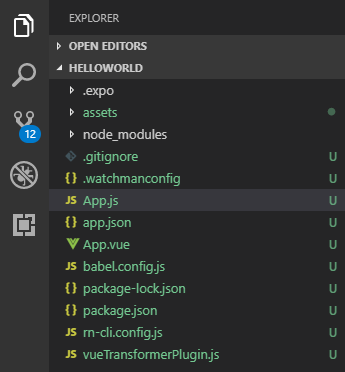
App.js
import React from 'react';
import { StyleSheet, Text, View } from 'react-native';

export default class App extends React.Component {
  render() {
    return (
      <View style={styles.container}>
        <Text>Open up App.js to start working on your app!</Text>
      </View>
    );
  }
}

const styles = StyleSheet.create({
  container: {
    flex: 1,
    backgroundColor: '#fff',
    alignItems: 'center',
    justifyContent: 'center',
  },
});
App.vue
<template>
  <view class="container">
    <text class="text-color-primary">My Vue Native App</text>
    </view>
</template>

<style>
.container {
  background-color: white;
  align-items: center;
  justify-content: center;
  flex: 1;
}
.text-color-primary {
  color: blue;
}
</style>
谢谢
回答 4
Stack Overflow用户
发布于 2020-02-13 09:53:21
虽然答案可能对某些人有用。还有一种方法可以在不删除任何文件的情况下修复此问题。导航到节点模块文件夹。搜索博览文件夹。
打开AppEntry.js文件。它应该是这样的:
import 'expo/build/Expo.fx';
import registerRootComponent from 'expo/build/launch/registerRootComponent';
import { activateKeepAwake } from 'expo-keep-awake';

import App from '../../App'; // we will change this!

if (__DEV__) {
  activateKeepAwake();
}

registerRootComponent(App);修改Appentry.js如下:
import 'expo/build/Expo.fx';
import registerRootComponent from 'expo/build/launch/registerRootComponent';
import { activateKeepAwake } from 'expo-keep-awake';

import App from '../../App.vue'; // Will use App.vue as the entry point

if (__DEV__) {
  activateKeepAwake();
}

registerRootComponent(App);Stack Overflow用户
发布于 2019-02-20 19:47:20
以下几点对我有用:
首先,您删除app.js,这将给您一个错误,但不要担心。您必须运行npm install命令。之后,使用npm start再次运行vue本机。
这将正常运行app.vue文件。
Stack Overflow用户
发布于 2019-08-23 15:13:21
也有同样的问题。下面是我的作品
在app.json中添加
"sourceExts": [ "js", "json", "ts", "tsx", "jsx", "vue"]
在"packagerOpts“里面
"packagerOpts": { "sourceExts": [ "js", "json", "ts", "tsx", "jsx", "vue"], "config": "metro.config.js"}
https://stackoverflow.com/questions/53806021
复制相似问题
腾讯云开发者

Copyright © 2013 - 2026 Tencent Cloud. All Rights Reserved. 腾讯云 版权所有
深圳市腾讯计算机系统有限公司 ICP备案/许可证号:粤B2-20090059  粤公网安备44030502008569号
腾讯云计算(北京)有限责任公司 京ICP证150476号 | 京ICP备11018762号