
使用活页js插件
使用活页js插件
提问于 2019-01-26 15:50:11
我想使用一个传单插件,称为传单-geotiff (https://github.com/stuartmatthews/leaflet-geotiff),但我使用传单反应。我有可能把这个插件转换成传单反应版本吗?谢谢你们。
回答 1
Stack Overflow用户
回答已采纳
发布于 2019-01-28 15:50:36
下面是关于如何在leaflet-geotiff中使用react-leaflet库的说明
1)安装套餐
2)建议采用以下自定义组件:
import React, { Component } from "react";
import { withLeaflet, MapLayer } from "react-leaflet";
import L from "leaflet";


import "leaflet-geotiff"
import "leaflet-geotiff/leaflet-geotiff-plotty"
import "leaflet-geotiff/leaflet-geotiff-vector-arrows"

class GeotiffLayer extends MapLayer {
  createLeafletElement(props) {
    const { url, options } = props;
    return L.leafletGeotiff(url, options);
  }

  componentDidMount() {
    const { map } = this.props.leaflet;
    this.leafletElement.addTo(map);
  }
}

export const PlottyGeotiffLayer = withLeaflet(props => {
  const { options, layerRef } = props;
  options.renderer = new L.LeafletGeotiff.Plotty(options);
  return <GeotiffLayer ref={layerRef} {...props} />;
});

export const VectorArrowsGeotiffLayer = withLeaflet(props => {
  const { options, layerRef } = props;
  options.renderer = new L.LeafletGeotiff.VectorArrows(options);
  return <GeotiffLayer ref={layerRef} {...props} />;
});
3)最后在地图中添加层
<Map
    center={this.props.center}
    zoom={this.props.zoom}
    length={4}
>
    <TileLayer
          url="https://api.tiles.mapbox.com/v4/{id}/{z}/{x}/{y}.png?access_token=pk.eyJ1IjoibWFwYm94IiwiYSI6ImNpejY4NXVycTA2emYycXBndHRqcmZ3N3gifQ.rJcFIG214AriISLbB6B5aw"
          attribution='<a href="http://creativecommons.org/licenses/by-sa/2.0/">CC-BY-SA</a>, Imagery © <a href="http://mapbox.com">Mapbox</a>'
          id="mapbox.streets"
    />

    <PlottyGeotiffLayer
       layerRef={this.windSpeedRef}
       url={windSpeedUrl}
       options={windSpeedOptions}
    />

    <VectorArrowsGeotiffLayer
      layerRef={this.windDirectionRef}
      url={windDirectionUrl}
      options={windDirectionOptions}
    />
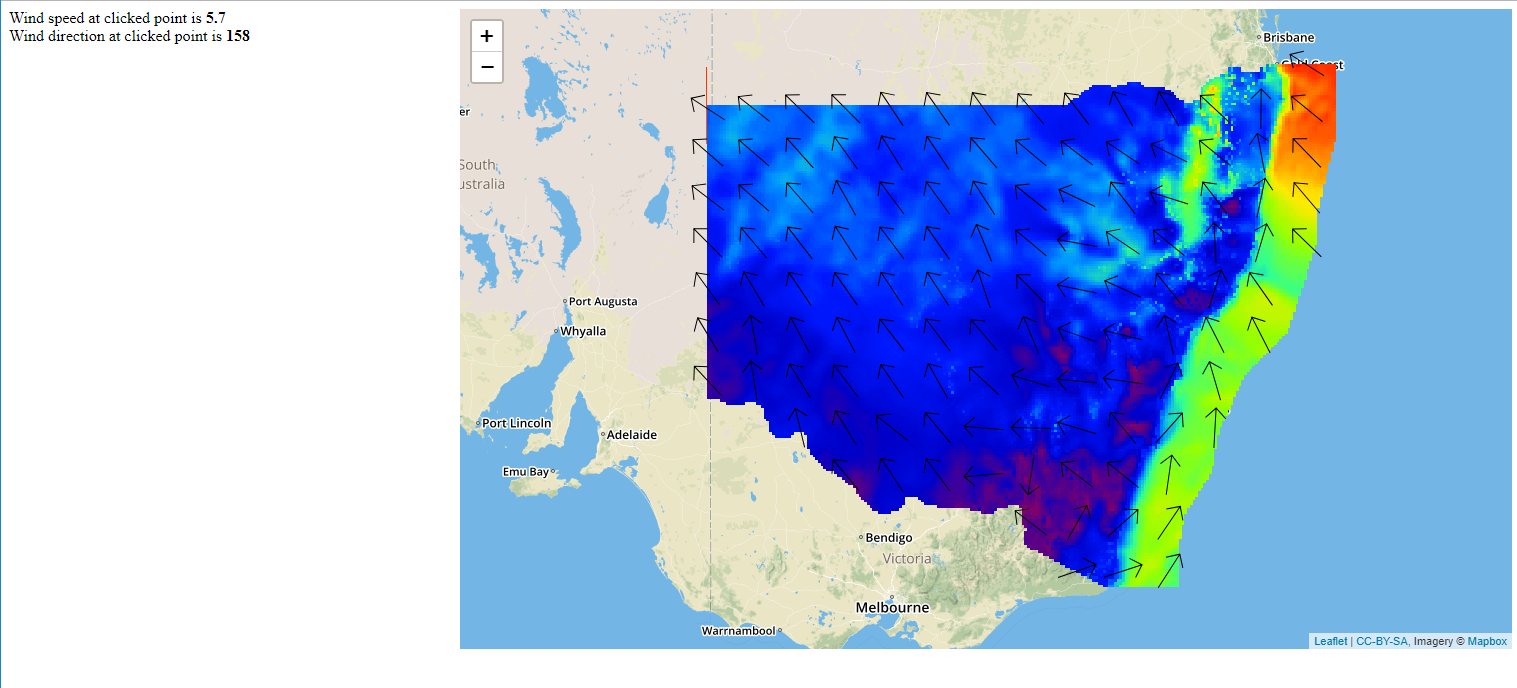
</Map>结果
页面原文内容由Stack Overflow提供。腾讯云小微IT领域专用引擎提供翻译支持
原文链接:
https://stackoverflow.com/questions/54379992
复制相关文章
相似问题
腾讯云开发者

Copyright © 2013 - 2026 Tencent Cloud. All Rights Reserved. 腾讯云 版权所有
深圳市腾讯计算机系统有限公司 ICP备案/许可证号:粤B2-20090059  粤公网安备44030502008569号
腾讯云计算(北京)有限责任公司 京ICP证150476号 | 京ICP备11018762号