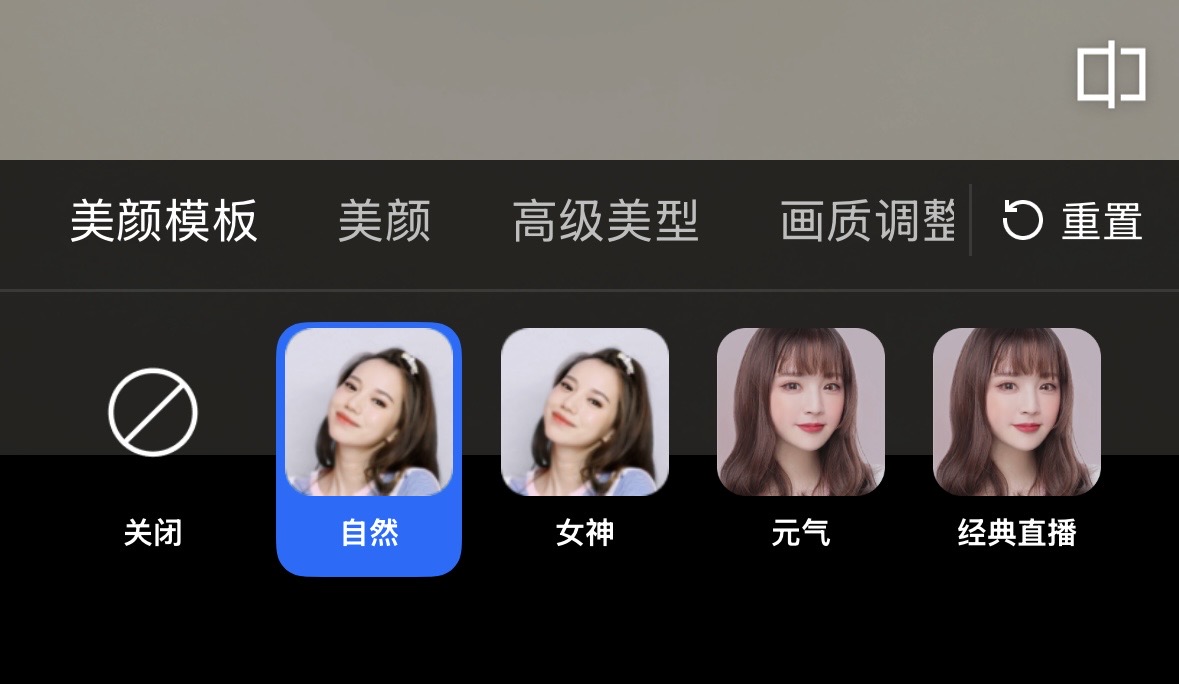
功能说明
集成步骤
1. 集成 TEBeautyKit,编辑 podfile 文件,添加下面的代码后执行
pod install。# 将S1-07替换成您购买的套餐pod 'TEBeautyKit/S1-07', :podspec => 'https://mediacloud-76607.gzc.vod.tencent-cloud.com/TencentEffect/iOS/TEBeautyKit/latest/TEBeautyKit.podspec'
3. 集成 美颜素材。
使用指引
步骤一:鉴权
[TEBeautyKit setTELicense:@"your license" key:@"your key" completion:^(NSInteger authresult, NSString * _Nullable errorMsg) {NSLog(@"----------result: %zd %@",authresult,errorMsg);}];
步骤二:配置面板资源路径
- (void)configPanel {NSBundle *bundle = [NSBundle mainBundle];NSString *beautyJsonPath = [bundle pathForResource:@"beauty" ofType:@"json"]; //美颜NSString *lutJsonPath = [bundle pathForResource:@"lut" ofType:@"json"]; //滤镜NSString *motion2dJsonPath = [bundle pathForResource:@"motion_2d" ofType:@"json"]; //2d贴纸NSMutableArray *resArray = [[NSMutableArray alloc] init];[resArray addObject:@{TEUI_BEAUTY : beautyJsonPath}];[resArray addObject:@{TEUI_LUT : lutJsonPath}];[resArray addObject:@{TEUI_MOTION_2D : motion2dJsonPath}];/// 设置资源[[TEUIConfig shareInstance] setTEPanelViewResources:resArray];}
各个套餐包含的 JSON 文件
套餐 | JSON 文件 |
A1-00 | beauty.json 、lut.json |
A1-01 | beauty.json 、beauty_image.json、beauty_base_shape.json、lut.json |
A1-02 | beauty.json 、beauty_image.json、beauty_base_shape.json、lut.json、motion_2d.json |
A1-03 | beauty.json 、beauty_image.json、beauty_general_shape.json、lut.json、motion_2d.json |
A1-04 | beauty.json 、beauty_image.json、beauty_general_shape.json、lut.json |
A1-05 | beauty.json 、beauty_image.json、beauty_base_shape.json、lut.json、motion_2d.json、segmentation.json |
A1-06 | beauty.json 、beauty_image.json、beauty_base_shape.json、lut.json、motion_2d.json、 makeup.json |
S1-00 | beauty.json 、beauty_image.json、beauty_shape.json、beauty_makeup.json、lut.json |
S1-01 | beauty.json 、beauty_image.json、beauty_shape.json、beauty_makeup.json、lut.json、motion_2d.json、motion_3d.json、(makeup.json & light_makeup.json) |
S1-02 | beauty.json 、beauty_image.json、beauty_shape.json、beauty_makeup.json、lut.json、motion_2d.json、motion_3d.json、(makeup.json & light_makeup.json)、motion_gesture.json |
S1-03 | beauty.json 、beauty_image.json、beauty_shape.json、beauty_makeup.json、lut.json、motion_2d.json、motion_3d.json、(makeup.json & light_makeup.json)、 segmentation.json |
S1-04 | beauty.json 、beauty_image.json、beauty_shape.json、beauty_makeup.json、lut.json、motion_2d.json、motion_3d.json、(makeup.json & light_makeup.json)、motion_gesture.json、segmentation.json |
S1-07 | beauty.json 、beauty_image.json、beauty_shape.json、beauty_makeup.json、lut.json、motion_2d.json、motion_3d.json、(makeup.json & light_makeup.json)、motion_gesture.json、segmentation.json、beauty_body.json |
注意:
美颜模板文件(
beauty_template.json )包含一组预设的美颜属性,可实现一键切换妆容效果。此功能适用于 S1 系列套餐。步骤三:添加面板
TEPanelView 是自定义的面板视图,用来展示步骤二中配置的数据。
- (void)addPanelView {TEPanelView *tePanelView = [[TEPanelView alloc] init];tePanelView.delegate = self;[self.view addSubview:tePanelView];[tePanelView mas_makeConstraints:^(MASConstraintMaker *make) {make.width.bottom.mas_equalTo(self.view);make.left.right.mas_equalTo(self.view);make.height.mas_equalTo(230 + self.view.safeAreaInsets.bottom);}];}
步骤四:使用美颜
1. 初始化。
- (void)initXMagic {__weak __typeof(self)weakSelf = self;[TEBeautyKit createXMagic:EFFECT_MODE_PRO onInitListener:^(TEBeautyKit * _Nullable beautyKit) {__strong typeof(self)strongSelf = weakSelf;strongSelf.teBeautyKit = beautyKit;strongSelf.tePanelView.teBeautyKit = strongSelf.teBeautyKit;[strongSelf.tePanelView setDefaultBeauty];}];}
2. 处理视频数据。
#pragma mark AVCaptureVideoDataOutputSampleBufferDelegate- (void)captureOutput:(AVCaptureOutput *)captureOutput didOutputSampleBuffer:(CMSampleBufferRef)sampleBuffer fromConnection:(AVCaptureConnection *)connection {if (captureOutput == self.videoDataOutput) {[self mycaptureOutput:captureOutput didOutputSampleBuffer:sampleBuffer fromConnection:connection originImageProcess:YES];}}- (void)mycaptureOutput:(AVCaptureOutput *)captureOutput didOutputSampleBuffer:(CMSampleBufferRef)inputSampleBuffer fromConnection:(AVCaptureConnection *)connection originImageProcess:(BOOL)originImageProcess {CVPixelBufferRef pixelBuffer = CMSampleBufferGetImageBuffer(inputSampleBuffer);YTProcessOutput *output = [self.teBeautyKit processPixelData:pixelBufferpixelDataWidth:(int)CVPixelBufferGetWidth(pixelBuffer)pixelDataHeight:(int)CVPixelBufferGetHeight(pixelBuffer)withOrigin:YtLightImageOriginTopLeftwithOrientation:YtLightCameraRotation0];if (output.pixelData.data != nil) {/// 输出视频数据,渲染或者其他处理,具体参加Demo}if (output != nil) {output.pixelData = nil;output = nil;}}
3. 如需销毁,可参考如下:
- (void)destroyXMagic {[self.teBeautyKit onDestroy];self.teBeautyKit = nil;}
步骤五:导出美颜参数
支持在使用过程中实时导出美颜参数,需要在销毁前调用。
/// 导出- (void)exportEffectData {self.exportBeautyString = [self.teBeautyKit exportInUseSDKParam];NSLog(@"%@",self.exportBeautyString);[[NSUserDefaults standardUserDefaults] setObject:self.exportBeautyString forKey:kExportEffectData];}/// 设置- (void)setExportEffectData {self.exportBeautyString = [[NSUserDefaults standardUserDefaults] objectForKey:kExportEffectData];if (self.exportBeautyString) {[self.tePanelView setExportParamList:self.exportBeautyString];}}
附录
面板 JSON 文件说明
各个 json 文件说明
文件 | 说明 |
beauty.json | 美颜配置文件。 |
beauty_body.json | 美体配置文件。 |
beauty_image.json | 画质调整配置文件。 |
beauty_makeup.json | 单点美妆配置文件。 |
beauty_shape.json | 高级美型配置文件。 |
beauty_template.json | 美颜模板配置文件。 |
light_makeup.json | 轻美妆配置文件。 |
lut.json | 滤镜配置文件。 注意:由于不同客户使用的滤镜素材不一样,所以客户在下载之后,可以按照 json 结构进行自行配置。 |
makeup.json | 风格整妆配置文件。 注意:由于不同客户使用的风格整妆素材不一样,所以客户在下载之后,可以按照 json 结构进行自行配置。 |
motion_2d.json | 2d动效贴纸配置文件。 注意:由于不同客户使用的动效贴纸素材不一样,所以客户在下载之后,可以按照 json 结构进行自行配置。 |
motion_3d.json | 3d动效贴纸配置文件。 注意:由于不同客户使用的动效贴纸素材不一样,所以客户在下载之后,可以按照 json 结构进行自行配置。 |
motion_gesture.json | 手势动效贴纸配置文件。 注意:由于不同客户使用的动效贴纸素材不一样,所以客户在下载之后,可以按照 json 结构进行自行配置。 |
segmentation.json | 背景分割(虚拟背景)配置文件。 注意:由于不同客户使用的分割素材不一样,所以客户在下载之后,可以按照 json 结构进行自行配置。 |
panel_icon | 此文件夹中用于存放 json 文件中配置的图片,必须添加。 |
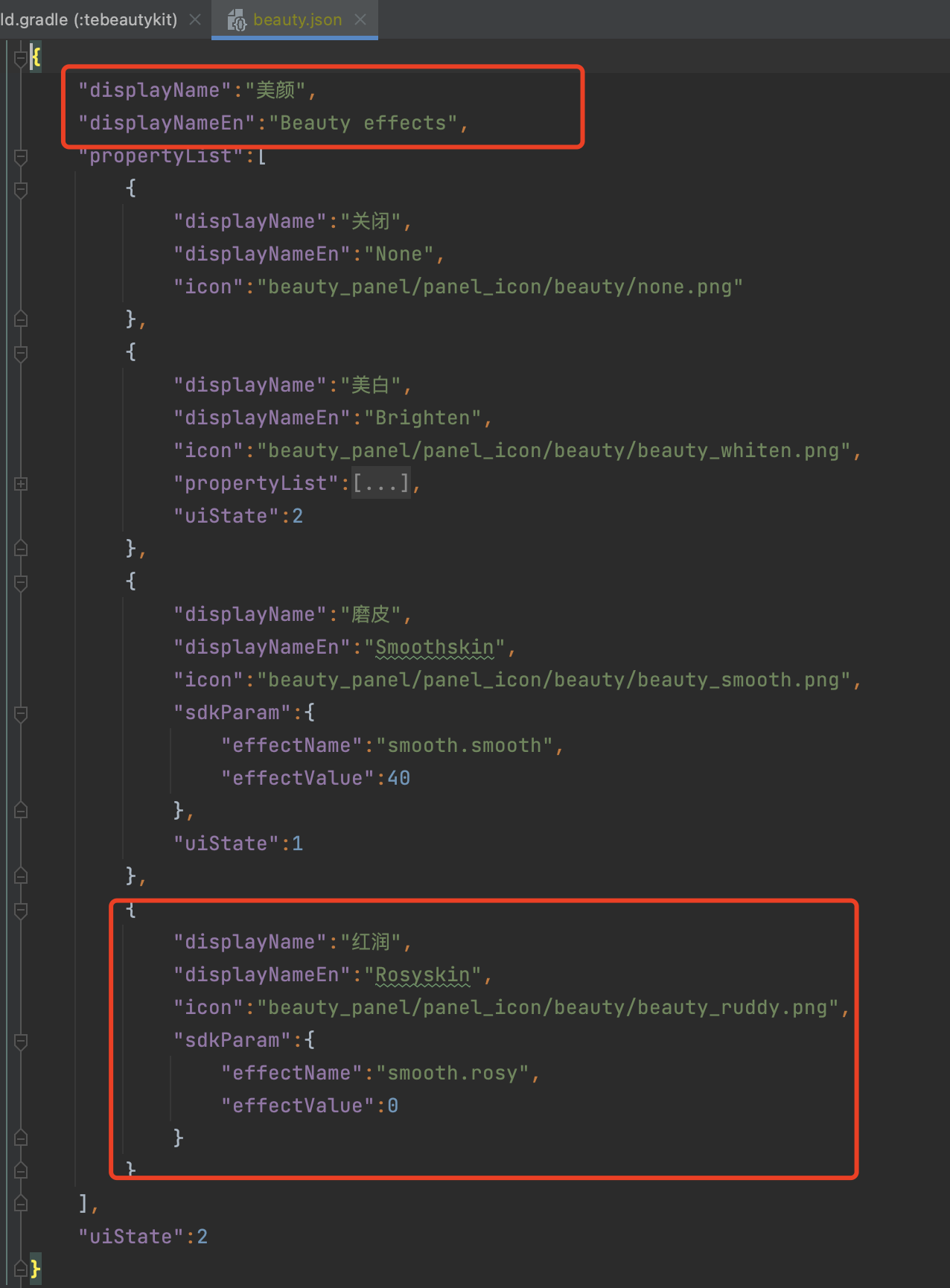
美颜、美体参数说明
滤镜、动效贴纸、分割参数说明
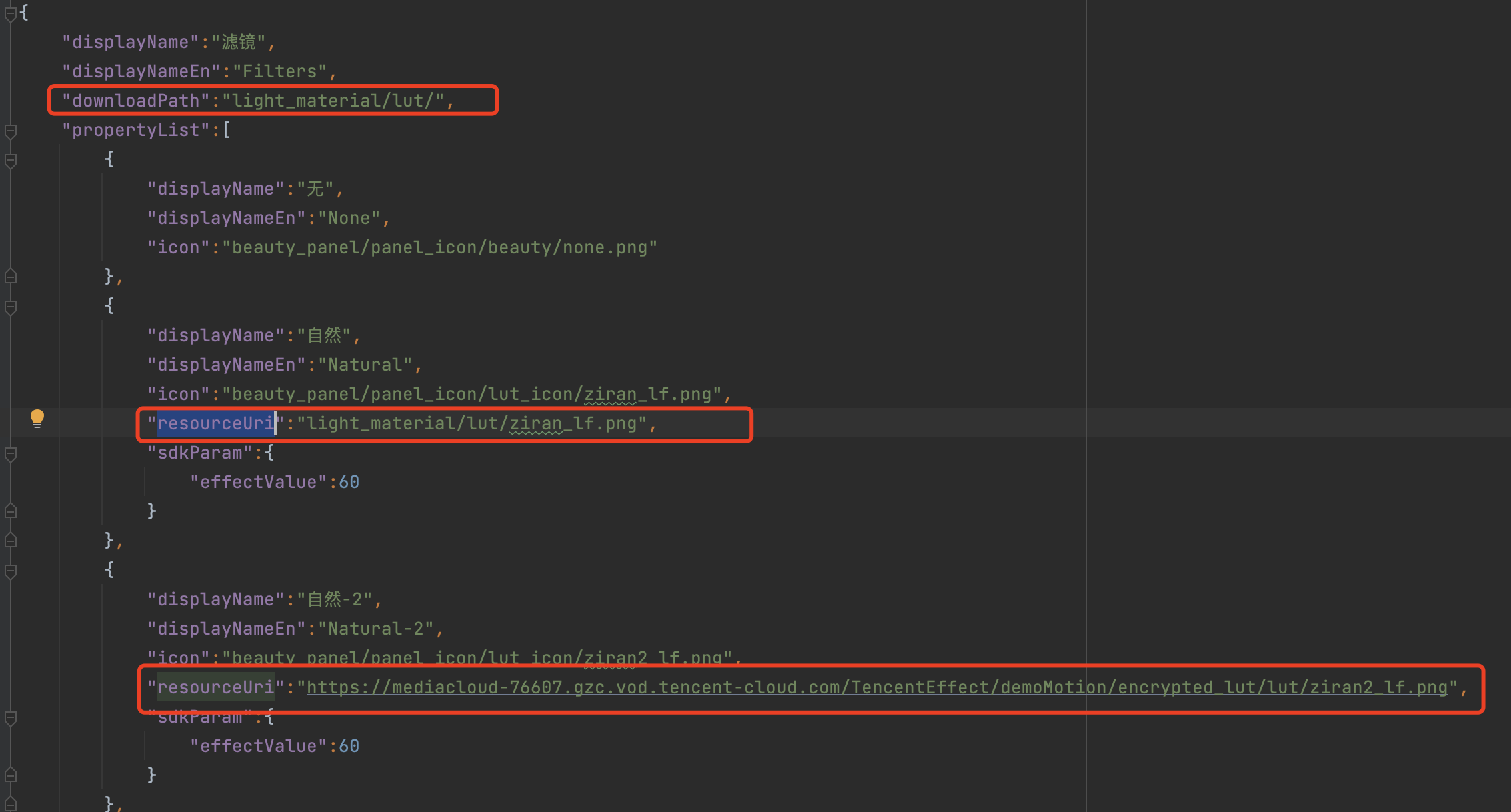
由于滤镜和动效贴纸、分割的配置基本一致,所以此处用滤镜的 JSON 进行说明,这里新增了 downloadPath 和 resourceUri 字段。
字段 | 说明 |
downloadPath | 如果您的滤镜素材是网络下载,那么这里配置的是您素材下载后在本地的存放位置,这里是相对路径,全路径是
TEDownloader.h 中设置的 basicPath+此处设置的路径。 |
resourceUri | 如果您的素材是需要通过网络下载的,那么这里配置网络地址,如上图第三个红框,如果您的滤镜素材在本地,则按照上图配置对应的本地地址。 |
风格整妆参数说明
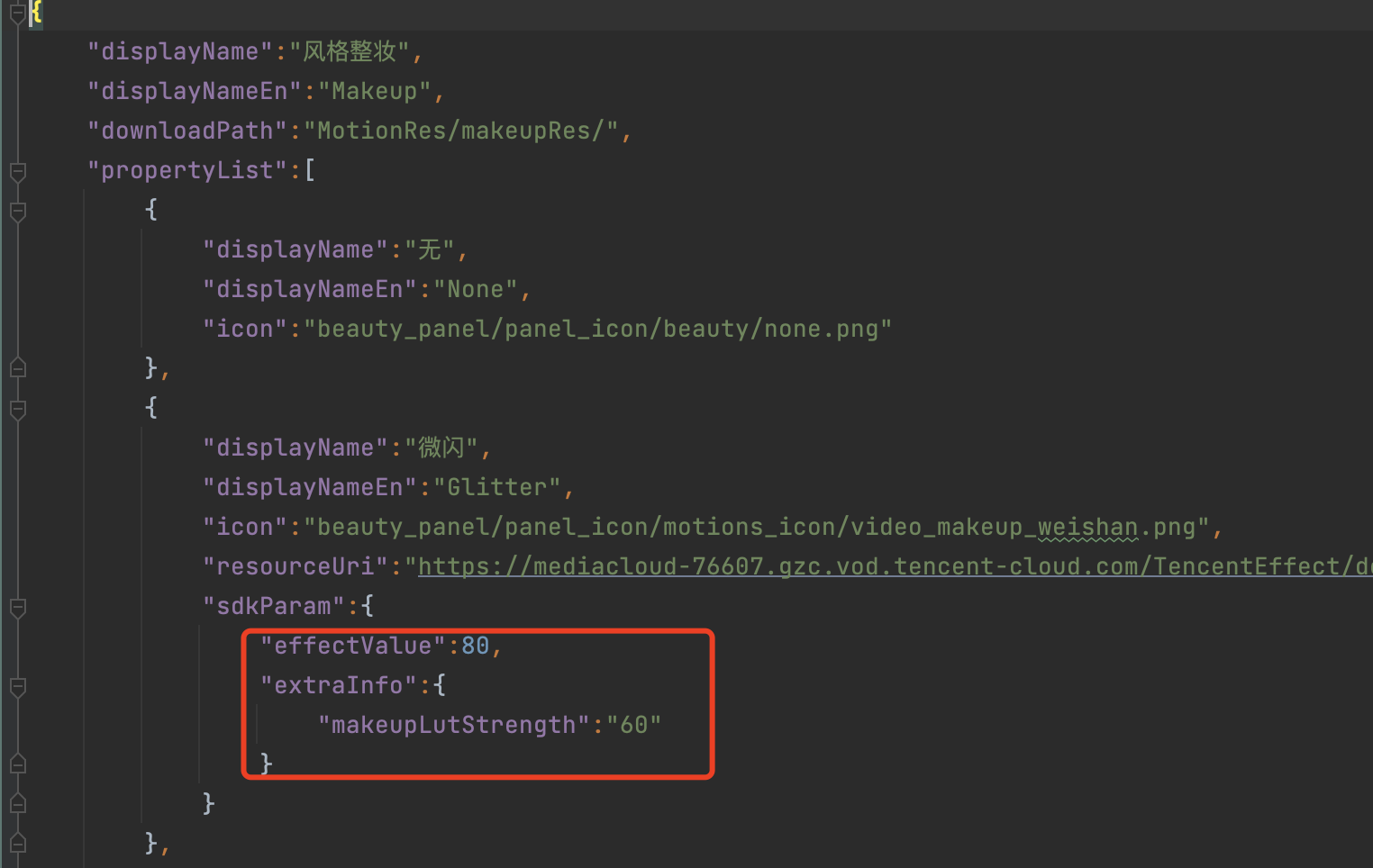
在风格整妆中增加了
extraInfo 下的 makeupLutStrength 字段,此字段用于调节风格整妆素材中滤镜的强度(如果此风格整妆素材支持调节滤镜强度就进行配置),此字段可参考美颜参数表。TEBeautyKit 方法说明
/// 创建TEBeautyKit对象/// - Parameters:/// - effectMode: EFFECT_MODE_NORMAL(高性能模式) EFFECT_MODE_PRO(默认模式)/// 高性能模式开启后,美颜占用的系统 CPU/GPU 资源更少,可减少手机的发热和卡顿现象,更适合低端机长时间用。/// 注意:开启高性能模式后,以下美颜项将不可用:/// 1. 眼部:眼宽、眼高、祛眼袋/// 2. 眉毛:角度、距离、高度、长度、粗细、眉峰/// 3. 嘴部:微笑唇/// 4. 面部:瘦脸(自然,女神,英俊),收下颌,祛皱、祛法令纹。建议用“脸型”实现综合大眼瘦脸效果/// - onInitListener: 回调+ (void)createXMagic:(EffectMode)effectMode onInitListener:(OnInitListener _Nullable)onInitListener;/// 美颜鉴权+ (void)setTELicense:(NSString *_Nullable)url key:(NSString *_Nullable)key completion:(callback _Nullable)completion;/// 设置美颜对象- (void)setXMagicApi:(XMagic *_Nullable)xmagicApi;/// 设置renderSize- (void)setRenderSize:(CGSize)size;/// 设置图像方向- (void)setImageOrientation:(YtLightDeviceCameraOrientation)orientation;/// 获取当前GL上下文接口- (nullable EAGLContext*)getCurrentGlContext;/// 静音- (void)setMute:(BOOL)isMute;/// 开启能力- (void)setFeatureEnableDisable:(NSString *_Nullable)featureName enable:(BOOL)enable;/// 设置帧同步模式/// @isSync 是否是同步/// @syncFrameCount同步的帧数。-1表示无限制。如果isSync为false,则此参数无意义- (void)setSyncMode:(BOOL)isSync syncFrameCount:(int)syncFrameCount;/// 获取设备等级+ (DeviceLevel)getDeviceLevel;/// 图片美颜- (UIImage *_Nullable)processUIImage:(UIImage *_Nullable)inputImageimageWidth:(int)imageWidthimageHeight:(int)imageHeightneedReset:(bool)needReset;/// 处理texture/// - Parameters:/// - textureId: 纹理id/// - textureWidth: 纹理宽度/// - textureHeight: 纹理高度/// - origin: 枚举值,设置成YtLightImageOriginBottomLeft 时,图像上下镜像翻转/// - orientation: 枚举值:图像旋转角度- (YTProcessOutput *_Nullable)processTexture:(unsigned int)textureIdtextureWidth:(int)textureWidthtextureHeight:(int)textureHeightwithOrigin:(YtLightImageOrigin)originwithOrientation:(YtLightDeviceCameraOrientation)orientation;/// 处理CVPixelBufferRef/// - Parameters:/// - pixelData: 图像数据/// - pixelDataWidth: 图像宽度/// - pixelDataHeight: 图像高度/// - origin: 枚举值,设置成YtLightImageOriginBottomLeft 时,图像上下镜像翻转/// - orientation: 枚举值:图像旋转角度- (YTProcessOutput * _Nullable)processPixelData:(CVPixelBufferRef _Nullable )pixelDatapixelDataWidth:(int)pixelDataWidthpixelDataHeight:(int)pixelDataHeightwithOrigin:(YtLightImageOrigin)originwithOrientation:(YtLightDeviceCameraOrientation)orientation;/// 设置美颜- (void)setEffect:(TESDKParam *_Nullable)sdkParam;/// 设置美颜- (void)setEffectList:(NSArray<TESDKParam *>*_Nullable)sdkParamList;/// 是否开启了美颜增强模式- (BOOL)isEnableEnhancedMode;/// 是否开启美颜增强模式- (void)enableEnhancedMode:(BOOL)enable;/// 恢复- (void)onResume;/// 暂停- (void)onPause;/// 销毁- (void)onDestroy;//获取当前texture的图片- (void)exportCurrentTexture:(void (^_Nullable)(UIImage * _Nullable image))callback;/// 设置log- (void)registerSDKLogListener:(id<YTSDKLogListener> _Nullable)listener level:(YtSDKLoggerLevel)level;/// SDK事件监听- (void)registerSDKEventListener:(id<YTSDKEventListener> _Nullable)listener;/// 保存设置的美颜数据- (void)saveEffectParam:(TESDKParam *_Nonnull)sdkParam;/// 删除某个保存的美颜数据- (void)deleteEffectParam:(TESDKParam *_Nonnull)sdkParam;/// 清空保存的美颜数据- (void)clearEffectParam;/// 设置输出纹理的居中裁剪比例- (void)setOutputTextureKeepRatio:(float)ratio;/// 获取保存的美颜数据- (NSMutableArray<TESDKParam *> *_Nonnull)getInUseSDKParamList;/// 导出正在使用的美颜数据/// return json字符串- (NSString *_Nullable)exportInUseSDKParam;/// 设置美颜数据/// - Parameter params: json字符串/// 如果要同时设置面板UI,则只需要调用 TEPanelView 的 setExportParamList 即可- (void)setExportedSDKParam:(NSString *_Nonnull)params;/// 是否开启美颜- (void)enableBeauty:(BOOL)enable;/// 注册回调清理接口 Register callback cleanup interface- (void)clearListeners;
TEUIConfig 方法说明
///可在外部修改下列属性的颜色/// 美颜面板背景色@property (nonatomic, strong) UIColor *panelBackgroundColor;/// 分割线颜色@property (nonatomic, strong) UIColor *panelDividerColor;/// 选中项颜色@property (nonatomic, strong) UIColor *panelItemCheckedColor;/// 文本颜色@property (nonatomic, strong) UIColor *textColor;/// 文本选中颜色@property (nonatomic, strong) UIColor *textCheckedColor;/// 进度条颜色@property (nonatomic, strong) UIColor *seekBarProgressColor;/// 设置displayName展示的语言,默认YES:展示displayName字段,设置NO:展示displayNameEn字段@property (nonatomic, assign) BOOL useDisplayName;/// 单例+ (instancetype)shareInstance;/// 设置面板资源路径/// - Parameter resources: 资源路径列表/// e.g. @[@{TEUI_BEAUTY : @"json file path"}]- (void)setTEPanelViewResources:(NSArray<NSDictionary *> *)resources;/// 获取面板资源路径- (NSArray<NSDictionary *> *)getTEPanelViewResources;/// 设置LightCore.bundle路径- (void)setLightCoreBundlePath:(NSString *)corePath;/// 获取LightCore.bundle路径- (NSString *)getLightCoreBundlePath;/// 设置Resources bundle路径- (void)setResourcesBundlePath:(NSString *)resPath;/// 获取Resources bundle路径- (NSString *)getResourcesBundlePath;
TEPanelView 方法说明
/// 美颜SDK对象@property (nonatomic, weak) XMagic *beautyKitApi;/// beautyKit对象@property (nonatomic, strong) TEBeautyKit *teBeautyKit;/// 代理@property (nonatomic, weak) id<TEPanelViewDelegate> delegate;/// 设置导出的美颜数据- (void)setExportParamList:(NSString *)lastParamList;/// 默认美颜- (void)setDefaultBeauty;/// 重置所有效果- (void)performFullReset;/// 增强模式- (void)setEnhancedMode:(BOOL)enhancedMode;/// 显示对比按钮- (void)isShowCompareBtn:(BOOL)isShow;
设置多语言说明
面板的语言设置分为两部分:系统文本和面板项名称。
1. 系统文本
系统文本位于 Assets 下 Localizable.strings 文件中。
默认支持语言: 简体中文、英文
添加其他语言:
在您的项目创建 Localizable.strings 文件,如果已经创建则只需添加其他语言即可
在 PROJECT 列表中,Localizations 下面添加多语言
翻译 TEBeautyKit 中的文本内容
2. 面板项名称
面板项名称定义在 JSON 配置文件中,通过以下两个字段控制:
字段 | 默认语言 |
displayName | 简体中文 |
displayNameEn | 英文 |
切换中英文:
// 显示中文(使用 displayName 字段)[[TEUIConfig shareInstance] setUseDisplayName:YES];// 显示英文(使用 displayNameEn 字段)[[TEUIConfig shareInstance] setUseDisplayName:NO];
添加其他语言:
复制原 JSON 文件,创建对应语言的版本(如繁体中文 panel_zh_hant.json)。
将 displayName 字段的值翻译为目标语言。
在代码中检测当前系统语言,加载对应的 JSON 文件。
调用 [[TEUIConfig shareInstance] setUseDisplayName:YES]。


