Chrome 125:CSS 锚点定位来了!

Chrome 125:CSS 锚点定位来了!

ConardLi
发布于 2024-06-06 19:50:40
发布于 2024-06-06 19:50:40
大家好,我是 ConardLi。
最近,Chrome 发布了 Chrome 125 稳定版本,其中我觉得最有亮点的新特性就是 CSS 锚点定位了。
我觉得 CSS 锚点定位 API (CSS anchor positioning API)可以在一定程度上改变 Web 的开发方式,因为它允许我们以原生方式定位相对于其他元素(称为锚点)的元素。
它可以帮助我们简化许多界面功能的复杂布局要求,例如菜单和子菜单、工具提示、选择、标签、卡片、设置对话框等。借助浏览器内置的锚点定位,我们可以在无需依赖第三方库的情况下简单构建分层用户界面。
此 API 的核心就在于锚点和定位元素之间的关系。
锚点指的就是使用 anchor-name 属性指定为参考点的元素,定位元素则是使用 position-anchor 属性或在其定位逻辑中明确使用 anchor-name 相对于锚点放置的元素。
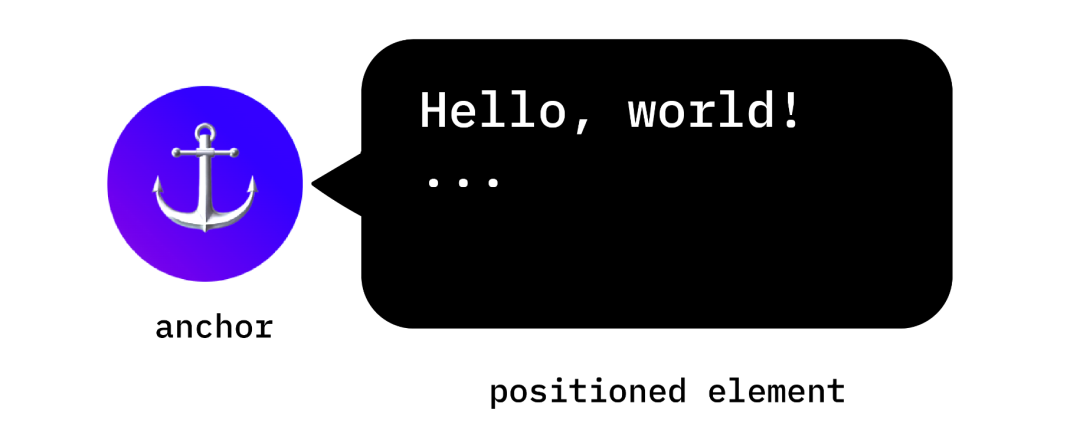
创建锚点非常简单,将锚点名称属性应用于所选元素,并为其分配一个唯一标识符。这个唯一标识符必须前面加上双破折号(--),就像 CSS 变量一样。
.anchor-button {
    anchor-name: --anchor-el;
}
一旦分配了锚点名称,.anchor-butto 就可以充当锚点,可以用来指导其他元素的放置。我们可以通过下面两种方式之一来将这个锚点关联到其他元素:
隐式锚点(Implicit anchors)
将锚点关联到另一个元素的第一种方法是使用隐式锚点,我们可以看下面的代码。
我们将 position-anchor 属性添加到要关联到锚点的元素,然后指定上面定义好的锚点名称:--anchor-el 。
.positioned-notice {
    position-anchor: --anchor-el;
}
通过这种隐式锚点关系,我们可以使用 anchor() 函数定位元素,而不需要在其第一个参数中显式指定锚点名称。
.positioned-notice {
    position-anchor: --anchor-el;
    top: anchor(bottom);
}
显式锚点(Explicit anchors)
或者,我们可以直接在锚点函数中使用锚点名称(例如,top:anchor-elbottom)。这种方式称为显式锚点,如果我们想锚定到多个元素的话,这种方式会很方便。
.positioned-notice {
    top: anchor(--anchor-el bottom);
}
锚点定位

锚点定位建立在 CSS 绝对定位的基础上,要使用定位值,我们需要向定位元素添加 position:absolute。然后,使用 anchor() 函数应用定位值。例如,要将锚定元素定位在锚定元素的左上角,可以使用以下定位:
.positioned-notice {
    position-anchor: --anchor-el;
    position: absolute;
    right: anchor(right);
    bottom: anchor(top);
}

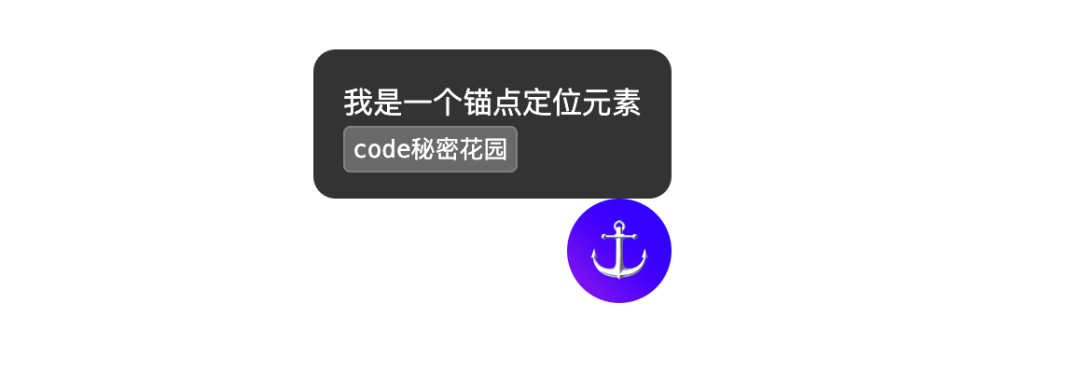
我们来看下面的例子:
<div class="anchor">
  <p>⚓︎</p>
</div>

<div class="anchored-notice">
  <p>我是一个锚点定位元素<p>
  <code>code秘密花园</code>
</div>
.anchor {
  anchor-name: --anchor-el;
}

.anchored-notice {
  position: absolute;
  position-anchor: --anchor-el;
  bottom: anchor(top);
  right: anchor(right);
}

.anchor {
  background: linear-gradient(45deg, blueviolet, blue);
  font-size: 2rem;
  display: grid;
  place-items: center;
  border-radius: 100%;
  aspect-ratio: 1 / 1;
  width: 3.5rem;
  line-height: 0;
  margin-top: 60dvh;

  p {
    filter: brightness(2);
  }
}

.anchored-notice {
  font-family: system-ui, sans-serif;
  background: #333;
  border-radius: 0.75rem;
  color: white;
  padding: 1rem;
  max-width: 250px;
  line-height: 1.5;
}

code {
  font-family: monospace;
  background: dimgray;
  padding: 0.25rem;
  border-radius: 0.25rem;
  border: 1px solid gray;
}

body {
  display: grid;
  grid-template-rows: 1fr;
  justify-content: center;
  height: 100vh;
}
要对这些值使用逻辑定位,等价的值如下:
- top =
inset-block-start - left =
inset-inline-start - bottom =
inset-block-end - right =
inset-inline-end
多个锚点
一个元素可以被拴在多个锚点上,我们可以设置相对于多个锚点定位的位置值,通过使用 anchor() 函数并明确说明在第一个参数中引用的锚点:
.anchored {
  position: absolute;
  top: anchor(--one bottom);
  left: anchor(--one right);
  right: anchor(--two left);
  bottom: anchor(--two top);
}
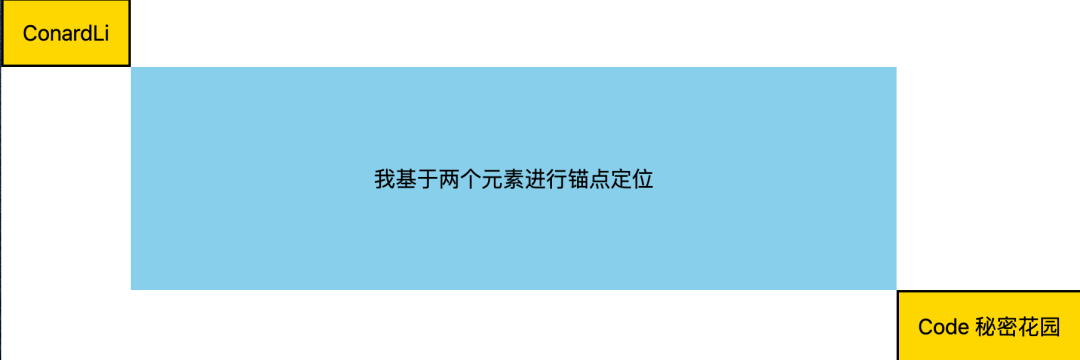
在下面的例子中,定位元素的左上角锚定到一个锚点的右下角,定位元素的右下角锚定到第二个锚点的左上角:
<div class="one">ConardLi</div>
<div class="two">Code 秘密花园</div>
<div class="anchored">我基于两个元素进行锚点定位Å</div>
.one,
.two {
  position: absolute;
  padding: 1rem;
  border: 2px solid;
  background: gold;
}

.one {
  anchor-name: --one;
}

.two {
  anchor-name: --two;
  bottom: 0;
  right: 0;
}

.anchored {
  position: absolute;
  top: anchor(--one bottom);
  left: anchor(--one right);
  right: anchor(--two left);
  bottom: anchor(--two top);
  display: grid;
  place-items: center;
}

body {
  height: 100dvh;
  font-family: system-ui;
  font-size: 18px;
  margin: 0;
}

.anchored {
  background: skyblue;
}
兼容性
由于目前浏览器支持有限,在生产环境中大家还是要谨慎使用。

我们可以使用 @supports 先查询一下当前浏览器环境是否支持:
@supports (anchor-name: --myanchor) {

  /* 锚点定位样式 */

}
此外,我们还可以使用 Oddbird 的 CSS 锚点定位 polyfill,它适用于 Firefox 54、Chrome 51、Edge 79 和 Safari 10,该 polyfill 支持大多数基本的锚点位置功能。
https://github.com/oddbird/css-anchor-positioning
最后
以上就是 CSS 锚点定位的基础用法了,想了解更详细的使用方式,可以看官方文档:https://developer.chrome.com/blog/anchor-positioning-api
本文参与 腾讯云自媒体同步曝光计划,分享自微信公众号。
原始发表:2024-06-05,如有侵权请联系 cloudcommunity@tencent.com 删除
目录
腾讯云开发者

Copyright © 2013 - 2026 Tencent Cloud. All Rights Reserved. 腾讯云 版权所有
深圳市腾讯计算机系统有限公司 ICP备案/许可证号:粤B2-20090059  粤公网安备44030502008569号
腾讯云计算(北京)有限责任公司 京ICP证150476号 | 京ICP备11018762号