【Linux系统】日志与策略模式


在模拟实现线程池之前,我们先来实现一个简单的日志,在这之前我们需要铺垫一些概念
1. 设计模式
一、核心定义:什么是设计模式?
设计模式是在软件设计中,针对特定场景的常见问题的、可重用的解决方案。它并不是一个可以直接转换成代码的完整设计,而更像是一个模板或蓝图,指导你如何优雅地解决一类问题。
你可以把它想象成:
- 建筑学中的蓝图:建筑师在设计房子时,会遇到“如何设计楼梯”、“如何布局客厅和卧室”等常见问题。他们有一套经过验证的最佳实践和标准方案(蓝图),这些方案保证了建筑的稳固、美观和实用。设计模式就是软件世界的“蓝图”。
- 武功秘籍中的招式:一招一式都是为了破解对手特定的攻击而设计的。程序员学习设计模式,就像习武之人学习招式,当遇到特定的问题(对手出招)时,可以迅速使出最有效的解决方案(见招拆招)。
二、为什么需要设计模式?(目的与好处)
- 代码复用:提供了一套标准化的解决方案,避免重复造轮子。
- 提高可维护性:设计模式通常意味着代码是经过良好组织和结构化的,使得代码更容易被他人理解和修改。
- 提高可扩展性:许多模式(如策略模式、装饰器模式)都是为了方便未来扩展功能而设计的,符合“开闭原则”(对扩展开放,对修改关闭)。
- 提高代码的灵活性:通过解耦(降低代码之间的依赖关系),使得代码模块更容易被替换和组合。
- 团队沟通的通用语言:当你说“这里我们用个单例模式吧”,所有懂设计模式的队友立刻就能明白你的意图和设计思路,极大地提高了沟通效率。
三、设计模式的三大分类
经典著作《设计模式:可复用面向对象软件的基础》中将23种常见模式分为三类:
1. 创建型模式
关注点:如何创建对象。 它们将对象的创建过程抽象出来,使得系统与对象的创建、组合方式解耦。
- 单例模式:保证一个类只有一个实例,并提供一个全局访问点。
- 例子:数据库连接池、日志对象、应用配置。
- 工厂方法模式:定义一个创建对象的接口,但让子类决定实例化哪一个类。
- 例子:UI库中,有一个抽象的
Button类,其子类WindowsButton和MacButton由不同的工厂创建。
- 例子:UI库中,有一个抽象的
- 抽象工厂模式:提供一个接口,用于创建相关或依赖对象的家族,而不需要指定具体的类。
- 建造者模式:将一个复杂对象的构建与其表示分离,使得同样的构建过程可以创建不同的表示。
- 例子:创建一个
Computer对象,CPU、内存、硬盘等部件可以灵活组合,而不是在构造函数中传入无数参数。
- 例子:创建一个
- 原型模式:通过复制现有的实例来创建新的实例。
2. 结构型模式
关注点:如何组合类和对象以形成更大的结构。 它们通过继承和组合,来构建灵活、高效的程序结构。
- 适配器模式:将一个类的接口转换成客户希望的另外一个接口。
- 例子:读卡器是内存卡和笔记本电脑之间的适配器。
- 装饰器模式:动态地给一个对象添加一些额外的职责,相比生成子类更为灵活。
- 例子:给一杯咖啡(主体)动态地加入摩卡、奶泡等“装饰”,而不是创建“摩卡咖啡”、“奶泡咖啡”等子类。
- 代理模式:为其他对象提供一种代理以控制对这个对象的访问。
- 例子:VPN代理、图片懒加载(代理先占位,真正需要时再加载真实图片)。
- 外观模式:提供一个统一的接口,用来访问子系统中的一群接口。
- 例子:一键启动电脑(封装了CPU启动、内存加载、硬盘读取等一系列复杂操作)。
- 桥接模式:将抽象部分与它的实现部分分离,使它们都可以独立地变化。
- 组合模式:将对象组合成树形结构以表示“部分-整体”的层次结构。
- 享元模式:运用共享技术有效地支持大量细粒度的对象。
3. 行为型模式
关注点:对象之间的职责分配和通信。 它们主要负责管理算法、职责和对象间的交互。
- 观察者模式:定义对象间的一种一对多的依赖关系,当一个对象的状态发生改变时,所有依赖于它的对象都得到通知并被自动更新。
- 例子:事件处理系统、消息订阅。
- 策略模式:定义一系列的算法,把它们一个个封装起来,并且使它们可相互替换。
- 例子:支付方式(支付宝、微信、信用卡),可以轻松替换不同的支付策略。
- 模板方法模式:定义一个操作中的算法的骨架,而将一些步骤延迟到子类中。
- 迭代器模式:提供一种方法顺序访问一个聚合对象中各个元素,而又不需暴露该对象的内部表示。
- 责任链模式:为请求创建一个接收者对象的链,每个接收者都包含对另一个接收者的引用。如果一个对象不能处理该请求,那么它会把相同的请求传给下一个接收者。
- 例子:审批流程(员工 -> 经理 -> 总监 -> CEO)。
- 命令模式:将一个请求封装成一个对象,从而使您可以用不同的请求对客户进行参数化。
四、重要原则:SOLID原则
设计模式背后是面向对象设计的核心原则,最著名的就是SOLID原则:
- S - 单一职责原则:一个类只负责一项职责。
- O - 开闭原则:对扩展开放,对修改关闭。
- L - 里氏替换原则:子类必须能够替换掉它们的父类。
- I - 接口隔离原则:使用多个专门的接口,而不是一个庞大臃肿的总接口。
- D - 依赖倒置原则:依赖于抽象(接口),而不是具体实现。
五、如何使用设计模式?(忠告)
- 不要滥用:设计模式是为了解决复杂性问题而生的。如果你的场景非常简单,直接几行代码就能搞定,强行使用模式反而会让代码变得过度复杂、难以理解。这就是所谓的“过度设计”。
- 理解优于记忆:理解每个模式要解决什么问题、它的应用场景和优缺点,远比死记硬背23种模式的UML图更重要。
- 重构 towards模式:不要一开始就想着要用什么模式。先写出可运行的、简单的代码,当发现代码有坏味道(难以扩展、难以维护)时,再考虑用合适的模式来重构它。
2. 日志认识
计算机中的日志文件是记录系统和应用程序运行过程中发生事件的重要数据载体。它们以时间序列的方式详细记录系统状态、用户操作、异常情况等关键信息。日志的主要作用体现在三个方面:一是实时监控系统运行状态,帮助运维人员了解系统健康状况;二是记录异常和错误信息,为后续故障排查提供依据;三是支持安全审计,通过分析用户行为和系统事件来发现潜在安全隐患。
在日志格式规范方面,通常会包含以下核心要素:
- 时间戳(必须)
- 精确到毫秒级的时间记录(如:2023-11-15 14:23:45.678)
- 采用UTC或本地时区时间
- 日志等级(必须)
- 通常包括:DEBUG、INFO、WARNING、ERROR、FATAL等
- 用于区分日志的重要性和紧急程度
- 示例:ERROR - 数据库连接失败
- 日志内容(必须)
- 详细的事件描述
- 可能包含错误代码、堆栈信息等
- 示例:"Failed to connect to database: Connection timeout"
可选的高级指标包括:
- 文件名和行号
- 记录日志产生位置的源代码信息
- 示例:main.cpp:123
- 进程/线程信息
- 进程ID(PID)
- 线程ID(TID)
- 示例:[PID:1234][TID:5678]
- 其他上下文信息
- 用户ID
- 会话ID
- 请求ID等
在日志系统实现方面,常见的成熟解决方案有:
- 轻量级日志库
- spdlog:高性能C++日志库
- glog:Google开发的日志库
- 企业级日志框架
- Boost.Log:功能强大的C++日志库
- Log4cxx:Apache的跨平台日志框架
虽然这些现成方案功能完善,但考虑到特定项目需求,我们决定采用自定义日志系统的设计。为此,我们选择使用设计模式中的策略模式来构建灵活的日志系统架构:
策略模式的实现思路:
- 定义日志接口(抽象策略)
- 包含write()等基本操作
- 规定日志格式标准
- 实现具体策略类
- 控制台日志策略
- 文件日志策略
- 网络日志策略
- 数据库日志策略
- 上下文类管理策略
- 运行时动态切换日志输出方式
- 统一管理日志级别等配置
这种设计允许在不修改现有代码的情况下,灵活扩展新的日志输出方式,同时保持日志格式的统一性。例如,在开发阶段可以使用控制台日志便于调试,而在生产环境可以无缝切换到文件日志或网络日志。
3. 实现日志
我们想要的日志格式如下:
[可读性很好的时间] [⽇志等级] [进程pid] [打印对应⽇志的⽂件名][⾏号] - 消息内容,⽀持可变参数
[2024-08-04 12:27:03] [DEBUG] [202938] [main.cc] [16] - hello world
[2024-08-04 12:27:03] [DEBUG] [202938] [main.cc] [17] - hello world
[2024-08-04 12:27:03] [DEBUG] [202938] [main.cc] [18] - hello world
[2024-08-04 12:27:03] [DEBUG] [202938] [main.cc] [20] - hello world
[2024-08-04 12:27:03] [DEBUG] [202938] [main.cc] [21] - hello world
[2024-08-04 12:27:03] [WARNING] [202938] [main.cc] [23] - hello world
3.1 日志策略
我们先来实现具体的策略类,这里使用两种日志策略,分别是控制台日志策略和文件日志策略
代码如下:
#ifndef __LOG_HPP__
#define __LOG_HPP__

#include <iostream>
#include <filesystem> // C++17
#include <fstream>
#include <cstdio>
#include <string>
#include "Mutex.hpp"

namespace LogModule
{
    using namespace MutexModule;

    const std::string gsep = "\r\n";
    // 策略模式
    // 刷新策略 a: 显示器打印 b:向指定的文件写入
    // 刷新策略基类——抽象类
    class LogStrategy
    {
    public:
        ~LogStrategy() = default; // 本质也是虚函数,多态行为,防止资源泄漏
        virtual void SyncLog(const std::string& message) = 0; // 纯虚函数
    };

    // 显示器打印日志的策略 : 子类
    class ConsoleLogStrategy : public LogStrategy
    {
    public:
        ConsoleLogStrategy() {}

        void SyncLog(const std::string& message) override
        {
            LockGuard lockguard(_mutex);
            std::cout << message << std::endl;
        }

        ~ConsoleLogStrategy() {}
    private:
        Mutex _mutex;
    };

    const std::string defaultpath = "./log";
    const std::string defaultfile = "my.log";
    // 文件打印日志的策略 : 子类
    class FileLogStrategy : public LogStrategy
    {
    public:
        FileLogStrategy(const std::string& path = defaultpath, const std::string& file = defaultfile)
            :_path(path), _file(file)
            {
                LockGuard lockguard(_mutex);
                // 判断文件路径存不存在
                if(std::filesystem::exists(_path))
                {
                    return;
                }
                try
                {
                    std::filesystem::create_directories(_path); // 不存在则创建路径
                }
                catch(const std::filesystem::filesystem_error &e)
                {
                    std::cerr << e.what() << '\n'; // 失败就抛异常,并捕获
                }
            }

        void SyncLog(const std::string& message) override
        {
            LockGuard lockguard(_mutex);
            std::string filename = _path + (_path.back() == '/' ? "" : "/") + _file;
            std::ofstream out(filename, std::ios::app); // 以追加的方式打开文件
            if(!out.is_open())
            {
                return; // 打开失败就返回
            }
            out << message << gsep;
            out.close();
        }

        ~FileLogStrategy() {}

    private:
        std::string _path; // 日志文件所在路径
        std::string _file; // 日志文件
        Mutex _mutex;
    };

}


#endif
1. 总体架构 (策略模式核心)
- 抽象策略接口 (
LogStrategy):定义所有具体策略必须实现的通用接口SyncLog。这是多态的基础,允许上下文(未来的Logger类)依赖抽象,而非具体实现。 - 具体策略类 (
ConsoleLogStrategy,FileLogStrategy):继承自抽象接口,并提供了接口方法的不同实现。一个将日志输出到控制台,另一个则输出到文件。
这种结构使得增加新的日志输出策略(例如输出到网络、数据库、Syslog等)变得非常容易,只需创建一个新的类继承 LogStrategy 并实现 SyncLog 方法即可,完全符合 “开闭原则”。
2. 代码结构分解
a. 抽象基类:LogStrategy
class LogStrategy {
public:
    ~LogStrategy() = default; // 关键:虚析构函数确保派生类正确释放
    virtual void SyncLog(const std::string& message) = 0; // 纯虚函数,定义策略契约
};- 职责:定义所有日志输出策略必须遵守的契约。
- 关键点:
- 虚析构函数:至关重要。确保了当通过基类指针删除派生类对象时,派生类的析构函数会被正确调用,防止资源泄漏。
- 纯虚函数
SyncLog:强制所有子类必须实现这个日志同步输出方法。
b. 具体策略A:ConsoleLogStrategy (输出到标准输出)
class ConsoleLogStrategy : public LogStrategy {
public:
    ConsoleLogStrategy() {} // 构造函数通常不需要特殊操作
    void SyncLog(const std::string& message) override {
        LockGuard lockguard(_mutex); // 线程安全关键!
        std::cout << message << std::endl; // 核心操作:输出到控制台
    }
    ~ConsoleLogStrategy() {}
private:
    Mutex _mutex; // 互斥锁,保证多线程下输出不混乱
};- 职责:将接收到的日志消息安全地打印到标准输出(通常是终端)。
- 关键点:
- 线程安全:使用
LockGuard和Mutex确保在多线程环境下,多个线程同时调用SyncLog时,日志消息不会交叉重叠,输出是完整的。这是生产级代码的重要特征。
- 线程安全:使用
c. 具体策略B:FileLogStrategy (输出到文件)
class FileLogStrategy : public LogStrategy {
public:
    FileLogStrategy(const std::string& path = defaultpath, const std::string& file = defaultfile)
        :_path(path), _file(file) {
        LockGuard lockguard(_mutex);
        // 构造时检查并创建日志目录
        if(!std::filesystem::exists(_path)) {
            try {
                std::filesystem::create_directories(_path);
            } catch(const std::filesystem::filesystem_error &e) {
                std::cerr << e.what() << '\n'; // 异常处理:目录创建失败
            }
        }
    }

    void SyncLog(const std::string& message) override {
        LockGuard lockguard(_mutex); // 线程安全
        std::string filename = _path + (_path.back() == '/' ? "" : "/") + _file;
        std::ofstream out(filename, std::ios::app); // 核心:以追加模式打开文件
        if(!out.is_open()) {
            return; // 处理文件打开失败
        }
        out << message << gsep; // 写入文件并换行
        out.close(); // 显式关闭文件(也可依赖析构函数自动关闭)
    }
private:
    std::string _path;
    std::string _file;
    Mutex _mutex; // 保证多线程写文件安全
};- 职责:将日志消息写入到指定的文件中。
- 关键点:
- 目录管理:在构造函数中检查并创建所需的目录结构,体现了良好的自管理性。
- 文件操作:使用
std::ofstream以追加模式 (std::ios::app) 打开文件,确保不会覆盖历史日志。 - 错误处理:对创建目录和打开文件可能出现的异常和错误进行了处理(捕获异常、检查文件是否打开成功)。
- 路径拼接:智能地处理路径分隔符
'/'。 - 线程安全:同样使用互斥锁保证多线程下写文件的安全性。
注意:上面代码中我们使用了<filesystem> 库。下面我们来简单介绍一下C++17 引入的 <filesystem> 库:
什么是 <filesystem> 库?
C++ <filesystem> 库(正式名称为 std::filesystem)是 C++ 标准库的一部分,它提供了一套用于操作文件系统路径、目录和文件的类、函数和常量。
在它出现之前,C++ 程序员必须依赖操作系统特定的 API(如 Windows 的 <windows.h> 或 Linux 的 <unistd.h>)或第三方库(如 Boost.Filesystem)来进行文件系统操作。<filesystem> 库将这些功能标准化,使得编写跨平台的文件操作代码变得非常简单和便捷。
它的核心功能是什么?
<filesystem> 库主要帮助你处理以下几类任务:
- 路径操作 (Path Manipulation)
- 拼接、分解、检查路径。
- 示例:
path p = "/home/user/logs"; p /= "app.log"; // 路径变为 /home/user/logs/app.log
- 文件和目录查询 (File and Directory Queries)
- 检查路径是否存在 (
exists)。 - 判断是文件还是目录 (
is_directory,is_regular_file)。 - 获取文件大小、最后修改时间等属性。
- 检查路径是否存在 (
- 文件和目录操作 (File and Directory Operations)
- 创建目录 (
create_directory,create_directories)。 - 复制文件和目录 (
copy)。 - 重命名/移动文件和目录 (
rename)。 - 删除文件和目录 (
remove,remove_all)。
- 创建目录 (
- 遍历目录 (Directory Iteration)
- 循环遍历目录下的所有文件和子目录,非常强大和方便。
3.2 测试日志策略
我们来测试一下效果:
#include "Log.hpp"

using namespace LogModule;

int main()
{
    std::unique_ptr<LogStrategy> strategy = std::make_unique<ConsoleLogStrategy>();
    //std::unique_ptr<LogStrategy> strategy = std::make_unique<FileLogStrategy>();
    strategy->SyncLog("hello log!");
    return 0;
}
先来测试一下控制台日志策略,将日志输出到控制台上,运行结果:
ltx@iv-ye1i2elts0wh2yp1ahah:~/gitLinux/Linux_system/lesson_thread/ThreadPool$ ./test
hello log!
再来试一下文件日志策略,将日志输出到文件中,运行结果:
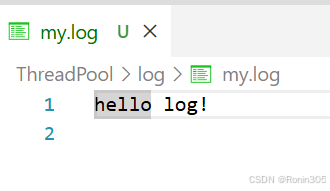
可以看到在当前路径中创建了一个log目录,并在log目录下创建了my.log文件,且日志也输出到了文件中
3.3 日志主体
代码如下:
    // 日志等级
    enum class LogLevel
    {
        DEBUG,
        INFO,
        WARNING,
        ERROR,
        FATAL
    };

    std::string LevelToStr(const LogLevel& level)
    {
        switch (level)
        {
        case LogLevel::DEBUG:
            return "DEBUG";
        case LogLevel::INFO:
            return "INFO";
        case LogLevel::WARNING:
            return "WARNING";
        case LogLevel::ERROR:
            return "ERROR";
        case LogLevel::FATAL:
            return "FATAL";
        default:
            return "UNKNOWN";
        }
    }

    std::string GetTimeStamp()
    {
        time_t cur = time(nullptr);
        struct tm curr_tm;
        localtime_r(&cur, &curr_tm);
        char timebuffer[128];
        snprintf(timebuffer, sizeof(timebuffer), "%4d-%02d-%02d %02d:%02d:%02d",
            curr_tm.tm_year + 1900, curr_tm.tm_mon + 1, curr_tm.tm_mday, curr_tm.tm_hour, curr_tm.tm_min, curr_tm.tm_sec);

        return timebuffer;
    }

    class Logger
    {
    public:
        Logger()
        {
            // 默认使用控制台策略
            EnableConsoleLogStrategy();
        }

        void EnableFileLogStrategy()
        {
            _flush_strategy = std::make_unique<FileLogStrategy>();
        }

        void EnableConsoleLogStrategy()
        {
            _flush_strategy = std::make_unique<ConsoleLogStrategy>();
        }

        // 一条日志信息
        class LogMessage
        {
        public:
            LogMessage(LogLevel& level, const std::string& src_name, int line, Logger& logger)
                :_cur_time(GetTimeStamp())
                ,_level(level)
                ,_pid(getpid())
                ,_src_name(src_name)
                ,_line(line)
                ,_logger(logger)
                {
                    // 日志的左边信息,合并起来
                    std::stringstream ss;
                    ss << "[" << _cur_time << "] "
                        << "[" << LevelToStr(_level) << "] "
                        << "[" << _pid << "] "
                        << "[" << _src_name << "] "
                        << "[" << _line << "] "
                        << "- ";
                    _loginfo = ss.str();
                }

            // 日志的右边信息,合并起来
            template<class T>
            LogMessage& operator<<(const T& info) // 注意使用引用返回,可以持续输入
            {
                std::stringstream ss;
                ss << info;
                _loginfo += ss.str();
                return *this;
            }

            ~LogMessage()
            {
                // 如果刷新策略的指针不为空,就将日志刷新到选择的策略中
                if(_logger._flush_strategy)
                {
                    _logger._flush_strategy->SyncLog(_loginfo);
                }
            }

        private:
            std::string _cur_time; // 当前时间
            LogLevel _level; // 日志等级
            pid_t _pid; // 进程pid
            std::string _src_name; // 源文件名
            int _line; // 行号
            std::string _loginfo; // 一条完整日志信息
            Logger& _logger;
        };

        // 这里故意写成返回临时对象
        LogMessage operator()(LogLevel level, std::string name, int line)
        {
            return LogMessage(level, name, line, *this);
        }

        ~Logger() {}

    private:
        std::unique_ptr<LogStrategy> _flush_strategy;
    };

    // 定义全局对象
    Logger logger;

    // 使用宏,简化用户操作,获取文件名和行号
    #define LOG(level) logger(level, __FILE__, __LINE__)
    #define Enable_Console_Log_Strategy() logger.EnableConsoleLogStrategy()
    #define Enable_File_Log_Strategy() logger.EnableFileLogStrategy()
整体架构概述
主要组成部分包括:
- 日志等级枚举(LogLevel):定义日志级别
- 工具函数:
LevelToStr和GetTimeStamp - 核心Logger类:管理日志策略和生成日志消息
- 内部类LogMessage:构建和输出单条日志
- 全局对象和宏:简化用户接口
获取时间的系统调用接口详解
在GetTimeStamp()函数中使用了几个重要的时间相关系统调用:
std::string GetTimeStamp()
{
    time_t cur = time(nullptr);           // 1. 获取当前时间戳
    struct tm curr_tm;
    localtime_r(&cur, &curr_tm);          // 2. 转换为本地时间结构
    char timebuffer[128];
    snprintf(timebuffer, sizeof(timebuffer), "%4d-%02d-%02d %02d:%02d:%02d",
        curr_tm.tm_year + 1900, curr_tm.tm_mon + 1, curr_tm.tm_mday,
        curr_tm.tm_hour, curr_tm.tm_min, curr_tm.tm_sec); // 3. 格式化时间

    return timebuffer;
}
详细说明:
-
time(nullptr):- 功能:获取从1970年1月1日00:00:00 UTC(Unix纪元)到当前的秒数
- 参数:
nullptr表示不需要将结果存储在额外的地方 - 返回值:
time_t类型的时间戳
-
localtime_r(&cur, &curr_tm):- 功能:将
time_t表示的时间转换为本地时间的tm结构 - 与
localtime()的区别:localtime_r是线程安全版本,它将结果存储在用户提供的缓冲区中 -
tm结构字段:-
tm_year: 从1900年开始的年数 -
tm_mon: 月份(0-11) -
tm_mday: 月中的天数(1-31) -
tm_hour: 小时(0-23) -
tm_min: 分钟(0-59) -
tm_sec: 秒(0-60,60用于闰秒)
-
- 功能:将
-
snprintf:- 功能:安全地格式化字符串到缓冲区
- 优势:比
sprintf更安全,因为它限制了最大写入字节数
使用内部类LogMessage的好处
将LogMessage设计为Logger的内部类有几个重要优势:
- 紧密的逻辑关联:
-
LogMessage完全依赖于Logger的存在和功能 - 它直接访问
Logger的私有成员_flush_strategy
-
- 封装性:
- 隐藏了日志消息构建的复杂细节
- 用户只需要使用简单的
<<操作符接口
- RAII模式的应用:
- 在构造函数中收集日志的元信息(时间、级别等)
- 在析构函数中自动执行实际的日志输出操作
- 确保即使发生异常,日志也能被正确输出
- 简化用户接口:
- 用户不需要手动创建或管理
LogMessage对象 - 通过宏和运算符重载提供了非常简洁的使用方式
- 用户不需要手动创建或管理
重载()运算符返回临时对象的作用
// 这里故意写成返回临时对象
LogMessage operator()(LogLevel level, std::string name, int line)
{
    return LogMessage(level, name, line, *this);
}- 流畅的接口设计:
- 允许链式调用:
logger(level, file, line) << "message" << value; - 创建了一个临时对象,在其生命周期内收集所有日志内容
- 允许链式调用:
- 利用临时对象生命周期管理资源:
- 临时
LogMessage对象在完整表达式结束时析构 - 在析构函数中自动执行日志输出,确保日志完整性
- 临时
- 自然的作用域绑定:
- 每条日志语句对应一个完整的表达式
- 日志的开始和结束与C++语句的边界自然对齐
- 返回值优化(RVO):
- 现代C++编译器会对这种情况进行优化,避免不必要的拷贝
- 即使没有RVO,C++11的移动语义也能保证高效
整体工作流程
- 用户通过宏
LOG(level)调用,例如:LOG(LogLevel::INFO) << "Hello" << value; - 宏展开为:
logger(LogLevel::INFO, __FILE__, __LINE__) << "Hello" << value; - 调用
Logger::operator(),创建并返回一个临时LogMessage对象 -
LogMessage构造函数收集时间、级别、进程ID等元信息 - 通过
operator<<连续调用,构建日志内容 - 表达式结束时,临时
LogMessage对象析构 - 在析构函数中,通过策略模式将完整日志输出到指定目标(控制台或文件)
测试代码:
#include "Log.hpp"

using namespace LogModule;

void fun()
{
    int a = 10;
    LOG(LogLevel::FATAL) << "hello world" << 1234 << ", 3.14" << 'c' << a;
}
int main()
{
    LOG(LogLevel::DEBUG) << "hello world";
    LOG(LogLevel::DEBUG) << "hello world";
    LOG(LogLevel::DEBUG) << "hello world";

    LOG(LogLevel::DEBUG) << "hello world";
    LOG(LogLevel::DEBUG) << "hello world";
    LOG(LogLevel::WARNING) << "hello world";
    fun();
    return 0;
}
运行结果;
ltx@iv-ye1i2elts0wh2yp1ahah:~/gitLinux/Linux_system/lesson_thread/ThreadPool$ ./test
[2025-09-09 23:15:59] [DEBUG] [3580018] [Main.cc] [12] - hello world
[2025-09-09 23:15:59] [DEBUG] [3580018] [Main.cc] [13] - hello world
[2025-09-09 23:15:59] [DEBUG] [3580018] [Main.cc] [14] - hello world
[2025-09-09 23:15:59] [DEBUG] [3580018] [Main.cc] [16] - hello world
[2025-09-09 23:15:59] [DEBUG] [3580018] [Main.cc] [17] - hello world
[2025-09-09 23:15:59] [WARNING] [3580018] [Main.cc] [18] - hello world
[2025-09-09 23:15:59] [FATAL] [3580018] [Main.cc] [8] - hello world1234, 3.14c10
本文参与 腾讯云自媒体同步曝光计划,分享自作者个人站点/博客。
原始发表:2025-09-10,如有侵权请联系 cloudcommunity@tencent.com 删除
评论
登录后参与评论
推荐阅读
目录
腾讯云开发者

Copyright © 2013 - 2026 Tencent Cloud. All Rights Reserved. 腾讯云 版权所有
深圳市腾讯计算机系统有限公司 ICP备案/许可证号:粤B2-20090059  粤公网安备44030502008569号
腾讯云计算(北京)有限责任公司 京ICP证150476号 | 京ICP备11018762号