老板喊你调研文献?推荐你用R包软件①easyPubMed


1-背景&背景资料
新的任务还是来自贴心的曾大佬。
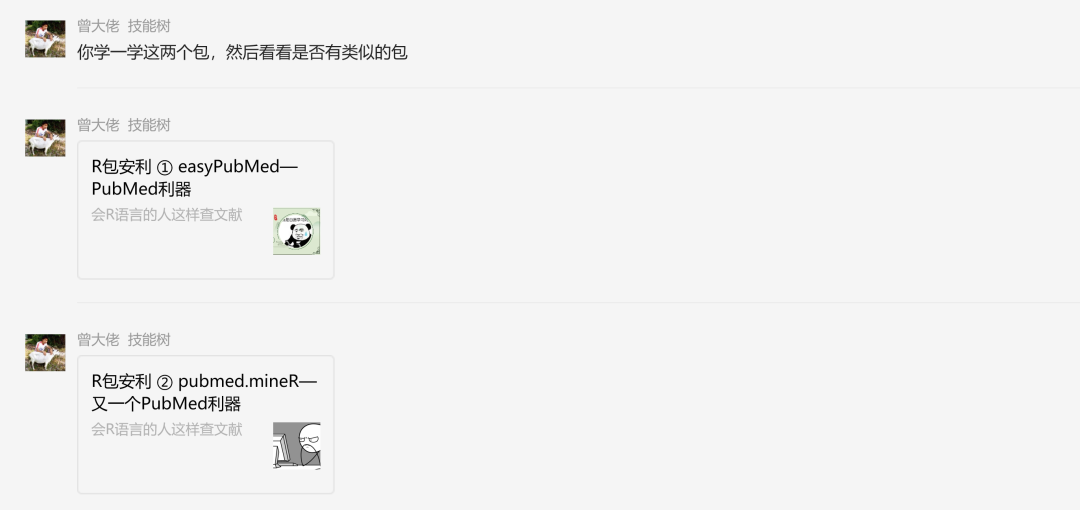
考虑到有大量研究生即将开学,可能要面对老板的批量文献查阅任务,在此适时为大家安利PubMed文件检索利器(提高效率,增加摸鱼时间)。
上个版本的文章:
R包安利 ① easyPubMed—PubMed利器 https://mp.weixin.qq.com/s/XSjviDilYGQIMItSTWA_HA
2-更新的理由
1- pubmed在上述推文2019年发表之后界面更新
2- 这篇推文里面的检索式更丰富
3- 小结了R包的用途,方便读者按需使用
3- easyPubMed
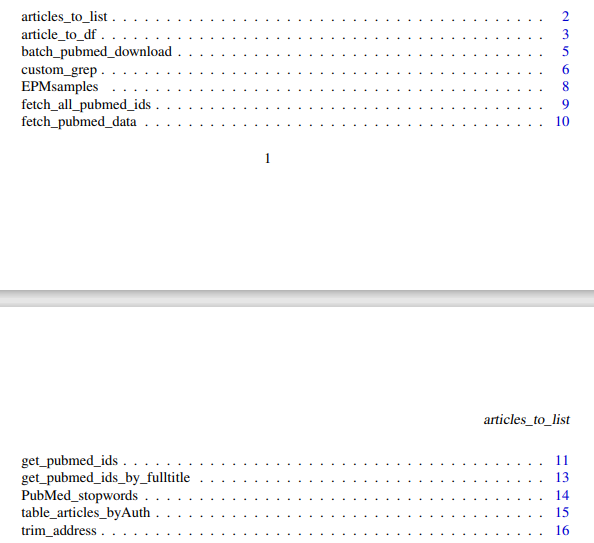
3.1- 函数展示,12个
大致浏览,包内函数名称大概如下
articles_to_list
article_to_df
batch_pubmed_download
custom_grep
EPMsamples
fetch_all_pubmed_ids
fetch_pubmed_data
get_pubmed_ids
get_pubmed_ids_by_fulltitle
PubMed_stopwords
table_articles_byAuth
trim_address
包的目的:Query NCBI Entrez and retrieve PubMed records in XML or TXT format.Data integrity is enforced during data download, allowing to retrieve and save very large number of records effortlessly. PubMed records can be processed to extract publication- and author-specific information 稍微说明一下:PubMed可以下载XML和TXT格式的文献搜索记录,但是不方便整理,easyPubMed包在检索时就整理检索记录,然后再调用它内置的函数梳理检索结果。
3.2-函数说明
本来是有打算按照用户手册的顺序展开说明的,但作者所提供的使用逻辑似乎与用户手册上的排列顺序无关。
3.3 get_pubmed_ids,在文章标题中搜索关键字
作者通过使用get_pubmed_ids函数加上自己限定作者,年份,关键词等等的信息,能够构建出一个用于后续信息提取的对象。
#  [AU], [PDAT], [Affiliation],[TI]
# get_pubmed_ids( )
rm(list=ls())
#install.packages("easyPubMed")
library("easyPubMed")

#4.1 get_pubmed_ids 函数
if (F){
  #牛刀小试
  pubmed.name <- get_pubmed_ids("Damiano Fantini[AU]") #限定作者
  print(pubmed.name$Count)
  title.date <- get_pubmed_ids("parkinson[TI] AND 2019[PDAT]")  #限定关键词和时间
  print(title.date$Count)
  #结合上述两者,参数之间选择OR,如果领域完全不重合,那么count数应该直接相加
  title.date.name <- get_pubmed_ids("parkinson[TI] AND 2019[PDAT] OR Damiano Fantini[AU]")
  print(title.date.name$Count)
  #说明函数内部可以使用检索表达式

  #铁死亡和肿瘤之间的关系,尝试加上Mesh
  #MeSH主题词【存在一意多词的情况】 1-liver cancer 2-hepatocellular carcinoma
  #"Ferroptosis"[Mesh] "Neoplasm Metastasis"[Mesh] "Lymphatic Metastasis"[Mesh]
  #检索词1:Ferroptosis[tw] OR oxytosis[tw] OR "Ferroptosis"[Mesh]
  #Mesh检索好像并不能使用,tw限定检索范围到标题和摘要
  #失败
  #限定Ferroptosis、Metastasis、2022
  finally.test <- get_pubmed_ids("Ferroptosis[TI] AND Metastasis[TI] AND 2022[PDAT]")
  print(finally.test$Count)
  #文章起一个好标题非常重要..
}
简单小结:pubmed自身携带的检索表达式布尔逻辑运算依旧有效,但是Mesh主题词检索失效,怀疑仅能用于搜索出标题携带目标词汇的文献。
最后拿consciousness和memory作为关键词,限定2023年为条件,获取memory.ids,作为后续函数探索的起点和这次R包学习的主线。
    #neurosciences emotion: consciousness memory  2023
memory.ids <- get_pubmed_ids("consciousness[TI] AND memory[TI] AND 2023[PDAT]")
print(memory.ids$Count)
#---------------------------------------------------------------------------------------------------------------------#
> #neurosciences:consciousness memory emotion 2023
> memory.ids <- get_pubmed_ids("consciousness[TI] AND memory[TI] AND 2023[PDAT]")
> print(memory.ids$Count)
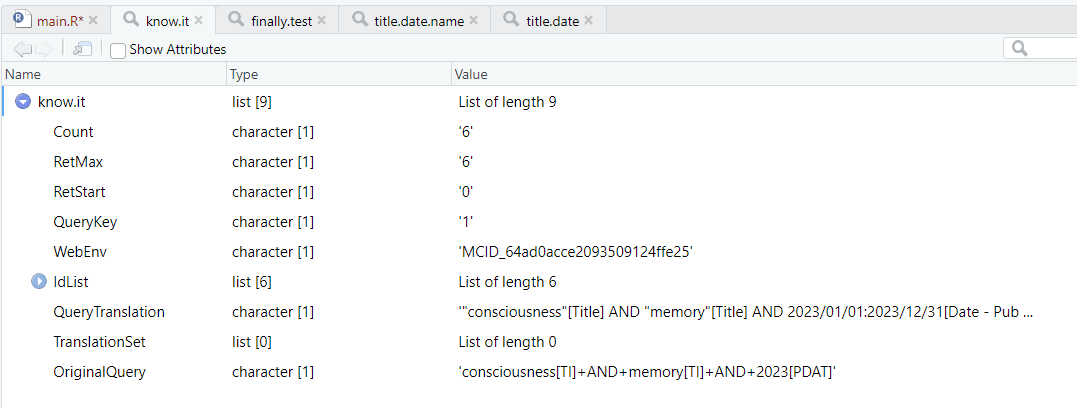
[1] "6"
尝试同样的关键词在pubmed上进行搜索,将检索范围限定指定在标题和摘要。
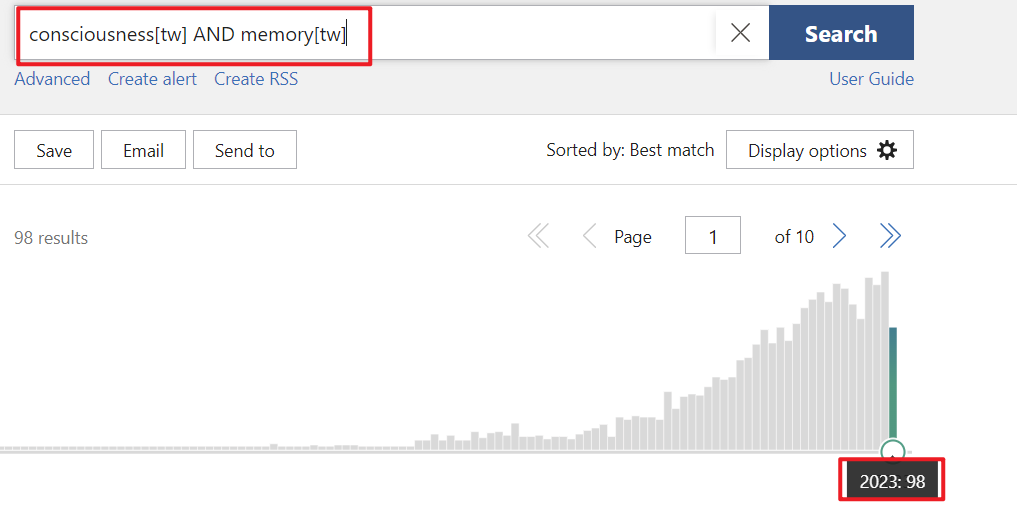
98篇,所以应该只检索了标题带有关键词的文章 get_pubmed_ids最终获取的列表如下:
不过在后续查资料的过程中发现可以用新的代码对文献摘要进行检索
补充在下面
3.3.1 补充 easyPubMed同时搜索摘要和标题中的关键词
在以下这个视频中发现的 https://www.zhihu.com/zvideo/1411035118174007296?playTime=67.6
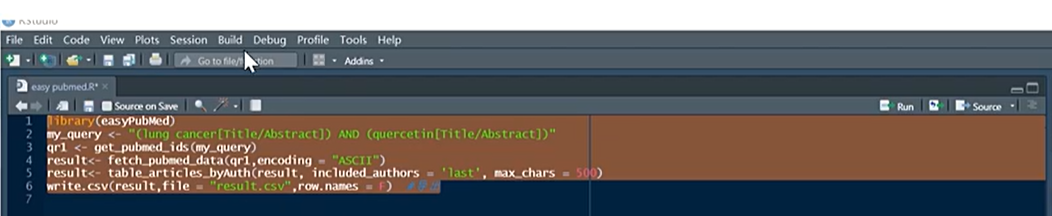
视频截图
my_query <- "(consciousness[Title/Abstract]) AND (memory[Title/Abstract])"
memory.ids <- get_pubmed_ids(my_query)
print(memory.ids$Count)
结果:91篇,虽然还是有差异,但比较接近了

3.4 fetch_pubmed_data(),获取上述文献的基本信息 custom_grep()文章标题抓取
通过3.3的步骤,我们已经获得了一批文献信息
在3.4中,通过fetch_pubmed_data() custom_grep()函数可以筛选3.3的信息。
#4.2 fetch_pubmed_data() 函数
#abstracts_txt <- fetch_pubmed_data(memory.ids, format = "abstract") #文章摘要
#print(abstracts_txt[1:16])

#install.packages("XML")
library(XML)
abstracts_xml <- fetch_pubmed_data(memory.ids,format = "xml")
class(abstracts_xml)
#本来是应该用下面if函数里面的代码的,但我的数据类型是"character",与预期的"xml"不相符合。
if (F){
  my_titles <- unlist(xpathApply(my_abstracts_xml, "//ArticleTitle", saveXML))
  my_titles <- gsub("(^.{5,10}Title>)|(<\\/.*$)", "", my_titles)
  my_titles[nchar(my_titles)>75] <- paste(substr(my_titles[nchar(my_titles)>75], 1, 70),
                                          "...", sep = "")
  print(my_titles)
}
#4.2.1 custom_grep()函数,格式补丁
titles<-custom_grep(abstracts_xml,"ArticleTitle","char")
##format,c("list","char"):
print(titles)
应该是作者已经料到不是所有fetch_pubmed_data()获得数据结果都按照预期是"xml"格式的,所以写了custom_grep()作为补救。
运行结果如下:
#---------------------------------------------------------------------------------------------------------------------#

> #4.2 fetch_pubmed_data() 函数
> #abstracts_txt <- fetch_pubmed_data(memory.ids, format = "abstract") #文章摘要
> #print(abstracts_txt[1:16])
> > #install.packages("XML")
> library(XML)
> abstracts_xml <- fetch_pubmed_data(memory.ids,format = "xml")
> class(abstracts_xml)
[1] "character"
#本来是应该用下面if函数里面的代码的,但我的数据类型是"character",与预期的"xml"不相符合。
> > if (F){
+ my_titles <- unlist(xpathApply(my_abstracts_xml, "//ArticleTitle", saveXML))
+ my_titles <- gsub("(^.{5,10}Title>)|(<\\/.*$)", "", my_titles)
+ my_titles[nchar(my_titles)>75] <- paste(substr(my_titles[nchar(my_titles)>75], 1, 70),
+ "...", sep = "")
+ print(my_titles)
+ }
> #4.2.1 custom_grep()函数,格式补丁
> titles<-custom_grep(abstracts_xml,"ArticleTitle","char")
> ##format,c("list","char"):
> print(titles)
[1] "Protein Folding and Molecular Basis of Memory: Molecular Vibrations and Quantum Entanglement as Basis of Consciousness."
[2] "Memory and Consciousness-Usually in Tandem but Sometimes Apart."
[3] "Commentary on \"Consciousness as a Memory System\" by Budson, Richman, and Kensinger (2022)."
[4] "Consciousness, Memory, and the Human Self: Commentary on \"Consciousness as a Memory System\" by Budson et al (2022)."
[5] "Can Patients with Encephalitis Lethargica Wake Up from Local Sleep? A Reply to Brigo et al. \"You Are Older, although You Do Not Know That\": Time, Consciousness, and Memory in \"A Kind of Alaska\" by Harold Pinter (1930-2008)."
[6] "Blurred Lines: Memory, Perceptions, and Consciousness: Commentary on \"Consciousness as a Memory System\" by Budson et al (2022)."
但是我,发现结果里面有\符号和""符号,不知道算不算正常。
于是找了一个标题进行搜索, 去文章对应界面截图,
发现有该文献标题中确实存在"",所以是正常现象。
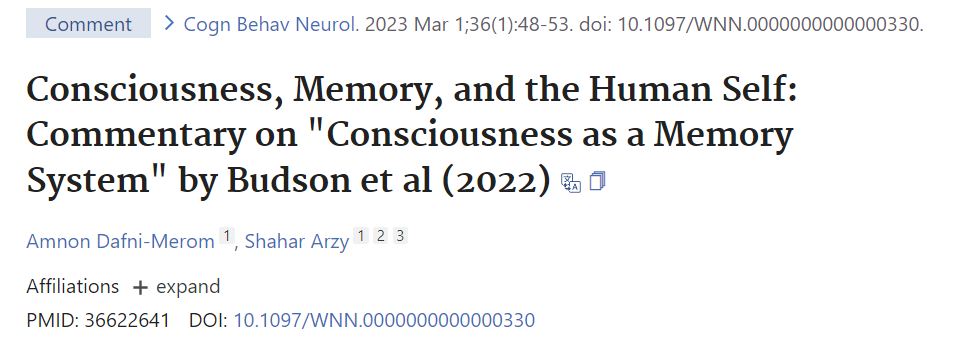
成功获取文献标题!
3.5 保存信息,batch_pubmed_download()
batch_pubmed_download()函数与3.3并没有先后关系,它是直接从网站上根据检索条件将我们所需要的信息保存成为txt或者xml文件,
但我xml文件没有成功。
#4.3 batch_pubmed_download() 函数
  ##搜索标题里有APE1或OGG1这两个基因——在2012-2016年间发表的文章
  new_query<-"(APE1[TI] OR OGG1[TI]) AND (2012[PDAT]:2016[PDAT])"

  ##设置输出文件格式、文件名前缀
  outfile<-batch_pubmed_download(pubmed_query_string=new_query,
                                 format="xml",
                                 batch_size=150,
                                 dest_file_prefix="easyPM_example")
  outfile


##搜索标题里有Alzheimer's Disease或memory这两个基因——在2020-2023年间发表的文章
new_query<-"(Alzheimer's Disease[TI] AND memory[TI]) AND (2020[PDAT]:2023[PDAT])"

if (F){
  memory.ids <- get_pubmed_ids("(Alzheimer's Disease[TI] AND memory[TI]) AND (2020[PDAT]:2023[PDAT])")
  print(memory.ids$Count)
##设置输出文件格式、文件名前缀
outfile<-batch_pubmed_download(pubmed_query_string=new_query,
                               format="xml",
                               batch_size=150,
                               dest_file_prefix="easyPM_memory")
outfile
}
# 最终输出的依旧是txt文件
示例代码的结果:
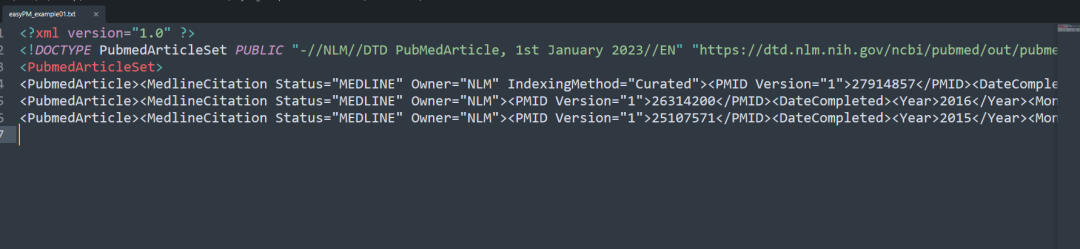
我运行代码的结果:
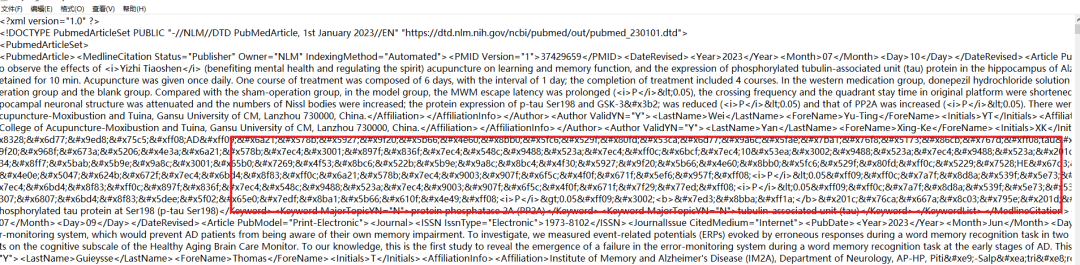
abstract部分是乱码的,文件内容作者,PMID等等的信息显示是正常的。
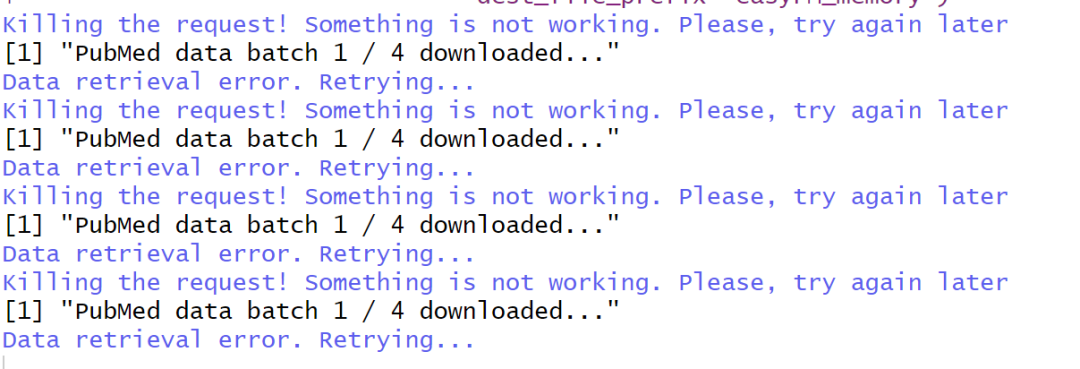
另外,还发现有时候网络也会限制文件下载,我自己设置的检索词在第一个检索文件下载完成之后第二个就下载不下来了。
不过,已经有一个文件下载成功,说明代码没有什么问题,就先没管了。
看下图,下载得非常挣扎。
3.6 articles_to_list&custom_grep(),提取单个记录
articles_to_list()接在3.4步骤后面,开始信息提取 articles_to_list()函数把数据组织成可以用于搜索的形式
#articles_to_list&custom_grep(),提取记录信息
PM_list <-articles_to_list(abstracts_xml)
## 任意选其中的一条,获得的数据list长度一共6
custom_grep(PM_list[3], tag = "DateCompleted")
custom_grep(PM_list[8], tag = "DateCompleted")
custom_grep(PM_list[3], tag = "LastName", format = "char")
# --------------------------------------------------------------------------------------------------------------#
> ## 任意选其中的一条,获得的数据list长度一共6
> custom_grep(PM_list[3], tag = "DateCompleted")
[[1]]
[1] "<Year>2023</Year><Month>03</Month><Day>07</Day>"

> custom_grep(PM_list[8], tag = "DateCompleted")
list()
> custom_grep(PM_list[3], tag = "LastName", format = "char")
[1] "Kirshner"

回到文本看了一眼,<>号里面的内容应该就是custom_grep()用于搜索的tag
3.7 article_to_df()把得到的数据转成数据框
接在3.6articles_to_list()后面,不像custom_grep()提取成为字符或者向量,而是转化成为数据框,可用于检索。
df <- article_to_df(PM_list[3], max_chars = 18)
colnames(df)
#----------------------------------------------------------------------------------------
> df <- article_to_df(PM_list[3], max_chars = 18)
> colnames(df)
 [1] "pmid"      "doi"       "title"     "abstract"  "year"
 [6] "month"     "day"       "jabbrv"    "journal"   "keywords"
[11] "lastname"  "firstname" "address"   "email"

提取了一篇文章的信息
3.8 table_articles_byAuth()
按原理来说这个步骤要接在3.5步骤之后 但写到现在小标题跳转来跳转去大家应该也都乱了。
于是我在这里另起炉灶,再次从设置搜索条件开始,
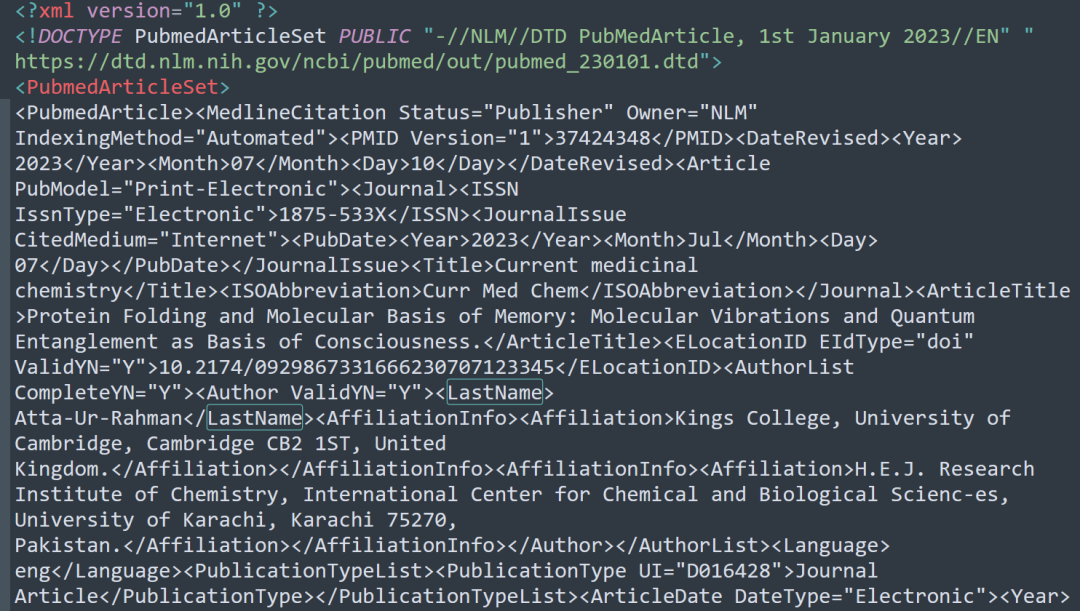
table_articles_byAuth()被使用的前提就是我已经使用batch_pubmed_download()函数将需要的文献汇总文件下载下来。
通过这个步骤,原本看起来有效信息不明显的txt文件,可以被我们轻松查找有效信息。
batch_pubmed_download()的结果:
代码:
new_PM_query <- "(APEX1[TI] OR OGG1[TI]) AND (2010[PDAT]:2013[PDAT])"
outfile2 <- batch_pubmed_download(pubmed_query_string = new_PM_query, dest_file_prefix = "apex1_sample")
new_PM_file <- outfile2[1]
new_PM_df <- table_articles_byAuth(pubmed_data = new_PM_file, included_authors = "first", max_chars = 0)
#转换为 `data.frame` , 调整表格。
library(stringr)
library(kableExtra)
new_PM_df$address <- substr(new_PM_df$address, 1, 28)
new_PM_df$jabbrv <- substr(new_PM_df$jabbrv, 1, 9)
new_PM_df[1:10, c("pmid", "year", "jabbrv", "lastname", "address")] %>%
  kable() %>% kable_styling(bootstrap_options = 'striped')
table_articles_byAuth()输出结果:
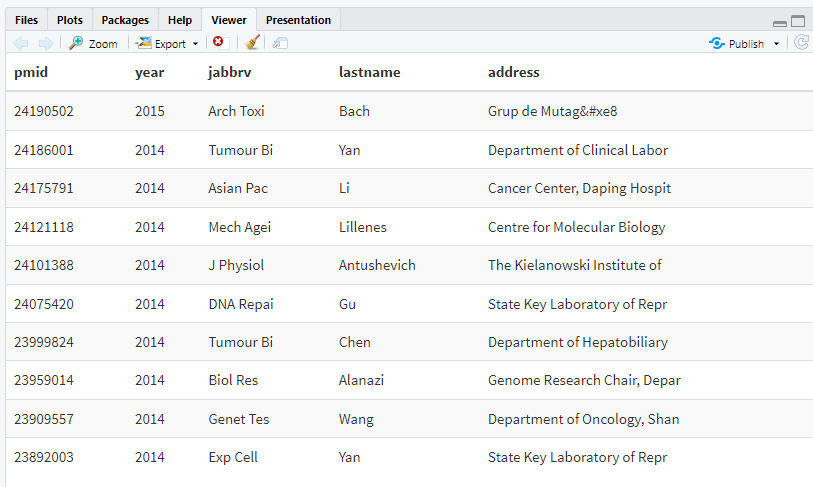
嗯,这张表,文献一目了然。nice!
3.9 get_pubmed_ids_by_fulltitle() 文章全标题的精准匹配
只要输入文章全称就可以获取文献的ID,与前面的内容没有太大的联系,算是单独一路的。
ftitle_query <- "Identification of hub genes and outcome in colon cancer based on bioinformatics analysis"
my_field <- "[Title]"
fullti <- get_pubmed_ids_by_fulltitle(ftitle_query, field = my_field)
print(as.numeric(fullti$IdList$Id[1]))
运行结果:

3.10 技能进阶
3.10.1 article_to_df(, getAuthors = FALSE) 反向选择
在将txt文件转换成为数据框的时候我们可以对显示内容进行选择(正向&反向)。
#老司机进阶
rm(list=ls())
library(easyPubMed)
library(dplyr)
library(kableExtra) # 用于显示
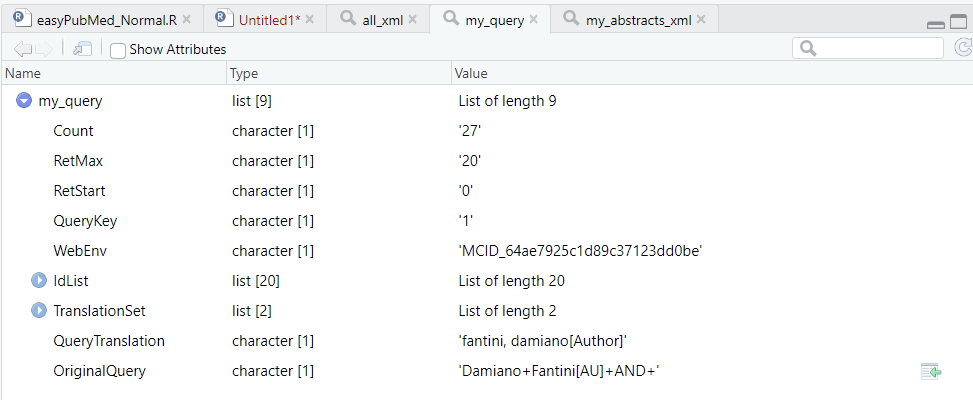
my_query <- 'Damiano Fantini[AU] AND '
my_query <- get_pubmed_ids(my_query)
# 按顺序提取文献
my_batches <- seq(from = 1, to = my_query$Count, by = 10)
# > my_batches
# [1]  1 11 21
my_abstracts_xml <- lapply(my_batches,  function(i) {
  fetch_pubmed_data(my_query, retmax = 1000, retstart = i)
})
# 提取目标文献的信息

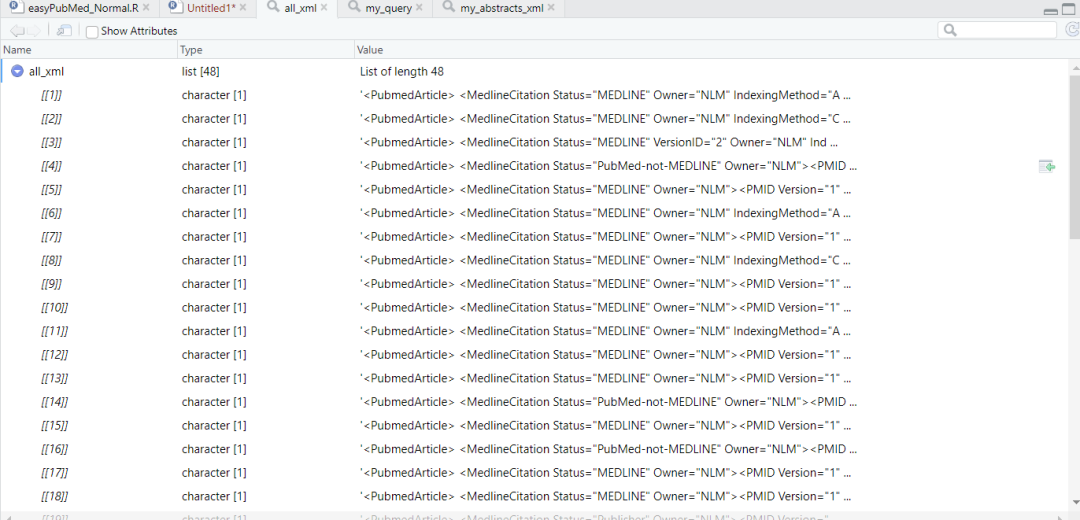
经过fetch_pubmed_data()函数之后,相当于使用了PubMed API search功能,现在上图中选出的目标文献信息目前在列表的3个子集里面,每一个子列表里面都不止一篇文献。
要把这些文献名称整理出来 信息只能通过 articles_to_list()函数一个一个提取,所以下面写了个循环
## 建立一个空的列表储存这些信息
## 储存为 list
all_xml <- list()
for(x in my_abstracts_xml) {
  xx <- articles_to_list(x)
  for(y in xx) {
    all_xml[[(1 + length(all_xml))]] <- y
  }
}
length(all_xml) #48
# do.call函数rbind为被调用的函数,lapply生成的结果长度是不固定的
## 对整个过程计时
t.start <- Sys.time()

## max_chars = -1 即提取全部摘要
final_df <- do.call(rbind, lapply(all_xml, article_to_df,
                                  max_chars = -1, getAuthors = FALSE))
t.stop <- Sys.time()
print(t.stop - t.start)
整理完的数据长这样:
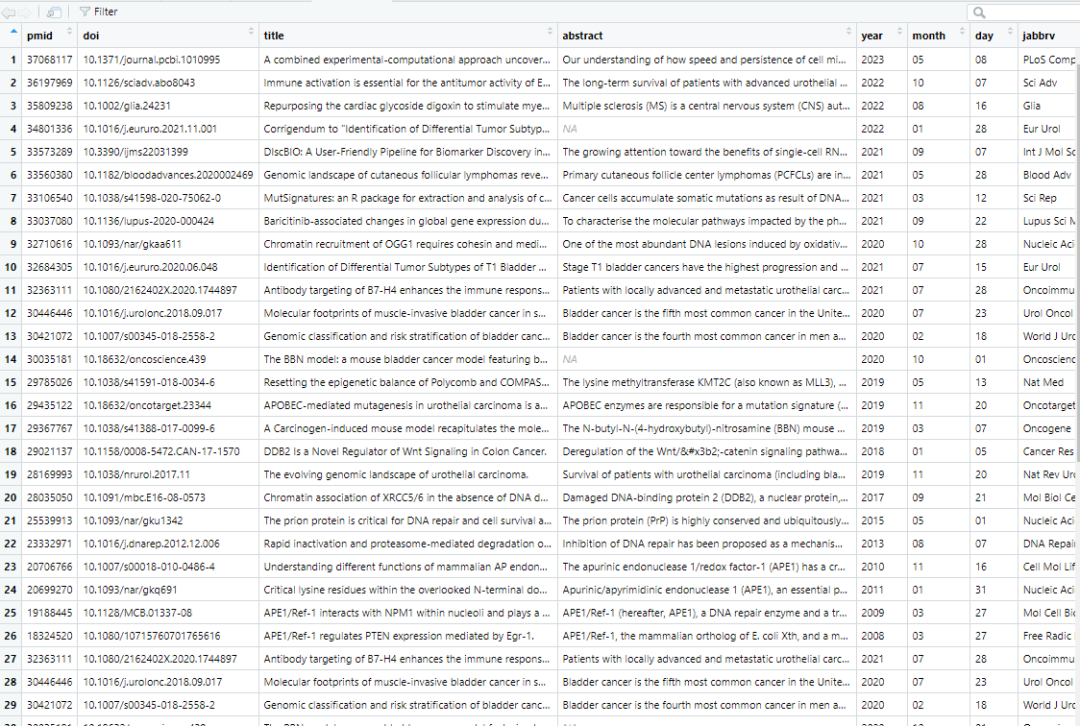
以上就是一个普通的数据框了
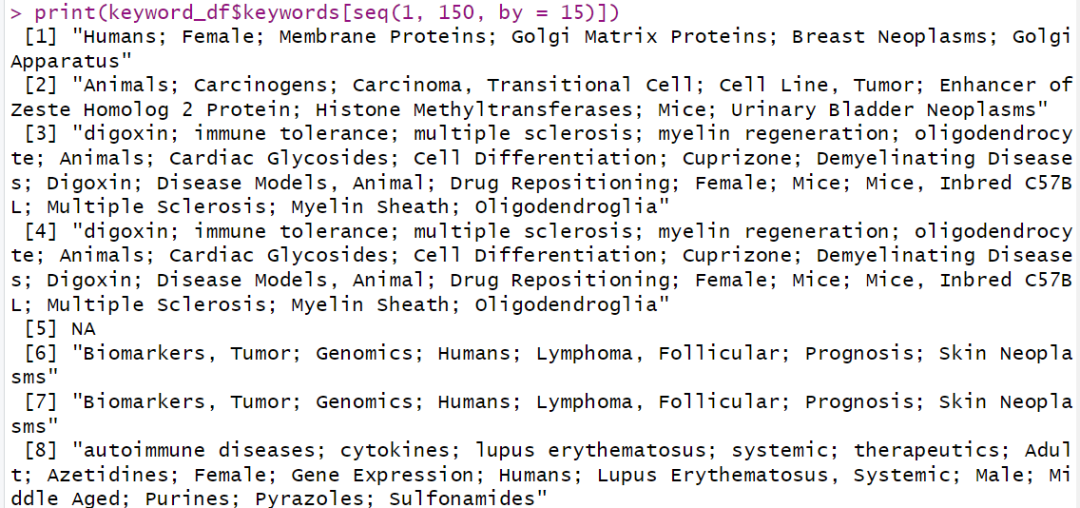
3.10.2 article_to_df(, getKeywords = TRUE) 找文章关键词
与上个函数类似
t.start <- Sys.time()
keyword_df <- do.call(rbind, lapply(all_xml,
                                    article_to_df, autofill = T,
                                    max_chars = 100, getKeywords = T))
t.stop <- Sys.time()
print(t.stop - t.start)
print(keyword_df$keywords[seq(1, 150, by = 15)])
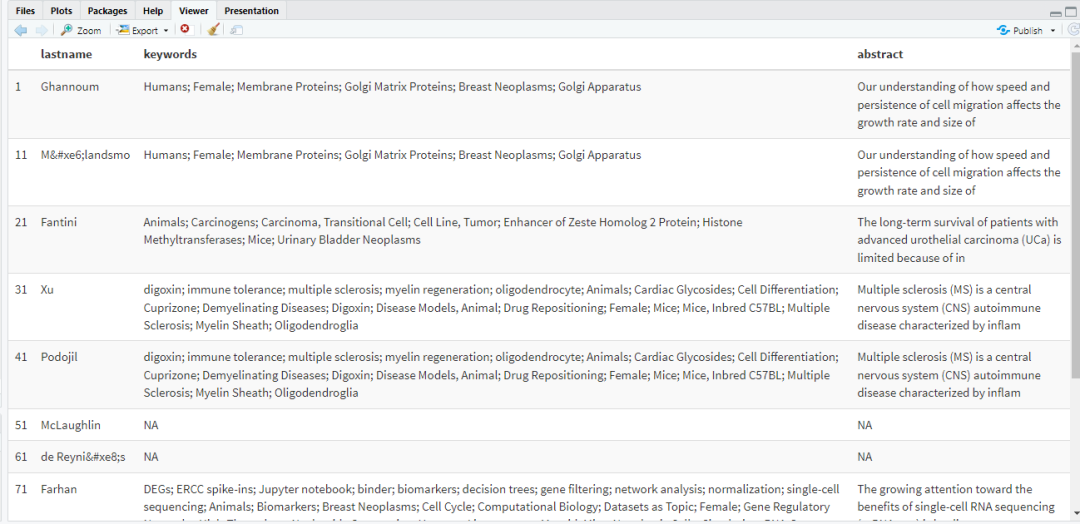
3.10.3 kable_styling()函数 让筛选的结果显示在Rstudio的右下角
library(parallel)
library(foreach)
library(doParallel)
## 可以自行设定列
keyword_df[seq(1, 100, by = 10), c("lastname", "keywords", "abstract")] %>%
  kable() %>% kable_styling(bootstrap_options = 'striped')
4-思考与小结 easyPubMed的用途
easyPubMed可用关键词对文献的名称进行搜索,通过整理可以快速获得感兴趣领域的相关信息,在写综述类文章的时候应该特别方便。
想到的用途:
1-快速入门学习新的知识,通过文献发表数量观察该研究领域的热度
2-快速识别领域大佬
3-能够给文献阅读提供目录性质的指导
4-老司机一样的检索能力,节约大量时间,不需要在网页上多次跳转
5-致谢
感谢生信技能树团队,感谢曾老师提供的公众号文章和练习素材~
本文参与 腾讯云自媒体同步曝光计划,分享自微信公众号。
原始发表:2023-07-31,如有侵权请联系 cloudcommunity@tencent.com 删除
评论
登录后参与评论
推荐阅读
目录
腾讯云开发者

Copyright © 2013 - 2026 Tencent Cloud. All Rights Reserved. 腾讯云 版权所有
深圳市腾讯计算机系统有限公司 ICP备案/许可证号:粤B2-20090059  粤公网安备44030502008569号
腾讯云计算(北京)有限责任公司 京ICP证150476号 | 京ICP备11018762号